SaaS customer support is the discipline of helping subscription software customers find answers, resolve issues, and keep getting value from a product they pay for every month. It looks like generic customer service from a distance. Up close, the model is different. Recurring revenue makes every interaction a renewal decision. In-product context lets the team answer questions before they become tickets. Self-service expectations are higher because the customer is already a power user of software. Product-led growth makes the help center the dominant touchpoint, not the phone line.
This guide is the pillar for everything we publish on the topic. It covers what SaaS customer support is, how it differs from the generic version, the four operating models teams choose between, how to staff each one, the tooling stack underneath, the metrics that actually predict retention, the best practices that scale, and the honest version of how AI is reshaping the discipline in 2026. Read it end to end if you are setting up a new team. Skim it by section if you are already running one and want to pressure-test the model.
The structure of the article reflects how the work compounds. Every layer earlier in the stack reduces load on every layer later. A clean help center reduces tickets. A clean ticket triage reduces escalations. Clean escalations reduce engineering interruptions. The teams that win at SaaS customer support are not the ones with the biggest headcount. They are the ones who invested in the upstream layers before they were forced to.
One claim shapes everything that follows. SaaS support quality is downstream of documentation quality. Every chat reply, every escalation, every AI deflection eventually pulls from the same well of written knowledge. If the well is stale, the whole system degrades. We touch this thread throughout, because every conversation we have had with experienced CX leaders ends in the same place.
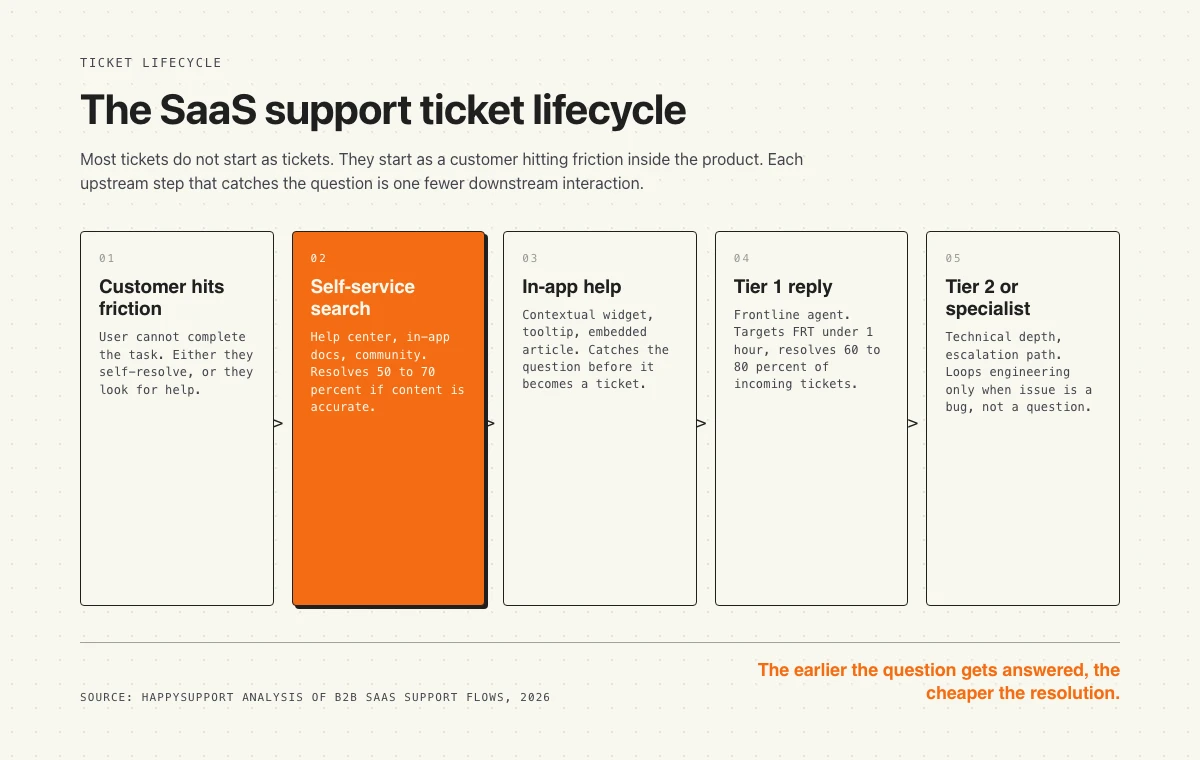
The SaaS support ticket lifecycle. Each upstream step that resolves the question is one fewer downstream interaction the team has to handle.
What is SaaS customer support?
SaaS customer support is the operational layer that helps subscription software customers succeed with the product after they sign up. It spans the help center, in-app guidance, live chat, email and ticket replies, community forums, and direct conversations with engineers when something is broken. It sits between the product (which the customer is using) and the company (which is responsible for keeping that use frictionless). In a B2B context, it usually overlaps with customer success and customer education, and the lines blur further in product-led organizations.
Defining SaaS customer support
The working definition: any structured help a SaaS company provides to existing customers, from self-service documentation to high-touch white-glove onboarding. The boundary cases matter. Sales engineering before purchase is not support. Customer success quarterly business reviews are not support. Onboarding the first time a user logs in is a gray zone, and most teams count it. Bug fixes are not support, but the conversation that surfaces the bug is.
The most useful frame is to think of support as the answer-delivery layer of the product. The product itself answers most questions implicitly through good UI. Documentation answers a layer of harder questions explicitly. Tickets handle the residue. AI is reshuffling the boundaries between these layers, but the layering itself is stable. A team that understands the layering ships a better experience than a team that treats every channel as its own kingdom.
How SaaS customer support differs from generic customer service
The generic version of customer service is mostly about handling transactions, complaints, and one-time interactions. A retail call center handles a return. A bank call center handles a charge dispute. A SaaS team handles a recurring relationship that is worth thousands of dollars per year and renews automatically unless the customer churns. That changes the math on every interaction.
The other big shift is context. In retail or banking, the customer is a stranger to the agent. In SaaS, the customer is using the product right now, and modern tooling lets the agent see exactly which feature they are looking at. That context is the largest single lever support teams have, and most teams under-use it. We come back to this in the section on tooling.
Why it matters for retention and revenue
Recurring revenue compounds. A customer who churns in month 6 instead of month 18 costs the business not just the lost subscription fees but the entire cohort effect: lower expansion revenue, fewer referrals, no case study, and a worse data signal back to product. Support quality is one of the earliest indicators a customer is going to renew or churn. The SuperOffice Customer Service Benchmark Report puts the cost of self-service at roughly $0.10 per interaction compared to $8 to $13 for live support, which means every unanswered question is an unforced economic loss that compounds across the customer base.
The retention case is also the hiring case. Customers who get good support tell their network. Hires who join a team that runs good support stay longer because the work is meaningful and the customers are not openly hostile. The two flywheels run together, and the strongest SaaS teams know it.
What makes SaaS support different from generic customer service
Five forces bend SaaS support away from the generic model. Each one is worth understanding individually, because the team that wins at all five looks different from the team that wins at none of them.
Self-service expectation
SaaS customers expect to figure things out themselves. They have already taught themselves the product. They are technical or semi-technical buyers. They Google before they ask. Harvard Business Review research is widely cited for the finding that 81 percent of customers try to solve a problem themselves before reaching out. In SaaS, that number is even higher in practice. Most teams find that the self-service rate (the percentage of customer questions resolved without a human reply) sits between 50 and 75 percent for a well-run help center, and only the tail comes through as tickets.
This changes the support funnel. In a generic call center, you scale agent count to ticket volume. In SaaS, you invest in the help center, and ticket volume per active user drops over time. The relationship between users and tickets is bent by content quality. A team that doubles its knowledge base coverage can absorb a doubling of users without doubling its agent headcount.
In-product context
SaaS support happens inside the product, not outside it. The customer is logged in. The agent knows which plan they are on, which feature they are using, what they clicked before they opened chat, and which version of the app they are running. None of that is true in a generic call center. The in-product context is a once-in-a-generation operational lever that most SaaS teams under-use because they treat their helpdesk as a separate application from their product.
The best teams embed support inside the product itself. A widget in the corner that surfaces the right help article based on the page the user is on. A contextual tooltip that catches the question before it becomes a search. An in-app banner that announces the new release. The teams that do this best see ticket volume per active user fall by a factor of two or more compared to teams running a separate help-center URL.
Product-led growth and the low-touch default
Product-led SaaS companies acquire most customers through self-serve signup. The product sells itself, the customer signs up, the customer activates inside the product, and only then does a sales conversation happen if the deal is big enough. This bends support toward low-touch by default. The team cannot afford a 30-minute onboarding call for every signup because most signups are self-serve and worth $20 a month. The economics force the team to invest in self-service, automation, and in-app help.
The exception is enterprise. PLG companies that move upmarket end up running two parallel support models: low-touch for the long tail of self-serve customers, high-touch for the named enterprise accounts. Most teams hit this dual structure between Series B and Series C and spend the next two years figuring out how to staff it. We come back to this in the section on support models.
The compounding cost of documentation drift
Generic customer service runs on scripts and training. SaaS support runs on documentation. Every chat reply pulls from articles. Every AI deflection grounds its answer in the same articles. Every new hire onboards by reading the articles. When the documentation drifts (which it does, constantly, because the product changes faster than the help center), the whole system degrades silently. CSAT drops slowly. AI hallucination rates climb. New hires take longer to ramp. The same dynamic shows up across software teams: the Stack Overflow Developer Survey repeatedly names poor or outdated documentation as the top productivity frustration for developers, and the same pattern holds for support agents trying to help customers from a stale help center.
The cost of documentation drift is the single largest hidden line item in most SaaS support budgets, and almost no team measures it. The teams that take this seriously invest in workflows that keep documentation current as code ships. The teams that ignore it pay the bill in escalation volume, AI accuracy gaps, and slow ramp time, none of which show up on a dashboard.
Renewals make every interaction a revenue decision
The last force is the renewal cycle. Every support interaction in SaaS is a moment in a 12-month renewal arc. A frustrated customer who rage-quits chat at month 9 is statistically less likely to renew at month 12. A delighted customer who got their problem solved in 4 minutes is statistically more likely to expand the contract. Most teams do not explicitly tie support quality to renewal odds, but the data does not care whether they measure it.
This is why the cost of bad customer service in SaaS is uniquely high. It is not a one-time refund. It is a stream of revenue that quietly stops.
SaaS support models: low-touch, mid-touch, high-touch, and hybrid
Every SaaS company picks a default support model whether they realize it or not. The four models differ in cost per customer, response speed, and the experience a customer can expect. Most teams drift into a model by accident, then keep paying the cost of mismatch with their economics. The right model depends on three inputs: average contract value, customer technical sophistication, and product complexity. The wrong model is the one a competitor convinced you to copy.
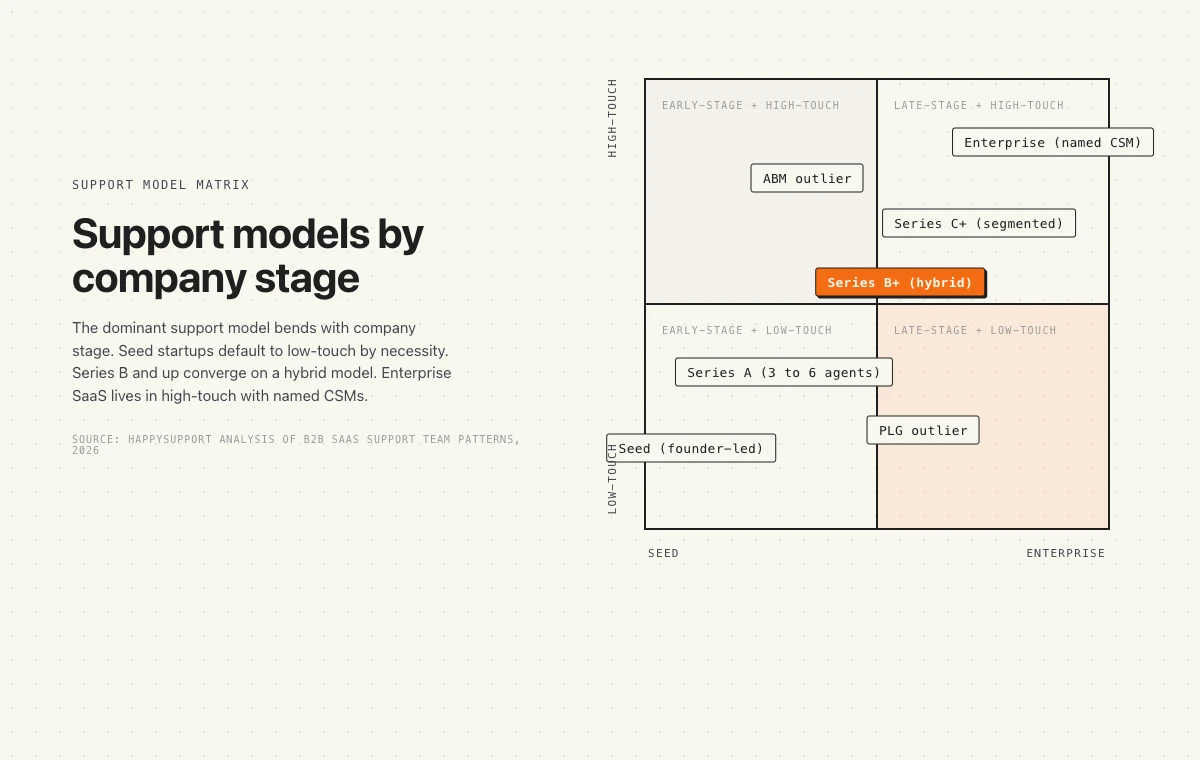
Support models map to company stage. Most teams converge on a hybrid model past Series B and run two motions in parallel: low-touch for the long tail and high-touch for named accounts.
Low-touch (self-service plus async)
The customer self-serves the help center, runs the product without onboarding calls, and contacts the team via email or chat only when stuck. Response SLA is measured in hours, not minutes. There is no named human assigned to the account. Most signups are worth less than $1,000 per year and the unit economics cannot afford anything more interactive. PLG companies live here by default. Atlassian, Notion, Linear, Figma, and most developer tools run low-touch as their primary motion. The customer is technical, the product is self-explanatory, and the help center carries 60 to 80 percent of the resolution load.
What makes low-touch work is investment in upstream layers. A clean help center. A well-tuned in-app onboarding flow. A search bar that actually returns the right article. The teams that try low-touch without these upstream investments end up with an angry inbox and high churn. Low-touch is not the absence of effort. It is the relocation of effort from per-customer interactions to per-product investment.
Mid-touch (chat plus async plus periodic check-ins)
The customer can self-serve but gets a real human in live chat during business hours. There may be a quarterly check-in by email or a short onboarding call. A named CSM exists but is shared across 100 to 300 accounts. Response SLA is measured in tens of minutes during business hours. ACV is typically $3,000 to $15,000 per year. This is the dominant model for mid-market SaaS that has moved past pure PLG but cannot yet afford named CSMs per customer.
Mid-touch is the most operationally complex model because it lives in the middle. The team has to balance synchronous chat with async tickets, decide which customers get a check-in and which do not, and constantly fight the urge to slide into high-touch for the squeaky wheels. Without clean segmentation rules, mid-touch teams burn out fast.
High-touch (named CSM, weekly cadence, SLA)
The customer has a named CSM, weekly or bi-weekly meetings, a Slack channel into the vendor, and an SLA with negotiated response times. CSMs handle 20 to 30 accounts each. Onboarding is a 4 to 8 week structured project. ACV is north of $50,000 per year and often above $200,000. The customer expects (and is paying for) the vendor to behave like a partner, not a software company. Salesforce, HubSpot Enterprise, Snowflake, Datadog, and most enterprise SaaS run high-touch for their named accounts.
High-touch is operationally expensive but the ROI math works because contract sizes support it. The risk is over-investment: a CSM who knows the customer too well becomes irreplaceable, and the team loses leverage. The best high-touch teams treat the CSM as the orchestrator, not the owner, of the customer relationship.
Hybrid (the dominant pattern past Series B)
Most SaaS companies past Series B end up running a hybrid model because their customer base is bimodal. There is a long tail of self-serve customers worth $50 to $200 per month. There are 20 to 100 named enterprise accounts worth $50,000 to $500,000 per year. The two cohorts cannot be served by the same playbook. Hybrid means the team runs a low-touch motion for the long tail and a high-touch motion for the enterprise accounts, with shared tooling, segmentation rules, and escalation paths between the two.
Hybrid is operationally complex because the team has to maintain two playbooks, two sets of metrics, and two cost-per-customer targets. But the alternative (forcing one playbook on both cohorts) under-serves enterprise and over-serves the long tail. The hybrid model is the empirical answer most successful SaaS companies converge on.
| Model | Typical ACV | CSM ratio | Response SLA | Self-service load |
|---|---|---|---|---|
| Low-touch | Less than $3,000 | None or 1:1000+ | Hours, business days | 60 to 80 percent |
| Mid-touch | $3,000 to $15,000 | 1:100 to 1:300 | Tens of minutes | 50 to 70 percent |
| High-touch | $50,000+ | 1:20 to 1:30 | Minutes during business hours | 30 to 50 percent |
| Hybrid | Bimodal | Segment-dependent | Segment-dependent | Segment-dependent |
The SaaS support team structure
Team structure mirrors the support model. A pure low-touch team needs a flat group of generalists who can handle anything that lands. A high-touch team needs specialists, named CSMs, and a clean escalation path to engineering. Hybrid teams need both, plus a routing layer that decides which cohort a ticket belongs to before it gets touched. The structure below describes the roles most teams settle into past 5 to 10 agents.
Tier 1: frontline coverage
Tier 1 handles the first response on every ticket. They acknowledge, triage, resolve what they can, and route everything else. Most well-run Tier 1 teams resolve 60 to 80 percent of incoming tickets without escalation. The remaining 20 to 40 percent get routed to Tier 2 or to a specialist queue. Tier 1 is where you measure first response time (FRT) and first contact resolution (FCR), because they are the team that produces those numbers.
The hardest part of running Tier 1 well is content quality. A Tier 1 agent armed with a clean help center can resolve 80 percent of tickets. The same agent armed with a stale help center resolves 40 percent and routes the rest. The bottleneck is rarely agent skill. It is the quality of the answer-source the agent is pulling from. Annette Franz, CX leader and author of CX Journey, put this bluntly when we interviewed her: AI systems inherit the quality of the organization behind them. Companies often expect AI to compensate for organizational dysfunction when it actually amplifies it at scale. The same dynamic applies to Tier 1.
Tier 2: technical resolution
Tier 2 handles tickets that need more product knowledge, deeper investigation, or a hand-off to engineering. They typically have 6 to 18 months of tenure, and the strongest ones have a software or technical background. Tier 2 resolves complex how-to questions, edge cases, configuration issues, and the surface layer of bug reports. They escalate to engineering only when reproducible bugs surface or when an architectural decision is needed.
Most teams build a Tier 1 to Tier 2 ratio of roughly 3:1 to 5:1. Below that ratio, Tier 1 escalates too aggressively and Tier 2 burns out. Above it, Tier 1 gets stuck on tickets they should have routed up and the customer pays for the delay. Get this ratio right and the team scales smoothly. Get it wrong and the team scales by force.
Specialist or escalations engineer
The escalations engineer (sometimes titled support engineer, customer engineer, or technical account manager) is the bridge to product engineering. They read code, write reproductions, file structured bug reports, and own the relationship with the engineering team. Most teams add one once they have 1,500 to 3,000 active customers, and they need at least one named owner of every product surface. The specialist is the most expensive role on the team and the highest-leverage one because they prevent engineering from being interrupted by ambiguous tickets.
The support-to-engineering bridge
The bridge between support and engineering is the single biggest leverage point in SaaS support. Done well, it means engineering hears 5 well-investigated bug reports per week instead of 30 vague tickets. Done poorly, it means engineering builds a wall, support gets nothing back, and the customer pays for the silence. The best teams formalize this with a weekly triage meeting, a shared backlog tag, and an SLA on engineering response. The worst teams leave it to ad-hoc Slack messages and stale Linear tickets.
The customer success overlap
Support and customer success do not have the same job. Support handles reactive issues. Customer success drives proactive adoption, expansion, and renewal. The roles overlap because the same customer often needs both at the same moment. The clearest line is: support owns tickets, CS owns relationships. A ticket that touches an enterprise account often gets shared visibility between the assigned CSM and the support agent, so the CSM is not blindsided in their next QBR.
Confusing the two roles is a common mistake. CSMs who get pulled into ticket triage stop running QBRs. Support agents who own renewal conversations stop being available for tickets. Most strong teams give each role a clear primary mandate and a secondary supporting role, with explicit handoff rules between them.
The SaaS support tooling stack
The tooling stack matters because it sets the operational ceiling of the team. A team with the wrong helpdesk does manual work that a better helpdesk would automate. A team with no in-app layer leaves the highest-leverage support channel on the table. A team with no knowledge base layer accepts that every question gets answered from scratch, every time. The stack below covers the five layers most B2B SaaS teams need.
Helpdesk layer
The helpdesk is where tickets live, get assigned, and get resolved. Zendesk is the default at scale and the most powerful, with the highest complexity tax. Intercom is the default for chat-heavy product-led companies. Help Scout is the default for teams that want a simple, opinionated tool with a clean inbox. Front is the default for teams that want shared email management with collaboration. HubSpot Service Hub is the default for teams already running HubSpot CRM. Freshdesk is the default for teams that want Zendesk economics without Zendesk complexity. Salesforce Service Cloud is the default for teams already running Salesforce. Gorgias is the default for e-commerce DTC brands.
Picking a helpdesk is a five-year commitment. Switching helpdesks is one of the most painful migrations in SaaS operations because it touches macros, automations, integrations, custom fields, and the muscle memory of the entire team. The right helpdesk for a team is the one that matches their support model, integrates with their product stack, and has a pricing curve that scales with their growth.
Knowledge base and help center layer
The knowledge base is where the answers live. Most helpdesks ship a knowledge base feature: Zendesk Guide, Intercom Articles, Help Scout Docs, Freshdesk Knowledge Base, HubSpot Knowledge Base. They are all functional and they are all incomplete. The teams that take documentation seriously usually add a dedicated knowledge base tool: Document360, Helpjuice, HappySupport, or a developer-doc tool like GitBook. The trade-off between the bundled and standalone options is depth versus integration. Bundled tools sit inside the helpdesk and inherit the customer record. Standalone tools have better search, better versioning, better permissions, and better authoring workflows.
The single most important property of a knowledge base is whether the content stays current. Most teams underestimate the rate at which their documentation drifts behind the product. Articles written 18 months ago describe a UI that no longer exists. New features ship without articles. Old features get killed without article cleanup. The decay is silent and constant. We have written about the difference between a knowledge base (internal-and-external) and a help center (public, customer-facing), and the workflow gap between the two is where most teams lose.
In-app and contextual layer
The in-app layer is the support surface that lives inside the product. Beacon (from Help Scout) and Intercom Messenger are the dominant chat widgets. Pendo and ProductFruits run the digital adoption layer with tooltips, walkthroughs, and in-app guides. WalkMe runs the enterprise version. Newer entrants like HappySupport sit in this layer too, with a help center widget that can be embedded inside the product and stays in sync with the underlying knowledge base.
The in-app layer is the highest-leverage support channel in SaaS because it catches the question at the moment of confusion, in the page where the confusion is happening, before the customer thinks to open a ticket. Teams that get this right see ticket volume per active user drop substantially. Teams that get it wrong (a separate help-center URL the customer has to find, search, and navigate) see tickets that should never have existed.
Community layer
Community forums route the long tail of questions to other customers, not the team. Discourse runs the open-source default. Circle and Mighty Networks run the modern hosted versions. Slack and Discord communities run the informal version. Communities work when the product has enough power-users to generate organic answers and when the team is willing to invest in seeding, moderating, and federating answers back into the help center. Communities do not work as a substitute for documentation. They work as a layer on top of it.
CRM and customer success layer
The CS layer is where the customer relationship lives across the full lifecycle, not just the support ticket. Gainsight is the default for high-touch enterprise teams. Vitally and Catalyst are the modern defaults for mid-market SaaS. ChurnZero competes here too. HubSpot Service Hub can extend into CS for teams already on HubSpot. Pylon is the newer entrant for B2B SaaS teams running customer support inside Slack.
The CS layer integrates with the helpdesk to give the CSM visibility into the customer's support history before a QBR or a renewal call. Without that integration, the CSM walks into the renewal blind and the customer notices. The single most under-invested integration in SaaS is the one between the helpdesk and the CS platform.
| Layer | Common picks | When you need it |
|---|---|---|
| Helpdesk | Zendesk, Intercom, Help Scout, Front, HubSpot Service Hub, Freshdesk, Gorgias | From the first hire |
| Knowledge base | HappySupport, Document360, Helpjuice, bundled options | From day one |
| In-app and contextual | Beacon, Intercom Messenger, Pendo, ProductFruits, HappySupport | First 100 customers |
| Community | Discourse, Circle, Slack, Discord | 1,000+ active customers |
| CRM and customer success | Gainsight, Vitally, Catalyst, ChurnZero, HubSpot, Pylon | First enterprise customer |
The full picture of which knowledge base tools are best for SaaS, with side-by-side breakdowns, lives in our best knowledge base for SaaS roundup. For broader help-center comparisons, see best help center software.
The smallest stack for a young European SaaS team
A common starting point: a founder answers support email, the product ships every week, nobody writes documentation full time, and the company prefers a European vendor. That team needs three jobs covered, not three tools: publishing answers, keeping them current, and replying when an answer does not solve the problem.
| What the team needs | What to look for | Test it with |
|---|---|---|
| Help center plus customer requests | Articles, AI chat and a ticket inbox fed from the same content | Ask a question the docs cannot answer, escalate it, reply by email |
| A European provider | Company location, where content is stored, where AI features are processed, the subprocessor list and a DPA | The privacy policy and the DPA, not the homepage badge |
| Help center only, existing inbox stays | Recorder or editor, search, an in-app widget, a clear contact link | Publish five guides and find them with the words customers actually use |
| Low maintenance | Change detection tied to releases, with a human approving every edit | Ship one UI change and see which articles get flagged |
A practical first week: five reviewed articles for the most repeated questions, the widget in the product, one person owning the inbox, and a release check for affected content. A help center can go live without moving every channel on day one.
For HappySupport specifically: Starter (129 EUR/month) covers the recorder, AI writing, the help center and widget search. Professional (399 EUR/month) adds customer AI answers, Git Handoff and content health audits. Content is hosted on EU infrastructure in Germany; AI processing also runs in the EU, on Microsoft Azure OpenAI in Sweden and Amazon Bedrock, as listed in the privacy policy. See the startup setup guide and pricing for the full matrix.
The metrics that matter for SaaS support
Most teams track too many metrics and act on too few. The list below is ranked by signal-to-noise. The top three predict customer outcomes. The next three are operational hygiene. The last two are the metrics most teams stop measuring after Series A, which is precisely when they start to matter most.
First response time (FRT)
The time between ticket creation and the first human or AI reply. The most-watched support metric in SaaS. The honest benchmark depends on channel: phone under 3 minutes, chat under 2 minutes, email between 1 hour and 12 hours depending on team maturity. The number is heavily right-skewed because a small group of teams takes days to reply. The right number to publish is the median, not the mean. Our deeper analysis of support response time benchmarks breaks the distribution apart by channel and percentile.
Average handle time (AHT)
The time it takes an agent to handle a single interaction, from open to close. Used to forecast staffing. Useful only when paired with quality metrics. Without a quality counterweight, AHT incentivizes the team to close tickets fast at the cost of resolution quality. The right ratio of AHT to CSAT signals a healthy team. AHT alone signals a treadmill.
First contact resolution (FCR)
The percentage of tickets resolved in a single interaction with no follow-up needed. The single most underused metric in SaaS support because it requires accurate tagging of follow-up status. A team with 70 percent FCR is in a different operational reality from a team at 40 percent FCR, even if their volume looks similar. The lower FCR rate hides escalations, multi-touch threads, and customer frustration that does not surface in CSAT.
CSAT (customer satisfaction score)
The post-ticket survey: how satisfied were you with this interaction? Reported as a percentage of 4 or 5 responses on a 5-point scale (or 8 to 10 on a 10-point scale). Industry benchmark for B2B SaaS sits between 85 and 92 percent for healthy teams. Useful but noisy. Customers who had bad experiences are over-represented because they are more likely to fill out the survey. Track the trend over time, not the absolute number.
NPS (net promoter score)
Asks the customer how likely they are to recommend the product on a 0 to 10 scale. NPS is a brand and product metric, not a support metric, but support teams often own the survey because they are the team that talks to customers. Useful for board reporting. Not useful for week-to-week operational decisions.
CES (customer effort score)
Asks the customer how easy it was to get their issue resolved. CES is the metric Gartner has cited as a better predictor of loyalty than CSAT because it captures the friction the customer experienced, not just whether the outcome was acceptable. Most teams should measure CES alongside CSAT, but only one in three actually does.
Deflection rate
The percentage of customer questions resolved without ever opening a ticket. Calculated by measuring help-center traffic against ticket volume, typically over the same time window. Deflection rate is the operational metric that captures how much value the help center generates. A team that drives deflection from 40 percent to 60 percent has done the equivalent of doubling the agent headcount without hiring anyone.
Self-service rate
The percentage of customer questions that resolve through self-service alone (no ticket, no AI deflection, no human touch). Different from deflection rate because self-service rate is the floor: it is the cases where the customer never even engaged with the support channel because the answer was already there. The metric most teams stop measuring after Series A because it is hard to instrument, and the metric most predictive of cost-per-active-user for support. Our deep dive on self-service rate covers measurement and benchmarks.
The teams that win at SaaS support measure self-service rate and deflection rate alongside CSAT. The teams that win at SaaS support headcount measure FRT and AHT and call it a day.
Best practices for SaaS support in 2026
The best practices below are not new in 2026. They were already best practices in 2022. What is new in 2026 is that AI is forcing every team to revisit the assumptions underneath these practices, and the teams that stayed disciplined about the basics are winning. The fundamentals compound. The shortcuts unwind.
Invest in self-service first
The first hire should not be an agent. The first hire should be the help center. Every ticket the help center resolves is one less ticket the team has to handle, and the ROI compounds for the life of the article. Most teams flip this and hire agents before they invest in documentation, then complain about ticket volume. Our writeup on how to reduce support tickets with a help center covers the operational specifics, but the principle is simple: the cheapest support interaction is the one that never happens.
Self-service investment is also the only investment that scales with active-user count instead of ticket-volume count. Hiring agents scales linearly. Help-center investment scales sub-linearly. The economic curve only bends in the team's favor if they invest in the upstream layer before they need it.
Embed support in-product
A help center the customer has to find, search, and navigate is worse than a help center that surfaces the right answer inside the product, on the page where the question is being asked. Most B2B SaaS teams still run a separate help-center URL with a search bar. The teams winning at SaaS support in 2026 embed support inside the product, with contextual links to the right article based on the page the user is on. This is the single highest-leverage investment most support teams have not made.
Use AI assistively, not autonomously
The AI-deflection narrative oversells what AI can do alone and undersells what AI can do alongside a human. Agent assist (AI that drafts a reply for the agent to review, edit, and send) works today. It speeds up replies, reduces typing time, and gives newer agents a senior-quality first draft. Autonomous deflection (AI that answers the customer directly with no human in the loop) only works in a narrow band of question types. Jeff Toister, in our interview with him, framed it as: The most successful customer-facing AI focuses on automating CRaP: Confident, Routine, Predictable. Outside that band, autonomous AI is a liability.
The honest version: AI handles 20 to 50 percent of incoming volume well, depending on product complexity and documentation quality. The other 50 to 80 percent still needs a human. Teams that try to push AI past its honest range pay the cost in CSAT, escalations, and customer trust.
Measure self-service rate alongside CSAT
CSAT alone tells you what customers felt about the tickets they filed. It does not tell you about the customers who never filed a ticket. Self-service rate fills that gap. Track both, and the picture sharpens. A team with rising CSAT and falling self-service rate is over-investing in tickets and under-investing in the help center. A team with falling CSAT and rising self-service rate has a content quality problem masked by a falling ticket count. Only the two metrics together give an honest read.
Hire for product literacy
The strongest support hires in SaaS are people who can read documentation, use the product, and translate between technical and non-technical. They do not have to come from a support background. Some of the best support hires we have seen come from teaching, journalism, or technical writing. The trait that matters is product literacy: the ability to learn a product fast and explain it clearly. Empathy can be taught. Product literacy is a faster ramp.
Close the loop with product and engineering
Every ticket is a signal. Support that does not feed those signals back to product loses the most valuable byproduct of the work. The teams that close the loop run a weekly triage with product, share a dashboard of top issue categories, and tag tickets so that the product team can see what is breaking. Without the feedback loop, support stays reactive forever. With it, support becomes the most informed function in the company about what customers actually struggle with.
Treat documentation as a product
Documentation is not a write-once asset. It is a product surface that has its own roadmap, its own bug reports, and its own deprecation cycle. The teams that take this seriously assign owners per article category, track article-level usefulness signals, and have a process for retiring or updating articles when the underlying product changes. The teams that do not, ship documentation that ages out of relevance within 6 to 12 months and never gets fixed.
Common SaaS support mistakes
Five mistakes show up over and over in conversations with SaaS support leaders. The cost of each one compounds across the customer base, and none of them show up cleanly on a dashboard. They are quiet failures, which is what makes them dangerous.
Treating the help center as a write-once asset
Most teams launch the help center, populate it with 30 to 60 articles, and stop. The product keeps changing, the articles stop matching, and the customer who hits a 6-month-old article gets a worse answer than the one who opens a ticket. The right model is to treat the help center like a product feature with its own roadmap, owners, and decay budget. Documentation drift is real and unmeasured. Our documentation decay analysis covers the math.
Measuring volume instead of resolution
Ticket volume is a vanity metric. A team can drive ticket volume down by adding friction to the contact form, hiding the support email, or routing everything to a chatbot that loops. The real metric is resolution quality across all channels: did the customer get the right answer, fast, with no rework. Volume reduction is only good when it comes from upstream deflection, not from a worse customer experience downstream.
Bolting AI on top of a stale knowledge base
The single most common AI failure mode in 2026 is a team that ships an AI chatbot grounded in a stale knowledge base, then watches it confidently hallucinate wrong answers to customers. The chatbot is doing exactly what it was trained to do. The problem is the source. Annette Franz again: AI should absorb complexity for the customer, not create new complexity around the customer. An AI grounded in stale documentation does the opposite. It moves the complexity from the human team to the AI surface, and the customer pays. We covered this in detail in our AI chatbot accuracy gap piece and again in our breakdown of why Intercom Fin accuracy is a documentation problem.
Confusing customer success with customer support
Most teams that complain about CSMs spending too much time on tickets have not drawn the line clearly enough between the two functions. CSMs who get pulled into ticket queues stop running QBRs. Support agents who get pulled into renewal conversations stop being available for tickets. The fix is operational, not philosophical. Draw the line, build the handoff rules, and enforce them.
Ignoring the support-to-engineering bridge
If support and engineering do not have a clean weekly handshake, support tickets pile up around reproducible bugs that never get fixed, and engineering gets interrupted by vague tickets that should have been triaged better. Both sides lose. The fix is a weekly triage meeting, a shared backlog tag, and an SLA on engineering response. The teams that have this rarely complain about it. The teams that do not, complain constantly.
How AI is reshaping SaaS customer support in 2026
AI is not the only thing happening in SaaS support in 2026, but it is the one shaping every team's roadmap. The honest read is more nuanced than the marketing copy from any vendor. AI works for a narrow band of question types, fails for the rest, and amplifies whatever quality problems already exist in the underlying knowledge base. The teams that win in 2026 will be the ones with a clear-eyed view of where AI helps and where it does not.
Where AI works today
AI works for confident, routine, predictable questions where the answer is documented and the customer can verify it themselves. Pricing questions. Feature explanations. How-to walkthroughs for common workflows. Onboarding questions. Account management questions. These are the cases where AI deflection rates above 30 percent are achievable and the CSAT impact is positive. Agent assist (AI that drafts replies for human review) works across an even broader range because the human catches the AI's mistakes before the customer sees them.
Where AI fails today
AI fails when the question is novel, when the answer is not in the documentation, when the documentation is stale, when the customer needs empathy, and when the issue requires a system-level investigation. It fails worst when it sounds confident while being wrong, which is the default failure mode for current-generation LLMs grounded in incomplete sources. The cost of an AI confidently wrong is higher than the cost of an AI saying I don't know, because the customer trusts the wrong answer and acts on it.
The agent-assist versus autonomous-deflection split
The most useful framing in 2026 is to separate agent assist from autonomous deflection. Agent assist is the workflow where AI drafts and a human reviews. Autonomous deflection is the workflow where AI replies directly with no human in the loop. The first works across most question types. The second works only in a narrow band. Teams that build their AI strategy around agent assist see consistent productivity gains. Teams that bet the farm on autonomous deflection see CSAT drops, escalation spikes, and customer trust erosion. Pick the one that matches the risk profile of your customer base.
The foundational requirement under both AI paths is the same: an accurate, up-to-date knowledge base. Without it, agent assist drafts bad replies and autonomous deflection ships hallucinations. The teams that take AI seriously start by taking documentation seriously. The two investments compound. Connecting a knowledge base to an AI chatbot is a process worth getting right.
Bringing it together
SaaS customer support is not a function the company can outgrow. It is a layer that gets more important as the customer base scales, the product surface expands, and the renewal stakes rise. The teams that win at it are the ones who treat support as a system, not a queue. They invest in the upstream layers (the help center, in-app guidance, AI agent assist) before they need to. They measure the right metrics. They draw clean lines between roles. They keep documentation current. They use AI honestly, where it works, and back off where it does not.
The single biggest leverage point we keep coming back to: documentation quality determines support quality. Every layer above documentation, from chat replies to AI deflection to in-app help, pulls from the same well. Keep the well clean, and the whole stack works. Let the well go stale, and the whole stack degrades. We built HappySupport because the well goes stale in every B2B SaaS company we audit, and the cost of that staleness is invisible until it shows up as a renewal failure, a hallucinated AI reply, or a Tier 1 agent guessing because no article matches the question.
HappySupport is built on that premise. It is the help center that stays current as the product changes, with AI answers grounded in articles you actually wrote and cited back to them, a ticket inbox where the AI chat escalates to a human with the visitor's email and an AI-written problem summary, and a widget that embeds the right answer inside the product on the page where the question is being asked. Help center, AI chat, tickets and in-app help come from one content source at one flat price, hosted in the EU.
Keep or replace, your call. A team that already runs Intercom, Zendesk, Help Scout, HubSpot Service Hub, Front, Freshdesk, or Salesforce Service Cloud can keep it: HappySupport imports the existing articles, sets up redirects for every old URL, and the help center feeds answers into the channels you already run. A team that does not want a separate helpdesk does not need one. HappySupport is not the right buy for large contact centers that need phone, omnichannel routing and workforce management; Zendesk and Salesforce cover that ground. The teams getting AI deflection right in 2026 are the ones that fixed the knowledge underneath first, whichever inbox they reply from.
 Book a demo