AI support chatbots fail in a specific and repeatable way. Not randomly. Not because the model is bad. They fail because the documentation they pull answers from is months behind the product it claims to describe. The chatbot sounds confident because large language models are optimized to sound confident. But confidence is not factual correctness, and nowhere is that gap more expensive than in customer support. Understanding the AI chatbot accuracy gap (what causes it, how to measure it, and how to close it) is the most critical thing a support team can do before deploying any artificial intelligence on their knowledge base.
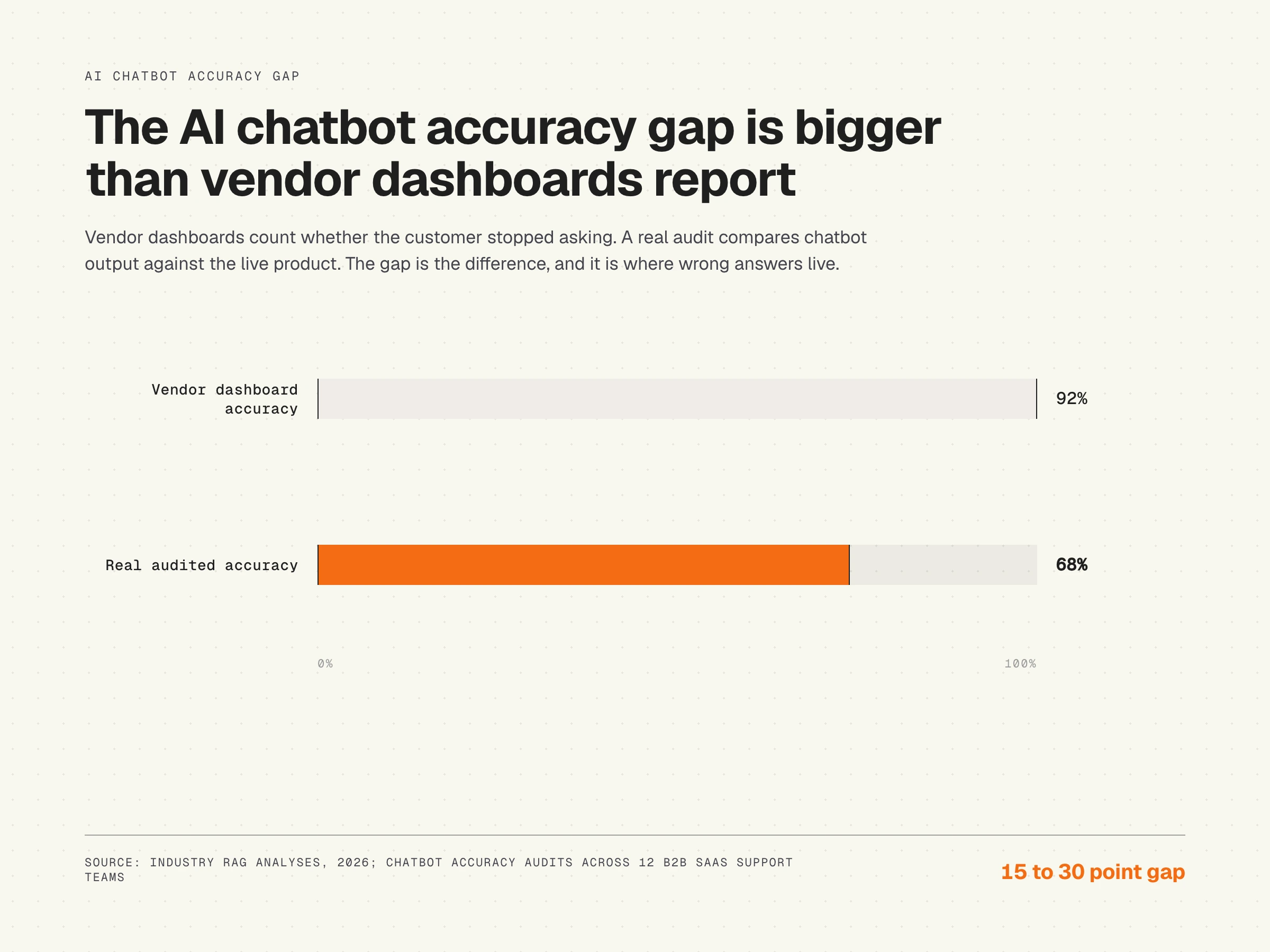
Vendor dashboards report resolution rates. A real audit compares chatbot output against the live product. The difference is the AI chatbot accuracy gap.
What is the AI chatbot accuracy gap?
The AI chatbot accuracy gap is the difference between what an AI support bot tells customers and what your product actually does right now. It is not a model problem. It is a documentation problem that produces wrong answers with more confidence and better grammar than any human agent would dare to provide. The risk is not theoretical, it is a daily drag on customer satisfaction.
The gap has a specific mechanism. Modern AI support bots use retrieval-augmented generation (RAG): the chatbot searches your help center for relevant passages, then feeds those passages to a language model that writes the answer. The model does not answer from memory or general training data. It answers from what the retrieval step hands it. Which means if your help center still describes a navigation path that moved three releases ago, the chatbot will explain that navigation path to every customer who asks, in fluent prose, with no indication that anything has changed.
This is why vendor-reported resolution rates are misleading. A resolution rate measures whether the user stopped asking, not whether the answer was correct. A customer who follows the wrong instructions and gives up counts as a resolved interaction in most dashboards. The gap between "resolved" and "correctly resolved" is exactly what the AI chatbot accuracy gap measures. It is a gap most teams are not tracking, and it directly limits the chatbot's ability to deliver real value.
Why AI chatbots sound confident even when wrong
The confidence asymmetry in AI support bots is not a side effect. It is a design property of how language models work. Models are trained to produce fluent, natural-sounding text. The training process, including reinforcement learning from human feedback, rewards completeness and coherence, not epistemic humility. A model that regularly says "I'm not sure" scores worse in human evaluations during training, so it learns not to say it. Researchers studying response quality across multiple dimensions consistently find that fluency outpaces factual correctness when the underlying source material is weak.
“AI systems inherit the quality of the organization behind them. Companies often expect AI to compensate for organizational dysfunction when it actually amplifies it at scale.
”
The result is a system that is structurally more confident when it is less accurate. If the retrieved passage is current and precise, the model produces a precise answer. If the retrieved passage is outdated and vague, the model still produces a fluent answer, filling in the gaps with plausible-sounding language that may have nothing to do with your product today.
This asymmetry is well-documented in the RAG literature. The most common failure mode is not model fabrication from nothing. It is model interpolation from stale or incomplete source material. The model is doing exactly what it was trained to do. The problem sits one layer deeper, in the retrieval corpus.
Probabilistic guessing, not knowing
It helps to be precise about what large language models actually do. Probabilistic guessing means chatbots do not know facts; they predict the next most statistically likely word to provide plausible-sounding answers. The chatbot is not retrieving a fact and stating it. The chatbot is generating the next token that fits the prompt and context window. When the context window contains accurate information, the most likely next token is also accurate. When the context contains stale information, the most likely next token reflects that staleness without any signal that something is wrong.
This is compounded by what the model learned during pre-training. Models are trained on massive, scraped internet datasets that contain biases, contradictions, and outdated information. Two articles on the public internet from two different years can give contradictory advice about the same product. The model absorbs both and averages them. Machine learning does not include a fact-checking step. Reinforcement learning fine-tunes tone and helpfulness, not accuracy in a specific product context. This is why the answers provided by even the strongest models still depend on the quality of the retrieval corpus you ground them in.
Why prompt engineering does not fix this
The first thing most teams try when they notice wrong chatbot responses is prompt engineering. Add guardrails. Tell the model to cite sources. Tell it to refuse when uncertain. This produces marginally more careful-sounding answers. It does not produce correct answers, because prompts run after retrieval. By the time the prompt executes, the model already has the stale passage in its context window. The prompt can affect how that passage is summarized. It cannot affect what was retrieved.
Teams that spend engineering cycles tuning prompts instead of fixing their documentation corpus are optimizing the presentation layer while leaving the root cause in place. The chatbot sounds more careful. The customer still gets wrong instructions.
Why switching models does not fix this either
The same logic applies to model upgrades. A better large language model reading a documentation corpus that is 60% current produces answers that are 60% accurate, rendered with better grammar. Chatbot performance equals model quality multiplied by corpus quality. Optimizing model quality while neglecting corpus quality is optimizing the wrong variable. The bound is always set by the source. The technology gets faster every quarter; the reliability of the underlying knowledge base is what determines whether that speed is a benefit or a faster path to wrong answers.
The documentation dependency behind every RAG failure
RAG-powered chatbots achieve 94-98% accuracy on domain-specific questions when backed by well-structured, current knowledge bases. That figure, reported across multiple 2026 industry analyses, highlights the importance of maintaining up to date information in the retrieval corpus. The operative phrase is "current knowledge bases." Most knowledge bases are not current. That is precisely the problem the AI chatbot accuracy gap names.
According to the GitLab DevSecOps Survey, 65% of software teams ship at least weekly. Every release is a potential documentation mismatch. A button renamed "Apply Changes" from "Save." A menu moved from Settings to Organization. A tier rebranded from "Pro" to "Business." None of these changes automatically update the help center. The chatbot keeps telling users to click "Save," find the old settings path, and check their "Pro" plan features.
The Knowledge-Centered Service methodology from the Consortium for Service Innovation identifies documentation maintenance as a continuous improvement function, not a one-time content project. Knowledge articles have a useful life that is bounded by how frequently the product they describe changes. At weekly shipping cadence, that lifespan is measured in weeks, not months. Every article past its effective lifespan is a liability in the retrieval corpus and a direct hit to the effectiveness of the chatbot.
The underlying mechanism connecting stale documentation to chatbot errors is detailed in why AI chatbots give wrong answers. It is worth reading before making any chatbot accuracy decisions.
Where wrong answers do the most damage: healthcare, legal, and regulated contexts
Customer support is the largest commercial category for AI chatbots, but the consequences of wrong answers are most visible in regulated domains. A 2024 PubMed Central report found that conversational AI chatbots failed to adequately address 132 out of 172 queries due to insufficient knowledge, often resulting in AI hallucinations, highlighting the risk of spreading misconceptions. The study was specific to healthcare, with queries spanning cancer information, dosing, and triage. The takeaway generalizes: when the underlying corpus is incomplete or outdated, the model fills the gap with plausible-sounding text, and in regard to medical information that text can be dangerous.
Legal-tech applications face a similar challenge. Successful legal-tech applications avoid hallucinations by limiting their scope and holding data to over 95% accuracy thresholds before public deployment. The pattern is the same: shrink the domain, increase corpus quality, validate against a known-good source. The deployed chatbots are reliable not because the model is smarter, but because the operational discipline is stricter.
The NYC context's complex regulatory environment leaves little room for error, emphasizing the need for heavily curated, restricted-domain databases rather than open-ended large language models. For NYC applications, the database must contain the latest updates from official sources to prevent hallucinations on local laws. In highly complex and legally strict local landscapes, accuracy requires a distinct set of operational and technical interventions, including narrow scope, mandatory citation, and ongoing validation against the authoritative source.
The lesson for B2B SaaS support is direct. Improving AI chatbot accuracy requires targeted strategies, especially in complex, diverse environments. The methods that work in regulated industries (restricted scope, current source, strict citation) are the same methods that work in customer support, even when the consequences are smaller per query.
The six documentation failures that do the most damage
Not all documentation decay damages chatbot accuracy equally. Six failure modes account for the majority of wrong answers in production RAG support systems.
Screenshot drift
Articles reference old UI screenshots while the product has moved on. The chatbot cannot read images, but it reads captions, alt text, and the instructional text around those screenshots. When the surrounding text says "click the blue button in the top right," and that button no longer exists there, the chatbot confidently misroutes customers.
Renamed features and buttons
"Save" becomes "Apply Changes." "Export" becomes "Download Report." "Workspace" becomes "Organization." The help center still uses the old names. Customers search for the button the chatbot described and find nothing. They file a ticket. The ticket costs $15-22 to resolve (HDI/MetricNet benchmark for B2B support). Multiply that by every customer who hit the same renamed button that week, and the efficiency loss adds up quickly.
Moved navigation paths
Settings structures reorganize with nearly every major product update. "Settings > Team Management" becomes "Organization > Members." Every article referencing the old path sends customers to dead ends via the chatbot. The path is specific, the confidence is high, the destination no longer exists. Intent recognition correctly identifies what the user wanted; the retrieved path simply no longer works.
Outdated pricing and plan references
Pricing changes faster than most support content calendars. Articles still describe the old plan structure after a rebrand or restructure. The chatbot quotes obsolete feature gates and price points. Customers discover the discrepancy during onboarding or at renewal. Neither is a recoverable moment.
Removed features still documented
A feature gets sunset. The article describing it stays live in the help center because nobody flagged it for removal. The chatbot recommends a workflow that cannot be performed. This is the most damaging category because it does not just confuse customers. It actively misleads them into a dead end that requires human escalation to resolve.
Conflicting articles
Two articles give different answers to the same question. A new one was written when the feature changed; the old one was never deprecated. The retriever grabs whichever one scores higher in semantic search. Often that is the older article, which has more inbound links and longer indexing history. The wrong version wins, and the chatbot's ability to give a consistent answer to the most common questions collapses.
Hardening accuracy with technical controls
Improvements to chatbot accuracy live in two layers: the corpus (fix the documentation) and the retrieval pipeline (constrain what the model is allowed to do with retrieved content). The corpus layer is structural. The pipeline layer is operational. Both matter, and the strongest deployments use them together.
“The most successful customer-facing AI focuses on automating CRaP: Confident, Routine, Predictable.
”
Mandatory source citations
Mandatory source citations restrict the chatbot from answering unless it can explicitly cite a URL or internal document verifying its claim. This converts the chatbot from a generative system back into something closer to a search engine: every claim has to be traceable to a passage in the corpus. It does not eliminate the risk of citing a stale passage, but it makes the failure observable. A wrong answer with a citation can be audited. A wrong answer without one cannot.
Judge LLMs and human evaluation loops
Establishing an accuracy and evaluation pipeline involves creating continuous testing loops using distinct "Judge LLMs" or human reviewers to grade AI responses against a rubric. The judge model is a separate large language model whose only job is evaluating, not generating. It reads the question, the retrieved passage, and the produced answer, and scores them on factual correctness and source alignment. Combined with sampled human review, this is what lets a team test chatbot performance on a known set of questions every week instead of waiting for a customer complaint.
Controlled vector databases
Controlled vector databases connect the chatbot to a restricted, verified repository of documents. Rather than letting retrieval roam over every piece of content the company has ever published, a controlled vector database includes only the canonical source for each topic. Removed features, deprecated tutorials, and old marketing pages are not in the index at all, so they cannot be retrieved by mistake. This is the same principle that legal and healthcare deployments rely on, applied to support documentation.
Input sanitization and intent checks
Input sanitization uses keyword filtering and intent-checking layers to neutralize adversarial prompt injections aimed at providing unauthorized advice. A user who asks the chatbot to "ignore previous instructions and..." should hit a guard before the prompt reaches the model. Intent recognition layers also help to route ambiguous queries to a more conservative path, including handoff to a human. Modern systems classify intent before retrieval and reach 94% accuracy in intent classification, correctly identifying user goals even when expressed indirectly. That classification is what lets the rest of the pipeline respond appropriately rather than guessing.
How to measure your actual AI chatbot accuracy gap
Most teams do not know their real chatbot accuracy rate because they are measuring the wrong thing. Resolution rate, containment rate, deflection rate: these all measure whether the user stopped interacting, not whether they got a correct answer. Evaluating the AI chatbot accuracy gap requires comparing chatbot output to current product state.
A practical audit takes under two hours and gives you a real number:
- Pull the 20 common questions from the last 30 days of support tickets.
- Ask the chatbot each question in a fresh session, with no prior context.
- Open each answer side by side with the current live product.
- Score each answer on four dimensions: factual accuracy (does it describe what the product does today?), navigation accuracy (are menu paths and button names current?), completeness (does it cover all steps without leaving the customer stranded?), and source freshness (when was the underlying article last updated, and has the product changed since?). Natural language understanding makes the chatbot sound polished; only the four dimensions test whether that polish is backed by truth.
- Score each dimension one to five. Average across all 20 queries.
Most teams running this audit for the first time find their actual accuracy sits 15-30 points below the vendor dashboard they are shown. The gap is not imaginary. It is measurable. And once measured, the fix path becomes specific. A real accuracy score of 70% is not a model tuning problem. It is a corpus problem. Every point of improvement comes from fixing the documentation the chatbot reads.
For a structured approach to this audit, the AI readiness audit for knowledge bases walks through the full process with a scoring template.
The Salesforce State of Service research is direct about why this matters at the business level: customers who cannot get accurate self-service answers escalate or churn. The reliability of the self-service layer is not a support operations detail. It is a retention metric, and the value of the chatbot to the business is bounded by it. This research example suggests that what looks like a chatbot problem is usually a knowledge base problem in disguise.
The compound effect: staleness times shipping velocity
Documentation decay is not linear. It compounds. A team shipping weekly accumulates documentation debt faster than it is cleared by any manual review process. The math is straightforward: if your team ships changes that affect product UI or behavior once per week on average, and the help center is updated on a monthly review cadence, you enter each review cycle with 3-4 releases of undocumented or incorrectly documented changes already in the corpus.
Each stale article does not just affect its own question. It affects every related question that retrieves it as context. A renamed feature that appears in 12 articles spreads one inaccuracy across all 12 retrieval surfaces. The chatbot does not know to quarantine stale content. It retrieves whatever is most semantically relevant, which often means the most detailed and historically consistent article: the oldest one.
The compounding effect is why teams that manage documentation decay well see outsized chatbot accuracy improvements relative to the content they actually fixed. Removing one stale article that was poisoning retrieval across dozens of related questions moves the accuracy needle more than shipping a new article in a clean space. The hidden cost of this decay is essential to understand, and it is explored in detail in the documentation decay article.
Closing the AI chatbot accuracy gap for real
The sustainable fix for the AI chatbot accuracy gap is not a bigger documentation team, a more aggressive review calendar, or a better large language model. It is documentation that is structurally coupled to the product, so that when the product changes, the documentation changes with it, or at minimum flags the affected articles immediately.
Three capabilities define documentation that does not drift:
Code-aware recording
Capture documentation using DOM and CSS selectors, not pixel screenshots. Screenshot-based tools break on every UI change because they compare images, not code state. A tool that captures the actual CSS selector for a button knows when that button moves or changes, because it is watching the code, not the pixels. This is the structural difference between documentation that degrades and documentation that tracks.
Repository-level change detection
Monitor the code repository for changes that affect recorded selectors. When an engineer renames a button or restructures navigation, the affected articles should surface immediately, not three weeks later when a customer files a ticket. The documentation system needs to watch the same signals the engineering team watches: commits, pull requests, merged changes.
Automated updates and staleness alerting
When a matched change is detected, affected articles should update automatically where the change is unambiguous, or queue for review where judgment is required. The goal is not zero manual work. It is zero silent staleness. Every stale article should be known before it damages chatbot accuracy, not discovered after.
This is what HappySupport is built around. HappyRecorder captures DOM and CSS metadata during a single recorded walkthrough. HappyAgent monitors the connected GitHub repository and auto-updates guides when underlying selectors change. The same content source also feeds the rest of the product: the help center itself, an AI chat that answers only from your own articles with citations, a ticket inbox with email replies, an in-app widget, and in-app tours and banners, at one flat monthly price. The retrieval corpus stays current without a documentation team running quarterly audits. An AI chatbot reading that corpus does not need better prompts. It needs accurate source material. That is what self-updating documentation provides, and it is what closes the gap between what the chatbot says and what the product does.
The technical approach behind this, and why selector-based recording outperforms screenshots at scale, is covered in the AI chatbot failure mechanisms article. The short version: you cannot patch a structural problem at the prompt layer. Fix the source, and the accuracy gap closes.
If your team ships weekly and your chatbot keeps quoting last quarter's UI, start a free 14-day trial with HappySupport and measure your accuracy gap before and after one real release cycle.
 Book a demo