.png)


The docusaurus vs gitbook decision sits at the open-source vs hosted-SaaS fault line of the developer-documentation market. Docusaurus is the React-based static site generator from Meta, free under MIT license, deployed on whatever static hosting your team already runs. GitBook is the hosted SaaS platform built around a polished block editor and AI-powered authoring, billed per site and per user, with no build step to manage. Both products are used to ship developer docs at serious scale, both have meaningful AI investments in 2026, and both share a deeper question that the marketing pages skip past: whether customer-facing how-to documentation should live in a dev-docs tool at all.
This article compares Docusaurus and GitBook across editor depth, customization, AI features (GitBook AI Assistant and Agent vs Docusaurus plus search plugins), versioning and Git workflow, hosting and deployment, multilingual support, pricing economics, and the bigger question hiding underneath the comparison. It closes with a decision framework based on team profile and where a self-updating help center fits inside the gap both tools leave open for product-facing content.
What is Docusaurus?
Docusaurus is an open-source static site generator built by Meta (formerly Facebook), now on version 3.10.1. The product is purpose-built for documentation sites and ships with conventions for sidebars, versioning, internationalization, search, and theming out of the box. The primary surface is a React-based single-page application generated at build time from MDX files (Markdown plus JSX), which means content authors write in Markdown and developers can embed React components for interactive examples, code playgrounds, or custom widgets. Hosting is on whatever static-site provider the team uses (GitHub Pages, Netlify, Vercel, Cloudflare Pages, or self-hosted).
The output of Docusaurus is a static site under your full control: themes are React components, plugins extend the site at every stage of the build, and the entire content tree lives in version-controlled Markdown next to the codebase. Versioning is first-class (each release branch can carry its own documentation), MDX v3 unlocks deeper component embedding, the official Algolia search plugin powers full-site search, and i18n ships out of the box with workflows for Crowdin and Git-based translation. The trade-off is that everything except content authoring is engineering work: setup, deploy pipelines, theme customization, plugin selection, search wiring.
What is GitBook?
GitBook is a hosted SaaS documentation platform that has spent the last several years rebuilding around a polished block-based editor and an AI-first authoring workflow. The product is sold per site and per user, with no build step and no deploy pipeline to manage: sign up, create a space, and the docs are live. The primary surface is a web editor that handles complex formatting (tables, callouts, tabs, code blocks) more cleanly than most competitors, plus Git sync that two-way mirrors content between GitBook and a connected GitHub or GitLab repo for teams that want a hybrid workflow.
The output of GitBook is a hosted documentation site under GitBook's infrastructure, with custom domains on paid tiers, AI search that returns conversational answers, GitBook AI Assistant (500 answers included on Ultimate) that drafts content and generates docs from a connected codebase, and GitBook Agent for cross-document operations. Versioning, branching, and review workflows are built in. The trade-off is that the team trades engineering control for vendor speed: customization stops at the templated layer, AI features gate by tier, and the heavier pages can feel sluggish on large documentation sets.
Quick verdict on the docusaurus vs gitbook question
If your team is engineering-led, comfortable owning a build pipeline, wants full control over theme and plugins, prioritizes open-source licensing and self-hosting, and accepts the trade that everything outside content authoring is engineering work, Docusaurus wins on customization, performance, and total cost of ownership. If your team wants no build step, a polished editor non-engineers can use, AI-powered authoring out of the box, hosted infrastructure with custom domains, and a per-site-per-user pricing model that scales with adoption, GitBook wins on time-to-publish and on editor depth. Neither tool was built to handle the staleness gap on customer-facing how-to documentation, which is the dimension most evaluations skip.
How to create documentation with each tool
The day-one experience inside the docusaurus vs gitbook pairing tells you most of what you need to know about who each tool is for. Docusaurus expects an engineer at the keyboard. GitBook expects a writer (or any non-engineer) at the keyboard.
Publishing in Docusaurus
In Docusaurus, you run npx create-docusaurus@latest my-docs classic to scaffold a project, write content in Markdown or MDX files inside the docs/ directory, configure the sidebar in sidebars.js, customize the theme by overriding React components in the swizzle layer, deploy by running npm run build and pushing the output to your static host of choice. Content updates flow through pull requests; the docs ship with the codebase. Search is wired through the Algolia plugin (free for open-source projects via Algolia DocSearch). Versioning snapshots the current docs into a versioned folder on each release.
Publishing in GitBook
In GitBook, you sign up, create a Space, click New Page, write in the block editor (paragraphs, headings, callouts, tabs, code blocks, embeds, tables), publish. The site is live immediately on a gitbook.io subdomain (or a custom domain on paid tiers). Two-way Git sync mirrors the GitBook content to a GitHub or GitLab repo for teams that want pull-request workflows; one-way sync (Git as the source of truth) is also supported. GitBook AI Assistant drafts content from prompts, generates documentation from a connected repo, and answers questions in conversational search.
The end product looks different on the consumer side. Docusaurus sites tend to feel snappier (static HTML with React hydration, no per-page database lookup), have tighter design control because every theme element is editable, and integrate more deeply with the engineering workflow. GitBook sites feel more uniform across the GitBook ecosystem, ship faster because there is no build step, and lean on AI search as the primary discovery surface.
Feature breakdown of Docusaurus and GitBook
Six dimensions decide most docusaurus vs gitbook evaluations once the marketing pages are out of the way: editor and content authoring, customization and theming, AI features, versioning and Git workflow, hosting and deployment, and i18n.
Editor and content authoring
Docusaurus authoring happens in Markdown or MDX files inside the repository, edited in whatever editor the team already uses (VS Code, Cursor, JetBrains, plain vim). The interface is the team's existing editor. The trade-off is that non-engineers find Git workflows friction. GitBook ships a polished block editor that handles complex formatting (nested tables, callouts, tabs, code blocks, math) more cleanly than most competitors, optimized for non-engineers. The trade-off is the loss of full-text Git history per file unless Git sync is configured. For teams whose docs writers are engineers, Docusaurus's editor (their existing IDE) is faster. For teams where product managers or technical writers own the docs, GitBook's editor is materially friendlier.
Customization and theming
Docusaurus offers full theming through React components. Every UI element can be swizzled (overridden), plugins inject content at every stage of the build, and the theme can be styled with CSS Modules or any styling solution the team prefers. The customization ceiling is the React ecosystem, which is effectively unlimited. GitBook offers branded customization (logo, colors, custom domains, navigation labels) but caps at the templated layer. For teams that want their docs site to look like an extension of the product, Docusaurus wins. For teams that want a clean polished docs site without engineering investment, GitBook wins.
AI features: GitBook AI and Agent vs Docusaurus plus search plugins
GitBook ships GitBook AI Assistant on Ultimate (500 answers included) for content drafting, AI search across the space, and documentation generation from a connected codebase. GitBook Agent adds cross-document operations, like rewriting style across an entire space or generating release notes from a Git diff, per the current GitBook pricing page. The AI footprint is a first-class part of the product on the higher tiers. Docusaurus ships no native AI authoring; teams that want AI features integrate third-party tools (typically Algolia AI search, Mendable for docs chat, or custom RAG pipelines on top of the Markdown source). The trade-off is that Docusaurus's open architecture means any AI tool can be plugged in, but the integration work is the team's problem.
Versioning and Git workflow
Docusaurus's versioning is first-class: each release branch can carry its own documentation snapshot, with the doc site showing a version dropdown at the top. The pattern matches semantic-versioned SDKs and libraries (v1.x docs vs v2.x docs vs current). The workflow lives in Git. GitBook ships versioning through variants and branches inside the GitBook UI, with Git sync as an optional bridge to a connected repo. For teams that ship multi-version SDKs and need docs to follow library versions, Docusaurus is the cleaner fit. For teams that ship a single-version SaaS product and want lightweight branching for review, GitBook's UI-driven workflow is the lower-friction path.
Hosting and deployment
Docusaurus deploys anywhere static files run: GitHub Pages, Netlify, Vercel, Cloudflare Pages, S3 plus CloudFront, or self-hosted. The cost is the hosting bill, which on most static hosts is negligible. GitBook hosts on GitBook's infrastructure, with custom domains on Premium and above. The trade-off is the platform lock-in: a GitBook export can be downloaded as Markdown, but the GitBook AI features, comments, edit history, and review workflow do not export. Teams that prioritize hosting control or want to keep docs inside their existing cloud account pick Docusaurus. Teams that want zero infrastructure overhead pick GitBook.
i18n and multilingual coverage
Docusaurus's i18n ships out of the box with Git-based translation workflows, plus integrations for Crowdin and other translation managers. Each locale lives in its own subfolder, which makes localization auditing straightforward. GitBook supports multilingual through variants and connected Crowdin workflows on higher tiers. For teams that ship docs in 5+ languages with a translation workflow already in place, Docusaurus's Git-based pattern is the lower-friction path. For teams in 1 to 3 languages, both tools cover the ground.
Pricing comparison: open-source self-hosted vs site-plus-user SaaS
The docusaurus vs gitbook economics diverge sharply because the two products charge for entirely different things. Docusaurus is free under MIT license; the only cost is the hosting bill (GitHub Pages is $0 for public repos; Netlify and Vercel free tiers cover most documentation sites; an enterprise self-host might run $50 to $500 per month for serious traffic). Engineering investment for setup, theme customization, and ongoing maintenance is the larger cost.
GitBook charges per site and per user. Free covers individual users with GitHub/GitLab sync. Premium is $65 per site per month plus $12 per user per month for branded public docs. Ultimate is $249 per site per month plus $12 per user per month for AI Assistant, Agent, adaptive content, and authenticated access. Enterprise is custom pricing for SAML SSO and white-glove migration, per the current GitBook pricing page. Annual billing knocks 2 months off the bill.
The pattern is the classic open-source vs hosted-SaaS trade. Docusaurus's licence cost stays flat at zero; the engineering investment scales with how customized you want the site. GitBook's bill scales with sites and users, but the time-to-publish stays near zero across every tier. The full GitBook pricing breakdown walks through each tier; the GitBook vs ReadMe comparison covers the adjacent decision most GitBook buyers face.
The bigger question hiding underneath: should customer docs live in a dev-docs tool at all
The docusaurus vs gitbook conversation usually frames as a developer-tools choice. Both products were architected for developer documentation: API references, SDK guides, integration tutorials, library docs. Both work well for that use case. The trap is that teams pick one (often based on the open-source vs SaaS preference) and then quietly extend it to cover customer-facing how-to documentation: in-product UI walkthroughs, support articles, onboarding guides, troubleshooting flows.
That extension is the failure point. Developer documentation moves on a release cadence (a new SDK version every few weeks or months); customer-facing how-to documentation moves on a deploy cadence (a UI change every few days). The same tools that handle API references well break on UI walkthroughs because the underlying surface (screenshots, click paths, field labels) moves too fast for the human review loop to keep up. Documentation decay is the hidden cost of every help center, and the failure mode is not visible until the existing customer base has been confused enough to file tickets at scale.
The Consortium for Service Innovation's KCS methodology sets a benchmark that organizational knowledge should be available at or before the time of case closure. Hitting that bar on customer-facing how-to content requires a freshness signal that neither Docusaurus nor GitBook ships natively, because neither product was designed for the problem.
Which failure mode is more disruptive
The two tools fail differently when stretched into customer-facing how-to duty.
Docusaurus's failure mode is the orphan version. Versioned documentation snapshots are first-class, which makes the v1.x docs immortal. When the product UI changes in v2.x and nobody updates the v1.x snapshot, the v1.x docs continue to surface in search and AI retrieval as authoritative content. The customer or AI agent reads the snapshot, follows the steps, the steps no longer match the current UI, and the trust collapse is delayed but compounding. The strength of the versioning model (immortal snapshots) becomes the weakness for non-versioned products.
GitBook's failure mode is the confidently AI-rewritten stale page. GitBook AI Assistant generates content from a connected codebase, which sounds like a freshness signal but reads the codebase, not the running product. If the codebase has stale comments, the AI inherits the stale framing. If the AI Assistant generates an onboarding flow from the API schema and the actual UI flow has diverged, the generated content is convincingly wrong. The AI confidence layer amplifies the freshness gap faster than a static page would.
Which is more disruptive depends on the use case. A multi-version SDK on Docusaurus feels the orphan-version failure as a search-engine problem (Google indexes the wrong snapshot). A single-version SaaS on GitBook with AI Assistant feels the AI-rewritten-stale-page failure as a customer-trust problem. Both are symptoms of the same root cause: neither tool reads the running product.
When Docusaurus is the right answer
- Your team is engineering-led, owns a build pipeline, and treats docs as code committed alongside the codebase.
- You ship multi-version SDKs or libraries and need per-release documentation snapshots that the versioning model handles out of the box.
- You want full control over theme and plugins through React swizzling, and the customization ceiling matters more than the default polish.
- You prioritize open-source MIT licensing and the ability to self-host on GitHub Pages, Netlify, Vercel, or your own infrastructure.
- You can absorb ongoing engineering investment for setup, plugin selection, and maintenance. The Mintlify alternatives comparison covers where Docusaurus lands inside the wider developer-docs market.
When GitBook is the right answer
- Your team includes non-engineer writers (PMs, technical writers, support engineers) who need a polished MDX editor without Git friction.
- You want zero infrastructure overhead: sign up, create a Space, the docs are live with no build step or deploy pipeline.
- You want AI authoring out of the box (GitBook AI Assistant with 500 answers on Ultimate, Agent for cross-document operations).
- You ship a single-version SaaS product where the per-release versioning model is overkill and a simpler variant-based history is enough.
- You can absorb per-site-per-user pricing ($65 plus $12 per user on Premium, $249 plus $12 per user on Ultimate) and prefer predictable SaaS billing over open-source engineering cost.
Do not use either as a customer-facing how-to help center for a product that ships weekly. Both tools were built for documentation that moves on a release cadence, not for documentation that moves on a deploy cadence. Stretching either into help-center duty creates exactly the freshness gap described above.
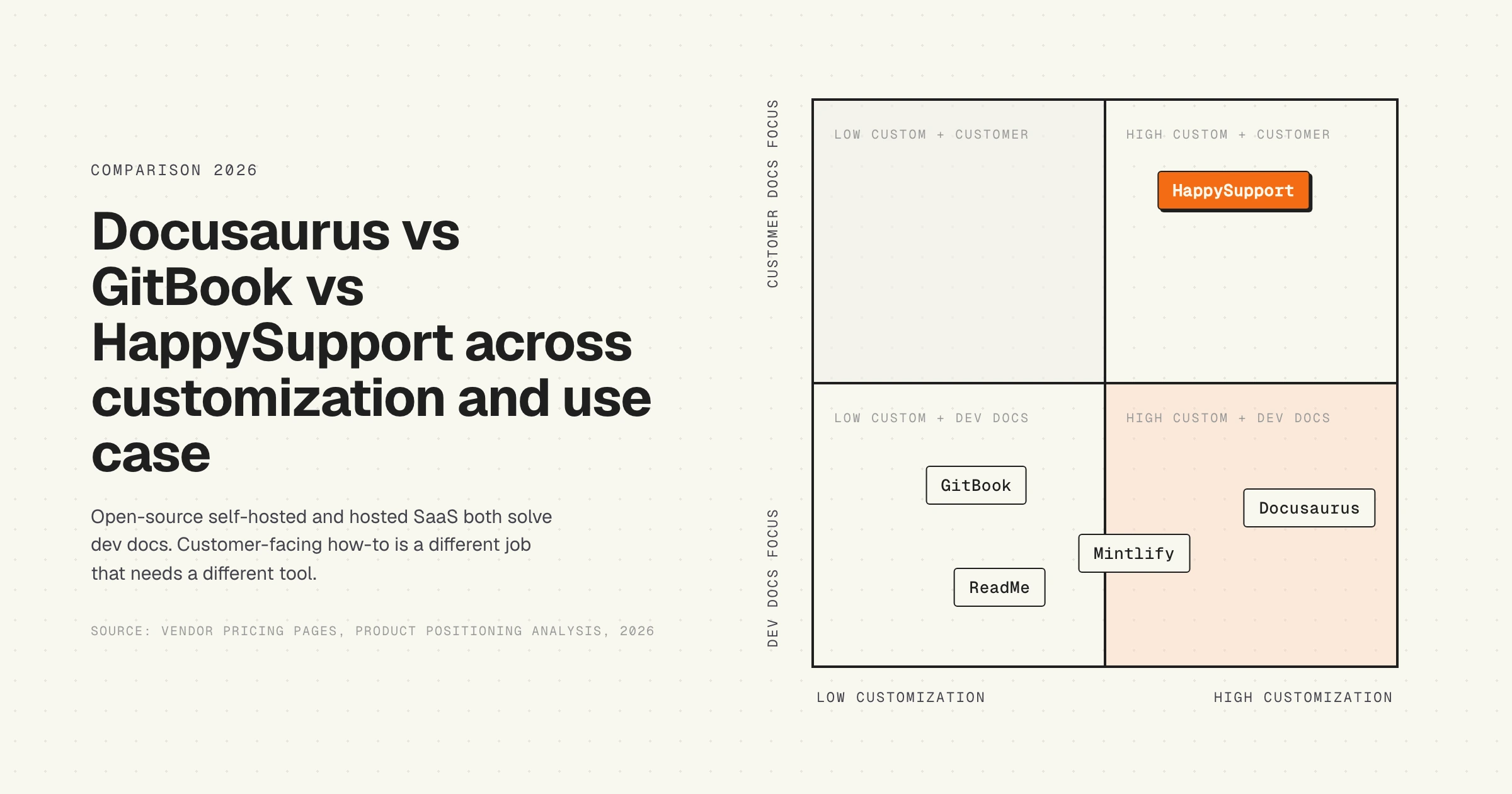
HappySupport sits beside Docusaurus or GitBook, not in place of either. Developer documentation (API references, SDK guides, integration tutorials) belongs in the dev-docs tool you picked. Customer-facing how-to content (in-product walkthroughs, UI-anchored troubleshooting, onboarding flows) belongs in a tool that reads the running product. Whichever dev-docs tool you run, swap in HappySupport for the customer-facing article layer that stops drifting between releases.
Alternatives to Docusaurus and GitBook
If the docusaurus vs gitbook evaluation surfaces a misfit on either side, there are four alternatives worth a serious look depending on use case.
- Mintlify. Markdown-first hosted SaaS competitor to GitBook, designed around API-first developer docs with strong OpenAPI support.
- ReadMe. OpenAPI-native hosted SaaS focused on developer-portal use cases (API key management, interactive API explorer, request history).
- MkDocs. Open-source Python-based static site generator, lighter than Docusaurus, popular for smaller documentation sets.
- HappySupport. Built for product-led B2B SaaS shipping weekly, where the maintenance problem dominates the editor problem on customer-facing how-to documentation. Covered in detail below.
For a broader view, the best knowledge base software comparison by team profile covers the full landscape of help-center and documentation tools, including how dev-docs tools compare to dedicated knowledge bases.
HappySupport in the docusaurus vs gitbook debate
HappySupport is a different category of help center than either Docusaurus or GitBook. The two dev-docs incumbents publish content; HappySupport reconciles content to product state. The architecture rests on two pieces: HappyRecorder, a Chrome extension that captures UI flows as DOM and CSS selectors instead of pixel screenshots, and HappyAgent, a GitHub Sync layer that watches the product repository for changes that affect documented flows and flags the affected articles for update. When engineering renames a field or restructures a screen, the affected articles surface automatically with a list of exact changes to apply, instead of relying on the next sprint to catch the drift or on the GitBook AI Assistant to confidently rewrite a stale page from a stale codebase. This compresses the maintenance labor line that dominates the 3-year total cost of every customer-facing how-to documentation site, regardless of whether it was built on Docusaurus or GitBook. For teams shipping customer-facing how-to content on a product that moves faster than its release cadence, HappySupport closes the loop that the docusaurus vs gitbook decision leaves open. Read more on what a self-updating help center actually means in practice, and on why the docusaurus vs gitbook choice misses the staleness layer that decides the long-run trust of every customer-facing article.










