

GitBook pricing is one of the more confusing tier structures in the documentation market, because GitBook bills two ways at once: per site and per user. A free tier exists, then Premium jumps to $65 per site per month plus $12 per user per month, then Ultimate jumps to $249 per site per month plus the same $12 per user. Enterprise is custom. Most pricing articles list those numbers and stop. The table is accurate. It is also incomplete. The per-site model penalizes teams that need a customer-facing help center alongside developer docs, the AI Assistant on Ultimate is rate-limited at 500 answers, and the published price is the cheaper half of what you actually pay over three years. The other half is the labor of keeping non-engineering docs current after every product release, and no GitBook pricing breakdown surfaces it.
This article walks through every GitBook plan, the per-site plus per-user math at realistic team sizes, what the AI Assistant and GitBook Agent cost, the true total cost of ownership at 3 and 10 users over three years, and what to verify before you sign. Then a short alternatives section for teams that realize at the end that they are paying for a documentation tool that works for engineers and breaks for customer-facing content.
What is GitBook?
GitBook is a documentation platform built originally for developer-facing content (API docs, technical references, internal engineering wikis) and now positioned as a general docs tool with AI features. It is sold per site, not per knowledge base or per project. A site is one published documentation property: docs.yourcompany.com, for example. Every paid plan layers per-user fees on top of the per-site fee, so a small team with one site does not stay cheap as it grows.
GitBook as a product covers a block-based visual editor with Git sync (changes can flow both ways between GitBook and a Git repository), custom blocks, interactive API playgrounds, OpenAPI rendering, preview deployments on pull requests, and on higher tiers AI Assistant, GitBook Agent, adaptive content, authenticated access for private docs, and SAML SSO. What GitBook does not do, the part the pricing page is silent on, is tell you when an article has gone stale because the customer-facing product changed. That is the cost we will return to.
GitBook plans: Free, Premium, Ultimate, Enterprise
The current GitBook plan lineup as of 2026 has four plans. Every price below is per site per month, billed annually, with per-user fees stacked on top. The Free plan supports one user only.
| Plan | Site price (annual) | Per-user fee | What you get |
|---|---|---|---|
| Free | $0/site/month | 1 user only | gitbook.io subdomain, block editor, Git sync, interactive API playgrounds, LLM optimizations |
| Premium | $65/site/month | $12/user/month | Team collaboration, custom domain, branding, analytics, AI search |
| Ultimate | $249/site/month | $12/user/month | AI Assistant (500 answers), GitBook Agent, adaptive content, authenticated access, channels |
| Enterprise | Custom | Custom | SAML SSO, migration support, custom integrations, IP allowlisting, unlimited adaptive content |
What each GitBook plan actually includes
The price table tells you what a plan costs. This one tells you what you get, which is where the upgrade decisions actually happen. Checked against GitBook's public pricing page in August 2026.
| Capability | Free | Premium | Ultimate | Enterprise |
|---|---|---|---|---|
| Users | 1 only | $12/user/month | $12/user/month | Custom |
| Custom domain | No, gitbook.io subdomain | Yes | Yes | Yes |
| Block editor and Git sync | Yes | Yes | Yes | Yes |
| Version history and rollback | Yes | Yes | Yes | Yes |
| Interactive API playgrounds | Yes | Yes | Yes | Yes |
| MCP server and LLM optimizations | Yes | Yes | Yes | Yes |
| Site customization | Primary colour and corner style only | Logo, font, footer, primary, header and header-link colours | Custom fonts, subdomains, advanced branding | Unlimited |
| Analytics | Page views | Page views plus search analytics | Plus AI Insights on Assistant answers | Custom |
| GitBook Agent | 10 messages per week | Included | Included | Included |
| AI search | No | Yes | Yes | Yes |
| AI Assistant | No | No | Yes, 500 successful answers, soft limit | Custom |
| Adaptive content | No | No | Unlimited | Unlimited |
| Sections across sites | No | No | Yes | Yes |
| SSO | Google and email domain | Google and email domain | Google and email domain | SAML SSO |
Four rows in that table decide most upgrades, and only one of them is a price.
Custom domain is the reason almost nobody stays on Free for real work. Publishing customer-facing documentation on a gitbook.io subdomain gives away the SEO value of the content and looks unfinished, so the first paid step is usually bought for the domain rather than for any feature.
Version history is on every tier, including Free. This is unusually generous and worth knowing, because several competitors gate history behind their top plan. If change tracking and rollback are your requirement, GitBook does not make you pay for them.
Customization is gated in three steps, and the middle step is narrower than it looks. Free gives you a primary colour. Premium gives you logo, font, footer and header colours, which is enough to look like your brand. Custom fonts and subdomains wait for Ultimate. Teams that assume "custom branding" at Premium means full control tend to discover the gap after signing.
AI Assistant is the whole reason Ultimate exists. Premium includes AI search, which finds pages. Ultimate includes the AI Assistant, which answers questions in a chat sidebar, plus AI Insights showing how those questions were answered and where your content has gaps. That is a $184 per site per month difference, and if you only need better search, you do not need it.
Is the GitBook free plan enough? What the free plan includes
The free plan is a genuine product rather than a gated demo, and it is more capable than most free documentation tiers. You get the block editor, two-way Git sync, version history with rollback, interactive API playgrounds, page-view analytics, the MCP server and LLM optimizations that let AI tools read your docs, and GitBook Agent capped at 10 messages per week.
Two limits define it, and neither is a usage cap you grow into gradually:
- One user. Not one editor and unlimited viewers: one user. The moment a second person needs to edit anything, you are on Premium. For a solo maintainer this is fine; for any team it is a hard stop on day one.
- No custom domain. Your docs live on a
gitbook.iosubdomain. For internal notes or a personal project that is irrelevant. For anything customer-facing it is disqualifying, because the domain is where the search-engine value accrues.
There is also no AI Assistant, no adaptive content, and customization stops at a primary colour and a corner style.
So the honest read: the free plan is genuinely good for a single maintainer documenting an open-source project or an internal tool, and for evaluating whether the editor and Git sync fit your workflow. It is not a free tier a company operates on. The trigger to leave it is almost always the second editor or the custom domain, both of which cost $65 per site per month plus $12 per user rather than a small step up.
What "per site" actually means at Premium
Premium at $65 per site per month is the entry to GitBook's paid plans. The number sounds reasonable until you add users. A 5-person team on Premium pays $65 + (5 x $12) = $125 per month for one site. That is $1,500 per year, which is comparable to Help Scout Docs on the Plus plan for 5 users including the helpdesk. The difference is that GitBook is just docs. The helpdesk is not in the bundle. For a team running customer support, Premium is documentation infrastructure on top of whatever helpdesk you already pay for separately.
What changes at Ultimate
Ultimate at $249 per site per month is where GitBook's AI features turn on. AI Assistant (500 successful answers per site per month, then rate-limited), GitBook Agent for automated content tasks, adaptive content that personalizes based on reader context, authenticated access for private docs, and channels for team announcements. A 10-person team on Ultimate with one site pays $249 + $120 = $369 per month, or $4,428 per year. The jump from Premium to Ultimate at one site for ten users is roughly $185 per month, which is the cost of adding the AI layer.
What changes at Enterprise
Enterprise is bought for procurement-grade controls and migration support, not editor features. The reason teams pay Enterprise quotes is SAML SSO with Just-in-Time provisioning, IP allowlisting on Git sync, unlimited adaptive content (no per-site cap on personalized variants), custom integrations, white-glove migration, and dedicated customer success. For a 50-person team running two or more sites with security review requirements, Enterprise is the floor.
The per-site plus per-user math at realistic team sizes
GitBook's pricing model rewards single-site, single-user setups and penalizes multi-site teams. Here is what the math actually looks like at common configurations.
3 users, 1 site, Premium
Premium: $65 + (3 x $12) = $101 per month, or $1,212 per year. This is the sweet spot for GitBook pricing. Small developer-docs team, one published site, AI search but no AI Assistant. Most early-stage technical documentation runs at this configuration.
10 users, 1 site, Ultimate
Ultimate: $249 + (10 x $12) = $369 per month, or $4,428 per year. This is the typical mid-stage configuration: docs team has grown, AI Assistant is turned on, one site still covers everything. AI Assistant rate-limits after 500 answers per month, which is a quiet cap most teams hit faster than they expect.
10 users, 2 sites, Ultimate
Two sites on Ultimate: ($249 x 2) + (10 x $12) = $618 per month, or $7,416 per year. The second site (often added for a separate customer-facing help center alongside developer docs) doubles the per-site line. Per-user does not double. The penalty for a second site is $249 per month flat, which is a structural choice in GitBook's pricing model. Multi-property teams should expect this.
AI Assistant and GitBook Agent costs
GitBook's AI layer turns on at Ultimate and includes AI Assistant (the user-facing answer surface) plus GitBook Agent (automated content workflows). Both draw from the content in your sites.
AI Assistant at 500 included answers, then rate-limited
AI Assistant on Ultimate includes 500 successful answers per site per month. Beyond that, the assistant rate-limits, meaning answers slow down or queue rather than billing per-resolution overage like Intercom Fin does. The effect is similar to a soft cap: high-traffic docs hit it and either negotiate up to Enterprise or accept degraded AI responses. For a docs site that gets 50,000 monthly visitors with a 1 percent AI engagement rate, you hit the cap on day 1.
GitBook Agent for automated content tasks
GitBook Agent runs automated content workflows: reformatting, link checking, generating drafts, summarizing changes. It is bundled into Ultimate. The Agent does not solve the freshness problem on customer-facing docs (it cannot detect that a UI screenshot is now wrong because the product changed), but it does compress some of the editorial overhead for engineering teams.
Translation add-on pricing
GitBook sells auto-updating translations as a separate add-on: $25 for the first 50,000 translated words, then $0.20 per 1,000 words after. For a multilingual docs site at modest volume, this is the most reasonable line in the GitBook bill.
GitBook total cost at 3 and 10 users over three years
License cost is the visible line. AI features are bundled into Ultimate, so they do not stack as a separate line until you exceed rate limits. Maintenance labor is the invisible third one. Every GitBook deployment that survives past month six for customer-facing content requires somebody to update articles when the product ships, audit dead content quarterly, fix screenshots after UI changes, and keep multi-site content aligned. For developer-only docs synced from Git, this work is often absorbed into the engineering review process. For customer-facing docs, it is a separate labor line.
3 users, 1 site, Premium, three years
Premium license: $1,212 x 3 years = $3,636. AI Search is included. Maintenance labor for developer docs synced from Git: 2 hours per month at $75 per hour = $5,400 over 36 months. Total: $9,036. License is 40 percent of the three-year cost. Maintenance is 60 percent.
10 users, 2 sites, Ultimate, three years
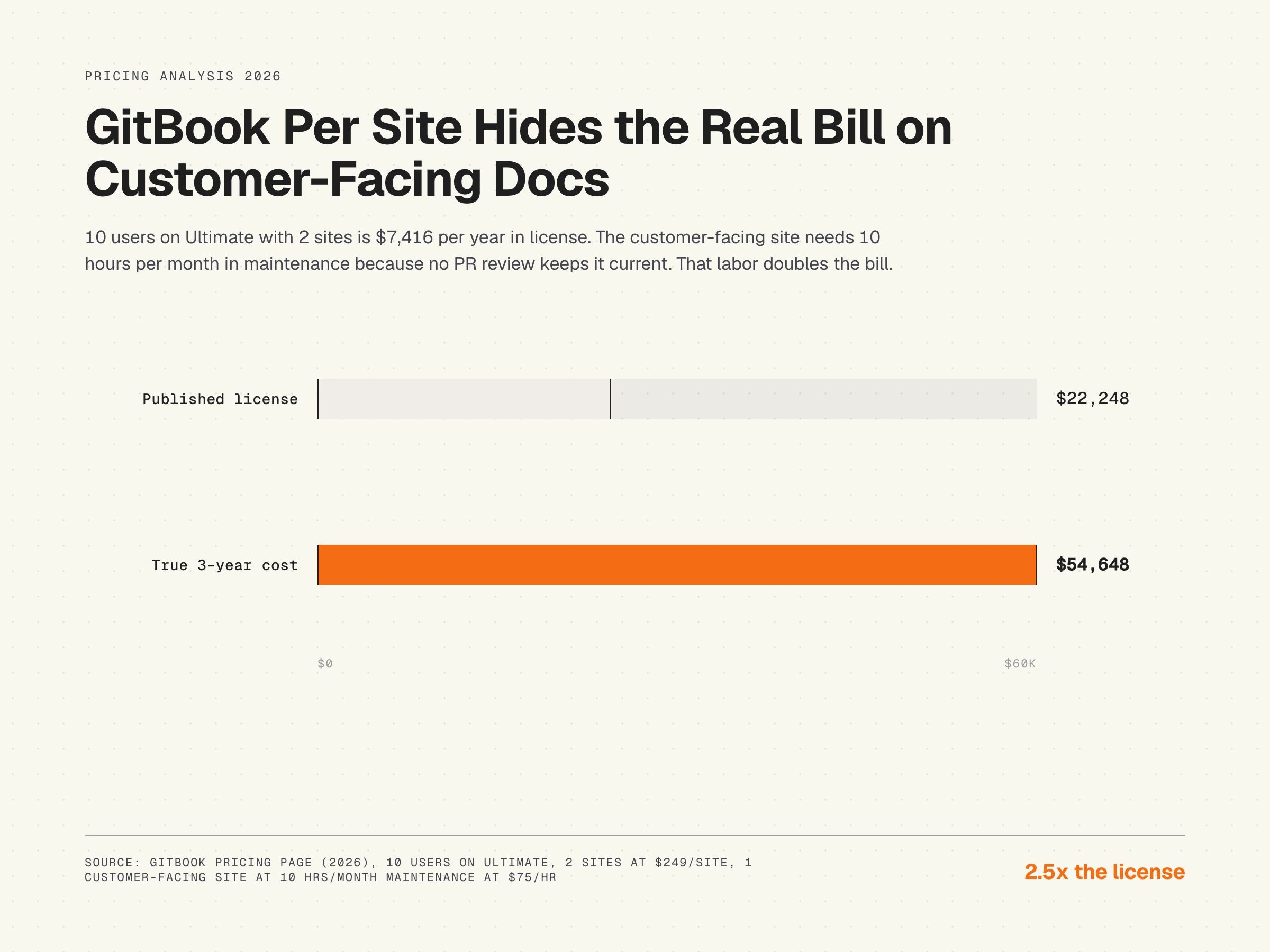
Ultimate license: $7,416 x 3 years = $22,248. AI Assistant included up to rate limits. Maintenance labor for one developer site (2 hours per month, absorbed in engineering) plus one customer-facing site (10 hours per month manual): 12 hours per month at $75 per hour = $32,400 over 36 months. Total: $54,648. Maintenance is 59 percent. Notice that the customer-facing site is where almost all the maintenance labor goes, even though both sites cost the same license.
The breakdown matters because it changes how you should think about the price. GitBook makes sense as developer-docs infrastructure because engineers update content as part of the PR workflow. Documentation decay is the hidden cost of every help center, and GitBook handles decay well for engineer-maintained content and badly for customer-facing content where no PR review exists.
The maintenance gap no GitBook pricing article mentions
GitBook is excellent at publishing engineer-maintained content. Git sync means a code change can carry the docs update with it: a developer changes an API endpoint, edits the docs in the same PR, the docs site updates on merge. For developer-facing content, this loop works.
For customer-facing content, the loop does not exist. A product engineer ships a UI change. The docs writer is not in the PR review. The customer-facing GitBook article references the old UI on Tuesday afternoon. Nobody knows until a customer files a ticket. AI Assistant reads the stale article and quotes it back to readers, confidently. This is the structural gap: GitBook assumes the docs author is in the engineering loop, and for customer-facing content they are not. The cost shows up as agent time, customer-success time, and the eventual cost of replacing every UI screenshot in the docs site.
GitBook hidden costs and what to verify before signing
The published per-site plus per-user price is the floor. Six categories of cost stack on top before your effective spend reaches reality. Verify each one in writing before you sign a multi-year contract.
- Per-site economics. A second site doubles the per-site line. Multi-property teams should budget for this from the start.
- Per-user growth. $12 per user per month seems small until the team grows. A 20-person team on Premium adds $240 per month in user fees on top of the $65 site fee.
- AI Assistant rate limits. 500 answers per site per month on Ultimate. Beyond that, answers throttle. High-traffic docs need to upgrade to Enterprise or accept degraded AI behavior.
- Translation overage. $25 for the first 50,000 words, $0.20 per 1,000 words after. A 200,000-word multilingual docs site costs $25 + (150 x $0.20) = $55 per language for the first batch, then $0.20 per 1,000 words for updates.
- Annual vs monthly billing. Annual unlocks the published per-site price. Monthly billing is offered at a premium.
- Enterprise floor. Enterprise quotes typically start in the $15,000 to $30,000 per year range for medium teams, scaling up. SAML SSO is the gating feature, so teams that need SSO cannot stay on Ultimate.
- Whether an AI answer add-on exists for your volume. Third-party pricing write-ups report an Advanced AI Assistant add-on sold on top of Ultimate, around $149 per month for roughly 1,000 successful answers plus embedding the assistant on external sites. That figure is not on GitBook's public pricing page, which says only "soft limit" and "contact us" beyond 500 answers, so treat it as reported rather than published. The reason to ask about it explicitly is that it is the difference between a predictable overage price and an unplanned Enterprise conversation the first month your docs get traffic.
When GitBook pricing makes sense, and when it does not
GitBook is the right choice for engineer-maintained documentation: API references, SDK docs, internal engineering wikis, technical product docs where the docs author is also in the code review. Git sync makes the freshness loop work because the docs update flows with the code change. AI Assistant on Ultimate is a clean add for technical readers searching across long-form reference material. The per-site model is acceptable because the team usually runs one site for one purpose.
It is the wrong choice for customer-facing help centers where the docs author is not in the engineering loop. The per-site model penalizes teams that need a separate help center for customers alongside developer docs. The AI Assistant draws from articles that have no automatic freshness signal, so confident wrong answers are the failure mode. For an honest comparison of AI documentation tools by use case, GitBook shows up as the strongest engineer-led choice and a worse fit for customer-facing help center work.
An open-access resource on the maintenance side of knowledge management is the Service Innovation Library, which covers the KCS (Knowledge-Centered Service) methodology and includes practical material on how to keep a help center current as the product evolves. KCS is platform-agnostic and applies regardless of whether you run GitBook, Mintlify, or any other tool.
GitBook alternatives by team profile
Three honest alternatives to consider, depending on where you sit:
- Mintlify. Closest direct competitor for developer-facing docs, similar Git sync model, often cheaper at small team sizes. See our breakdown of Mintlify alternatives for the comparable choices.
- Docusaurus. Open-source, self-hosted, no per-site or per-user fees. Higher engineering cost to maintain, lower license cost.
- HappySupport. Built for product-led SaaS teams shipping weekly. Different category from GitBook: the focus is on keeping a customer-facing SaaS help center current automatically as the product changes, not on engineer-maintained developer docs.
HappySupport in this context
HappySupport is a different category of tool than GitBook. GitBook solves the engineer-maintained docs problem: how do you let developers update docs as part of their PR workflow, how do you sync between code and content. HappySupport solves the customer-facing freshness problem: how do you keep those articles accurate when the product ships every week and the docs author is not in the engineering loop. The architecture is an AI article recorder (HappyRecorder, a Chrome extension) that captures UI flows as code selectors instead of pixels, paired with Git Handoff, which reads commits and pull requests in the product repository, finds the documented flows they affect, and proposes updates for review. That is how it can update docs when code changes even when no docs author sits in the PR. The maintenance labor line in the 3-year TCO model above is the line HappySupport is built to compress for customer-facing content. For teams whose customer help center sits outside the engineering PR loop, the math shifts: instead of license plus growing maintenance debt, you get license plus capped maintenance time. HappySupport's pricing is published if you want to run the comparison, and what a self-updating help center actually means covers the mechanics.
 Talk through the numbers