.png)


The document360 vs helpjuice comparison is interesting because both products were founded in 2011, both have spent fifteen years iterating on dedicated knowledge base software, and both have ended up with very different opinions on what the buyer actually wants. Document360 has moved to a quote-based pricing model with AI baked into every tier, marketed as a documentation suite for enterprise teams. Helpjuice has stayed transparent on pricing with three published tiers, AI gated to the higher tiers, and a louder pitch around customization and white-glove service. The two products solve the same job description with very different commercial bets.
This article compares Document360 and Helpjuice across editor depth, AI features (Eddy AI vs the Helpjuice AI Suite, including Wizardshot), versioning and content workflows, multilingual handling, pricing economics, and the dimension neither vendor markets: how each handles documentation drift when the underlying product ships weekly. It closes with a decision framework based on team profile and where a self-updating help center actually fits in the gap both leave open.
What is Document360?
Document360 is a dedicated knowledge base software platform built for customer-facing help centers, internal documentation, API references, and SOPs. The product launched in 2011 and has spent the last several years positioning itself as an AI-powered documentation suite for enterprises. The primary surface is a hosted knowledge base site with categories, articles, search, and an embeddable widget for in-product help. The editor is a block editor that supports rich content (images, callouts, code, tables) plus a Markdown view for users who prefer raw syntax.
The output of Document360 is a public or private knowledge base with hierarchical categories, version control on every article, multilingual auto-translation across 50+ languages, an embeddable help widget, and a small ecosystem of helpdesk and automation integrations. Eddy AI ships across tiers and covers AI Search, an AI Writing Agent, an AI Chatbot, and Text-to-Audio. Higher tiers add an AI search with MCP Server, a ticket deflector, decision trees, and SSO/SCIM for enterprise procurement. Pricing moved to a sales-led quote-based model in November 2024, which means transparent dollar amounts are no longer published on the marketing site.
What is Helpjuice?
Helpjuice is a dedicated knowledge base software platform with the same launch year as Document360 (2011) and a noticeably different brand position. Where Document360 markets to enterprise procurement, Helpjuice markets to teams that want a customizable knowledge base with hands-on design help and a flat monthly rate. The primary surface is a hosted knowledge base site with a WYSIWYG editor, theming, and a hand-crafted onboarding design service included in every plan.
The output of Helpjuice is a knowledge base with article translation, customizable branding, advanced analytics, 100+ integrations, and a 14-day free trial with full feature access. AI features (the Helpjuice AI Suite) gate to the $449-per-month tier and above, and include AI Writer, AI Search, AI Chatbot, an Auto-Updating KB Chrome Extension, and Wizardshot, a step-by-step tutorial builder that captures screen recordings and turns them into structured how-tos. Helpjuice also offers free 24-hour migration from Document360, Zendesk, Confluence, and Help Scout, which targets the buyer who is leaving one of those tools for a flatter rate.
Quick verdict on the document360 vs helpjuice question
If you need a knowledge base for a customer-facing help center, want AI across all tiers, plan to publish in 5+ languages, and can absorb sales-led procurement on the way in, Document360 wins on editor depth, multilingual auto-translation, and enterprise readiness. If you want transparent pricing, AI bundled in the middle tier, hands-on design help, and the option of step-by-step tutorial capture through Wizardshot, Helpjuice wins on per-month economics and on customization service. Neither vendor solves documentation drift, which is the dimension that most evaluations skip until month six.
How to create knowledge base articles with each tool
The day-one experience inside the document360 vs helpjuice pairing is closer than the marketing copy suggests. Both ship a web editor, both organize content by category, and both expect you to structure the knowledge base by hand.
Publishing in Document360
In Document360, you open the Knowledge Base portal, pick a Workspace (or Project, depending on the tier), pick a category, click New article, write in the block editor (or switch to Markdown), embed images, code, callouts, and tables, set the article status (Draft, In Review, Published), tag for SEO and search, pick the language version, and publish. Articles carry full version history per language, and changes show in a diff view. Eddy AI can draft article content, suggest related articles, and generate FAQ blocks from the body. The publishing flow is structured and built for teams that move articles through formal review.
Publishing in Helpjuice
In Helpjuice, you open the dashboard, pick a Category, click Create Article, write in the WYSIWYG editor (no block model; closer to a classic word processor with HTML access for advanced users), upload images, add internal and external links, set visibility (public, internal, draft), tag for search and SEO, and publish. On the $449+ AI tier, the AI Writer drafts article content from a prompt, and Wizardshot captures a flow on the screen and turns the recording into a structured how-to with steps and screenshots. The publishing flow is faster and built for teams that want to ship without a formal review loop.
The end product looks similar on the customer side: a hosted knowledge base on a custom domain or a Helpjuice/Document360 subdomain, with categories, search, and article pages. The difference is the speed-vs-depth trade. Document360 leans toward structured publishing for larger writing teams. Helpjuice leans toward fast publishing with stronger out-of-the-box design.
Feature breakdown of Document360 and Helpjuice
Six dimensions decide most document360 vs helpjuice evaluations once the marketing pages are out of the way: editor and authoring, AI features, versioning and workflows, multilingual coverage, analytics, and integrations. Each one breaks differently between the two products.
Editor and authoring
Document360 ships a block-based editor in the spirit of Notion, with discrete blocks for headings, paragraphs, callouts, code, tables, and embeds, plus a Markdown view for power users. The block model encourages structured documents and makes it easier to reuse content snippets across articles. Helpjuice uses a classic WYSIWYG editor with HTML access for users who want layout control. The editor is fast and friendly for non-technical authors, but lacks the structured block primitives that Document360 offers. For teams with a dedicated documentation function, Document360's editor depth shows. For teams where any support agent might write an article, Helpjuice's lighter editor is faster.
AI features: Eddy AI vs Helpjuice AI Suite (including Wizardshot)
Document360 includes Eddy AI across all tiers: AI Search returns conversational answers from the knowledge base, the AI Writing Agent drafts article content from prompts, the AI Chatbot handles in-product help, and Text-to-Audio generates spoken versions of articles. Higher tiers unlock AI search with an MCP Server for connected agents and a Ticket Deflector that classifies incoming tickets against the knowledge base. The AI footprint is broad and bundled.
Helpjuice gates its AI Suite to the $449-per-month tier and above. The suite includes the AI Writer, AI Search, AI Chatbot, an Auto-Updating KB Chrome Extension, and Wizardshot. Wizardshot is the standout: it captures a screen recording as the user performs a flow, then turns the recording into a structured step-by-step tutorial with annotated screenshots, similar in spirit to Scribe or Tango. The trade-off is that everything Wizardshot produces is pixel-based, which means the screenshots break as soon as the underlying UI moves.
Versioning and content workflows
Document360 ships article-level versioning with full history per language, branching workflows for content review, scheduled publishing, and contributor permissions per workspace. Higher tiers add a custom workflow builder for multi-stage approval. Helpjuice has a lighter touch: draft, review, publish states, version history per article, and reminders for content review, but no formal multi-stage approval. For documentation teams over five writers with a structured release cadence, Document360's workflow depth shows. For teams of one to three, Helpjuice's lighter loop is faster.
Multilingual and translation
Document360 offers auto-translation across 50+ languages with full version history per language, which means content can stay in sync across versions instead of drifting per locale. Helpjuice offers article translation included in every plan, but the translation workflow is lighter and per-article rather than bound into the publishing pipeline. For teams shipping in 5+ languages, Document360 carries the heavier lift. For teams shipping in 2 to 3 languages, Helpjuice covers the ground at lower friction. Solving multilingual help center freshness before scale covers why both tools leave the staleness gap open regardless of language count.
Analytics and search insights
Both tools track article views, search queries, no-result searches, and article ratings. Document360 layers in Pro Analytics on higher tiers with cross-language reporting and ticket-deflection metrics. Helpjuice ships advanced analytics across all plans, with strong per-article dashboards and a clear surface for top no-result searches (the single best leading indicator of a knowledge gap). For a documentation team focused on knowledge-gap discovery, both tools surface the right data. The differences are in presentation, not in raw signal.
Integrations and stack fit
Document360 supports 30+ integrations on higher tiers, including Zendesk, Freshdesk, Intercom, Microsoft Teams, Slack, and a webhook API for custom pipelines. Helpjuice supports 100+ integrations across all plans, with stronger native depth on Zapier and embeddable widgets for any web app. Stack fit usually decides this dimension before features do. If your support stack is already Zendesk or Freshdesk, Document360 slots in cleanly. If your stack is product-led with Zapier as the glue layer, Helpjuice covers more ground.
Pricing comparison: quote-based vs published tiers
The document360 vs helpjuice economics diverge sharply at the model. Document360 moved to quote-based pricing in November 2024, which means there are no published dollar amounts for the Professional, Business, or Enterprise tiers, per the current Document360 pricing page. Buyers must engage sales for a custom quote, which adds friction at the top of the funnel but allows for negotiated terms at larger deal sizes.
Helpjuice publishes flat monthly rates on three tiers, per the current Helpjuice pricing page. Knowledge Base is $249 per month with 30 users and 12 GB of storage, no AI. AI-Knowledge Base is $449 per month with 100 users and 24 GB of storage, with the full AI Suite including Wizardshot. Unlimited AI-Knowledge Base is $799 per month with unlimited users and 38 GB of storage, plus unlimited customization credits. All three plans include the hand-crafted onboarding design service and 24x5 support.
Pricing alone undersells the difference. Document360's quote-based model lets the vendor calibrate to deal size, which can land cheaper than Helpjuice for very small teams or much more expensive for enterprise procurement. Helpjuice's published flat-rate model gives a real predict-the-bill experience but caps the user count by tier. The full Document360 pricing breakdown and the Helpjuice pricing comparison dig deeper into each.
The shared limitation neither vendor will admit
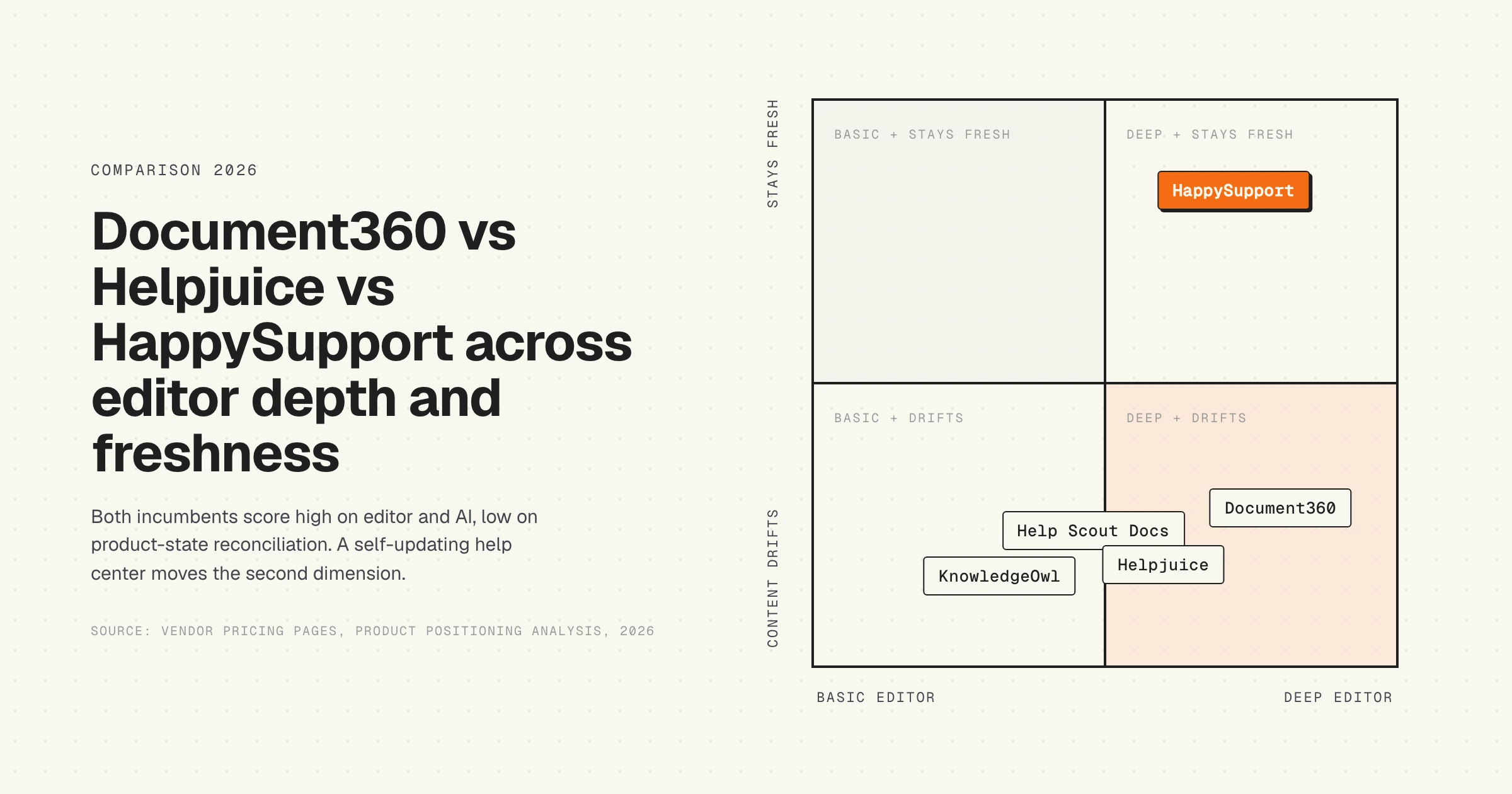
Both Document360 and Helpjuice are built to publish content. Neither is built to know when that content stops being correct. This is the single biggest blind spot in the entire document360 vs helpjuice comparison, and every competitor article skips past it because the marketing pages on both sides skip past it.
The mechanic is the same in both products. A writer publishes an article about feature X. Engineering ships a UI change. The article is now wrong. Nobody on the support side knows until a customer files the ticket the article should have deflected. The knowledge base does not read the product. The product does not write to the knowledge base. The two systems drift apart at the speed of engineering, and the AI agents on top (Eddy AI Search, Helpjuice AI Chatbot) quote the stale article with full confidence. Documentation decay is the hidden cost of every help center, and it compounds faster on tools with strong AI surfaces because users trust conversational answers more than search results.
Wizardshot makes the failure mode worse for Helpjuice. The tool captures screen recordings and turns them into pixel screenshots; when the underlying UI moves, every screenshot in every Wizardshot-generated tutorial is wrong. The fix is to re-record the flow, which is the same labor cost as the original capture. Screenshot documentation breaks every release, and Wizardshot does not change the math. The Consortium for Service Innovation's KCS methodology sets a benchmark that organizational knowledge should be available at or before the time of case closure. Hitting that bar requires content that updates as the product updates. Neither Document360 nor Helpjuice closes the update side of the equation.
Which failure mode is more disruptive
The two tools fail in different ways when the knowledge base falls behind the product.
Document360's failure mode is the buried stale article. The block editor and the structured publishing workflow encourage longer, more deeply nested articles. When the underlying flow changes, the article is still indexed, still searchable, and Eddy AI still quotes it. Because the publishing model assumes a writing team owns the review cycle, drift accumulates between scheduled audits. By the time an audit catches it, dozens of articles may be wrong in parallel.
Helpjuice's failure mode is the broken Wizardshot tutorial. A team enables Wizardshot, captures 50 flows, and ships them as the new self-service backbone. Six weeks later, engineering ships a redesign of the dashboard. Every screenshot inside every Wizardshot tutorial now shows the old UI. Customers follow the steps, the steps no longer match what they see, and the trust in the help center collapses faster than text-only drift because the screenshots make the staleness obvious. The fix is to re-capture every affected flow, which the original Wizardshot capture cost half a day to produce.
Which is more disruptive depends on shape. A 500-article Document360 base feels its failure as slow erosion of self-service deflection. A 50-tutorial Helpjuice Wizardshot library feels its failure as a sudden trust collapse across a redesign cycle. Both are symptoms of the same root cause: the tool does not know what the product looks like today.
When Document360 is the right answer
- You have a dedicated documentation team that treats docs as a first-class function with its own roadmap.
- You publish in five or more languages and need auto-translation with per-language version history.
- You need formal multi-stage approval workflows (Draft, In Review, Published) and contributor permissions per workspace.
- Your buyer expects SSO and SCIM at Enterprise, and your procurement loop tolerates sales-led pricing.
- You want Eddy AI (Search, Writing Agent, Chatbot, Text-to-Audio) bundled across every tier rather than gated to the top plan.
When Helpjuice is the right answer
- You want transparent flat monthly pricing you can quote to a CFO without a sales call ($249, $449, or $799).
- Your authors are non-technical (support agents, product managers) and a WYSIWYG editor is faster for them than a block model.
- You want AI gated to the tier where you actually need it ($449 AI-Knowledge Base) instead of paying for it on every plan.
- Your product UI is stable enough that Wizardshot screen-recording tutorials will not break on the next sprint.
- You value the hand-crafted onboarding design service included on every tier. The best knowledge base software for SaaS teams covers the wider list for the same buyer profile.
Do not pick either if your product ships weekly and your documented flows include screenshots, click paths, or in-product UI references. The maintenance line dominates the editor decision once release cadence is faster than content-review cadence, and neither vendor's architecture closes the gap.
HappySupport sits beside Document360 or Helpjuice, not in place of either. A dedicated knowledge base tool still wins for static reference content, internal docs, and content that does not depend on the live product UI. Customer-facing how-to articles where the UI keeps moving belong in a tool that reads the running product. Whichever knowledge base you pick, swap in HappySupport for the UI-anchored article layer that stops drifting between releases.
Alternatives to Document360 and Helpjuice
If the document360 vs helpjuice evaluation surfaces a misfit on either side, there are four alternatives worth a serious look depending on team profile.
- Help Scout Docs. Bundled with Help Scout's helpdesk, cheaper than Document360 for small teams. Strong editor, lighter on enterprise readiness.
- KnowledgeOwl. Flat-rate alternative to Helpjuice with strong customization. Smaller AI surface, lower per-month cost.
- GitBook or Notion. Internal docs tools that some teams stretch into customer-facing knowledge bases. Cheaper, weaker on customer-facing polish.
- HappySupport. Built for product-led B2B SaaS shipping weekly, where the maintenance problem dominates the editor problem. Covered in detail below.
For a wider view of the dedicated knowledge base market, the best knowledge base software comparison by team profile covers the full landscape across editors, AI features, and pricing.
HappySupport in the document360 vs helpjuice debate
HappySupport is a different category of knowledge base tool than either Document360 or Helpjuice. The two incumbents publish content; HappySupport reconciles content to product state. The architecture rests on two pieces: HappyRecorder, a Chrome extension that captures UI flows as DOM and CSS selectors instead of pixel screenshots, and HappyAgent, a GitHub Sync layer that watches the product repository for changes that affect documented flows and flags the affected articles for update. When engineering renames a field or restructures a screen, the affected articles surface automatically with a list of exact changes to apply, instead of waiting for the next scheduled audit or for a customer to file the ticket that reveals the drift. This compresses the maintenance labor line that dominates the 3-year total cost of every dedicated knowledge base deployment, and it removes the structural condition that lets AI agents quote stale articles with confidence. For teams shipping a product where the UI moves faster than the audit cycle, HappySupport closes the loop that the document360 vs helpjuice decision leaves open. Read more on what a self-updating help center actually means in practice, and on why the document360 vs helpjuice choice misses the freshness layer that decides the long-run cost.










