

GitBook vs ReadMe is the comparison every developer-docs team runs into within their first week of tooling research, and most of the answers online frame it as a binary between "API-first" and "general-purpose." That framing is close to right but it hides where each tool actually breaks. Both are good products. Both are popular for a reason. And both make assumptions about what kind of documentation you are writing that quietly disqualify them for adjacent use cases.
This article walks through what GitBook and ReadMe each are in 2026, how they differ on editor, Git sync, OpenAPI rendering, hosting, search, AI, integrations, and security, what each tier costs, who each one is best for, and the shared limitation neither one solves.
What is GitBook?
GitBook is a documentation platform built for general-purpose developer docs, product guides, tutorials, and internal knowledge bases. It uses a block-based visual editor that non-technical contributors pick up in a day, layered on top of bi-directional Git sync with GitHub and GitLab. The product is sold per site plus per user, with annual contracts giving two months free.
GitBook's strength is breadth. The editor handles mixed content well: prose, code samples, callouts, embeds, interactive blocks, and now AI-generated tables and diagrams on the Ultimate tier. Git sync means a docs change can flow through a normal pull-request review with engineers, then publish on merge. The product positions itself as the docs platform "engineers and writers can both live in," and on that promise it largely delivers. Where it backs off, as we will get to, is when the docs in question are a customer-facing help center or a deep OpenAPI reference.
What is ReadMe?
ReadMe is an API documentation platform built around the developer who is about to call your endpoint. The product is structured around a developer dashboard: an interactive API explorer where developers authenticate with their own keys, fill in parameters, and make real API calls from your docs; a metrics layer that shows which endpoints are being called, which docs are being read, and where developers drop off; and a content layer for guides, recipes, and changelogs that sit alongside the API reference. ReadMe launched its AI Agent Owlbert in October 2025 for doc linting, style enforcement, and conversational search.
ReadMe's strength is depth on API reference quality. It ingests an OpenAPI spec and auto-generates a full interactive reference with parameter docs, code samples in every common language, real-call testing, and per-endpoint analytics. The trade-off is that everything outside an API reference, prose-heavy onboarding guides, customer-support content, internal wikis, feels like it is squatting in the wrong app. ReadMe assumes the reader is a developer making a paid API call, and the UX flows downstream of that assumption.
Quick verdict: when to pick GitBook vs ReadMe
Both tools are good. The question is which assumption matches your content. GitBook assumes mixed contributors and mixed content types. ReadMe assumes a developer audience and an API at the center. The table below is the 30-second version.
| Dimension | GitBook | ReadMe |
|---|---|---|
| Primary focus | General developer docs, guides, internal wikis | API reference and developer hubs |
| Editor | Block-based WYSIWYG, mixed-team friendly | Markdown / MDX in a developer dashboard |
| API reference | API playground, basic OpenAPI rendering | Best-in-class interactive reference with live calls |
| Git sync | Bi-directional GitHub and GitLab sync | CLI + spec sync from GitHub |
| Starting price | Free for 1 user; Essential $65/site + $12/user | Free for 1 project; Pro $250/month |
| Best for | Mixed teams writing guides next to API docs | API-first products with an interactive reference |
If your content is primarily an API reference, ReadMe wins on reference quality. If your content is a mix of onboarding, concept guides, internal docs, and a small API reference on the side, GitBook wins on editor flexibility. Neither one fits a customer-facing Help Center cleanly, which is a separate problem we will get to.
How to publish docs with each tool
The publishing workflow is where the difference between GitBook and ReadMe becomes physical. Each tool moves the writer through a different set of motions.
Publishing with GitBook
A GitBook publish starts in the block editor. A writer creates pages inside a space, organizes them into a tree of guides and sections, and either publishes directly or connects Git sync to push changes through GitHub. The bi-directional sync means a developer can edit a markdown file in their repo, open a pull request, get it reviewed, and on merge the GitBook site updates. Non-technical contributors can stay in the editor and never see the Git layer.
The publish itself is one-click or an automatic effect of the merge. Custom domains, branding, search, and analytics are configured per site in the GitBook dashboard. The flow is friendly to teams where a product manager, a tech writer, and a backend engineer all commit to the same docs.
Publishing with ReadMe
A ReadMe publish starts with an OpenAPI spec. The spec is uploaded via the dashboard or pushed via CLI from a GitHub repo, ReadMe parses it, and an interactive reference is generated automatically. Endpoints, parameters, request bodies, response examples, and per-language code samples populate without manual writing. The developer then layers guides, recipes, and changelogs on top in the dashboard editor.
The dashboard-first model is the largest single difference. ReadMe treats the docs site as a developer product with its own CMS, versioning model, and analytics. The writer logs in, writes in the dashboard, and reviews changes there. Bi-directional editing in markdown files is possible but it is the secondary path. This is fine if the team is mostly engineers and DevRel. It becomes friction the moment a product manager tries to publish a feature explainer.
Feature breakdown: GitBook vs ReadMe
Pricing aside, the real choice comes down to how each tool handles seven things: editor, Git sync, API reference rendering, hosting, search, AI, and security. Walk through each one against the kind of content you actually need to publish.
Editor and authoring
GitBook's editor is block-based, similar to Notion, with a strong mixed-content experience. A writer can drop a callout, embed a code sample, paste a Loom video, or insert an interactive block without context-switching. Non-technical contributors pick it up in under an hour. ReadMe's editor is a dashboard around markdown and MDX with custom MDX components on Pro. It is more powerful in some ways (reusable content, custom components) but the surface is heavier and assumes the writer is comfortable in a developer tool.
If your docs operation includes a tech writer plus product managers plus support engineers, GitBook produces less friction. If your docs are written exclusively by DevRel and engineers who already prefer markdown, ReadMe's editor is fine and the extra customization is worth the heavier surface.
Git sync and version control
GitBook ships bi-directional Git sync as a first-class feature on every paid plan. Changes in the GitBook editor push to a GitHub or GitLab branch; changes in the repo push back to GitBook. Pull-request review fits naturally on top. ReadMe supports Git sync via CLI and through bi-directional spec sync for the OpenAPI definition, but the prose-content side leans more on the dashboard. For docs-as-code teams that want the same review workflow they use for code, GitBook is the more honest fit.
One nuance worth flagging: Git sync solves "where the markdown source lives." It does not solve "is the content correct after the product changes." Both tools still require a human to write the diff. Git sync moves the editing surface, not the maintenance burden. See the GitHub sync for documentation piece for a longer treatment of where Git workflows help and where they stop.
API reference quality and OpenAPI rendering
This is ReadMe's home field. ReadMe ingests an OpenAPI spec and produces a full interactive reference with per-endpoint pages, language-switched code samples, in-page parameter docs, "Try It" live calls with the developer's own keys, and per-endpoint analytics. GitBook supports an API playground that renders OpenAPI well enough for a small reference, but the surface around it (per-endpoint analytics, per-version diffs, request logs) is thinner than ReadMe's. For an API-first product where the reference is the conversion surface, ReadMe is the better tool.
For a product where the API is a feature, not the primary surface, GitBook's lighter API rendering is usually enough. Ten endpoints with a long workflow guide: GitBook handles both. 200 endpoints with three SDKs: ReadMe handles it better.
Hosting and custom domains
Both tools host the docs site for you. Both support a custom domain on every paid tier. Both serve a clean URL structure, SSL out of the box, and CDN-backed delivery. The free tier on either one uses a vendor subdomain (gitbook.io for GitBook, readme.io for ReadMe). Neither offers self-hosting on standard plans, which is a meaningful constraint for teams in regulated industries or with strict data-residency requirements. Document360, Mintlify alternatives, and some open-source tools cover the self-host gap.
Search and AI features
GitBook ships a built-in search across the docs site on every paid plan and adds AI search, an AI Assistant for readers, and AI insights on Ultimate. The Ultimate tier includes $100 of AI credits a month (10,000 credits, about 500 answers) and adds GitBook Agent for content workflows. ReadMe's AI surface is Agent Owlbert (launched October 2025), which covers doc linting, style enforcement, and conversational search on Pro, with extended capabilities (Docs Audit, Private AI Context, Global Lint Rules) on Enterprise. Ask AI is a $150/month add-on.
Both AI surfaces have the same structural limit. They search and rewrite the docs you already wrote. They do not detect when the underlying product changed and your docs are now stale. Mintlify research suggests nearly half of documentation site traffic in 2026 now comes from AI agents rather than human readers. If the docs are wrong, the AI answer is wrong, and the user never files a ticket because they just left. That is a category problem, not a GitBook problem or a ReadMe problem.
Integrations
GitBook integrates with GitHub, GitLab, Slack, Notion, Figma, Linear, and Intercom. ReadMe integrates with Segment, Datadog, Webhooks, Salesforce, and several developer-tool sources, with deeper analytics ties on Enterprise. Neither has a strong third-party plugin ecosystem; both lean on direct integrations. For most teams the list is sufficient. Pushing docs events into marketing automation or a custom data warehouse means building the bridge yourself.
Enterprise and security
Both vendors offer SAML SSO, audit logs, and SOC 2 compliance on top tiers. GitBook Enterprise adds white-glove migration, Git Sync IP allowlisting, dedicated 1:1 support, and custom legal and security reviews. ReadMe Enterprise adds user roles, branch review permissions, a global reusable content library, and dedicated implementation services. Pricing on both is custom; expect ReadMe Enterprise to start around $3,000/month and GitBook Enterprise to land in a similar zone. Both clear the standard B2B SaaS procurement bar.
Pricing comparison: GitBook vs ReadMe in 2026
The pricing structure is genuinely different. GitBook charges per site plus per user, with site fees in the foreground. ReadMe charges flat per project with no per-user fee on Pro, then flips to a high enterprise floor. Annual billing on both gives roughly two months free. Numbers below are pulled live from the GitBook and ReadMe pricing pages as of May 2026.
| Tier | GitBook | ReadMe |
|---|---|---|
| Free / Starter | $0, 1 user max, gitbook.io subdomain, Git sync, API playground, LLM optimizations | $0, 1 project, 1 version, custom domain, bi-directional sync, interactive API reference, AI dropdown, MCP server |
| Mid tier | Essential: $65/site/month + $12/user/month, AI search, custom domain, analytics | Pro: $250/month (annual billing), unlimited versions and projects, branching and reviews, custom MDX, AI add-ons available |
| Top tier | Ultimate: $249/site/month + $12/user/month, AI Assistant, 500 AI answers included, GitBook Agent | Enterprise: $3,000+/month (annual), SSO/OAuth, audit logs, multiple combined projects, no ReadMe branding |
| AI add-on | AI Assistant included on Ultimate, extra answers metered | Ask AI $150/month add-on; Agent Owlbert included on Pro |
The per-team math matters more than the tier names. A six-person docs team on GitBook Essential pays $65 + (6 x $12) = $137 per month per site. The same team on ReadMe Pro pays $250 flat. At ten or more people the ReadMe flat rate wins; at three or four GitBook Essential is cheaper. For a deeper breakdown see the GitBook pricing 2026 article.
The shared limitation: manual maintenance
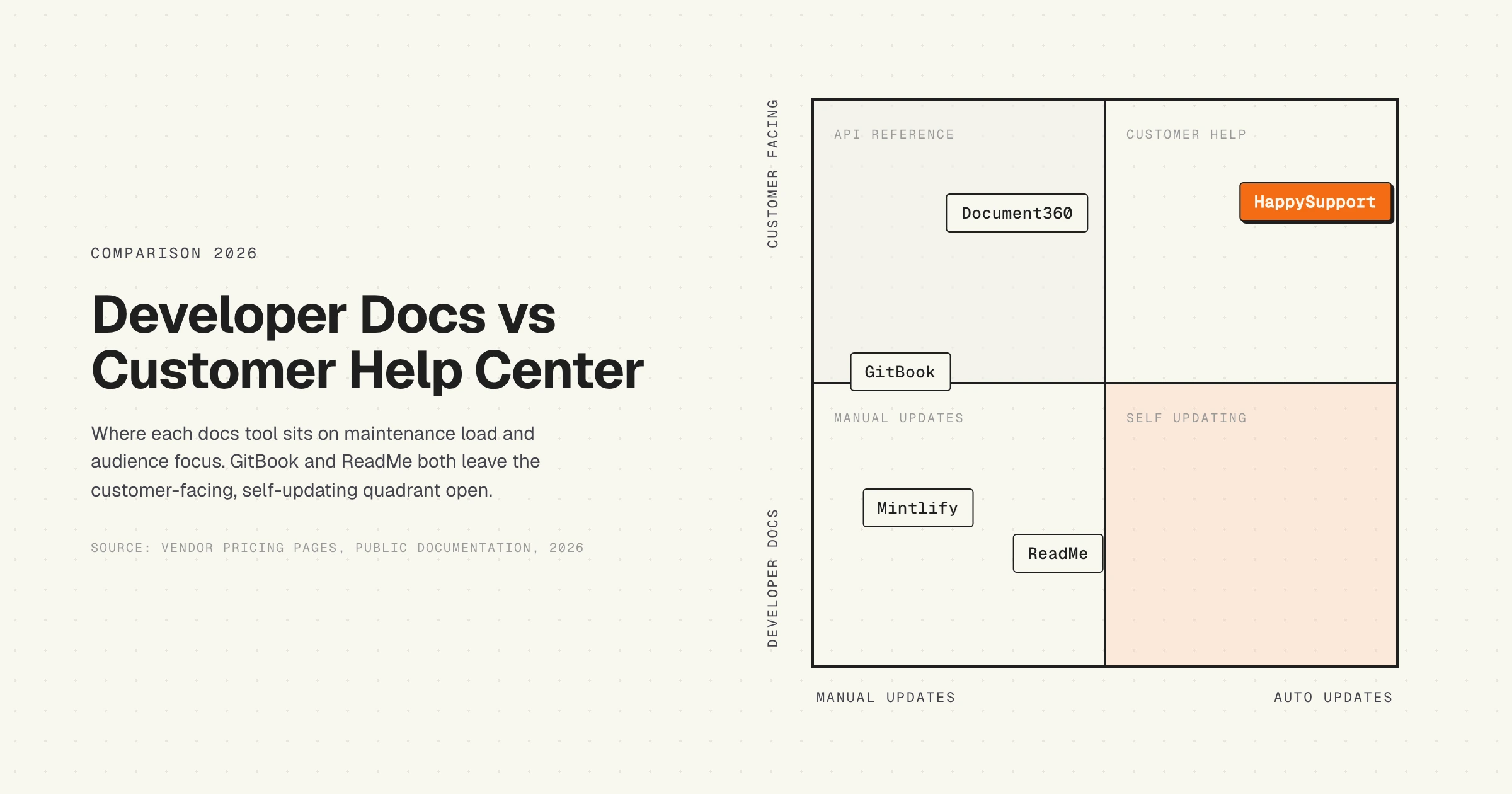
Here is the part most GitBook vs ReadMe comparisons skip. Both tools assume the same maintenance model: a human notices the docs are out of date and edits them. Git sync, AI search, OpenAPI auto-generation, none of those features close the loop between "the product UI changed" and "the docs reflect the change." The author still has to write the diff.
For an API reference, the gap is smaller because the OpenAPI spec ships with the code. If your spec is up to date, ReadMe re-renders the reference automatically. The reference stays current with the API surface. For everything else (concept guides, onboarding tutorials, screenshots, in-app references, version-specific notes), the gap is full size. After 6 months, research on developer documentation suggests docs become "suspect." After 12 months, they are often actively misleading, which is worse than having no documentation at all. The 30-SaaS-help-center audit in our own archive found that customer-facing help centers fall behind their product within three release cycles on average.
The same problem appears on GitBook, ReadMe, Mintlify, Document360, Notion, or a custom build. The platform is not the cause. Manual maintenance is. The platform either acknowledges that (and helps you triage staleness) or it does not.
Which failure mode is more disruptive
If you pick the wrong tool, the failure looks different depending on the direction.
GitBook for a deep API reference. The API playground works but the per-endpoint developer experience is thinner. Developers cannot make authenticated test calls from the docs as easily. There is no per-endpoint analytics, no usage logs, no "which endpoint is most-called" surface. For an API-first product where developer activation is the primary business metric, this gap reads as a missed conversion surface.
ReadMe for non-developer customer docs. ReadMe was not built for a customer-facing help center. There is no native ticket-deflection widget, no in-app contextual guidance, no support-engineer workflow that maps to "deflect a ticket type by writing one article." Prose-heavy onboarding content sits awkwardly in the developer dashboard. For a customer-facing help center on a B2B SaaS product, the failure is sustained: every week someone wishes the tool would behave more like Intercom Articles or HappySupport.
Of the two failure modes, the second is worse because it persists longer. A bad API reference gets replaced quickly because developer NPS shows up on every customer call. A bad customer help center accumulates ticket volume invisibly. Six months in, the support queue is 30 percent fuller and nobody traces it back to the docs tool choice.
Who each tool is best for
Strip away the matrix and the recommendation is roughly this.
GitBook is best for
- Engineering teams shipping a developer product where docs are mostly guides, concepts, and tutorials with a small API reference on the side.
- Mixed teams (engineering + product + tech writing) where contributor breadth matters more than API reference depth.
- Docs-as-code shops that want bi-directional Git sync as a first-class workflow.
- Internal knowledge bases for engineering teams between 10 and 100 people.
ReadMe is best for
- API-first products where the API reference is the primary developer surface.
- Teams that need per-endpoint analytics, request logs, and live test calls with developer keys.
- Large API surfaces (100+ endpoints) with multiple SDKs and language-specific code samples.
- Companies with a dedicated DevRel function and a measurable developer-activation funnel.
Neither one is best for
- Customer-facing help centers for non-developer SaaS users (use a Help Center built for ticket deflection).
- Internal product docs that need to stay synced to a fast-shipping UI without manual edits.
- Teams that need DOM-aware screenshots and walkthroughs that survive a UI redesign.
ReadMe vs GitBook vs WriteChoice: a category error worth clearing up
This three-way comparison gets searched often, and it does not resolve the way the phrasing implies, because the three things are not the same kind of thing.
WriteChoice is not a documentation platform. It is a technical writing agency for SaaS and API-first companies. The model is a staffed documentation squad, typically a technical writer plus a UX designer and a developer, embedded with your team to build a developer portal in a matter of weeks. It hosts nothing of its own. Its own site names Mintlify, ReadMe, GitBook, Fumadocs and Docusaurus as the platforms it publishes client documentation onto, and GitBook or ReadMe may well be the tool it puts you on.
So the real comparison is two decisions, not one choice among three:
- Which platform will the docs live on? That is the GitBook vs ReadMe question this article answers, and the short version is that ReadMe wins on API reference and developer-portal features while GitBook wins on general documentation authoring and Git-synced editing.
- Who writes the content? In-house, a contractor, or an agency such as WriteChoice. This is a staffing and budget question, and the answer does not constrain the answer to the first one.
Framing it as three platforms leads to the wrong evaluation, because you can hire WriteChoice and buy GitBook, and plenty of teams do. The useful way to compare them is on cost type: GitBook and ReadMe are recurring software subscriptions where your team supplies the labour, while an agency is a project or retainer cost that supplies the labour and leaves you the subscription anyway. If the reason your documentation is bad is that nobody has time to write it, no platform choice fixes that, and this is the honest case for the agency route.
One caveat to carry into either decision: an agency delivers a portal at a point in time. Six weeks after handover, your product ships again, and the maintenance question is back in your team's hands regardless of who built it. Ask any agency what the ongoing arrangement looks like, because the launch is the easy part.
Comparing GitBook and Redocly for OpenAPI, branding and analytics
Another pairing worth naming, because GitBook and Redocly are frequently shortlisted together and they are built around opposite assumptions.
| GitBook | Redocly | |
|---|---|---|
| Centre of gravity | General documentation with API reference alongside | OpenAPI-first, the spec is the product |
| OpenAPI rendering | Interactive API playgrounds on every tier, Free included | The category benchmark, built on the Redoc renderer |
| Spec quality tooling | None to speak of | Linting, governance rules and CI-enforced style guides |
| Authoring | Block-based visual editor, two-way Git sync | Docs-as-code, Markdown and MDX in the repository |
| Custom branding | Logo, font, footer and header colours from Essential; custom fonts and subdomains at Ultimate | Full theming, and you own the templates |
| Analytics | Page views on Free, plus search analytics from Essential, plus AI Insights at Ultimate | Built-in analytics plus your own tooling, since you control the build |
| Non-technical contributors | Yes, this is the main advantage | Realistically no, contribution goes through Git |
Choose Redocly if the OpenAPI specification is the centre of your documentation and you want it linted and governed like code. The reason Redocly exists is that a large API surface maintained by many contributors drifts into inconsistency, and Redocly's linting and governance rules are how you stop that in CI rather than in review comments. Branding is fully in your hands because the templates are.
Choose GitBook if the API reference is one section of a wider docs site and some of the people writing it will never open a terminal. The playgrounds are good enough for most APIs, the visual editor lets a product manager fix a paragraph, and analytics come without building anything.
The practical split on the two requirements in the question: on custom branding, Redocly gives you more control and GitBook gives you more result per hour, so it depends whether you have front-end time to spend. On analytics tracking, GitBook is the faster path because page views, search terms and, at Ultimate, AI answer insights are already there, whereas with Redocly you get whatever you instrument. For the Redocly comparison against the other modern option, see Redocly vs Mintlify, and GitBook pricing breaks down which of those GitBook tiers you actually need.
Alternatives to GitBook and ReadMe
The market around GitBook and ReadMe has filled out. A few directions to consider before committing.
Mintlify is the most-cited alternative for modern API and developer docs in 2026, with React-native components, fast static publishing, and an AI Workflows agent that drafts updates from code changes. See Mintlify alternatives for the wider landscape.
Stoplight and Redocly compete with ReadMe specifically on API reference quality, with stronger design-time tooling for OpenAPI authoring and reviews. The GitBook and Redocly comparison is above.
WriteChoice and similar technical writing agencies are a different kind of answer: they supply the writers rather than the platform, and publish onto GitBook, ReadMe, Mintlify or Docusaurus. Covered above.
Docusaurus remains the open-source go-to for teams that want to own their docs site, host it on GitHub Pages, and write in markdown with full code control.
Document360 and similar standalone help-center products win where the audience is customer-facing rather than developer-facing. HappySupport takes a different angle, covered below.
The HappySupport angle: docs that update themselves
Both GitBook and ReadMe solve the same half of the documentation problem: they make publishing fast and the editor reasonable. Neither one solves the maintenance half. Every time the product UI changes, somebody on your team still has to find the affected articles, re-screenshot the new UI, rewrite the steps, and republish. For a developer-only API reference, an updated OpenAPI spec closes most of that gap. For a customer-facing help center, the gap stays open and gets wider every release.
HappySupport sits in the customer-facing lane and approaches the maintenance gap as a product problem, not a workflow problem. HappyRecorder is a Chrome extension that captures customer-facing walkthroughs as DOM and CSS metadata rather than pixel screenshots. HappyAgent ties those walkthroughs to GitHub Sync so that when a developer ships a change that breaks a UI element referenced in an article, the affected article is flagged automatically and a suggested update is drafted. The result is a help center that stays close to the product without a dedicated docs hire absorbing the maintenance load. If you want the longer version of why this matters, read how a self-updating help center works. For teams already on GitBook or ReadMe and feeling the maintenance drag, HappySupport runs alongside, taking the customer-facing surface while you keep the developer reference where it lives today.