.png)

The freshdesk vs zoho desk knowledge base comparison is one of the most-searched help-desk choices for teams outside North America, mostly because both vendors price aggressively below Zendesk and Intercom and both ship a knowledge base as part of the help desk rather than as a standalone product. Freshdesk Knowledge Base sits inside the Freshworks platform alongside Freddy AI. Zoho Desk's knowledge base sits inside the Zoho ecosystem alongside Zia and the ASAP help widget. Both products work, both have real customers, and both share an architectural blind spot that the marketing pages skip past: neither tool knows when the solution article it serves has stopped matching the product.
This article compares the freshdesk vs zoho desk knowledge base across structure, editor depth, AI features (Freddy AI vs Zia), multilingual coverage, self-service portal and widget surfaces, pricing economics, and the failure mode both share. It closes with a decision framework based on ICP and stack fit, and where a self-updating help center actually fits inside the gap both vendors leave open.
What is Freshdesk knowledge base?
Freshdesk Knowledge Base is the self-service module inside Freshdesk, the help desk product from Freshworks. The knowledge base is sold as part of every Freshdesk plan including the Free tier, which means a 1- or 2-agent team can stand up a customer-facing knowledge base without paying anything for the first six months. The primary surface is a hosted help center site with categories, folders, and solution articles, plus an embeddable help widget that can be added to any web app to give customers contact forms and solution-article lookup.
The output of Freshdesk Knowledge Base is a customer-facing portal organized into categories and folders, with solution articles that are full-length WYSIWYG documents. Multilingual coverage spans up to 42 languages, and Freddy AI Agent (the AI bot built into Freshdesk) pulls answers directly from the knowledge base and surfaces them in tickets and chat. Higher tiers add Freddy AI Copilot (agent-side assistance during ticket handling) and Freddy AI Insights (analytics across knowledge gaps and ticket trends). Freshdesk's editorial bet is breadth of language and AI baked into every tier.
What is Zoho Desk knowledge base?
Zoho Desk knowledge base is the self-service module inside Zoho Desk, the help desk product from Zoho Corporation. The knowledge base unlocks on the Standard tier and above (the Free tier covers ticketing only for 3 users). The primary surface is a hosted help center with categories, articles, and an ASAP widget, Zoho's branded help widget that exposes multiple self-service channels (knowledge base, community forums, contact form, live chat, Guided Conversations, and an AI-powered chatbot) inside any web app or mobile experience.
The output of Zoho Desk knowledge base is a help center organized into categories with related-article suggestions, customizable templates, and SEO controls, plus full brand customization across multiple help centers per account on the Enterprise tier. Multilingual coverage spans 40+ languages on Professional and above. Zia, Zoho's AI assistant, surfaces relevant articles to agents and customers, performs sentiment analysis on tickets, and auto-tags incoming queries; on Enterprise, Zia gets generative AI for article drafting and ticket replies. Zoho's editorial bet is breadth of self-service surfaces (ASAP widget) and tight integration with the wider Zoho ecosystem.
Quick verdict on the freshdesk vs zoho desk knowledge base question
If your team needs a customer-facing knowledge base on a Free or very-low-cost entry plan, Freddy AI bundled in from the cheapest paid tier, and the broadest multilingual coverage (42 languages), Freshdesk wins on AI depth at low price points and on knowledge-base usability. If your team needs richer self-service surfaces (the ASAP widget with multiple channels in one embeddable), tighter integration into a wider Zoho stack (CRM, Books, SalesIQ), and per-brand help center management on Enterprise, Zoho Desk wins on flexibility and on value at scale. Neither vendor solves documentation drift, which is the dimension most evaluations skip until month six.
How to create knowledge base articles with each tool
The day-one experience inside the freshdesk vs zoho desk knowledge base comparison is closer than the pricing pages suggest. Both ship a web editor, both organize content by category and folder, and both expect you to structure the help center by hand.
Publishing in Freshdesk
In Freshdesk, you open the Solutions module, pick a Category, pick a Folder, click New Article, write in the WYSIWYG editor, embed images and attachments, add internal and external links, set visibility (public, logged-in users, internal agents only), pick the language version, and publish. Articles support full HTML access for layout control, and translation workflows let you spin up a parallel article per language with shared status. Freddy AI Agent picks up published articles automatically and surfaces them in tickets, chat, and the help widget.
Publishing in Zoho Desk
In Zoho Desk, you open the Knowledge Base module, pick a Category (Zoho calls these Sections in some configurations), pick a sub-section, click New Article, write in the rich editor, embed images, attach files, set the permission level (public, internal, registered users), tag for search, pick the language version, set SEO metadata, and publish. The ASAP widget pulls published articles into the embeddable self-service experience automatically. Zia surfaces related articles to agents and tags incoming tickets against the knowledge base; on Enterprise, Zia can also draft article replies.
The end product looks similar on the customer side: a hosted help center on a custom domain (Enterprise) or a vendor subdomain (lower tiers), with categories, search, and article pages. The difference is the surrounding surface. Freshdesk pushes traffic to a single help center with a simpler widget. Zoho's ASAP widget bundles more self-service into the embeddable, which can deflect more requests inside the product without redirecting to the help center.
Feature breakdown of Freshdesk and Zoho Desk knowledge bases
Six dimensions decide most freshdesk vs zoho desk knowledge base evaluations once the marketing pages are out of the way: editor and authoring, AI features, multilingual coverage, the self-service portal and widget, analytics, and ticketing integration. Each one breaks differently between the two products.
Editor and authoring
Freshdesk's WYSIWYG editor is the more polished of the two for content authors who want layout control without dropping into HTML. The interface is closer to a classic word processor with image and attachment handling, and the translation workflow lets a single article carry parallel language versions with shared lifecycle. Zoho Desk's editor is functional but less opinionated, with stronger support for templates and a more direct SEO panel on each article. For teams that write long structured articles, Freshdesk's editor feels more polished. For teams that lean on templates and SEO controls, Zoho's editor is the closer fit.
AI features: Freddy AI vs Zia
Freshdesk's Freddy AI suite is broader at lower price points. Freddy AI Agent ships on Growth ($19 per agent per month annual) with 500 included sessions and pulls answers directly from the knowledge base into tickets, chat, and the help widget; additional sessions are billed at $49 per 100 sessions, per the current Freshdesk pricing page. Pro and Enterprise add Freddy AI Copilot (agent-side assistance) and Freddy AI Insights (analytics across knowledge gaps and ticket trends).
Zoho Desk's Zia is narrower in scope and gated higher up the tier ladder. Zia delivers article suggestions, sentiment analysis, and auto-tagging across Professional and Enterprise, but the generative AI features (article drafting, ticket reply generation, advanced anomaly detection) unlock on Enterprise only, per the current Zoho Desk pricing page. For teams that want AI-driven deflection from the cheapest paid tier, Freshdesk has the better ladder. For teams that already run on Zoho One and want Zia consistent across CRM, Books, and Desk, the Zoho integration is the lower-friction path.
Multilingual coverage
Freshdesk supports knowledge bases in 42 languages with full per-language article versioning, which makes it the broadest multilingual option in this comparison. Zoho Desk supports 40+ languages on Professional and above, with similar per-language article versioning. For teams shipping in 5+ languages, both tools clear the bar. For teams in 1 or 2 languages, the difference is irrelevant. Solving multilingual help center freshness before scale covers the deeper trade-off that more languages multiplies the maintenance line regardless of which vendor you pick.
Self-service portal and widget
Zoho Desk wins on the embeddable widget. The ASAP widget exposes six self-service surfaces (knowledge base, community forums, contact form, live chat, Guided Conversations, AI chatbot) inside a single embeddable component that drops into any web app or mobile experience. Freshdesk's help widget exposes two: solution articles and contact form. For teams whose deflection strategy depends on giving customers multiple self-service paths inside the product (not on a separate help center destination), Zoho's surface is materially deeper. For teams whose deflection strategy is a standalone help center, the difference shrinks.
Analytics and content insights
Both tools track article views, search queries, no-result searches, and article ratings. Freshdesk on Pro and above layers in Freddy AI Insights, which surfaces knowledge gaps from ticket patterns and recommends articles to write or update. Zoho Desk on Professional and above layers in dashboards across ticket volume, agent performance, and article performance, with stronger drill-down on a per-brand basis on Enterprise. For teams focused on knowledge-gap discovery, Freshdesk's insights are tighter. For teams focused on cross-brand performance, Zoho's dashboards are broader.
Ticketing integration depth
Both knowledge bases live inside their parent help desk, which means article suggestions in tickets, deflection metrics tied to ticket trends, and AI agents that pull from the knowledge base on incoming queries are first-class capabilities in both products. Freshdesk has a slightly cleaner separation between the Solutions module and the ticketing module, which makes content ownership easier to delegate. Zoho Desk's tighter Zoho One integration is the bigger story: knowledge-base articles, CRM records, and SalesIQ chat all live in the same identity and data graph, which removes the second-tool friction for teams already on Zoho.
Pricing comparison: per-agent tiers vs Zoho's value math
The freshdesk vs zoho desk knowledge base economics are closer than most comparisons suggest at the entry tiers, and Zoho pulls ahead at scale.
Freshdesk's tier ladder (billed annually) is Free for 1 to 2 agents for 6 months, then Growth at $19 per agent per month, Pro at $55 per agent per month, and Enterprise at $89 per agent per month. Freddy AI Agent is included on every paid tier with 500 sessions; additional sessions are $49 per 100. A 10-agent team on Pro runs $550 per month before AI overage.
Zoho Desk's tier ladder (billed annually, converted from regional pricing) is Free for 3 users, then Express around $7 per user per month, Standard around $14 per user per month, Professional around $23 per user per month, and Enterprise around $40 per user per month. The knowledge base unlocks at Standard. Zia generative AI unlocks at Enterprise. A 10-agent team on Professional runs $230 per month. A 10-agent team on Enterprise runs $400 per month, which compares favorably to Freshdesk Pro at $550.
The pattern is clear. Freshdesk wins at the lowest tiers because the Free plan includes the knowledge base and Freddy AI starts at the cheapest paid tier. Zoho pulls ahead at scale because per-user pricing tops out lower than Freshdesk's per-agent pricing and because Enterprise unlocks multi-brand help centers and generative Zia at a lower per-seat cost.
The shared limitation neither tool will mention
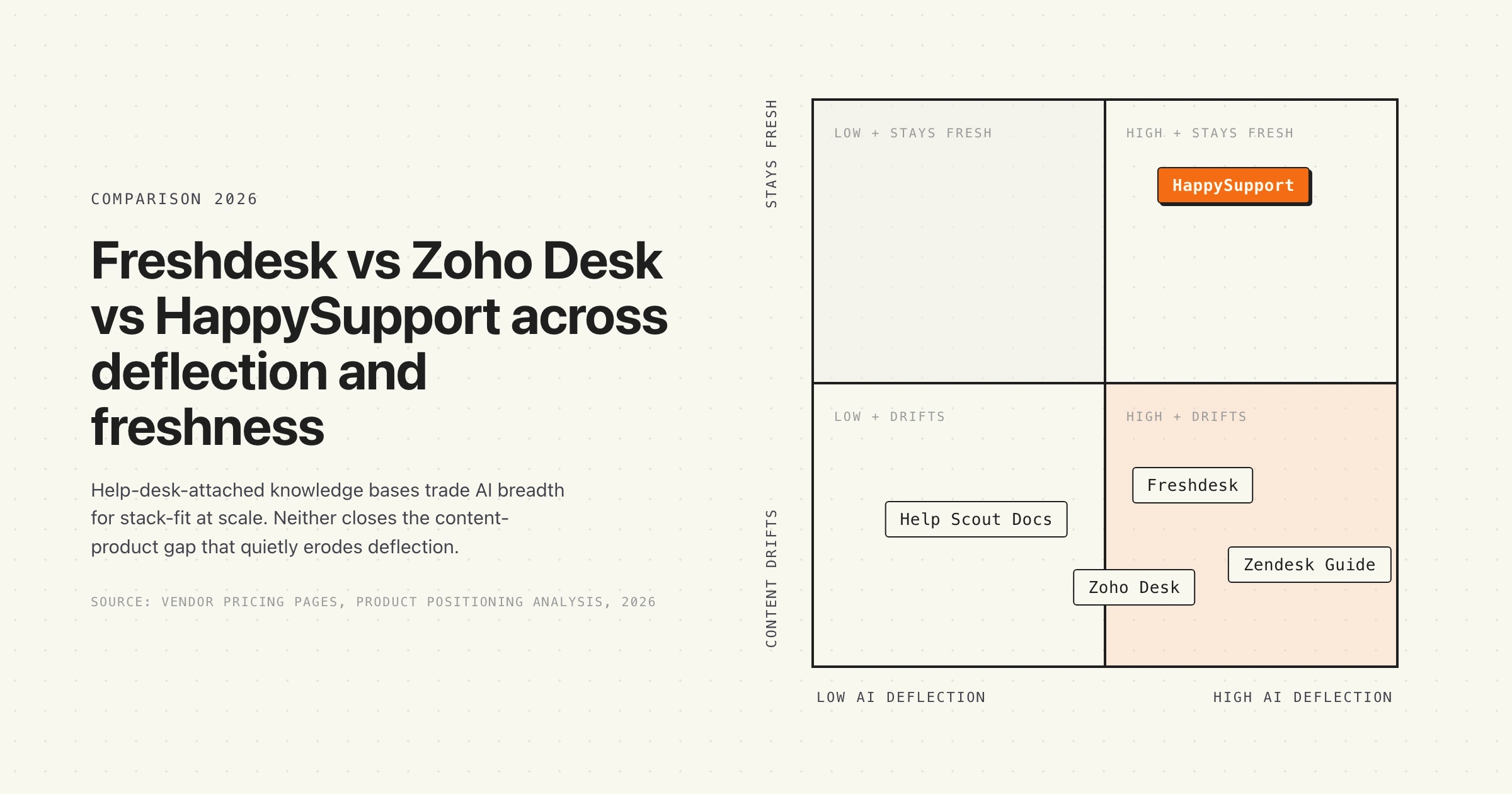
Both Freshdesk and Zoho Desk are built to publish solution articles. Neither is built to know when those articles stop being correct. This is the single biggest blind spot in the entire freshdesk vs zoho desk knowledge base comparison, and the marketing pages on both sides skip past it because the architecture on both sides shares the same gap.
The mechanic is the same in both products. A writer publishes a solution article about feature X. Engineering ships a UI change. The article is now wrong. Nobody on the support side knows until a customer files the ticket the article should have deflected. The knowledge base does not read the product. The product does not write to the knowledge base. The two systems drift apart at the speed of engineering. Documentation decay is the hidden cost of every help center, and it compounds faster on AI-driven help desks because Freddy AI and Zia both quote whatever the article says, stale or fresh.
Multilingual coverage makes the failure mode worse, not better. A help center published in 5 languages has 5 times the surface area to drift, and the translation workflow in both tools assumes the source article stays correct. When the source drifts, every translated version inherits the drift. The Consortium for Service Innovation's KCS methodology sets a benchmark that organizational knowledge should be available at or before the time of case closure. Hitting that bar in 5 languages requires a freshness signal that neither Freshdesk nor Zoho Desk ships.
Which failure mode is more disruptive for SaaS support
The two tools fail in slightly different ways when the knowledge base falls behind the product.
Freshdesk's failure mode is the confidently deflected wrong answer. Freddy AI Agent picks up a published solution article, surfaces it in chat or the widget, and the customer trusts the answer because it arrived in conversation. The article is stale, the steps no longer match the UI, the customer tries them anyway, the flow breaks, and the customer files a ticket with a more frustrated tone than if they had read a static article. The AI confidence layer accelerates the trust collapse.
Zoho Desk's failure mode is the broken self-service path inside the ASAP widget. The widget exposes six self-service surfaces, each of which can carry a stale answer (the knowledge base, the community forum, the Guided Conversations script, the AI chatbot, all reading from a knowledge base that does not know the UI moved on Tuesday). One stale article shows up in three or four channels at the same time. The customer feels like the whole product is misaligned, even though only the source content drifted.
Which is more disruptive depends on volume. A 200-article Freshdesk base feels Freddy's confident-wrong-answer failure as a slow trust erosion on chat. A 500-article Zoho base feels the multi-channel ASAP failure as a sudden trust collapse when a redesign ships. Both are symptoms of the same root cause: the help desk does not read the product.
When Freshdesk is the right answer
- Your support team is small (1 to 10 agents) and the Free plan covering 1 to 2 agents for 6 months gives you a real on-ramp.
- You want Freddy AI Agent deflection from the cheapest paid tier ($19 per agent per month) without an extra add-on.
- You publish in 5+ languages with parallel article versions and need the broadest multilingual coverage (42 languages).
- Your stack is not already Zoho, so the Zoho One integration depth is not a tie-breaker.
- You are a SaaS startup or mid-market team in DACH or APAC that values fast time-to-value over multi-brand procurement depth. The best knowledge base software comparison by team profile covers where Freshdesk lands in the wider category.
When Zoho Desk is the right answer
- Your stack is already Zoho (Zoho One, Zoho CRM, Zoho SalesIQ), and Zia's consistency across the suite removes second-tool friction.
- Your deflection strategy depends on the ASAP widget exposing six self-service channels (KB, forums, contact, chat, Guided Conversations, AI bot) inside your product.
- You run multiple brands under one support org and need multi-brand help center management on the Enterprise tier.
- You value flat per-user pricing over per-agent pricing as the team grows past 25 agents.
- You can absorb the gating of Zia generative AI to Enterprise; article suggestions and sentiment analysis on Professional are enough at lower tiers.
Do not pick either if your product ships weekly and your documented flows include click paths or in-product UI references. The maintenance line dominates the editor and AI decisions once release cadence is faster than content-review cadence, and neither vendor's architecture closes the gap.
HappySupport sits beside Freshdesk or Zoho Desk, not in place of either. The ticketing system, agent inbox, SLA workflow, and omnichannel routing stay on the help desk you picked. The knowledge-base article surface, the layer where the UI keeps moving and AI agents quote stale answers, belongs in a tool that reads the running product. Whichever help desk you run, swap in HappySupport for the article layer that stops drifting between releases.
Alternatives to Freshdesk and Zoho Desk knowledge bases
If the freshdesk vs zoho desk knowledge base evaluation surfaces a misfit on either side, there are four alternatives worth a serious look depending on team profile.
- Help Scout Docs. Cleaner editor, simpler pricing, friendlier brand voice. Lighter on AI than either Freshdesk or Zoho.
- Zendesk Guide. Heavier procurement, deeper publishing workflows, more expensive per agent. Right call if you already run Zendesk Suite.
- Document360 or Helpjuice. Dedicated knowledge base tools (not help-desk-attached). Stronger editor and analytics for external documentation, separate from the ticketing system.
- HappySupport. Built for product-led B2B SaaS shipping weekly, where the maintenance problem dominates the editor problem. Covered in detail below.
For a broader market view, the best help center software comparison by team profile covers the full landscape across editors, AI deflection, and maintenance.
HappySupport in the freshdesk vs zoho desk knowledge base debate
HappySupport is a different category of help center than either Freshdesk Knowledge Base or Zoho Desk knowledge base. The two help-desk-attached incumbents publish content; HappySupport reconciles content to product state. The architecture rests on two pieces: HappyRecorder, a Chrome extension that captures UI flows as DOM and CSS selectors instead of pixel screenshots, and HappyAgent, a GitHub Sync layer that watches the product repository for changes that affect documented flows and flags the affected articles for update. When engineering renames a field or restructures a screen, the affected articles surface automatically with a list of exact changes to apply, instead of waiting for the AI bot to confidently quote the stale version. This compresses the maintenance labor line that dominates the 3-year total cost of every help-desk-attached knowledge base, and it removes the structural condition that lets Freddy AI and Zia quote stale articles with full confidence. For teams shipping a product where the UI moves faster than the help-desk content-review cadence, HappySupport closes the loop that the freshdesk vs zoho desk knowledge base decision leaves open. Read more on what a self-updating help center actually means in practice, and on why the freshdesk vs zoho desk knowledge base choice still leaves the freshness layer wide open regardless of which vendor you sign.










