The guru vs confluence debate sits in an awkward corner of the knowledge management market. Both products are sold as internal knowledge platforms, both target teams that need a shared single source of truth, and both get pulled into customer-facing help center duty by support teams who run out of better options. Guru is the card-based, verified knowledge platform that surfaces answers in Slack and the browser. Confluence is the page-and-space wiki that ships with Atlassian Intelligence and Rovo AI inside every paid plan. The two products solve overlapping problems with very different architectures, and the pricing math behind each one is more lopsided than the marketing pages suggest.
This article compares Guru and Confluence across structure, editor, AI features (Guru Knowledge Agents vs Atlassian Rovo), verification workflows vs version history, search, pricing economics (per-seat with a 10-seat minimum vs per-user under a Standard tier), and the failure modes both share once internal knowledge gets used for customer-facing documentation. It closes with a decision framework based on stack and team size, and where a self-updating help center actually fits.
What is Guru?
Guru is a verified knowledge platform built around the idea of cards, short, expert-verified answers that surface in the flow of work. The product launched in 2013 as a sales-enablement tool and has since broadened into internal knowledge management, with strong workflows for support teams, customer success, and revenue operations. The primary surface is not a destination website. It is a browser extension, a Slack app, and embeds inside tools like Salesforce and HubSpot, which means the knowledge appears next to the task instead of asking the user to switch contexts.
The output of Guru is a library of cards, each card owned by a named expert who is responsible for keeping the content correct. The verification workflow is the headline feature: every card has a verification cadence (default 30 to 90 days), and when a card expires, the owner gets a prompt to re-verify or update. The model behind this is that knowledge rots on a predictable timer, and forcing a regular review forces the rot back. Guru Knowledge Agents add AI retrieval on top: the agent reads the verified card library and returns contextual answers, with citations pointing back to the cards.
What is Confluence?
Confluence is the knowledge management product inside the Atlassian portfolio, alongside Jira, Trello, and Bitbucket. It launched in 2004, which makes it one of the oldest enterprise wiki tools still in active development. The primary surface is a web destination, organized into spaces (departments, teams, or projects), pages (long-form content), and a hierarchical tree that scales to tens of thousands of pages per workspace. Atlassian Intelligence and Rovo AI ship inside every paid plan, with Rovo bringing AI search, chat, and a library of pre-built agents that read across Confluence, Jira, and connected tools.
The output of Confluence is a centralized wiki where content lives in spaces and pages, with version history per page, page templates, inline comments, and tight integration with the rest of the Atlassian stack. Customers running Jira for engineering will find Confluence pre-wired with epic, sprint, and roadmap macros that pull live data from Jira into the page. Multi-team enterprises tend to land on Confluence because the integration depth across Atlassian products removes the second-tool friction. The trade-off is breadth: Confluence covers a lot of ground, which means no single workflow is as opinionated as Guru's verification loop.
Quick verdict on the guru vs confluence question
If your team needs short verified answers surfaced inside Slack, the browser, or revenue tools, and you can absorb a 10-seat minimum on the Guru Self-Serve plan, Guru wins on the verification workflow and the in-the-flow-of-work integration. If your team needs a centralized wiki with deep page hierarchies, version history, page templates, native Jira integration, and AI search bundled at no extra cost, Confluence wins on breadth and on per-user economics. Neither was built as a customer-facing help center, which is the dimension that most evaluations skip until month six.
| Dimension | Guru | Confluence |
|---|---|---|
| Primary surface | Browser extension, Slack, embeds | Centralized wiki destination |
| Content unit | Short verified cards | Long-form pages in spaces |
| AI | Guru Knowledge Agents (retrieval) | Atlassian Rovo (search, chat, 20+ agents) |
| Maintenance model | Time-based verification cycle | Page version history, manual review |
| Entry price | $250 per month (10 seats minimum) | Free up to 10 users, then ~$5 per user per month |
| Article freshness signal | Time expiry only, no product signal | No native signal, manual |
How to create knowledge content with each tool
The day-one experience of the guru vs confluence pairing tells you most of what you need to know about who each tool is for. Guru asks you to think in short, atomic, expert-owned answers. Confluence asks you to think in long-form pages organized into spaces.
Publishing a card in Guru
In Guru, you click New Card, pick a Collection (the rough equivalent of a folder), assign a Verifier (the named expert who owns the card), write 50 to 300 words in the block editor, add tags, set the verification interval (30, 60, or 90 days by default), and publish. The card is immediately available in the browser extension, Slack, and any connected app. When the verification interval lapses, the Verifier gets a prompt: re-verify as still correct, edit the content, or archive. The cadence enforces a regular review even if nobody flags the card as wrong.
Publishing a page in Confluence
In Confluence, you open a Space, click Create, pick a template (meeting notes, product spec, runbook, knowledge base article, blank, or any of dozens of others), write in the rich editor with macros for Jira issues, tables, diagrams, and embeds, set page permissions, and publish. Pages live in a hierarchical tree, and any change creates a new version with full version history. There is no native verification cadence, but page restrictions let owners require a review on update. Rovo can surface stale pages on request, but the trigger is conversational, not scheduled.
The end product looks different on the consumer side. Guru content shows up next to the task, often without the user knowing they are reading a Guru card. Confluence content lives at a URL inside the workspace, and the user navigates to it. Both work for internal knowledge. Neither is what a customer expects from a public help center.
Feature breakdown of Guru and Confluence
Six dimensions decide most guru vs confluence evaluations once the marketing copy is out of the way: editor and content creation, AI features, the verification workflow vs version history split, search, enterprise readiness, and integrations. Each one breaks differently between the two products.
Editor and content creation
Guru uses a block-based editor optimized for short cards. Headings, bullets, callouts, images, and embeds are available, plus a slash command menu in the spirit of Notion. The editor discourages long pages by feel: the interface gets uncomfortable past about 500 words. Confluence ships a richer editor with macros for live Jira tickets, decision tables, drawing canvases, and dozens of third-party Marketplace integrations that inject content blocks. For teams that publish long structured documents (runbooks, post-incident reports, product specs), Confluence is the right shape. For teams that publish short atomic answers, Guru is the right shape.
AI features: Guru Knowledge Agents vs Atlassian Rovo
Guru Knowledge Agents are retrieval-focused: the agent reads the verified card library and answers questions in the browser, in Slack, or inside connected apps, with citations pointing back to the source card. The model is that AI is only as good as the verified content underneath, so the verification cycle stays load-bearing. Guru pricing bundles AI credits into the Self-Serve plan with usage limits.
Atlassian Rovo, included in every paid Confluence plan, brings AI search across Confluence, Jira, and connected tools, conversational chat, and a library of more than 20 pre-built agents (status report writer, meeting summarizer, change log generator, and more) that read across the Atlassian graph. The Standard tier includes 25 Rovo credits per user per month; Premium and Enterprise unlock higher allocations and the Virtual Service Agent for ITSM use cases. Rovo's bigger range comes from the surrounding Atlassian graph, not the underlying language model.
Verification workflow vs version control
The architectural difference between the two products shows here. Guru's verification workflow assumes knowledge expires on a calendar. The Verifier gets a prompt every 30, 60, or 90 days and decides whether the card is still correct. This catches drift that no user has flagged, which is the slow leak in most knowledge bases. Confluence's version history captures every change with an author, a timestamp, and a diff, which makes audit and rollback trivial, but it does not ask anyone to look at the page until someone reports the page is wrong. For knowledge that drifts faster than users notice (UI flows in a product that ships weekly), Guru's model catches more drift. For knowledge that is reviewed event-driven (post-incident, post-release), Confluence's model is enough.
Search and retrieval
Guru's search is tightly fused to the verified card library and the surface area is small, which keeps relevance high. The browser extension surfaces matched cards on the right side of any web page based on text on the page. Slack returns cards on a slash command. Confluence search runs across pages, attachments, comments, and connected Jira issues, and Rovo lifts the same search into conversational answers. The larger surface area of Confluence is a double-edged sword: more content to find, more noise to filter. For teams under 100 people, Guru's narrower search returns sharper answers. For teams over 500 people, Confluence's broader graph plus Rovo wins on coverage.
Enterprise readiness and security
Both vendors carry SOC 2 Type II compliance. Confluence ships SAML SSO on Premium and above, plus deeper audit logs, IP allowlists, and Atlassian Access for centralized identity. Guru ships SAML SSO on Enterprise, SCIM provisioning, and the same SOC 2 baseline. For regulated buyers, Confluence has the longer procurement track record, the larger consultant ecosystem, and the deeper compliance audit trail. For mid-market buyers, the difference disappears.
Integrations and stack fit
Guru integrates with Slack, Microsoft Teams, Salesforce, HubSpot, Zendesk, Intercom, and Chrome via the browser extension. The pattern is to surface cards inside the tool the user is already in. Confluence integrates natively with Jira, Bitbucket, Trello, and the rest of Atlassian, plus a 3,000+ Marketplace app ecosystem covering most enterprise tooling. Stack fit usually decides this dimension before features do. If your engineering team lives in Jira, Confluence is the lower-friction choice. If your revenue team lives in Slack and Salesforce, Guru is the lower-friction choice.
Pricing comparison: per-seat with minimums vs per-user under a Standard tier
The guru vs confluence economics diverge sharply at the floor. Guru's Self-Serve plan carries a 10-seat minimum at $25 per user per month annual ($30 monthly), which puts the entry point at $250 per month even if only three people will actually use it. Enterprise pricing is custom and quote-based. One caveat on that number: as of August 2026 Guru's own pricing page leads with quote-based messaging ("tailored to your organization's scale, knowledge complexity, and AI maturity") rather than publishing the tier table, so treat the $25 self-serve rate as the consistently reported figure rather than a currently published one, and confirm it before budgeting. Confluence has a Free tier for up to 10 users with 2 GB of storage, which gives a real start-from-zero on-ramp, then Standard at roughly $5.42 per user per month monthly (about $5.16 annual), and Premium at roughly $10.44 per user per month monthly, per the current Atlassian Confluence pricing page.
The pattern is that Guru is more expensive at small headcount and more competitive at larger headcount, because the per-seat list price stays flat while Confluence's seat cost rises with the tier. Atlassian Rovo coming bundled into Standard removes the AI add-on that other vendors charge separately, which makes Confluence's all-in cost lower than the per-user list price suggests once AI is in the picture.
| Scenario | Guru Self-Serve | Confluence Standard |
|---|---|---|
| 5 users | $250 per month (10-seat minimum) | Free |
| 25 users | $625 per month | ~$135 per month |
| 100 users | $2,500 per month | ~$540 per month |
| 100 users on Premium tier | Custom Enterprise quote | ~$1,040 per month |
Pricing alone undersells the gap. Guru's bet is that verified short answers in the flow of work are worth a premium per seat. Confluence's bet is that wide adoption at low per-seat cost feeds a wider AI graph for Rovo to read. Both bets work for the customers each one targets. Neither answers what happens when the underlying source material drifts from product reality.
The shared limitation neither tool will mention
Both Guru and Confluence are built to store and surface human-written knowledge. Neither is built to know when that knowledge stops matching the product. The verification cycle in Guru is the closest thing in either tool to a freshness mechanism, and it is calendar-based, not product-based: a card verified on Tuesday is treated as fresh whether or not the underlying UI changed on Wednesday.
The mechanic is the same in both products when they get used for customer-facing documentation, which happens often enough to matter. A writer publishes content about feature X. Engineering ships a UI change. The Guru card or Confluence page is now wrong. Nobody on the support side knows until a customer files the ticket the article should have deflected. Documentation decay is the hidden cost of every help center, and it shows up as a slow erosion of self-service deflection instead of a single visible failure.
The Consortium for Service Innovation, the standards body behind Knowledge-Centered Service (KCS), sets a benchmark that organizational knowledge should be available at or before the time of case closure. Hitting that bar requires content that updates as the product updates. Neither Guru's time-based verification nor Confluence's version history closes the gap. Both assume someone notices the drift in time to fix it.
Which failure mode is more disruptive for customer-facing docs
The two tools fail differently when they get stretched into help center duty.
Guru's failure mode is the verified-but-stale card. The Verifier ticked the box on the calendar prompt, the card carries a fresh verification timestamp, and the AI retrieval layer treats it as canonical. The customer or agent reads the verified card, follows the steps, and the steps no longer match the UI. The verification cycle gives a false signal of freshness because the Verifier did not actually look at the product, only at the card.
Confluence's failure mode is the orphan page. A page written 18 months ago lives in a deep tree under a Space owned by a team that has reorganized twice. Nobody owns the page. Search returns it. Rovo summarizes it. The customer or agent reads it as authoritative. There is no verification timestamp at all, just a "Last updated" date that nobody acts on. The error compounds because the page has no owner to escalate to.
Which is more disruptive depends on volume. A 50-person internal knowledge base feels Guru's verified-but-stale failure as a few wrong answers a quarter. A 5,000-page Confluence workspace feels the orphan-page failure as a steady background noise that erodes trust in search. Both are symptoms of the same root cause: the tool does not read the product.
When Guru is the right answer
- Your team is sales, customer success, or support, and the knowledge they need has to surface in the flow of work, not on a wiki destination.
- Slack is the primary work surface and reps live in Salesforce or HubSpot rather than Jira.
- You have at least 10 seats to absorb the Self-Serve minimum, so the $250 per month floor is not a deal-breaker.
- The knowledge you store is short and atomic (FAQs, objection responses, product positioning), not long-form documentation.
- You value a time-based verification cycle that catches drift on a calendar even when no user has flagged the card.
When Confluence is the right answer
- Your team is engineering, product, or any function that already runs on Jira and the rest of the Atlassian stack.
- You publish long-form documentation (runbooks, specs, decision records, post-incident reports) where page depth matters more than card brevity.
- You want Atlassian Intelligence and Rovo AI bundled at no extra add-on cost, with 25 Rovo credits per user per month on Standard.
- You need the Atlassian Marketplace ecosystem for extensions across security, automation, and reporting.
- The Free tier for up to 10 users gives a real on-ramp before you commit to per-user pricing. The honest Confluence vs Notion comparison for knowledge base use covers the adjacent decision most teams face.
Do not use either as a customer-facing help center. Both are designed to live inside the company. Guru's primary surface (browser extension, Slack) does not work for end customers. Confluence Spaces can be made public, and some teams do, but the publishing controls, theming, search relevance, and SEO controls are weaker than any dedicated help center tool. Stretching either into help center duty creates exactly the freshness gap described above.
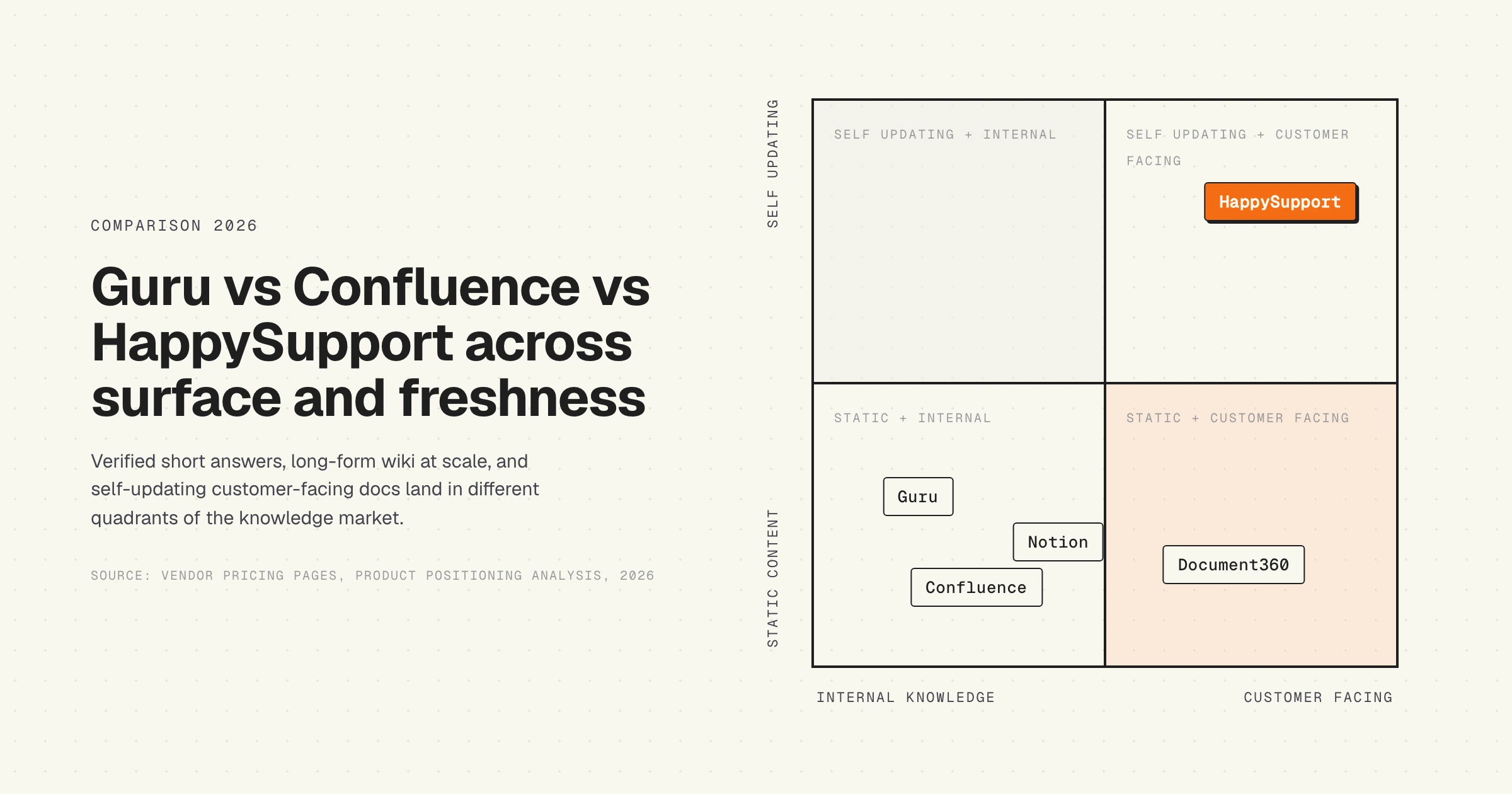
HappySupport is a different category from Guru or Confluence. Short verified answers for sales, CS, and support in the flow of work belong in Guru. Long-form engineering and product documentation belongs in Confluence. Customer-facing help center articles, where the UI keeps moving, belong in a tool that reads the running product; HappySupport publishes an internal knowledge base for the team from that same source and adds AI chat, a ticket inbox and an in-app widget on top, at one flat price. Whichever you pick for internal knowledge, HappySupport is the customer-facing help center that stops drifting between releases.
Guru vs Confluence for a growing team: AI search, content verification, and pricing
Three axes, one verdict each, for a team that is adding people rather than already large. This is the shape most evaluations actually take, and the answer is not the same on all three.
AI search: Confluence, on breadth and on cost
Rovo is included in every paid Confluence plan, including Standard at roughly $5.42 per user per month, with 25 Rovo credits per user per month and over 20 pre-built agents. Guru's Knowledge Agents are bundled into Self-Serve with usage limits. Both are competent retrieval layers over your own content.
Confluence wins this one for two reasons that have little to do with model quality. First, reach: Rovo searches across Confluence, Jira and connected tools, so it answers questions your wiki alone cannot. Second, price: you get it at the $5.42 tier rather than at a $25 seat. Guru's counter-argument is real but narrower, which is that its agent reads a library where every card has a named owner and a verification date, so retrieval quality starts from cleaner material. If your content is messy, Guru's structure helps more than Rovo's breadth does.
Content verification: Guru, and it is not close
This is Guru's reason to exist. Every card has a named Verifier and a verification interval of 30, 60 or 90 days, and when the interval lapses the owner is prompted to re-verify, edit or archive. Nothing in Confluence does this. Version history tells you what changed and who changed it; it never asks anyone to look at a page again. Rovo can surface stale pages if you ask it to, but the trigger is a person deciding to ask.
The distinction that matters for a growing team: Confluence's model assumes someone notices a page is wrong. That assumption holds at 30 pages and fails somewhere around 300, which is exactly the range a growing team passes through. Guru's model does not depend on anyone noticing.
The honest caveat, covered at more length below, is that Guru verifies against a calendar and not against your product. A Verifier can tick the box without opening the app, and the card then carries a fresh timestamp while being wrong.
Pricing: Confluence, decisively, until roughly 100 seats
Guru's 10-seat minimum at $25 per user per month annual means a floor of $250 per month regardless of team size. Confluence is free to 10 users and about $5.42 per user per month on Standard after that. For a 25-person team the gap is $625 against roughly $135 a month. Guru only starts looking price-competitive at headcounts where the flat per-seat rate stops compounding against a rising Confluence tier, and by then you are having a procurement conversation either way.
For a team growing from 10 to 50 people, Confluence costs roughly a fifth of Guru and includes AI in the base price.
The verdict for a growing team
Choose Confluence if cost per seat matters, you already run Jira, and you can put a real review process around the wiki yourself. You get better AI search reach, far better economics, and you accept that freshness is a process you run rather than a feature you bought.
Choose Guru if the failure mode you are trying to prevent is people acting on stale internal answers, and if your team already works in Slack and the browser rather than in a wiki. You are paying roughly 5x per seat for one mechanism, the verification cadence, plus delivery in the flow of work. That is a defensible purchase when wrong answers are expensive, and an expensive one otherwise.
Choose neither if the content in question is customer-facing. That case is the section below.
Alternatives to Guru and Confluence
If the guru vs confluence evaluation surfaces a misfit on either side, there are four alternatives worth a serious look depending on use case.
- Notion. Page-based like Confluence with a cleaner editor and a broader template ecosystem. Weaker on enterprise compliance and Jira integration; stronger on cross-functional adoption.
- Slab or Slite. Lightweight wikis aimed at small to mid-market teams that find Confluence too heavy and Guru too narrow. See the Slab comparison below, because Slab is closer to Guru than its price suggests.
- Document360 or Helpjuice. Dedicated knowledge base tools built for customer-facing documentation, with stronger editor and analytics for external use cases.
- HappySupport. Built for product-led B2B SaaS shipping weekly, where the maintenance problem dominates the editor problem. Covered in detail below.
For a broader view, the best knowledge base software comparison by team profile covers the full landscape across editors, AI features, and maintenance.
Slab vs Guru: what to pick
Slab comes up against Guru more often than against Confluence, and the comparison is more interesting than the price gap implies, because the two overlap on the feature people assume is Guru's alone.
| Slab | Guru | |
|---|---|---|
| Entry price | Free to 10 users | $25/user/month annual, 10-seat minimum, so $250/month floor |
| Next tier | Startup, $6.67/user/month annual, unlimited users | Same $25 rate |
| Verification | Included on every plan, Free included | The core of the product: named Verifier per card, 30, 60 or 90-day cadence |
| AI | AI Autofix from Startup; AI Ask and AI Predict from Business at $12.50/user/month | Knowledge Agents bundled into Self-Serve with usage limits |
| Where content appears | Web app, plus unified search across Slack, Google Drive and connected tools | Browser extension, Slack, and inside connected apps, often without the reader leaving their task |
| Version history | 90 days on Free, 365 on Startup, unlimited on Business | Card history |
| SSO | SSO from Startup, SAML from Business | SAML on Enterprise |
| Custom domains | Business and above | Not the use case |
Two corrections to what usually gets said about this pair. First, several comparison pages claim Slab has no verification and no AI. Slab's own pricing page lists verification as included on all plans and names three AI features across its paid tiers, so both claims are out of date. Second, the two verification features are not equivalent even though they share a name: Slab's is a lighter review-state mechanism, while Guru's is an opinionated ownership model where a specific person is accountable on a specific clock, and the Trust Score surfaces that state everywhere the card appears.
Pick Slab if the requirement is a clean internal wiki with search that reaches into the tools you already use, and if the cost difference is material. A 10-person team pays nothing on Slab and $250 a month on Guru. At 25 people it is roughly $167 a month against $625. Slab is also the better editor for longer-form documentation, because Guru's card format deliberately pushes you toward 50 to 300 words.
Pick Guru if the answers need to reach people without them going to look, and if you want accountability rather than a review state. The browser extension and Slack surfacing are the actual product, not the wiki, and no amount of Slab's search reach replicates an answer appearing next to the task. You are paying for delivery and for enforced ownership.
The tiebreaker is content length. If your knowledge is short answers to recurring questions, Guru's model fits and the premium is defensible. If it is process documentation, runbooks and onboarding material that runs to pages, Slab is the better shape at a fraction of the price.
HappySupport in the guru vs confluence debate
HappySupport is a different category of knowledge tool than either Guru or Confluence. The two incumbents store and surface human-written content; HappySupport reconciles the content to the product. The architecture rests on two pieces: HappyRecorder, a Chrome extension that captures UI flows as DOM and CSS selectors instead of pixel screenshots, and HappyAgent, the Git handoff that watches the product repository for changes that affect documented flows and flags the affected articles for update. When engineering renames a field or restructures a screen, the affected articles surface automatically with a list of exact changes to apply, instead of waiting for a verification prompt that expires on a calendar or for a customer to file a ticket. For teams shipping a product where the UI moves faster than the verification calendar, HappySupport closes the loop that the guru vs confluence choice leaves open. Read more on what a self-updating help center actually means in practice, and on why the guru vs confluence decision still leaves the staleness question wide open after both products are deployed correctly.