.png)

Intercom Articles pricing is one of the most-searched questions for any team running a customer-facing help center on top of Intercom, and most of the answers stop in the same place: a copy of the published seat table. The table is accurate. It is also incomplete. Intercom Articles is bundled into Intercom plans, the per-seat math grows fast at realistic team sizes, the Fin AI line stacks on top per resolution, and the published seat price is the cheaper half of what you actually pay over three years. The other half is the labor of keeping Articles accurate after every product release, and no Intercom pricing breakdown surfaces it.
This article walks through every Intercom plan, what each tier includes for Articles and the public or private help center, the Fin AI per-resolution model, the true total cost of ownership at 5 and 25 seats over three years, and what to verify before you sign. Then a short alternatives section for teams that realize at the end that they are paying for a help center that ships articles but does not maintain them.
What is Intercom Articles?
Intercom Articles is the knowledge base and help center module inside the Intercom product family. It is not sold standalone. To get Articles, you buy an Intercom plan, and Articles capabilities scale by tier: public versus private help center, multilingual support, multibrand support, and audience segmentation all depend on which Intercom plan you are on. Every Intercom plan includes Articles in some form, so the floor for any team that wants a public Intercom help center is Essential at $29 per seat per month billed annually.
Articles as a product covers article authoring, collections and sections, a public help center theme, search, the in-Messenger article surface, and on higher tiers private content access, audience targeting, multilingual help centers, and multibrand setups. What it does not do, the part the pricing page is silent on, is tell you when an article has gone stale because the product changed. That is the cost we will return to.
Intercom plans and Articles features per tier
The current Intercom plan lineup as of 2026 has three plans, plus an Enterprise option with custom pricing for very large deployments. Every price below is per seat per month, billed annually. Monthly billing runs 15 to 35 percent higher across all tiers. Intercom migrated from MAU-based to seat-based pricing in 2024, and existing customers were moved to the new model at renewal.
What "public help center only" actually means at Essential
Essential gives you one public help center. That is fine for an early-stage company with one product, one brand, and no need to gate content behind logins. The moment you need a private knowledge base for paying customers, a separate help center for a second product, or a multilingual setup for international customers, you are pushed up to Advanced. Most B2B SaaS teams budget $29 per seat and end up paying $85.
What changes at Advanced
Advanced adds private help center access (gated content for logged-in customers), multilingual help centers (separate content per language), and workflow automation that lets you trigger article suggestions inside the Messenger based on conversation context. It also includes 20 Lite Seats at no charge, which matters for product or engineering teams that need read-only Intercom access. For most mid-market SaaS teams running Intercom seriously, Advanced is the realistic floor, not Essential.
What changes at Expert
Expert is bought for procurement-grade controls and multibrand support, not Articles features. The reason teams pay $132 per seat is SSO and SCIM, HIPAA compliance for healthcare SaaS, service-level agreements, multibrand Messenger and help center (separate brands sharing one Intercom account), and 50 free Lite Seats. For a 25-seat team selling into regulated industries or running two products, Expert is the floor.
Intercom Fin AI pricing and where it stacks on Articles
Fin is Intercom's AI agent, and it is the line that breaks every Intercom pricing model built on seat math alone. Fin bills per successful resolution at $0.99, uncapped, and a resolution is counted when Fin closes a conversation without human handoff. Fin draws answers from your Articles. That coupling is the whole product thesis: Fin only works because the Articles exist, and Fin only answers correctly when the Articles are current.
Fin at $0.99 per resolution
The $0.99 number is simple to model on a spreadsheet and brutal in practice. A 5-seat team with 3,000 monthly conversations and a modest 30 percent Fin resolution rate generates 900 resolutions at $891 per month, or $10,692 per year. That is more than the entire Essential seat license for 5 seats at $1,740 per year. Fin is the most consequential line on the bill, and it is also the line teams underestimate first.
The Fin accuracy problem nobody includes in the pricing math
Fin's answers are only as accurate as your Articles. When an article is six weeks behind the product, Fin will quote it back to customers verbatim, confidently, in natural language, as if it were current. The customer trusts the answer because the format suggests authority. The support team finds out two days later when the ticket arrives complaining that the documented flow does not exist anymore. The Fin accuracy gap is a documentation problem, not a model problem, and the cost shows up in tickets that Fin handed to customers wrong.
Fin Tasks and Fin Voice as additional lines
Beyond the per-resolution conversation charge, Intercom now sells Fin Tasks (automated workflows triggered by AI) and Fin Voice (AI handling of phone calls) as separate usage-billed lines. Each one has its own per-event or per-minute price. For a budget exercise, assume Fin alone is one line and the others are exploratory. Most teams adopt Fin first and add the others only after the conversation use case proves out.
Intercom Articles total cost at 5 and 25 seats over three years
License cost is the visible line. Fin AI is the stacked variable line. Maintenance labor is the invisible third one. Every Intercom Articles deployment that survives past month six requires somebody to update articles when the product ships, audit dead content quarterly, fix screenshots after UI changes, and keep multilingual versions aligned across any second-language help center. For most SaaS teams shipping weekly, that work runs 6 to 12 hours per month per help center, conservatively. Fully-loaded support and docs labor at $75 per hour in the US, or 65 to 70 euros per hour in DACH, makes this a real number.
5 seats, Advanced plan, three years
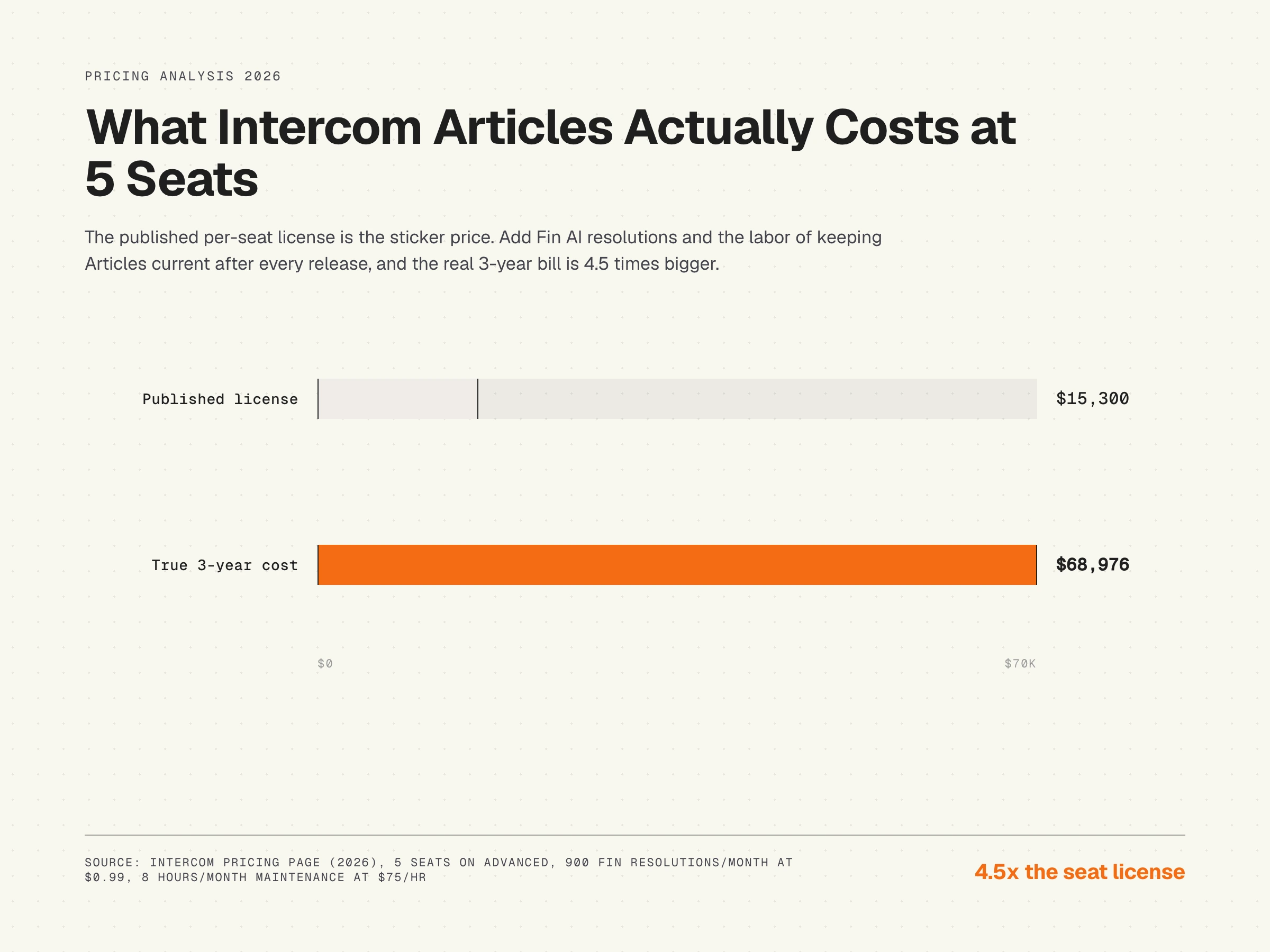
Advanced license: $85 x 5 seats x 36 months = $15,300. Fin AI at 900 resolutions per month at $0.99: $32,076 over 36 months. Maintenance labor at 8 hours per month at $75 per hour: $21,600. Total: $68,976. The seat license is 22 percent of the three-year cost. Fin is 46 percent. Maintenance is 31 percent. Three years in, you have spent more on Fin alone than you spent on the seats and on the labor combined to start.
25 seats, Expert plan, three years
Expert license: $132 x 25 seats x 36 months = $118,800. Fin AI at 4,500 resolutions per month (scaled with team size, modest assumption) at $0.99: $160,380. Maintenance labor for a multilingual multibrand team at 20 hours per month at $75 per hour: $54,000. Total: $333,180. Notice that at this scale, Fin is the largest single line, larger than the entire seat bill, and maintenance is still 16 percent of the total.
The breakdown matters because it changes how you should think about the price. You are not buying a help center. You are buying a help center plus a recurring AI deflection commitment plus a labor commitment that scales with how often the product changes. If the product ships weekly and Articles fall behind, Fin gets confidently wrong, and the resolutions you paid $0.99 for become tickets you pay agent time to fix. Documentation decay is the hidden cost of every help center, and Intercom Articles is the platform where decay costs the most because Fin is downstream of it.
The Articles maintenance cost no Intercom pricing article mentions
Intercom Articles is excellent at publishing. It is silent on whether those articles are still correct three months later. The platform has no concept of "this article references a UI element that no longer exists in your product." There is no link between code changes in your product and content drift in the Articles. When the product team ships a UI change on a Tuesday, the Articles entry is wrong on Tuesday afternoon. Nobody on the support side knows until Fin starts citing the stale paragraph back to customers, or until a ticket arrives.
This is structural, not Intercom-specific. Every traditional help center has the same blind spot. The cost shows up as agent time fixing what Fin handed out wrong, as customer-success time correcting incorrect onboarding flows, and as the eventual cost of replacing every UI screenshot that broke after a product redesign. For teams shipping weekly, the maintenance interval needs to match the release interval. Most teams set up a monthly content review, fall behind by month four, and either accept the drift or hire a dedicated docs person.
Intercom Articles hidden costs and what to verify before signing
The published per-seat price is the floor. Six categories of cost stack on top before your effective spend reaches reality. Verify each one in writing before you sign a multi-year contract.
- Annual vs monthly billing. Annual unlocks the published price. Monthly billing runs 15 to 35 percent higher. Quarterly is not offered.
- Renewal increases. Intercom renewals commonly come in at 15 to 30 percent year-over-year, especially after the 2024 seat migration. Negotiate a renewal cap (5 to 8 percent) before the first signature.
- Fin resolution overage. Fin resolutions bill at $0.99 each, uncapped. There is no included allowance on Essential and small included allowances on higher tiers. Set a hard ceiling in the contract or commit to a volume tier with discounted per-resolution rates.
- Early Stage Program decay. Intercom offers up to 90 percent off year one for qualifying startups, declining to 50 percent year two and full price year three. The cliff is real. Forecast year-three cost at full list, not the discounted year-one rate.
- Lite Seat caps. Advanced includes 20 Lite Seats, Expert includes 50. Going over either cap forces you to upgrade the tier or pay full seat price for read-only users.
- Channel add-ons. SMS, WhatsApp, voice, and email campaigns bill on top of the seat license. SMS runs $0.01 to $0.10 per message depending on region. WhatsApp follows Meta's conversation pricing. A multi-channel rollout adds 20 to 40 percent to the seat bill.
When Intercom Articles pricing makes sense, and when it does not
Intercom plus Articles is the right choice for messenger-led organizations: teams where the in-app Messenger is the primary customer surface, the AI deflection use case is well-funded, the company is already running on Intercom for support, and the help center is one piece of a larger conversational support strategy. The Fin integration is genuinely strong when Articles are current, and the platform handles enterprise-grade controls (SSO, SCIM, audit logs, multibrand) that lighter competitors do not.
It is the wrong choice for content-first teams where the help center is the primary self-service surface and the messenger is secondary. The per-seat cost plus the per-resolution Fin cost stacks badly when the AI is answering from articles that nobody is updating. For an honest comparison of help center tools by team profile, see our breakdown of help center software by team size and stage, and for a direct platform comparison read the HappySupport vs Intercom analysis.
An open-access resource on the maintenance side of knowledge management is the Service Innovation Library, which covers the KCS (Knowledge-Centered Service) methodology and includes practical material on how to keep a help center current as the product evolves. KCS is platform-agnostic and applies regardless of whether you run Intercom, Zendesk, or any other tool.
Intercom Articles alternatives by team profile
Three honest alternatives to consider, depending on where you sit:
- Help Scout Docs. Cheaper bundle, simpler product, no Fin equivalent. Good fit for small to mid-market teams that want a help center attached to a helpdesk without the AI deflection pricing line.
- Zendesk Guide. Larger and pricier, stronger for support-led enterprises with multibrand and multilingual at scale. See our Zendesk Guide pricing breakdown for the comparable math.
- HappySupport. Built for product-led SaaS teams shipping weekly. Different category from Intercom: the focus is on keeping the help center current automatically as the product changes, not on bundling docs with messaging. See below.
HappySupport in this context
HappySupport is a different category of tool than Intercom Articles. Intercom Articles solves the publishing and AI-distribution problem: how do you let teams write articles, how do you organize them, how do you let Fin answer from them. HappySupport solves the freshness problem: how do you keep those articles accurate when the product ships every week. The architecture is DOM/CSS recording in a Chrome extension (HappyRecorder), which captures UI flows as code-selectors instead of pixels, paired with HappyAgent GitHub Sync, which watches the product repository for changes that affect documented flows and flags the affected articles for update. The maintenance labor line in the 3-year TCO model above is the line HappySupport is built to compress, and the Fin-accuracy gap is the gap HappySupport closes by ensuring the source Articles are not the thing introducing the error. Read more on what a self-updating help center actually means, or look at how a self-updating knowledge base integrates with Intercom if Fin is staying in your stack.










