The confluence vs notion knowledge base decision sounds like a feature comparison and ends up as a category mistake. Confluence is a structured enterprise wiki built around Spaces, child pages, and Atlassian Intelligence. Notion is a free-form workspace built around blocks, databases, and an all-in-one OS pitch. Both started as internal collaboration tools, both now sell themselves as knowledge management platforms, and both get bought by teams who want a single place for company documentation. The choice usually comes down to whether your team prefers a strict page hierarchy or a flexible block editor.
The decision that actually matters is downstream. If the knowledge base is internal only, either tool works and the choice is taste. If the knowledge base needs to face customers, neither tool was built for that job. The rest of this confluence vs notion knowledge base comparison covers structure, AI tooling, pricing, security, and the failure mode each tool inherits from its origin story, then a short section on when to leave both behind for a tool built for customer-facing docs.
What is Confluence?
Confluence is Atlassian's enterprise wiki, launched in 2004, built around a strict architectural model: Spaces contain pages, pages contain child pages, and every page lives inside the hierarchy. A Space typically maps to a team, a department, or a product. Inside a Space, content is organized by parent and child relationships, with breadcrumbs, page trees, and labels for cross-cutting topics. This structure is the reason Confluence shows up so often in engineering organizations that already run Jira: the integration with Jira issues, sprints, and roadmaps is native, and the same admin model handles both.
Confluence ships with templates, real-time collaboration, comments and inline tasks, version history, advanced permissions at the Space and page level, and a full-text search engine that handles labels, operators, and content type filters. Atlassian's marketing claims Confluence is used by 80% of Fortune 500 companies, and the product scales to 150,000 users per cloud instance according to Atlassian's product documentation. The AI layer is Rovo, included on all paid plans with a credit-pool model that scales by tier.
What is Notion?
Notion is a free-form workspace launched in 2016, built around a block editor and databases. There is no fixed hierarchy. Every page is a tree of nestable blocks, every database is a flexible structure that can be displayed as a table, board, calendar, gallery, or timeline. A page can contain a database, a database row can open as a page, and pages can link to pages anywhere in the workspace. The result is extreme flexibility: a single Notion workspace can hold meeting notes, project trackers, OKRs, internal wikis, customer CRM, and product specs all at once.
Notion ships with templates, real-time collaboration, comments, version history (7 days on Free, longer on paid plans), simple permissions, public sharing on any page, and an all-in-one positioning. The AI layer is Notion AI, included on Business and Enterprise plans and available as a paid add-on otherwise. Notion's customer roster includes OpenAI, Figma, Volvo, and Ramp according to Notion's public customer page, and the workspace model is popular with startups and creative teams who want to consolidate tools.
Quick verdict
The confluence vs notion knowledge base choice usually breaks along two axes: how strict you want the structure, and whether you already run Atlassian tools. Confluence wins on enterprise scale, search, and Jira integration. Notion wins on flexibility, block editor experience, and consolidating multiple tools into one. Pricing is closer than most confluence vs notion knowledge base articles admit once you compare the AI-included tiers.
| Dimension | Confluence | Notion |
|---|---|---|
| Architecture | Spaces + page hierarchy | Free-form blocks + databases |
| Editor | Page-based, structured | Block-based, drag and drop |
| Search | Full-text with operators, labels | Basic full-text, weaker at scale |
| AI | Rovo + Atlassian Intelligence, all paid plans | Notion AI, Business and above |
| Entry price | $5.42 per user per month (Standard) | $8 per user per month (Plus annual) |
| Free tier | 10 users, 2 GB storage | Unlimited individuals, limited team blocks |
| Scale ceiling | 150,000 users per instance | Performance degrades above ~200 active users |
| Best for | Engineering, enterprise, Jira shops | Startups, product teams, all-in-one consolidation |
| Customer-facing fit | Weak, not designed for it | Weak, public pages expose workspace |
How to build a knowledge base with each
Both tools can host a working internal knowledge base. The setup paths differ in ways that show up six months later.
Confluence approach: Spaces and child pages
A Confluence knowledge base starts with one or more Spaces, typically one per team or product area. Inside each Space, an admin builds a page tree: top-level pages for major categories (Onboarding, Engineering, Sales Playbook), child pages for subtopics, grandchild pages for individual articles. Labels cut across the hierarchy for topics that span multiple Spaces. Permissions are set at the Space level by default and inherited down the tree, with page-level overrides for sensitive content. Search runs across all Spaces a user has access to, with operators for filtering by Space, label, contributor, or date.
The strength is rigor. Six months in, a 2,000-page Confluence wiki still feels like a knowledge base, not a pile of pages. The weakness is friction. Designing a page hierarchy that survives reorganization takes hours, and most teams over-engineer the structure at the start.
Notion approach: databases and linked pages
A Notion knowledge base starts as a single page, usually called Wiki or Company Hub. Inside, the team adds a database (often called Articles, Pages, or Wiki Database) where each row is one article. Properties on the database track category, owner, status, last updated, and tags. Views filter the database by category, owner, or freshness. Pages outside the database link to articles freely, and any block can reference any other block.
The strength is flexibility. Five minutes after creating the workspace, you have a working internal knowledge base that scales to dozens of contributors. The weakness is entropy. Twelve months in, the same workspace contains six "Wiki" databases, four orphaned pages, two competing tag systems, and a search that returns 47 results for "onboarding" with no obvious canonical page.
Feature breakdown
The headline features overlap. The implementation details diverge in ways that matter for any confluence vs notion knowledge base evaluation.
Editor and block model
Confluence uses a structured page editor with rich formatting, macros (embedded widgets for Jira issues, code blocks, expand sections, status labels), and tables that survive copy-paste. The editor was modernized in 2022 with slash commands and drag-and-drop reordering. The macro library is the differentiator: enterprise teams use macros to embed live Jira queries, roadmap timelines, and decision logs inline.
Notion's block editor is the strongest part of the product. Every line is a block, blocks nest infinitely, and you can drag any block anywhere. The editor is faster and the keyboard shortcuts are tighter. The tradeoff is that Notion's macros (callouts, toggles, synced blocks) are less powerful than Confluence's enterprise macros, but enough for 90% of internal knowledge base needs.
Search and discoverability
Confluence search is one of the strongest in the workspace category. Full-text search with operators (space:, label:, creator:, lastModified:), filter chips, content-type filters, and a separate result lane for attachments and comments. Rovo Search adds a conversational layer on top: ask "what's our policy on remote work" and Rovo returns a synthesized answer plus the source pages. At 5,000 to 50,000 pages, Confluence search holds up.
Notion search is the weakest part of the product. Full-text search works for exact matches and short queries, but partial matches and complex queries struggle. Notion AI Search (renamed Enterprise Search on Business and above) improves this with conversational answers, but the underlying index is still weaker than Confluence's. Eesel's 2026 benchmark notes that Notion performance degrades above 200 active users or databases with hundreds of thousands of records.
AI features: Atlassian Intelligence vs Notion AI
Atlassian Intelligence and Rovo are bundled into all paid Confluence plans. Every licensed seat gets a monthly credit pool: 25 credits on Standard, 70 on Premium, 150 on Enterprise. Credits power Rovo Search (conversational Q&A over your Confluence), Rovo Chat (a chat interface across Atlassian products), and Rovo Agents (custom workflows). As of mid-2026, Atlassian is not billing for usage above the included allowance and has committed to at least 90 days' notice before that changes. The pricing is published in Atlassian's Rovo usage documentation.
Notion AI sits on Business and Enterprise only. Plus and Free users get a trial. Notion AI covers drafting, summarization, translation, and Q&A across the workspace. Custom Agents cost $10 per 1,000 Notion credits after the trial. For a 10-person team that wants AI included, Confluence Standard at $5.42 per user is meaningfully cheaper than Notion Business at $15 per user annual.
Real-time collaboration and version history
Both tools handle real-time collaboration well: multiple editors per page, live cursors, comments with mentions, inline reactions. Notion's collaboration feels slightly tighter because the editor was built for it from day one.
Version history is where Confluence wins clearly. Unlimited version history on all paid plans, full diff views, restore-to-any-version. Notion offers 7 days on Free, 30 days on Plus, 90 days on Business, and unlimited on Enterprise. For any knowledge base where audit trail matters, unlimited version history on Confluence Standard is the cheaper path.
Permissions and access control
Confluence permissions are detailed: Space-level, page-level overrides, restricted pages, anonymous access controls, group-based assignment, and inheritance rules admins can tune. For an internal wiki with five teams who need different access levels, Confluence handles the case cleanly.
Notion permissions are simpler: workspace, teamspace, page, and database row. Sharing is intuitive but coarser, and the inheritance model can surprise you (sharing a parent page silently exposes every child). For a 500-person organization with regulated content, Confluence is the safer choice.
Enterprise security and compliance
Confluence holds ISO 27001 and SOC 2 Type II certifications, GDPR compliance, and HIPAA-ready configurations on the Enterprise tier. SSO via SAML, automated provisioning via SCIM, mobile device management, and audit logs at the admin level. Atlassian publishes uptime guarantees and runs a dedicated trust portal.
Notion holds SOC 2 Type II compliance and GDPR alignment but does not currently hold ISO 27001 certification. SSO via SAML and SCIM provisioning land on the Business and Enterprise tiers respectively. Audit logs are an Enterprise feature. For regulated industries or procurement teams that require ISO 27001, Confluence wins by default.
Integrations
Confluence integrates natively with the entire Atlassian product line (Jira, Trello, Bitbucket, Statuspage), plus Slack, Microsoft Teams, Google Workspace, and 3,000+ apps through the Atlassian Marketplace. The Jira tie is the strongest reason engineering teams pick Confluence.
Notion integrates with Slack, Google Drive, GitHub, Figma, Asana, and Jira through native connectors and the Notion API, which is more developer-friendly than Confluence's REST API. Atlassian's own survey claims 95% of dual-platform users rated Confluence integrations superior, which reads as flattering but the Jira advantage is real.
Pricing comparison
Both tools publish per-user pricing with similar tier structures. The AI bundling is the variable that matters in any confluence vs notion knowledge base budget call.
| Tier | Confluence | Notion |
|---|---|---|
| Free | 10 users, 2 GB storage, basic features | Unlimited individuals, 7-day history, AI trial |
| Entry paid | Standard at $5.42/user/month annual, 25 Rovo credits | Plus at $8/user/month annual, no AI included |
| Mid tier | Premium at $10.44/user/month annual, 70 Rovo credits | Business at $15/user/month annual, Notion AI included |
| Enterprise | Custom, annual only, 150 Rovo credits per user | Custom, SCIM, audit logs, ZDR with LLM providers |
| AI add-on | Bundled, no separate billing through 2026 | Custom Agents at $10 per 1,000 credits after trial |
For a 10-user team that needs AI search across documentation, Confluence Standard at $54 per month bundles 250 Rovo credits and beats Notion Business at $150 per month. For a 50-user creative team already inside Notion, the gap narrows. Pricing is rarely the deciding factor on its own, but it should be the last factor, not the first.
The shared limitation: wikis are not help centers
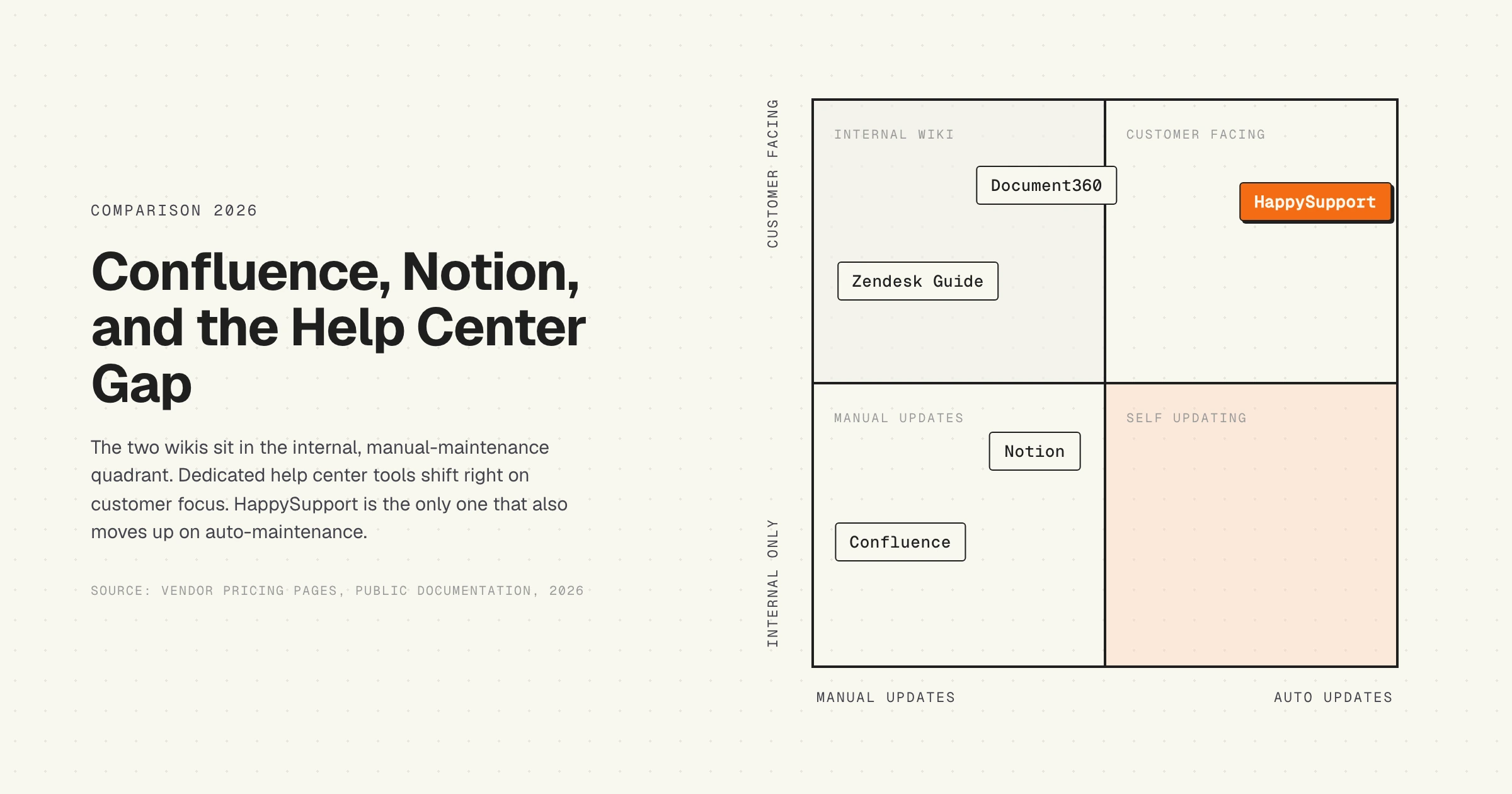
Here the confluence vs notion knowledge base comparison usually stops, and the more honest analysis begins. Both tools were designed for internal knowledge management. A customer-facing help center is a different product category. The two get conflated because both involve "writing articles," but the surface and the audience are not the same.
A real customer-facing knowledge base needs a branded public domain (help.yourcompany.com), SEO metadata so articles rank on Google, structured FAQs with schema markup, an AI chat surface that answers customer questions over the content, ticket-deflection analytics tied to your helpdesk, multilingual variants per market, WCAG accessibility, and a maintenance loop that keeps articles correct as the product ships. Confluence and Notion address roughly two of those nine requirements.
Public sharing on either tool exposes your internal wiki structure to the open internet. Custom domains require workarounds (reverse proxies, Super.so for Notion, or a Confluence Enterprise add-on). SEO metadata on a Notion public page is limited. AI chat over wiki content is possible via third-party tools, but it is a bolt-on. The distinction between a help center and a knowledge base matters more than most teams realize at the buying stage.
Which failure mode is more disruptive
Both tools fail predictably as a customer-facing knowledge base, but they fail differently.
Confluence fails by being too internal. The interface looks like an employee wiki, page metadata leaks ("Last edited by Sarah from Engineering"), URLs are unfriendly, SEO is weak. Customers can read the content but the experience feels like reading someone else's internal notes. Support teams who publish a Confluence Space as a public help center usually rebuild the front-end with a third-party tool or migrate to a dedicated help center within 18 months.
Notion fails by being too flexible. Public pages render cleanly, but the structure that worked internally collapses under customer load. Search returns competing pages, the database views customers see are the same ones the internal team uses (now leaked publicly), and brand control is limited. Notion-as-help-center looks like a slightly nicer Notion workspace, not a help center.
Which failure hurts more depends on which audience you can least afford to lose. If the internal knowledge base is the bottleneck, Notion's entropy stings more. If customer-facing docs are the bottleneck, Confluence's internal-tool aesthetic stings more. The right move is usually to split the use cases. The cost of running the wrong tool for customer-facing docs rarely shows up on the invoice; it shows up as ticket volume and churn.
Who each tool is best for
The honest confluence vs notion knowledge base recommendation is segmented, not absolute.
Confluence wins for engineering organizations already running Jira, enterprises with strict compliance requirements, cost-sensitive teams that want AI bundled at the lowest per-user cost, and large companies (500+) where the internal knowledge base spans many departments. If your team is over 100 people, runs a Jira workflow, and needs SOC 2 plus ISO 27001 for procurement, Confluence is the default.
Notion wins for startups using one tool as the company OS, product and design teams that value editor experience and visual flexibility, organizations under 200 active users where the database model handles the load, and teams that prioritize fast iteration over rigid structure. If you live in Notion for project tracking already, the knowledge base is a natural extension.
Neither wins for teams whose primary need is a customer knowledge base that updates itself, ranks on Google, and deflects support tickets as the product ships weekly. That is a different category.
Alternatives for customer-facing knowledge bases
If the knowledge base needs to face customers, the comparison set widens beyond Confluence and Notion. Document360, Zendesk Guide, GitBook, Help Scout Docs, and HappySupport all sit in the help center category. Document360 has the strongest pure-editor experience. Zendesk Guide ships bundled with the Zendesk helpdesk. GitBook is the developer-docs default. Help Scout Docs is the small-team option. HappySupport is the only one built around DOM and CSS recording plus a GitHub Sync that updates articles when the product ships.
The maintenance dimension is where every help center tool faces the same problem: a human has to keep the articles current. The traditional answer is "write a content review process and hope it survives the first quarter." A more recent answer ties the documentation to the code, so changes in the product propagate automatically. A vendor-neutral comparison of help center tools shows how each product handles this gap.
For the discipline (not the tool category), the Service Innovation Library hosts open-access material on Knowledge-Centered Service (KCS), the methodology most modern help centers organize their content around. KCS is platform-agnostic.
HappySupport is the only tool in this comparison built around the maintenance gap from the start. The product records UI flows as DOM and CSS selectors instead of pixel screenshots, so when the product ships a UI change, HappyAgent updates the affected article without a human in the loop. Confluence and Notion are excellent at letting humans write articles; HappySupport keeps those articles correct after the next release. If you have ever maintained a customer-facing knowledge base on a wiki and watched it drift behind the product, the self-updating help center model is what closes the gap. The confluence vs notion knowledge base question is real; the maintenance question is what makes either choice survive past month nine.