The help scout docs vs zendesk guide decision usually starts as a knowledge base question and ends as a help desk question. Both products are help desk attached doc systems. You do not buy Help Scout Docs without Help Scout, and you cannot buy Zendesk Guide without a Zendesk Suite seat. That means the comparison is never really about which editor is better in isolation. It is about which parent system you want to live in for the next three years, what your AI search will cost once self-service deflection becomes real, and how much per-agent license stacking you can absorb before procurement starts asking questions.
This help scout docs vs zendesk guide breakdown walks through both tools as they exist in 2026, with verified pricing, a feature-by-feature breakdown, the per-agent math at common team sizes, and a recommendation framework that maps cleanly to company size. Then we surface the part nobody compares on: both Help Scout Docs and Zendesk Guide leave the same blind spot in your documentation, and the failure modes are different in ways that matter.
What is Help Scout Docs?
Help Scout Docs is the knowledge base product bundled inside Help Scout, a help desk built for small to mid-market teams that want a shared inbox, a help center, and basic AI search without a long implementation. Help Scout Docs is included on every Help Scout plan, including the free tier, which still offers one Docs site. The editor is a clean WYSIWYG with collections, articles, basic media, and a public help center theme. The product ships with Beacon, the in-page chat widget that doubles as the search surface for Docs, and Beacon AI Answers, the per-resolution AI search layer on top.
What Help Scout Docs deliberately does not include: version history with rollback, content reuse blocks, approval workflows, native auto-translation, or content governance. For a 5 to 30 person support team running one product, that absence is the feature. There is nothing to configure, nothing to maintain, no workflow to argue about. You write an article, hit publish, and it is live.
What is Zendesk Guide?
Zendesk Guide is the help center product bundled inside the Zendesk Suite, the enterprise customer service platform used by support organizations that need ticketing, messaging, voice, workforce management, and AI in one place. Zendesk Guide cannot be purchased standalone, which is the single most important fact in any Zendesk Guide pricing conversation. To get Guide, you buy at least Suite Team at $55 per agent per month (annual billing), and Guide comes with it.
Zendesk Guide is built for organizations that publish hundreds or thousands of articles across multiple brands and languages, with content approval, version history, content blocks for reuse, native auto-translation, and a community forum on higher tiers. The editor is denser and more configurable than Help Scout's. The AI layer (formerly Answer Bot, now folded into Zendesk AI Agent under the Advanced AI add-on) reads from Guide content to deflect tickets, with billing now measured in automated resolutions per month rather than monthly active users.
Quick verdict: help scout docs vs zendesk guide at a glance
Help Scout Docs wins the help scout docs vs zendesk guide comparison for teams of 5 to 30 agents that want a help desk and a help center in one product, do not need approval workflows or multi-brand publishing, and prefer simple per-resolution AI search billing. Zendesk Guide wins for teams of 30 or more agents that publish at scale, need approval workflows, run multiple brands or languages, and already use the Zendesk Suite for ticketing. The pricing gap at 10 agents is 4.6x in Help Scout's favor; the feature gap at 100 agents is wide in Zendesk's favor.
| Dimension | Help Scout Docs | Zendesk Guide |
|---|---|---|
| Entry price | $0 (free) or $25 per user / month | $55 per agent / month (Suite Team) |
| Standalone purchase | Yes (free with any plan) | No, Suite only |
| Editor | Simple WYSIWYG, no version control | Block editor, version history, content blocks |
| Approval workflow | No | Yes (Suite Professional and up) |
| Multilingual | Manual collections per language | Native auto-translation |
| AI search | Beacon AI Answers, $0.75 per resolution | Zendesk AI Agent, $1.50 to $2.00 per automated resolution + $50/agent Advanced AI add-on |
| Multi-brand | Up to 5 Docs sites (Pro) | Multi-brand on Suite Growth and up |
| Best for | 5 to 30 agents, one product | 30+ agents, multi-product or multi-brand |
How to create help docs with each tool
The day-to-day authoring loop in help scout docs vs zendesk guide is similar in shape and very different in friction. Both start from a dashboard, both have a collections-and-articles structure, both publish to a public help center URL. Where they diverge is in what the editor expects you to do before an article goes live.
Help Scout Docs authoring loop
You log into Help Scout, click Docs, pick a site, create a collection, add an article. The editor is a plain rich text surface with media uploads. Hit publish, the article is live. There is no draft state to negotiate, no reviewer to ping, no version history to manage. For small teams this is liberating. For 50 agents writing simultaneously, it is a content governance problem waiting to happen.
Zendesk Guide authoring loop
Same starting point, three more steps. You write the article, save as draft, route it to a reviewer based on the approval workflow configured in Guide Professional, the reviewer approves or rejects, the article either publishes or returns to the queue. Content blocks reference shared snippets across hundreds of articles. Version history lets a reviewer compare today's edit to last quarter's published version. The overhead is real and the governance is real.
Help scout docs vs zendesk guide: feature breakdown by category
Five categories matter once a team is past the trial: the editor itself, AI search, parent-system integration, analytics, and enterprise / security controls. Each one tips a different way.
Editor and content management
Zendesk Guide has the stronger editor in raw capability. Content blocks, native multilingual content with auto-translation, version history with diff views, approval workflows, and scheduled publishing are all baseline on Suite Professional. Help Scout Docs has none of these. What Help Scout Docs has is a 5-minute learning curve and zero friction between idea and published article. For one-product teams under 200 articles, that simplicity beats the feature list. For a 1,000-article multi-brand operation, Help Scout Docs runs out of room.
AI search: Beacon AI Answers vs Zendesk AI Agent
Both products now ship an AI search layer that reads from the knowledge base. Help Scout calls it Beacon AI Answers (a renaming of the original "Beacon Answers" feature in 2024), and bills it at $0.75 per resolution on top of any paid plan. There is no per-agent add-on. You pay only for the conversations the AI fully resolves. Help Scout's own documentation describes AI Answers as an OpenAI-powered chatbot embedded in the Beacon widget that reads your Docs site and any additional sources you provide.
Zendesk's AI search is now part of Zendesk AI Agent (the consolidation of the legacy Answer Bot product and the autonomous AI Agent product) under the Advanced AI add-on. The add-on costs $50 per agent per month on top of Suite Professional or Suite Enterprise. Each Suite tier includes a per-agent bundle of automated resolutions (Suite Team includes 50 per agent per month, Suite Growth 100, Suite Professional 500), with overages billed at $1.50 to $2.00 per automated resolution. Zendesk's official AI page describes the shift from monthly-active-user pricing to automated-resolution billing, which took effect in 2024 and 2025.
For a 10-agent team resolving 1,000 AI conversations per month, Help Scout costs $750 in AI fees. Zendesk costs $500 for the Advanced AI add-on plus $1,000 in overage (500 included on Professional, then 500 x $2). Total $1,500, or 2x Help Scout.
Parent-system integration
Help Scout Docs is tightly integrated with the Help Scout inbox. Articles surface as suggested replies, AI Drafts pull from Docs to draft outbound emails, and the Beacon widget on your site pulls from Docs for in-context search. Zendesk Guide is similarly integrated with Zendesk Support: macros reference articles, AI Agent reads from Guide, and the help center widget surfaces articles in messaging. Both integrations are mature. The difference is scope. Zendesk also brings ticket routing, voice, workforce management, and a full agent workspace, all of which read from Guide.
Analytics and reporting
Help Scout Docs analytics cover the basics: article views, search terms with no results, helpful votes, top searches. Readable but shallow. Zendesk Guide analytics live in Zendesk Explore (included in Suite plans), with cohorting, segmentation, custom dashboards, and the ability to correlate help center traffic with ticket volume. For serious content operations, Explore is a real edge.
Integrations and ecosystem
Zendesk has the larger marketplace, with more than 1,000 integrations and a deeper third-party developer ecosystem. Help Scout's integration library is narrower but covers the obvious ones: Salesforce, HubSpot, Jira, Slack, Stripe. For most B2B SaaS teams, both ecosystems cover the necessary connections. For specialized workflows (workforce management, voice routing, custom CTI) Zendesk is usually the only option.
Enterprise and security
Zendesk Suite Enterprise and Help Scout Pro both offer SAML SSO, audit logs, and the typical enterprise controls. Help Scout Pro adds HIPAA compliance and a dedicated onboarding specialist. Zendesk goes further with advanced data privacy controls, FedRAMP, ISO 27001 certifications, and per-region data residency on Enterprise tiers. For a regulated industry buyer, Zendesk's certifications often close the deal regardless of editor strength.
Help scout docs vs zendesk guide: pricing per-agent comparison
The per-agent math is where Help Scout's structural advantage in the help scout docs vs zendesk guide comparison becomes obvious. Help Scout publishes three tiers with clear caps and predictable bundling. Zendesk publishes four Suite tiers, plus a separate Advanced AI add-on, plus per-resolution overage fees, plus optional Workforce Management and QA add-ons. The published Suite Team number is the floor, not the ceiling.
| Tier | Help Scout | Zendesk Suite | Gap |
|---|---|---|---|
| Entry | Standard, $25 per user / month (up to 25 users) | Suite Team, $55 per agent / month | 2.2x |
| Mid | Plus, $45 per user / month (up to 50 users) | Suite Growth, $89 per agent / month | 2.0x |
| Top | Pro, $75 per user / month (10+ users) | Suite Professional, $115 per agent / month | 1.5x |
| AI add-on | $0.75 per resolution, no per-agent fee | $50 per agent / month Advanced AI + $1.50 to $2.00 per overage resolution | Varies |
| Extra Docs site / brand | $20 per month per site | Multi-brand included on Growth+ | N/A |
At 10 agents on a mid-tier plan with 1,000 AI conversations per month, Help Scout Plus runs about $450 in licenses plus $750 in AI fees, for $1,200 total per month. Zendesk Suite Professional with Advanced AI runs $1,150 in licenses plus $500 in add-on plus $1,000 in overage, for $2,650 total per month. Over a three-year contract that gap compounds to $52,000 in favor of Help Scout. At 50 agents the gap is closer to $260,000 over three years.
The shared limitation in help scout docs vs zendesk guide: manual maintenance
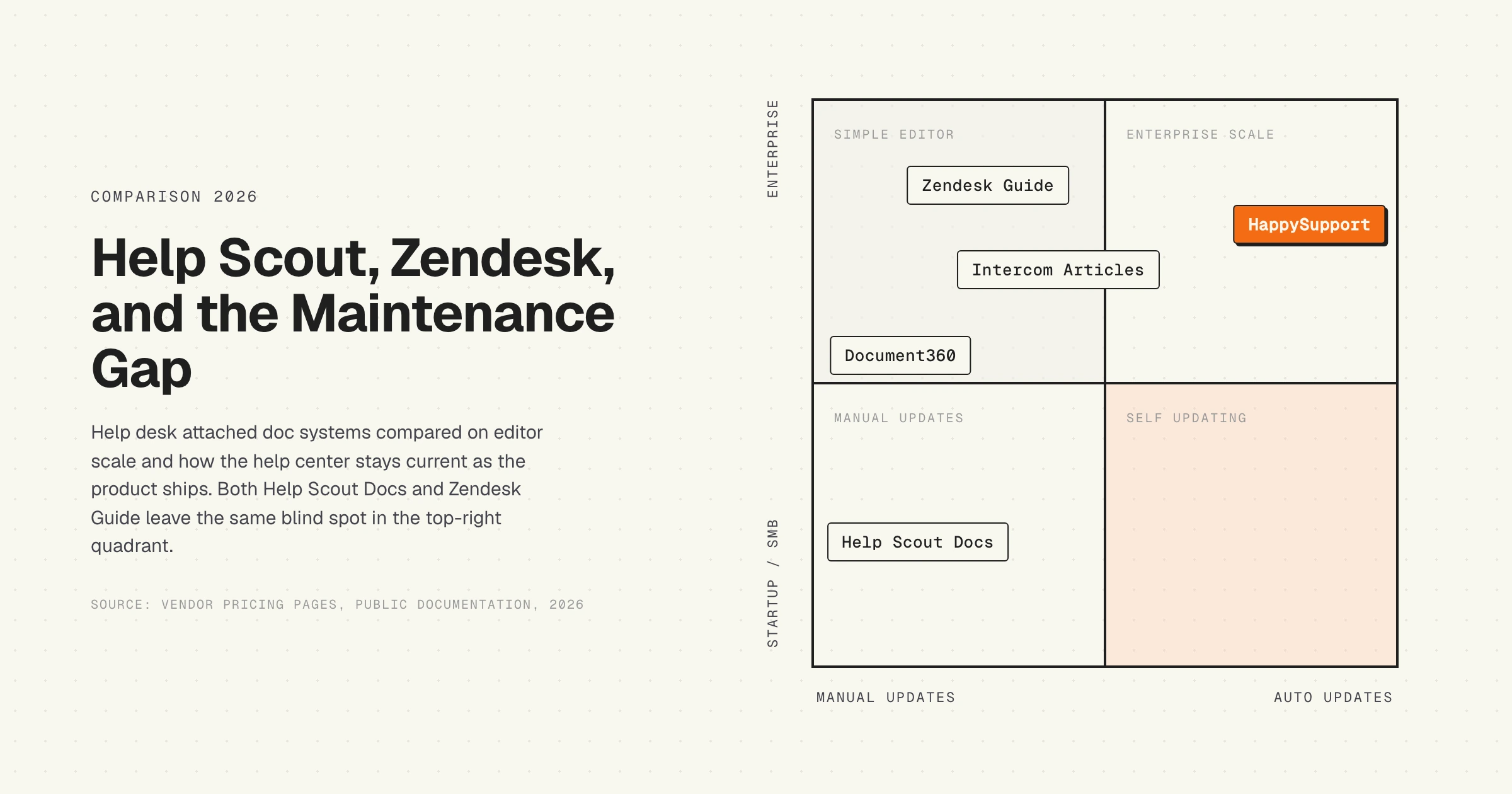
Here is the part nobody compares on. Help Scout Docs and Zendesk Guide are excellent at publishing. Both editors capture an article. Both surface it on a public help center. Both feed an AI search layer that reads from the article. Neither tool has any concept of "this article is now wrong because the product changed."
The article gets written on a Tuesday. The product team ships a UI change on a Friday. By Monday the screenshots are stale, the button labels in step 3 no longer match what the customer sees, and the AI search is now confidently quoting an out-of-date workflow back to every customer who asks. Help Scout's Beacon AI Answers and Zendesk's AI Agent both have the same blind spot: they assume the underlying article is correct, and they amplify whatever is in the knowledge base. If the article is six weeks behind the product, every AI surface that reads from it propagates the stale information.
This is structural to the help desk attached knowledge base model. The help desk does not know what the product is doing. The knowledge base reads from articles, the articles were written by a human, the human last looked at the product six weeks ago. Documentation decay is the hidden cost of every help center, and the cost scales with how often the product ships. For weekly-release SaaS teams, the maintenance interval is permanently behind the release interval.
The Knowledge Centered Service methodology, documented by the Consortium for Service Innovation, is the platform-agnostic answer: bake article maintenance into every ticket-resolution loop, so the knowledge base updates as a side effect of solving cases. KCS works regardless of which tool you run. The problem is that KCS requires discipline most small teams cannot sustain.
Which failure mode is more disruptive
Both tools go stale. The failure modes are different, and the difference matters when you pick a tool.
Help Scout Docs goes silently stale. There is no governance layer to catch it. Nobody reviews an article quarterly because there is no review workflow. The article sits, the product ships, the article drifts, customers file tickets, agents notice the article is wrong, agents fix the article inline (sometimes), and the cycle continues. The stale state is invisible until a customer complains.
Zendesk Guide goes loudly stale. The approval workflow flags articles for review, the analytics dashboard shows a stale-article report, the content blocks need updating across hundreds of references. The problem is queued and visible. The problem is also rarely solved. Most teams accumulate a stale-article backlog in Zendesk Guide that grows quarter over quarter because the workflow surfaces the work but no one is assigned to do it. The backlog is the visible artifact of an invisible problem: the underlying product moves faster than the team can review documentation.
For a 10-agent team running Help Scout Docs, the silent failure mode is usually cheaper because there is less infrastructure to ignore. For a 100-agent team running Zendesk Guide, the loud failure mode is more expensive because the governance layer creates the illusion of control. Both teams end up with the same underlying problem: documentation drift the help desk cannot detect.
Help scout docs vs zendesk guide recommendation framework by company size
Map the decision to company size and motion. The thresholds are not rigid, but they hold up across the customer-interview data we have collected on the support-tooling market.
Under 10 agents, one product, founder-led support
Help Scout, or HappySupport. Help Scout's free Docs site covers a working help center, Standard at $25 per user gives shared inboxes and Beacon, and AI Answers at $0.75 per resolution is the cleanest AI billing model on the market. HappySupport fits the same size when nobody owns documentation full time: articles in minutes with the recorder, kept current through Git handoff and health audits, AI chat and a ticket inbox included, one flat price from 129 EUR per month, EU hosting. There is no reason to pay for Zendesk Suite at this size.
10 to 30 agents, one product, growing self-service
Help Scout Plus or Pro depending on workflow needs. The lack of approval workflows starts to matter around 15 agents, but Help Scout Plus at $45 per user is still half of Zendesk Growth at $89. Unless you need multi-brand or multilingual auto-translation, stay on Help Scout.
30 to 100 agents, multi-product or multi-brand
Mixed. If the knowledge base is the primary self-service surface and content governance matters more than per-agent cost, Zendesk Guide on Suite Growth or Professional is the right call. If self-service is secondary to a strong shared-inbox motion and you are willing to manage multiple Help Scout Docs sites manually, Help Scout Pro still works at this size.
100+ agents, multi-brand, regulated industry
Zendesk Suite Enterprise. The certifications (FedRAMP, ISO 27001, HIPAA, advanced data privacy) and the data residency controls usually outweigh the per-agent premium. Help Scout Pro covers HIPAA but does not match Zendesk on the full enterprise compliance surface.
Product-led SaaS team shipping weekly
Neither tool solves the maintenance problem at the architectural level. If your bottleneck is "the help center is always behind the product," you are in a different category of tool: HappySupport, which pairs the help center with Git handoff, AI chat and a ticket inbox. See the alternatives section below.
Alternatives to both Help Scout Docs and Zendesk Guide
Three honest alternatives, depending on where the help scout docs vs zendesk guide comparison is actually pointing.
- Intercom Articles. If the parent system you want is Intercom (messenger, AI, ticketing in one product), Intercom Articles is the natural answer. Bundled with Intercom Suite. See our Intercom Articles pricing breakdown for the comparable math.
- Document360. Standalone, sold per project, not per agent. Strongest pure-documentation editor in the market. See our Document360 pricing analysis for the per-project economics. Best for content-led teams that already use a separate helpdesk.
- HappySupport. Different category. Built for product-led SaaS teams shipping weekly, where the maintenance interval matters more than the editor strength. The architecture detects product changes that affect documented flows and flags the articles before customers do. Help center, AI chat, ticket inbox and in-app widget come in one product at a flat price, so it does not need a separate helpdesk underneath it. See why most help centers are always wrong for the structural argument.
For broader comparisons see our honest review of help center software by team profile, which scores Help Scout Docs, Zendesk Guide, and the rest of the category against the maintenance dimension that this article surfaces.
HappySupport in this context
HappySupport is not competing on editor features against Help Scout Docs or Zendesk Guide. The architecture is built around a different problem. HappyRecorder is a Chrome extension that captures UI flows as DOM and CSS selectors instead of pixel screenshots, so the recorded steps survive a UI redesign. HappyAgent watches the product repository for code changes that affect documented flows and flags the affected articles before the customer notices anything is off. That closes the maintenance gap both Help Scout Docs and Zendesk Guide leave open. The product is not only the maintenance mechanism: it also includes the help center itself, an AI chatbot that answers only from your own articles, a ticket inbox with email replies, and in-app tours and banners, all at a flat price from 129 EUR per month. HappySupport is the right buy for SaaS teams that want help center, AI answers, tickets and in-app help from one source, without per-agent pricing, hosted in the EU, and whose product changes faster than a person can re-audit articles. It is not the right buy for large contact centers that need phone, omnichannel routing and workforce management, which is where Zendesk Suite earns its premium. For a 10-person SaaS team shipping weekly, HappySupport reframes the math: not "which editor is better" but "how many tickets per month does our stale help center generate, and what would it cost to eliminate that line." Read more on what a self-updating help center actually means for the full argument.