

Guru pricing is one of the more opaque tier structures in the knowledge management market, because Guru moved to a quote-only model on the marketing site in 2025 and most public references still cite the old per-seat numbers. The historical anchor is real: Guru's Self-Serve plan was approximately $15 to $25 per seat per month with a 10-seat minimum, putting the floor at $250 per month regardless of team size. Enterprise has always been custom. What changed in 2025 is that the AI Knowledge Agents (Chat, Research, MCP Server) moved to Enterprise-only, so the Self-Serve plan now ships with verification cards but no AI Agents. Most pricing articles list a stale tier table and stop. The numbers anchor a useful conversation. The current quote is what you actually pay, and the published number is the cheaper half of what you spend over three years. The other half is the labor of verifying cards as source documents drift, and no Guru pricing breakdown surfaces it.
This article walks through every Guru plan as it stands in 2026, the 10-seat minimum and what it means for small teams, where AI features sit per tier, the true total cost of ownership at 10 and 50 seats over three years, and what to verify before you sign. Then a short alternatives section for teams that realize at the end that they are paying for trusted knowledge that goes stale at the source.
What is Guru?
Guru is an internal knowledge management platform built around the concept of verification cards: short, structured pieces of internal documentation that subject matter experts re-verify on a cadence. Guru is sold per seat, with a minimum of 10 seats on the Self-Serve plan, and is targeted primarily at internal use cases: sales enablement, customer support agent assist, employee onboarding, internal process documentation. It is not a customer-facing help center; Guru is the layer behind the help center, where the team reads from internally.
Guru as a product covers card-based authoring with templates, a Chrome extension and Slack integration for in-context surfacing, verification cycles that prompt subject matter experts to re-verify cards on schedule, search across cards and connected sources, and on Enterprise the AI Knowledge Agents (Chat for conversational answers, Research for multi-step queries, MCP Server for programmatic access). What Guru does not do, the part the pricing page is silent on, is tell you when the source document a card references has been updated and the card needs more than a click-to-verify. That is the cost we will return to.
Guru pricing plans and the seat model
Guru currently lists two pricing tracks: Self-Serve (per-seat, public anchor) and Enterprise (custom quote). Earlier marketing used three named tiers (Starter, Builder, Expert), but the 2025 simplification consolidated the public option into Self-Serve plus Enterprise. Every price below reflects the most recent public anchor before the move to quote-only on the marketing site, with annotation on where 2026 quotes land in practice.
| Plan | Anchor price | 2026 quote range | What you get |
|---|---|---|---|
| Self-Serve (annual) | $15 to $25/seat/month | $18 to $30/seat/month | Verification cards, Slack/Chrome integration, search, 10-seat minimum, basic analytics |
| Self-Serve (monthly) | $25 to $30/seat/month | $30 to $36/seat/month | Same as annual, billed monthly, 10-seat minimum |
| Enterprise | Custom | Median $37,800/year (Vendr, 164 deals) | AI Knowledge Agents (Chat, Research, MCP Server), 100+ integrations, SOC 2 Type II, HIPAA, GxP compliance, permission-aware access |
The 10-seat minimum and what it means for small teams
Guru's Self-Serve plan requires a minimum of 10 seats, paid whether you have 3 users or 10. At the low end of the anchor range, this is $150 to $250 per month for 10 seats, or $1,800 to $3,000 per year minimum. At current 2026 quote ranges, the floor is closer to $250 to $300 per month, or $3,000 to $3,600 per year. A 3-person sales team pays for 10 seats. A 5-person support team pays for 10 seats. The minimum is structural, not a billing accident: it filters out teams Guru does not want as customers (very small companies where the verification workflow does not pay back the seat cost).
The verification card workflow that defines Guru's pricing logic
Verification cards are Guru's core unit. Each card has an owner (a designated subject matter expert), a verification cycle (30, 60, 90 days), and a status (verified, needs verification, unverified). When the cycle expires, Guru prompts the owner to re-verify, which is usually a click if the content is still correct. The pricing logic flows from this: Guru is selling the workflow that keeps internal knowledge from drifting silently, and the per-seat cost reflects the assumption that every seat is a knowledge consumer benefiting from verified content.
The move to quote-only Enterprise pricing in 2025
Guru's marketing site no longer publishes Enterprise pricing publicly. The official framing is "platform and expertise solution, not just a per-seat tool." The operational reality is that Knowledge Agents (Chat, Research, MCP Server) launched in 2024 and 2025 and are gated behind Enterprise. Teams evaluating Guru for AI-powered Q&A workflows face an unpredictable price jump from Self-Serve to Enterprise, with the Builder/Self-Serve plan creating opacity around what AI capability you actually get without an Enterprise contract.
AI features: which tier gets what
Guru's AI features split into two layers as of 2026. The base AI layer (AI Suggest for related cards, AI Answers in basic form) is bundled into Self-Serve. The advanced AI layer (Knowledge Agents) is Enterprise-only.
AI Suggest and basic AI Answers on Self-Serve
Self-Serve includes AI Suggest, which surfaces relevant cards to readers based on context (a Slack message, a browser URL, a query in the Chrome extension). It also includes basic AI Answers that summarize across cards. There is no separate per-resolution charge at this tier; AI usage is bundled into the seat price with soft fair-use limits.
Knowledge Agents on Enterprise
Enterprise unlocks the full Knowledge Agent suite: Chat (conversational AI over the knowledge base), Research (multi-step query workflows that pull from cards and connected sources), and MCP Server (programmatic access for engineering teams building AI applications on top of Guru). These are the features that make Guru competitive with newer AI-native knowledge tools, and they are entirely gated behind Enterprise.
The trusted-knowledge promise and where it breaks
Guru's positioning is built on verified cards. The verification cycle ensures that someone clicks to confirm a card is current, on schedule. The gap is that verification is binary (verified or not) and does not detect when the source document a card references has changed. If a sales card cites the pricing page, and the pricing page changes, Guru does not know. The owner clicks verify on schedule, the card stays green, and the AI Knowledge Agents quote it back to users as trusted. The trust signal is real but it is a signal of human attention, not source accuracy.
Guru total cost at 10 and 50 seats over three years
License cost is the visible line. Verification labor is the second line. Source-document maintenance labor is the invisible third one. Every Guru deployment that survives past month six requires somebody to verify cards on schedule (the explicit workflow Guru bills for), and separately requires somebody to update the source documents the cards reference when those documents change. For most teams, that work runs 5 to 15 hours per month depending on knowledge base size. Fully-loaded internal labor at $75 per hour in the US, or 65 to 70 euros per hour in DACH, makes this a real number.
10 seats, Self-Serve, three years
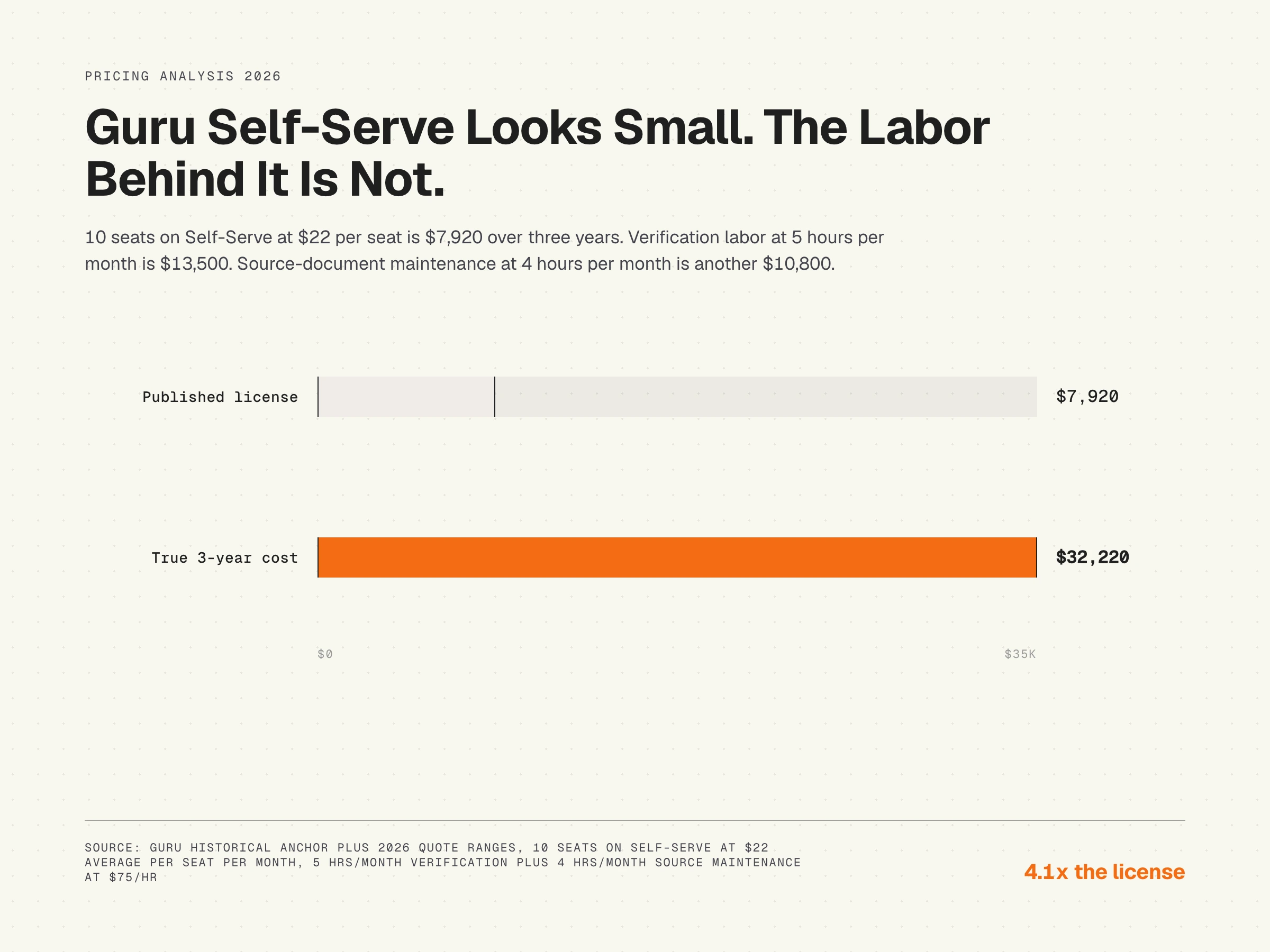
Self-Serve at $22 per seat per month average quote x 10 seats x 36 months: $7,920. Verification labor at 5 hours per month at $75: $13,500. Source-document maintenance for cards at 4 hours per month: $10,800. Total: $32,220. License is 25 percent of the three-year cost. Labor (verification plus source maintenance) is 75 percent.
50 seats, Enterprise, three years
Enterprise at Vendr median $37,800 per year x 3 years: $113,400. Verification labor at 15 hours per month at $75: $40,500. Source-document maintenance for a larger knowledge base at 12 hours per month: $32,400. Total: $186,300. License is 61 percent. Labor is 39 percent. The bigger the team, the more the license dominates, but labor is still 39 percent of total spend.
The breakdown matters because it changes how you should think about the price. Guru is selling the workflow that prompts humans to verify. You are paying for the prompt, then doing the verification, then separately maintaining the source documents the cards reference. Documentation decay is the hidden cost of every knowledge tool, and Guru's verification model exposes it cleanly: verified cards can still be wrong if the underlying source drifted.
The source-drift cost no Guru pricing article mentions
Guru is excellent at prompting humans to verify cards on schedule. The verification cycle is the cleanest workflow in the knowledge management market for keeping human attention on content. What Guru does not do is detect that the source the card references has changed. The platform has no concept of "this card cites a feature in the product that no longer exists." When the product team ships a UI change on a Tuesday, the card referencing that UI flow is wrong on Tuesday afternoon. The owner clicks verify on schedule because the card looks the same as last time, and the Knowledge Agent quotes the stale card back to the sales team in a customer call.
This is structural, not Guru-specific. Every knowledge management tool that relies on human verification has the same gap. The cost shows up as sales people quoting stale product details, as agents quoting stale workflow steps, and as the eventual cost of an audit when the team realizes the verified cards are not the same as the verified-and-current source documents. For internal knowledge that references a fast-shipping product, the maintenance interval needs to match the release interval, and Guru's verification cycle is not built for that cadence.
Guru hidden costs and what to verify before signing
The published per-seat price is the floor. Six categories of cost stack on top before your effective spend reaches reality. Verify each one in writing before you sign a multi-year contract.
- 10-seat minimum. Self-Serve requires 10 seats whether you have 3 or 10 users. Floor is $1,800 to $3,000 per year on annual, more on monthly.
- Knowledge Agent gating. AI Chat, Research, and MCP Server are Enterprise-only. Teams that want AI-powered Q&A cannot stay on Self-Serve.
- Enterprise jump. Vendr median Enterprise contract is $37,800 per year (164 deals). The jump from Self-Serve to Enterprise is large, often 5 to 10 times the Self-Serve floor.
- Annual vs monthly billing. Annual saves 10 to 20 percent vs monthly. Multi-year deals commonly achieve another 10 to 20 percent.
- Volume discounting. Volume discounts kick in at 100-plus seats. Teams between 25 and 100 seats have limited negotiation leverage.
- Verification labor. Verification is not a billing line, but it is the work Guru's pricing assumes you will do. Budget 3 to 15 hours per month depending on card volume.
When Guru pricing makes sense, and when it does not
Guru is the right choice for internal knowledge management at mid-market and enterprise scale: teams where the primary use case is sales enablement, agent assist, or employee onboarding, the company has 50 or more knowledge consumers, the subject matter experts can realistically own verification cycles, and the AI Knowledge Agents on Enterprise justify the price step. The Slack and Chrome integration is the strongest in the internal-KB category, and the verification workflow is genuinely valuable for content that has clear owners.
It is the wrong choice for small teams below the 10-seat minimum, for customer-facing help centers (Guru is internal), and for teams whose source documents change faster than the verification cycle. For an honest comparison of knowledge base tools by use case, Guru shows up as the strongest internal-KB choice and a poor fit for fast-shipping product teams that need source-level freshness.
An open-access resource on the maintenance side of knowledge management is the Service Innovation Library, which covers the KCS (Knowledge-Centered Service) methodology and includes practical material on how to keep knowledge current as the underlying systems evolve. KCS is platform-agnostic and applies regardless of whether you run Guru, Confluence, or any other internal knowledge tool.
Guru alternatives by team profile
Three honest alternatives to consider, depending on where you sit:
- Confluence. Larger, document-centric, weaker on verification workflow but stronger on long-form content. Common pairing with Jira for engineering teams.
- Notion. Flexible, AI-enabled, weaker on permission-aware access and verification. Good fit for small to mid-market teams that do not need Guru's strictness.
- HappySupport. Built for customer-facing help centers on product-led SaaS teams, not internal knowledge. Different category from Guru, but adjacent for teams whose primary use case is help-center content that needs to stay current as the product changes.
HappySupport in this context
HappySupport is a different category of tool than Guru. Guru solves the internal-knowledge verification problem: how do you prompt human owners to confirm cards stay current on schedule. HappySupport solves the customer-facing freshness problem: how do you keep customer help center articles accurate when the product ships every week, without relying on human verification cycles. The architecture is DOM/CSS recording in a Chrome extension (HappyRecorder), which captures UI flows as code-selectors instead of pixels, paired with HappyAgent GitHub Sync, which watches the product repository for changes that affect documented flows and flags the affected articles for update. The source-drift gap in Guru's model is the gap HappySupport closes for the customer-facing surface, by detecting product changes automatically instead of waiting for the verification cycle. For teams running both internal Guru and customer-facing docs, the two tools are complementary rather than competitive. Read more on what a self-updating help center actually means, or look at how AI knowledge management tools handle the source-drift problem.
 Talk through the numbers