.png)


This guide is for teams downsizing their support stack from Intercom to Help Scout. The reasons are familiar: Intercom's per-MAU pricing scales faster than your revenue, the Custom Bots you built last year never paid back the time, and your support lead wants a tool that looks like email instead of a chat platform with three sidebars.
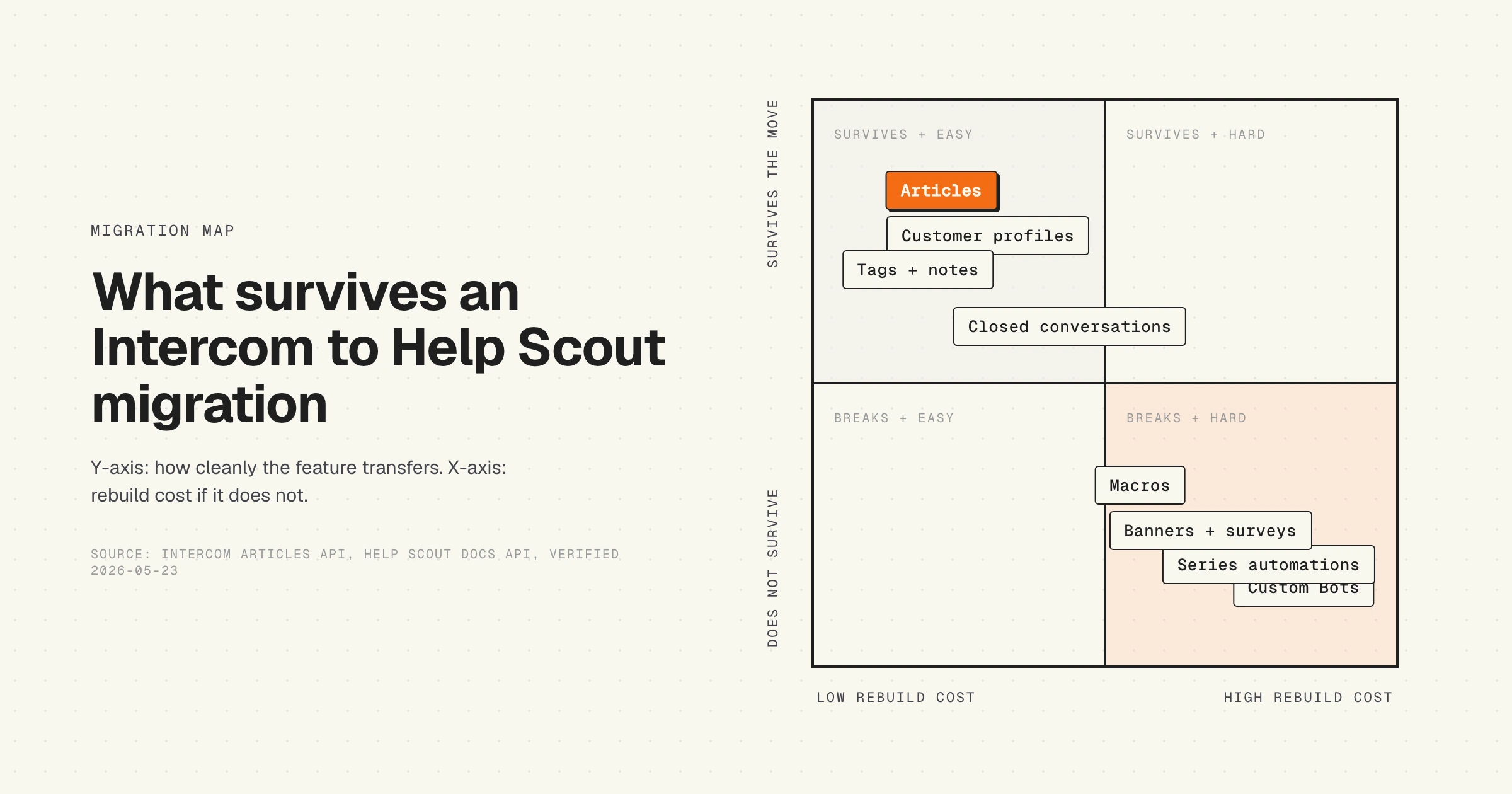
The honest version of an Intercom to Help Scout migration is that some things survive cleanly, some things require manual work, and some things just do not exist on the other side. Articles transfer. Customer profiles transfer. Closed conversation history transfers (with caveats). Custom Bots, Series, Resolution Bot, Banners, Surveys, and outbound campaigns do not, because Help Scout did not build that part of the product.
What follows is the step-by-step: how to export from Intercom, how to transform the data, how to import to Help Scout, how to handle URL redirects so SEO does not collapse, and the cutover day plan. The last section is the one most migration guides skip: the process you put in place after the move, so the new help center does not drift the same way the old one did.
Why teams move from Intercom to Help Scout
Three reasons surface in nearly every migration call.
First, pricing. Intercom prices on monthly active people. Your contact database grows whether your team gets bigger or not. Help Scout prices per user, which means the bill scales with your team, not your traffic. A team paying Intercom $400 a month at 2,000 MAUs will often pay Help Scout $80 to $200 a month for the same agent count. Read the breakdown in Intercom Articles pricing and Help Scout Docs pricing before the budget meeting.
Second, feature surface area. Intercom is a customer messaging platform with help center, chat, AI, automations, outbound, surveys, banners, and a Messenger SDK. Most teams use 30% of it. Help Scout is an email-first help desk with a docs site (Help Scout Docs) and a chat widget (Beacon). Fewer surfaces, fewer broken automations, fewer settings to audit.
Third, the AI angle has stopped being a moat. Intercom's Fin is impressive when it works, but it only works on documentation that is accurate, and Intercom Articles drifts the same way every other help center drifts. We wrote about this in why Intercom Fin breaks on stale docs. Help Scout's AI Answers is simpler and good enough for most teams that are paying Intercom for AI but not getting the deflection rate to justify it.
None of these reasons are wrong. They are also not the whole story. The cost of the migration itself, the rebuild work for anything you automated in Intercom, and the SEO risk if you fumble the redirects can eat the first year of savings if you do not plan it.
What survives the migration
Plan around this list. Anything not here is either manual work or genuinely gone.
What does NOT survive
Most teams underestimate this list. Build the rebuild plan around it before you sign the Help Scout contract, because some of these are weeks of work and some are genuinely gone with no equivalent.
This is the part of the migration most teams budget too little for. If your Custom Bots handle the bulk of your inbound, plan to absorb that volume with humans for the first month while you rewrite saved replies. If your Series sends 12-touch onboarding sequences, move them to a real marketing automation tool before you turn off Intercom, not after.
Step 1: Plan the cutover
Block four weeks. Most teams who try to do this in a weekend regret it. The exception is teams with under 100 articles and no automations, which can be done in a few days.
Decide three things up front.
The cutover date. Pick a low-volume day. Saturday morning, end of quarter, after a major release lands but before the next one starts. Communicate it to support, sales, and any team that touches Intercom.
Customer comms. Customers do not need to know you switched help desks. They do need to know if support response times will be longer for 48 hours during the cutover, and they need to know that any in-product chat widget URL is changing.
The rollback trigger. Define what would make you roll back. Critical conversation data missing. SEO traffic to docs drops by more than 30% week-over-week. The Help Scout API hits rate limits during import. Write the rollback plan before you start.
Help Scout's official migration team in their help desk migration guide calls out five common mistakes worth memorizing: failure to test before full deployment, incorrect data mapping, missing agent accounts in the new tool, insufficient time allocation, and overlooking support sources like old email addresses or API integrations. The third one bites teams every time. Create your Help Scout user accounts before any conversation import runs, otherwise author attribution falls back to a system user and your historical context is harder to read.
Step 2: Export Intercom Articles
Two paths. Pick one.
Path A. Use the open-source tool. The Raisely team open-sourced a Node.js migrator at github.com/raisely/intercom-to-helpscout-migrator. It pulls Intercom Articles, downloads images, creates Help Scout Categories from Intercom Collections, uploads images to Help Scout, creates the articles, and writes URL redirects to your Help Scout site. The README is honest about its limits: it was built for one migration, may break if Intercom changes class selectors, and ships with no warranty. It processes roughly 100 articles per hour. Good for teams with under 500 articles and basic structure.
Path B. Run the API export, manual transform, and API import yourself. This is the right choice for larger or more customized libraries.
Export from Intercom using the Articles API. The endpoint is GET https://api.intercom.io/articles, returning paginated results sorted by updated_at descending. Each article object includes id, title, body (HTML), parent_id, parent_type, state, created_at, updated_at, author_id, description, and url. Pagination uses cursor-based starting_after. Article tags are read-only in API responses. Reference: Intercom's official Articles API guide.
The export loop, in pseudocode:
Save the raw JSON dumps before you transform anything. If something goes wrong in Step 3 or Step 4, you do not want to hit the Intercom API again.
Step 3: Transform articles for Help Scout Docs
Help Scout Docs accepts HTML. So does Intercom. The transforms are about the differences in structure, not format.
Category mapping. Build a lookup table: Intercom collection ID to Help Scout category ID. You will create the categories in Step 4 first, then run the article import with the resolved IDs.
Internal links. Find every <a href> pointing to your Intercom help center domain. Rewrite them to the relative path that Help Scout will use. If your Intercom URL was https://intercom.help/yourbrand/en/articles/12345-getting-started, the Help Scout slug will likely be getting-started. Build the map before you transform, do not try to do it inline.
Images. Intercom images are hosted at downloads.intercomcdn.com. Help Scout will not proxy these. You need to download every image, upload to Help Scout Assets, and rewrite the src. The Raisely tool does this automatically. If you wrote your own pipeline, expect this step to take longer than the article import itself.
Nested headings. Intercom auto-collapses some heading hierarchies. Help Scout respects what you send. Audit a sample of 20 articles before bulk-importing.
Markdown vs HTML. Both platforms accept HTML in their APIs. If you prefer Markdown for source-of-truth control, consider running articles through a Pandoc or Turndown step and storing the Markdown in a git repo, then converting back to HTML on import. This is the foundation for the post-migration process step at the end of this article.
Step 4: Import to Help Scout Docs
The Help Scout Docs API runs on docsapi.helpscout.net over HTTPS, with Basic Auth using your API key as the username and an arbitrary value (typically X) as the password. Pull the key from your Help Scout profile under Authentication. Reference: Help Scout Docs API documentation.
Rate limits scale with your site count: 2,000 requests per 10 minutes on 1 site, 3,000 on 2 sites, 4,000 on 3 or more. A 429 response means you hit the cap. Build retry-with-backoff into your importer. Pagination caps at 50 results per page.
The import order matters:
- Create the Help Scout site (if not already provisioned).
- Create the categories (one POST per Intercom collection).
- Upload all images to Help Scout Assets, store the URL map.
- For each article: rewrite image src URLs using the map, rewrite internal links, POST to the Articles endpoint with the resolved category ID.
- Spot-check 10 articles for formatting fidelity before publishing.
Help Scout's API supports article drafts. Import everything as drafts first, audit, then publish in a second pass. This gives you a rollback escape hatch if a regex went wrong.
Step 5: Export and import customer data
Articles are the easy part. Customer data is where most teams stop and pay a migration service.
Intercom exposes contacts via the Contacts API. You can pull email, name, custom attributes, tags, and the company association. What you cannot pull cleanly via the standard API: complete conversation transcripts. Intercom's CSV export and S3 export skip conversation messages. To get full message histories, you need the REST API with its conversation list and conversation parts endpoints, paginated and rate-limited.
Three options for conversation history:
Option 1. Skip it. Closed conversation history is read-only in your old tool for as long as you keep the Intercom subscription. Many teams keep Intercom on its lowest tier for 6 to 12 months purely as an archive, then cancel. This is the cheapest path and the most honest one.
Option 2. Pay a migration service. Help Desk Migration, ClonePartner, and similar services have built mappings between Intercom and Help Scout. They handle the conversation parts pagination, the customer dedup, the tag mapping. Typical cost: $500 to $5,000 depending on volume. Most teams under 100k contacts pay for this rather than build it.
Option 3. Write a custom script. Worth it only if you have engineering capacity and either over a million contacts or specific data requirements the paid services do not meet. Plan for two to four engineering weeks.
For customer profiles only (no conversation history), the path is straightforward: export via Intercom Contacts API, transform to Help Scout's customer schema, POST via the Help Scout Mailbox API. The custom attributes map to Help Scout customer properties.
Step 6: Rebuild automations as Help Scout Workflows
This is the step most migration guides skip and most teams underestimate.
Inventory every Intercom Custom Bot, Series, and Workflow. Categorize them:
- Ticketing / routing logic (assign to team, set priority based on tag): rebuilds cleanly in Help Scout Workflows.
- Inbound chat triage (qualify lead, route to sales, deflect with article): Help Scout's Beacon does some of this, but not at parity. Plan to absorb with humans.
- Outbound lifecycle (onboarding emails, re-engagement): move to Customer.io, Loops, Klaviyo, or your existing marketing automation tool.
- In-product banners: move to a dedicated in-app messaging tool like Pendo, ProductFruits, or build it into your product.
Help Scout Workflows are simpler than Intercom Series. They handle if-this-then-that rules well: when conversation has X tag, assign to user Y; when conversation is from customer in segment Z, set priority to high. They do not handle branching sequences with delays, conditional waits, or A/B splits. If your Intercom Series has any of that, the rebuild is in your marketing automation stack, not in Help Scout.
The point of the audit is not to rebuild everything. It is to decide what gets rebuilt, what gets retired, and what moves to a different tool. Many automations built in Intercom in year one are stale by year three and never paid back the time. Use the migration as the forcing function to retire them.
Step 7: URL redirect strategy
If your Intercom help center has SEO traffic, this is the highest-stakes step in the migration.
Intercom hosts your help center at one of three URL patterns:
intercom.help/yourbrand/(the default)support.yourdomain.com(custom subdomain via CNAME)yourdomain.com/help/(reverse-proxied)
Help Scout Docs follows the same three patterns: yourbrand.helpscoutdocs.com, custom subdomain, or reverse-proxy.
The redirect plan depends on your URL pattern.
Custom subdomain. Easiest path. This is the most common Intercom hosting pattern. Change the CNAME from Intercom to Help Scout once you have created all article slugs to match (or maintained a redirect map). The article URLs change, but Google sees a 301 from each old URL to the new one and preserves the link equity. Help Scout Docs API has a Redirects endpoint specifically for this case.
Reverse proxy. Hardest path. You control the proxy config (Cloudflare Workers, Nginx, etc.). Update it to point at Help Scout. Build a redirect map from old URLs to new ones in the proxy layer. Test 50 random URLs before flipping production.
Default subdomain. Easiest to leave behind. The traffic is on intercom.help/yourbrand and you cannot redirect that since you do not own the domain. Set up your new Help Scout subdomain, manually request reindex in Google Search Console, and accept a temporary traffic dip while Google re-crawls.
The Raisely tool writes redirects to Help Scout's Redirects endpoint automatically. If you ran Path A in Step 2, your redirects are already in place. If you ran Path B, build the redirect map as the last step before cutover.
Step 8: Cutover day plan
One person owns the cutover. Everyone else is on standby.
The sequence:
- Final sync of any conversations created in the last 24 hours.
- Set Intercom to a maintenance state: turn off all Custom Bots, pause Series, set the chat widget to a generic "we are migrating, please email support@yourdomain.com" message.
- Update DNS or reverse-proxy to point at Help Scout.
- Verify the new help center loads at the expected URL.
- Test 10 random old-URL redirects.
- Update the chat widget code in your product to point at Help Scout's Beacon.
- Notify support team that Help Scout is now live.
- Monitor for 4 hours. If anything is broken, the rollback is: revert DNS, the Intercom maintenance message is still in place, no customer experience regression.
Give it 48 hours before you cancel the Intercom subscription. The first weekend after a migration is when edge cases surface. A customer with a saved bookmark to a specific Intercom article. A Stripe webhook that was firing into an Intercom integration. A Slack notification from Intercom that someone in the team relied on without realizing it.
Step 9: The process you put in place after
This is the angle most migration guides miss. A tool change does not fix documentation drift. If your Intercom Articles got stale, your Help Scout Docs will get stale, because the failure mode is upstream of the tool. The product ships, the docs do not get updated, the team blames the next release, repeat for two years.
The post-migration process is what determines whether the next 18 months are different. Three pieces.
Version control. Treat your Help Scout articles as code. Store the canonical Markdown in a git repo. Use the Help Scout API to push from git to Help Scout, not the Help Scout UI as the source of truth. This gives you change history, code review, and a single place to grep for stale references when your product team ships a new feature. Read more in how a self-updating help center works.
Product triggers docs. The current default in most companies is that support notices an article is wrong (from a customer complaint or a re-opened ticket) and someone fixes it weeks later. Reverse the polarity. When the product changes (release notes, deploy log, GitHub PR), an automated check flags every article that references the changed feature. The article either gets updated in the same PR, or it gets flagged for the next sprint. The mechanic is described in the hidden cost of documentation decay.
Measure freshness. Most help center dashboards show article count and views. Neither tells you if the docs are accurate. Track instead: average days since last edit, percentage of articles with a verified-fresh stamp in the last quarter, and the ratio of "did this help?" thumbs-down per article. A help center with 80 articles all updated this quarter beats a help center with 400 articles where half are two years stale.
The migration is the easy part. Most teams can finish it in four weeks. The hard part is making sure you do not have this same conversation again in 2028 with a different vendor name in the title.
HappySupport keeps the articles current
HappySupport sits beside your helpdesk as the always-current article layer. It does not replace Help Scout, Intercom, Zendesk, HubSpot, Front, or Freshdesk. Keep your ticketing system. Swap in HappySupport for the help center layer that has to stay accurate as the product ships.
The product records onboarding flows by capturing DOM and CSS selectors, not pixels, so when your UI changes the article updates itself. Articles regenerate on every meaningful product release. Customers find the right answer the first time, support tickets drop, and your team stops spending Friday afternoons rewriting screenshots.
If you are about to migrate from Intercom to Help Scout, the question worth asking before you sign the Help Scout contract: what is the process you have to keep Help Scout Docs current that you did not have to keep Intercom Articles current? If the answer is "the same one," you are buying yourself a tool change with no process change. The drift comes back.










