.png)


The HubSpot knowledge base is the help-center module bundled with Service Hub Professional ($450/month, 5-seat minimum) and Service Hub Enterprise ($1,500/month, 10-seat minimum). On Professional you get one knowledge base with up to 2,000 articles. On Enterprise you get up to 25 knowledge bases and 10,000 total articles. There is no free or Starter tier with knowledge base access.
The headline truth most comparison sites miss: the HubSpot knowledge base is excellent for teams already living inside Service Hub, and noticeably weaker the moment you compare it to a dedicated help-center tool on its own merits. The article editor is clean, multi-language publishing covers 17+ languages, and Breeze AI can draft articles from your closed tickets. The catch shows up in front-end customization, multi-brand support, search depth, and the credit economics behind the AI features. Pricing in this article was verified against hubspot.com on the publish date, and community threads on the HubSpot forum were mined for real-user perspectives.
If you are weighing Service Hub Pro against a standalone help center next to your ticketing system, this guide is the long version. For the head-to-head against Zendesk's KB, read HubSpot KB vs Zendesk Guide.
Where the HubSpot knowledge base actually lives
The knowledge base is a module of Service Hub, not a standalone product. You cannot buy "HubSpot Knowledge Base" the way you would buy GitBook or Document360. To use it, you need a Service Hub Professional or Enterprise seat, and the KB is wired into the same Smart CRM that powers your tickets, contacts, and conversations.
That tight coupling is the entire pitch. Articles tie to tickets. Tickets tie to contacts. Contacts tie to deals. When a customer reads an article, HubSpot tracks it on the contact timeline. When a support rep closes a ticket using an article, the CRM knows. None of this works if you publish articles in a separate tool sitting next to HubSpot. The convenience is real, and so is the lock-in.
Two things are not included in any tier: a community forum and a public changelog as a first-class object. Teams that need community use a third-party tool or pay for a bolt-on. Teams that publish changelogs put them in a regular page or article.
Service Hub Professional: the entry tier for the HubSpot knowledge base
Professional starts at $450/month with a 5-seat minimum, plus a one-time $1,500 onboarding fee. The Pro tier includes a single knowledge base, capped at 2,000 articles, with multi-language publishing, the drag-and-drop article editor, and the basic version of Breeze Copilot for drafting.
Who Pro actually fits: a single-product SaaS with one brand, one help center, and a support team of 5 to 25 people. The 2,000-article ceiling sounds high until you start translating into seven languages and tracking each translation as a separate article (which the system does). One brand, one help center, one language family: Pro is the right tier.
Hidden costs on Pro: every additional seat over the five included is $90/month at list price. The 3,000 included HubSpot Credits cover roughly 30 AI article drafts per month if you only use Breeze for KB generation. Credits also pay for translation, gap analysis, and content optimization, so heavy AI use can blow through the included allocation in a single content sprint.
Verdict: skip Pro if you need more than one knowledge base, more than one brand, or more than 25 seats. The Enterprise math gets better fast at that point.
Service Hub Enterprise: where the HubSpot knowledge base scales
Enterprise starts at $1,500/month with a 10-seat minimum, plus a one-time $3,500 onboarding fee. Enterprise unlocks up to 25 knowledge bases, 10,000 total articles, custom domain hosting, approval workflows, advanced analytics, single sign-on access controls, and the higher 5,000 monthly Credits allocation.
Who Enterprise actually fits: multi-product SaaS, multi-brand companies, businesses with separate customer and partner KBs, or any team that needs SSO on internal-facing knowledge bases. The 25-KB ceiling is real architecture: 25 separate help centers with their own domains, themes, permissions, and analytics.
Hidden costs on Enterprise: the $3,500 onboarding is mandatory. Per-seat overage is $120/month at list price. SSO, approvals, and the higher credit allocation only matter if you actually use them, and most mid-market teams do not need 25 knowledge bases. Many Enterprise customers admit privately they pay for the tier purely to unlock approvals and SSO, not the multi-KB feature.
Verdict: pick Enterprise when you genuinely need multi-brand, approvals, or SSO. Skip if the only reason is "more articles" - rewriting and culling on Pro is cheaper than paying triple for the limit.
HubSpot knowledge base pricing table
Prices reflect HubSpot's published pricing on the publish date. Annual billing is typically what HubSpot quotes; monthly billing carries a premium of roughly 10 to 15%. Always confirm the seat count math with your sales rep before signing, because included seats and overage rates have shifted twice in the last 18 months.
Breeze AI inside the HubSpot knowledge base
HubSpot's AI brand for the knowledge base is Breeze, and three Breeze tools matter here: Breeze Copilot, the Knowledge Base Agent, and the Customer Agent. Together they form a loop where unanswered customer questions become drafted articles that train future answers.
Breeze Copilot lives inside the article editor and helps you draft, rewrite, summarize, or expand existing content. It is the lightest-weight tool of the three, and the most useful day-to-day. Copilot is included with the AI quota on Pro and Enterprise.
The Knowledge Base Agent operates further upstream. It analyzes closed tickets, spots topics that come up repeatedly, and drafts articles to fill those gaps. It needs at least five closed tickets on a topic to suggest an article, and works best on accounts with six months or more of ticket history. The intelligence comes from Frame AI, which HubSpot acquired in December 2024.
The Customer Agent is the consumer-facing chatbot that resolves customer questions using your knowledge base. When it cannot resolve a question, it flags the gap, and the loop continues. Customer Agent deflection numbers vary wildly by industry. Teams with strong existing documentation see 30 to 50% deflection; teams without it see closer to 10 to 20% with the same configuration.
The catch is the credit economics. Drafting an article costs roughly 100 credits. Translating a single article into one language costs around 50 credits. A gap analysis report costs around 25 credits. A team aggressively using Breeze for translation and drafting can burn through Pro's 3,000 included credits in a single week of content work. Additional credits are purchased in packs, and the marginal cost rises with volume.
The bigger issue is what Breeze does not solve. The Knowledge Base Agent generates plausible drafts that still require human review for accuracy, because AI hallucination is a real risk, especially on technical product documentation. The agent does not know when a feature ships, does not read your codebase, and does not detect that a UI screenshot in your article no longer matches your live app. That is the documentation decay problem nobody is solving, including HubSpot.
The HubSpot knowledge base editor and search
The article editor is HubSpot's standard drag-and-drop editor, the same one used for landing pages and blog posts. Writers get headings, lists, links, embeds, code blocks, and image insertion. Comments and approval workflows are available on Enterprise. Version history lets you roll back changes. Article cloning is supported.
The editor is competent. It is not as fast as Notion-style editors used by tools like Document360, and not as code-friendly as GitBook for engineering teams. For a non-technical support author writing customer-facing articles, the editor is fine.
Search is the weaker side. HubSpot's KB search is keyword-based with synonym expansion, not vector-based or AI-generative the way newer help-center tools deliver direct answers. The Customer Agent provides a generative-search experience as a chatbot layer, but the on-page search field still surfaces a list of articles, not a synthesized answer. For teams used to ChatGPT-style search, the in-KB experience feels dated.
Multi-language support in the HubSpot knowledge base
HubSpot supports 17+ languages with automatic browser detection, language-specific URLs, and locale-aware analytics. Translation can happen manually or through Breeze, with each automated translation consuming credits. The system tracks translations as separate articles, which is what eats the 2,000-article cap on Pro fast for any team operating in three or more languages.
Translation quality is acceptable for FAQ-style content and brittle for any article that depends on specific product terminology. The recurring complaint on the HubSpot community forum is that translated articles need almost as much editing as starting from scratch, especially for technical documentation. For marketing content, the auto-translation holds up. For step-by-step product guides, plan to have a native speaker review every draft.
Branding and front-end control
This is where the HubSpot knowledge base most visibly lags dedicated help centers. The KB is themed, not designed. You pick a theme, set colors, adjust the header and footer, and that is roughly the extent of your control. The knowledge base cannot be customized in HubSpot's design manager the way landing pages or website pages can. Custom themes do not apply.
What that means in practice: every HubSpot knowledge base looks recognizable as a HubSpot knowledge base. If your brand identity matters at the help-center level (and for many consumer products it does), the visual ceiling is real. Custom domain hosting is only included on Enterprise.
For a B2B SaaS in stealth mode where the help center is a utility, the limitation does not matter. For a consumer product where the help center is part of the brand experience, it matters a lot.
What it actually costs at scale
The sticker price is rarely the invoice. Three concrete scenarios:
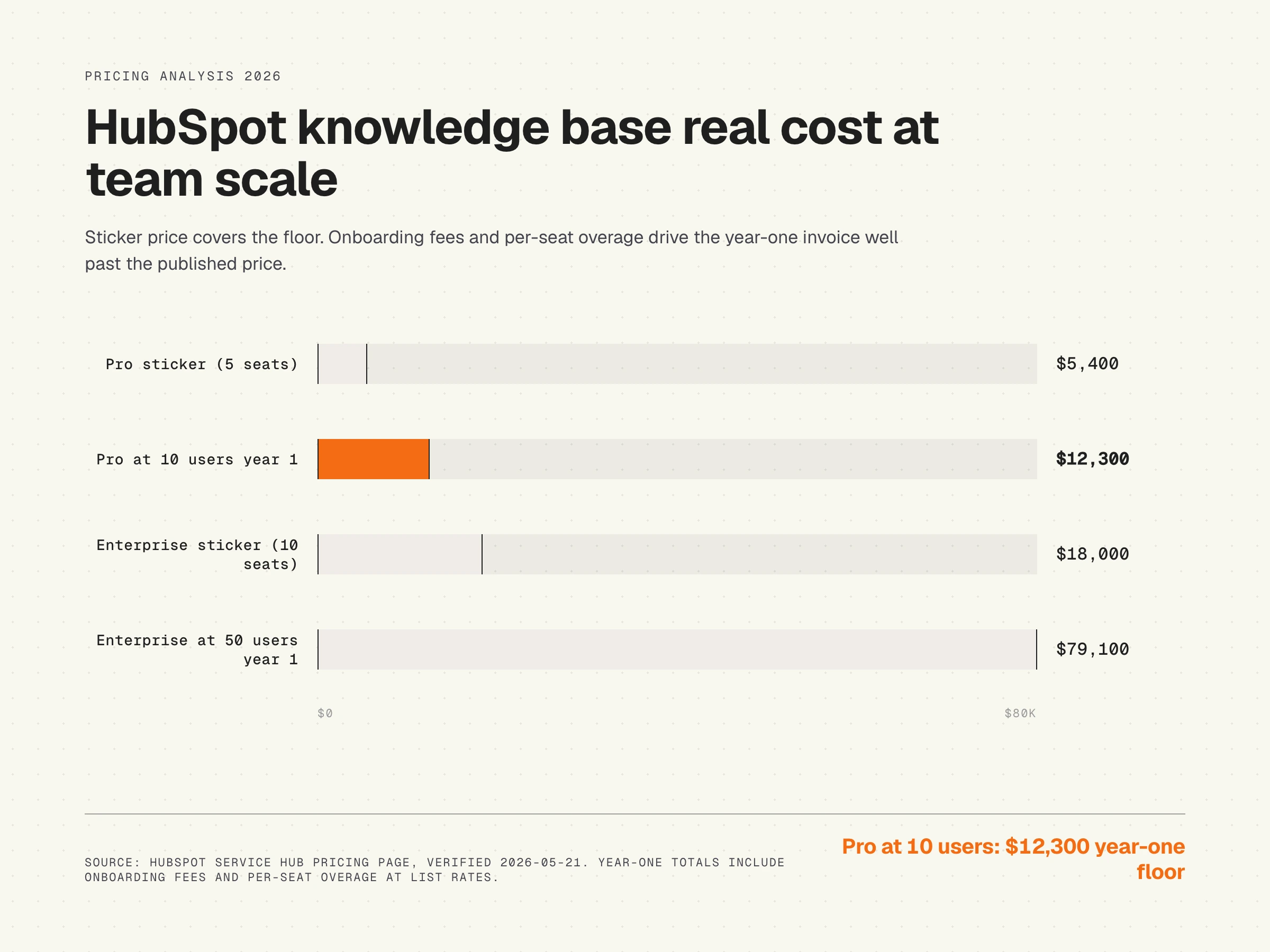
Solo founder, 1 user. The HubSpot knowledge base is not available. You need Pro minimum (5 seats), so the floor is $450/month or $5,400/year regardless of how many users you actually have. Many solo founders pay for unused seats simply to get KB access. If you are at this scale, dedicated help-center tools like GitBook or Document360 are cheaper at $50 to $200/month for a single user. See our GitBook pricing breakdown for the comparison.
Small team, 10 users. Pro at 10 seats: $450 + (5 extra seats x $90) = $900/month base, plus $1,500 onboarding in year one. Total year one: $12,300. Add 1,000 to 2,000 credits in overages and you are at $13,000+ for a mid-sized Pro deployment. This is where most HubSpot KB customers actually live, and the math is competitive with dedicated tools only if you are also using Service Hub for tickets and conversations.
Growing team, 50 users. Enterprise at 50 seats: $1,500 + (40 extra seats x $120) = $6,300/month base, plus $3,500 onboarding. Year one floor: $79,100. Heavy Breeze use adds another $5,000 to $20,000 in credit overages annually. At this scale, the question shifts from "is this competitive" to "what does my CFO need to see to justify the renewal." Companies frequently negotiate 15 to 25% off list at this volume; do not pay sticker.
The hidden costs nobody talks about
Annual versus monthly pricing differs by about 10 to 15%, which compounds at multi-year commitments. AI credit overages are the most volatile line item. Per-seat overage at Enterprise scale ($120/month) makes hiring decisions a Service Hub line-item review, not just an HR review.
Onboarding fees are non-negotiable in writing but routinely waived during sales cycles. If you do not push back on the $1,500 or $3,500, you will pay it. Integration premium is real: while Jira and Slack integrations are native, custom CRM integrations or migrations from legacy systems often come with implementation partner costs starting at $5,000.
The biggest hidden cost is documentation decay. The HubSpot knowledge base does not flag articles that have gone stale because a product changed. A team running on Pro for two years typically has 30 to 50% of articles partially or entirely outdated, and there is no native warning system. The cost is invisible until customers start complaining about the AI chatbot giving wrong answers, which is the moment teams discover the chatbot was confidently quoting outdated articles. We wrote about why this happens in AI chatbots and stale knowledge bases.
The honest limits of the HubSpot knowledge base standalone
Reviewed purely as a help-center tool, the HubSpot knowledge base trails dedicated competitors on five specific points.
- Front-end customization: theme-limited, no design-manager access.
- Search experience: keyword-based on-page, generative only via Customer Agent chatbot.
- Multi-brand support: Pro is single-KB only; Enterprise is the only path to multiple help centers.
- Community and forums: no native functionality.
- Documentation freshness: no built-in decay detection; manual audits required.
None of these are deal-breakers if HubSpot is your home base. All of them matter if you are choosing a help-center tool on its merits and HubSpot happens to also offer one.
G2 reviewer signal on HubSpot Service Hub pricing
HubSpot Service Hub scores around 4.0/5 on G2 overall, but the pricing-specific scores trail the product scores by a noticeable margin. Reviewers consistently rate HubSpot above the category median on usability and integration, and below the category median on pricing transparency and value-for-money.
Three representative G2 reviewer perspectives:
- An operations manager called the seat math "punishing" for teams that grow from 8 to 12 people in a year, because the cost-per-seat hit lands twice (Pro overage, then forced Enterprise upgrade).
- A customer success lead noted the KB Agent "drafts faster than we can review," meaning the bottleneck moved from writing to editing rather than disappearing.
- A small-business owner described HubSpot Service Hub as "the best CRM I have used and the most expensive way to maintain a knowledge base I have ever paid for" - praise and pricing critique in the same sentence.
The HubSpot community forum carries the same signal in less polished form. The recurring complaint is not that the product is bad; it is that the pricing scales faster than the value at small-team milestones.
Alternatives short list
If HubSpot's pricing or its standalone help-center weakness does not fit, three alternatives come up in the same conversations: Document360 (depth and structure for documentation-first teams), GitBook (developer-friendly, docs-as-code), and Help Scout (lighter-weight support-first stack). We compare the full landscape in our best knowledge base software roundup and the best help center software roundup.
Is the HubSpot knowledge base worth it
The verdict depends on which buyer profile you fit.
Founders and small teams (1 to 10 users). Skip Service Hub Professional purely for the knowledge base. The $450/month floor for 5 seats you do not need makes dedicated tools 5x cheaper. Pick Service Hub Pro only if you are also adopting HubSpot for tickets, conversations, and CRM in the same motion.
Mid-market teams (10 to 200 users). Pick Service Hub Pro if you are already on the HubSpot stack and your help center is a utility, not a brand asset. The integrated experience saves you a tool, the editor is fine, and the AI features are pragmatic. Pick a dedicated KB next to HubSpot if your help center is customer-facing strategy: search experience, branding, and freshness will matter.
Enterprise (200+ users). Service Hub Enterprise only makes sense if you genuinely need approvals, SSO, multi-brand, and the unified CRM data layer. The license cost is competitive at enterprise volume only after negotiating 15 to 25% off list. Teams that need a best-in-class help center should run a dedicated tool and integrate via API.
How HappySupport sits next to HubSpot
HappySupport is not a replacement for Service Hub. If you live in HubSpot for tickets, conversations, and CRM, keep doing that. HappySupport is the help-center layer for teams that need their documentation to stay accurate every product release without manual audits. It plugs in next to HubSpot the same way GitHub plugs in next to your IDE: same workflow, different specialization.
The argument for layering HappySupport alongside the HubSpot knowledge base is documentation freshness. The HubSpot KB has no native decay detection. HappySupport does. When your product ships a UI change, HappySupport flags the articles likely affected and proposes the edit. That is what a self-updating help center looks like in practice. If your team is running 30 to 200 articles and shipping product weekly, an audit-free help center is the difference between AI chatbots that work and AI chatbots that hallucinate from stale content. The fastest way to see if your current setup has this gap is a 5-step AI-readiness audit of your knowledge base.










