.png)

An AI technical writer is not a job title where a person was replaced by software. It is the shape the existing technical writer role is taking now that AI drafts the first version of almost any document. The drafting bottleneck collapsed. What used to take a week of typing now takes an afternoon of prompting. The work that remains, and the work that grew, is on either side of the draft: deciding what to write at all, reviewing what the model produced, and keeping the article surface accurate as the product ships.
This piece is for technical writers, documentation leads, and the engineering managers who hire them. It does not list tools, that is covered in the companion AI tools for technical writing roundup and the broader AI doc writer ranking. It answers the role question. What does a senior technical writer actually do when a model can produce a passable draft in two minutes? More reviewing, more architecture, less prose. And a new set of failure modes that nobody had to think about in 2022.
The U.S. Bureau of Labor Statistics projects roughly 1% employment growth in technical writing through 2034. That number reads like stagnation. Read against the volume of documentation now being produced per writer, it reads as a productivity surge that the headcount has not caught up to. One writer with AI ships what five writers shipped without it. The role is not shrinking. It is densifying.
What an AI technical writer actually is
The short version: a technical writer who treats AI as the drafting layer and themselves as the editorial, architectural, and verification layer above it. The role keeps its old job description (translate complex product information into accurate, usable docs) and adds three things on top.
First, prompt and context engineering. The writer assembles the inputs the model needs (PRD, code snippets, existing style guide, terminology list, prior article that lives in the same family) and constructs the prompt or context window. The draft quality depends almost entirely on this step. A bad input produces a confident but wrong draft that the writer then has to either rewrite or throw away.
Second, verification at scale. The writer reads the output line by line against the actual product. Does the UI label match. Does the API endpoint exist. Did the model invent a flag, a permission, an error state, a default value. Verification used to be a final-polish step. Now it is the longest step in the workflow.
Third, system design. With drafting cheap, the bottleneck moves to information architecture: which articles exist, how they relate, what taxonomy holds them together, what the customer journey through the docs looks like. AI does not architect. A senior writer does. The taxonomy decision is upstream of every draft.
Note what is not on the list. Typing. Most of the new role is not typing.
What changes when AI drafts the first version
The time budget inverts. In the old workflow, a 1500-word article took something like 70% drafting, 20% editing, 10% review. With AI in the loop the same article runs closer to 15% prompt construction, 25% editing, 60% verification and rework. The actual hours can drop by half or more. The composition of those hours barely overlaps with the previous job.
Output volume rises. Promptless cited 55% of technical communicators using AI tools regularly or semi-regularly in 2025. Most teams that adopt AI doc tooling roughly double the number of articles they ship per quarter. Backlogs that took two years to clear now clear in a few months. The flip side is the surface area to maintain doubles too. More articles, same number of writers, same product velocity. This is the documentation maintenance trap in a new costume. The documentation maintenance trap explains the mechanism: the more articles you publish, the more articles you have to keep current, and AI does not solve the keeping-current part.
Coverage broadens. Articles that used to be deprioritized because they served a niche use case (an integration used by 4% of customers, an admin setting touched once per quarter) get written. The marginal cost of one more article approaches zero. The marginal cost of one more accurate article does not.
Review queues lengthen. SMEs (engineers, product managers, designers) get pinged more often because the draft pipeline runs faster than their availability. Writers who used to be the bottleneck become the routers. They batch, prioritize, and pre-verify, so the SME only spends time on the genuinely ambiguous calls.
What does not change
Three things stay exactly where they were.
Information architecture. A model cannot design a documentation tree it has not seen. It can describe taxonomy in the abstract, draw a generic hierarchy, propose category names. It cannot decide that your billing edge cases belong under Account, not Billing, because that is where your customers look first based on the support ticket data nobody has fed the model. Architecture is a human judgment call grounded in user research the model does not have.
User research and audience understanding. Knowing what the reader already knows and what they need next is the core skill of technical writing. AI averages across all the documentation it has ever seen. Your customers are not average. A senior writer has watched five support calls this month and knows which sentence will save the next 50 tickets. The model has no idea.
Editorial judgment. Picking the right level of detail. Deciding when to link out instead of explain. Cutting a paragraph because it would make a beginner anxious. Adding one because an advanced user will trust the article more if you acknowledge an edge case. These calls require taste and product context, neither of which transfers to a model through a prompt.
The Knowledge-Centered Service (KCS) methodology has been arguing this since the 1990s, before AI was relevant. Their core claim, that knowledge is created at the moment of customer interaction and refined by the people closest to that interaction, holds up even harder now. See the KCS reference library for the canonical version. The model can draft. The human still has to know what is worth drafting.
The new skill stack
Job postings for technical writers now ask for skills that did not exist on the role description three years ago. The shift breaks down into five layers.
Prose craft has not disappeared. It moved to the editor seat. The senior writer rewrites the AI draft for voice, cuts filler, fixes the structural mistakes the model made (over-bulleting, redundant intros, the "in conclusion" tic). That work happens faster than writing from scratch but requires the same craft to do well.
How to evaluate an AI doc tool as a technical writer
The AI documentation market has more than 30 tools claiming the same thing. A working evaluation checklist for a technical writer covers the points the marketing pages do not.
- Ground truth handling. Does the tool let you upload PRDs, code repositories, API specs, support tickets as grounding context. Without grounding, every draft is a guess.
- Style guide enforcement. Can you load your style guide, terminology list, banned words. Does the output respect them or revert to model defaults after three paragraphs.
- Reference linking. When the model cites an internal article, does it link to an article that actually exists in your help center, or invents a plausible-sounding URL.
- Screenshot handling. Does the tool integrate with a recorder or screenshot capture, and does the screenshot stay accurate when the UI changes. This is the single biggest decay vector in 2026. See why screenshot tutorials break every release for the mechanism.
- Update detection. When the product ships a release that affects an existing article, does the tool flag the article, or does the article just quietly go stale.
- Audit trail. Who edited what, when, with which model, against which version of the product. Compliance teams will ask. Eventually customers will ask too.
- Voice consistency. Run 20 articles through the tool. Read them side by side. Does the voice hold or drift between sentences.
The tools that score well on the first three points are easy to find. The ones that score well on screenshot handling and update detection are rare. That is the frontier. For the current state of the market, see the companion AI tools for technical writing review and the AI doc writer ranking.
Where AI fails right now
The failure modes are not theoretical. Every team running AI in their documentation pipeline hits them within the first quarter.
Hallucinated APIs and settings. The model is confident about endpoints, permission names, configuration flags that do not exist. The prose reads fluent. The example code looks plausible. The customer who follows the instructions hits a 404 or a permission error. This is the most common failure and the hardest to catch on a fast read.
Screenshot rot. The article shows a "Settings, Integrations, Webhooks" path. Six weeks later the product moved Webhooks under Developer Tools. The article still shows the old screenshot. The text was AI-drafted; the screenshot was not. Static images decay every release. Most teams have no process for catching this until a customer complains. The deeper analysis is in the hidden cost of documentation decay.
Voice drift between articles. Article A was drafted last quarter, Article B last week, by the same writer with the same prompt and a model that updated in between. The voice changes. The reading level shifts. Headings get inconsistent. Customers feel it as an inconsistent product even when the product is fine.
Stale internal links. The AI references "see our article on permissions" and confidently links to a slug that does not exist. Or links to an article that has since been deleted and 301-redirected to a different topic.
Version mismatch. The model was trained or grounded on documentation that reflected Version 4.2 of the product. The current product is Version 5. The draft talks about a feature that has been renamed, repositioned, or removed.
None of these failures are solvable with a better prompt. They require workflow design and detection systems that catch drift continuously. That is the new operations layer of technical writing.
What this means for hiring
Three patterns are showing up in 2026 job postings.
Senior writers are worth more. Their value compounded. They review more drafts, design more architecture, own more of the failure modes that AI introduced. The same person who shipped 12 articles a quarter now ships 30 and owns the maintenance system for 200. Pay reflects that, slowly, where it reflects it at all.
Junior writers face a crunch. The entry-level role of "draft from a PRD and clean up" is the part AI does in two minutes. Companies cut the bottom of the pyramid first. The path in changed: new writers need to arrive with model-handling and verification skills already practiced, or they get filtered out at the screening stage.
A hybrid role is emerging. Call it "AI doc operator" or "documentation engineer." The skill mix leans 40% writing, 30% workflow tooling, 30% verification and ops. Often it sits in product or engineering rather than support. The job description looks like a technical writer who can also configure a CI pipeline, or an engineer who can also write a help article that reads like a human wrote it.
Hiring managers should look for one trait above all others: the ability to spot a confident lie. The candidate who can read an AI draft and say "this paragraph is fluent, but the third sentence describes a setting that does not exist" is the candidate worth hiring. That skill is mostly product literacy and a refusal to take the model at its word.
Practical workflow: AI plus technical writer
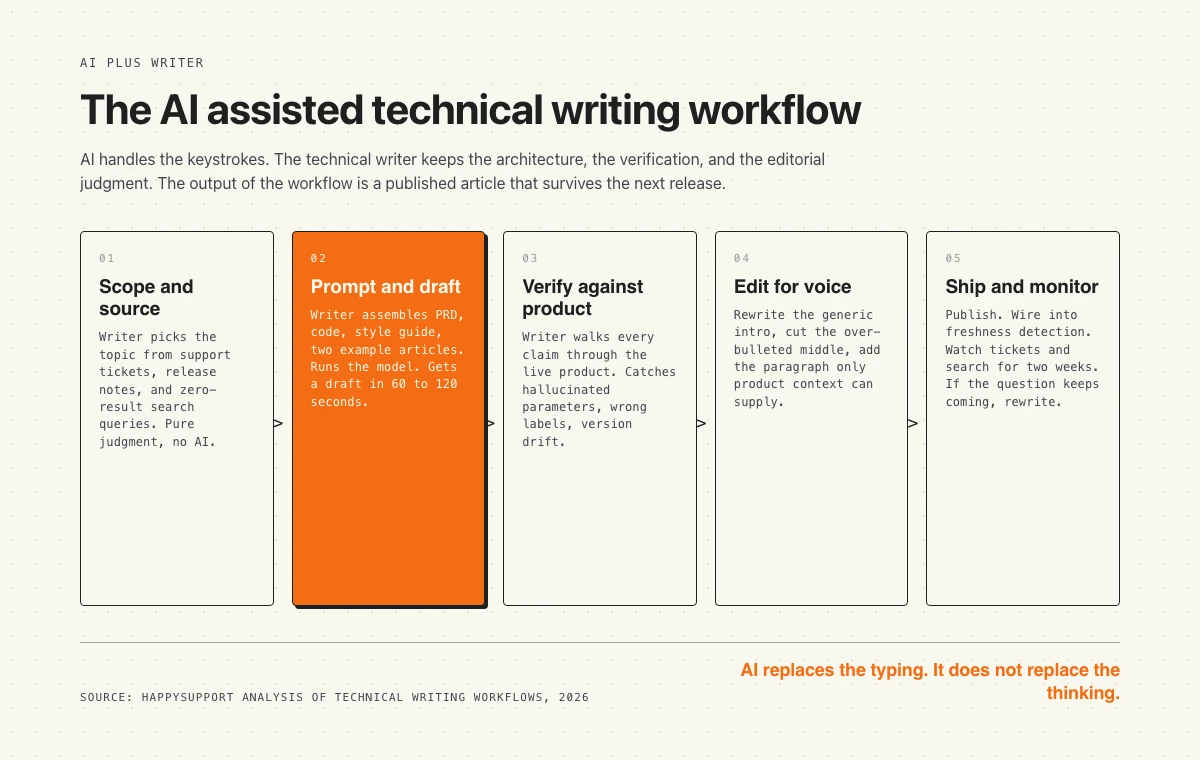
A working AI-assisted documentation workflow in 2026 looks roughly like this. Five steps, two of which are mostly the model, three of which are mostly the human.
Step 1, scope and source. The writer decides what to write. Inputs come from support tickets, sales-engineer requests, release notes, customer interviews, search queries that return zero results. This is a research and judgment step, not a writing step. AI plays no role.
Step 2, prompt and draft. The writer assembles the context: PRD, code snippets, API spec, style guide, terminology list, two example articles from the same family. Constructs the prompt. Runs the model. Gets a draft in 60 to 120 seconds.
Step 3, verify against product. The writer opens the product in a second window and walks through every claim in the draft. Clicks every path. Tries every example. Notes every hallucination, every version mismatch, every wrong label. This is the slowest step in the workflow and the one that catches the failures from the previous section.
Step 4, edit for voice and structure. Rewrite the intro (always too generic from the model). Cut the over-bulleted middle. Tighten the conclusion. Add the one paragraph the model did not know to write because it required product context. Inline screenshots, ideally from a recorder that captures DOM and CSS so they do not rot. Insert internal links to verified slugs.
Step 5, ship and monitor. Publish. Wire the article into the freshness-detection system so it gets flagged when the affected product surface changes. Watch the support-ticket and search-query signals for two weeks. If customers are still asking the same questions the article was supposed to answer, the article failed. Rewrite it.
The whole flow takes a senior writer between three and six hours per article in 2026, down from one to two days in 2022. The drop is real. The gain is real. The price is that the writer is now a system operator with editorial skills, not a craftsperson with a blank page.
Where HappySupport fits in this workflow
The single biggest gap in the AI-assisted documentation stack is the gap between draft and ground truth. AI generates a confident draft. The product ships a release. The draft is now stale. Nobody knows until a customer complains. The technical writer is reviewing, but reviewing what, in what order, at what cadence.
HappySupport closes that gap. The platform watches the product (UI changes via DOM and CSS metadata captured by HappyRecorder, code changes via GitHub Sync) and flags affected articles before customers find the drift. Screenshots stay accurate through redesigns because they are not screenshots, they are recordings of selectors that re-render on demand. The technical writer keeps their judgment role and stops doing the part nobody wants to do, which is babysitting an article surface that decays the moment the next release ships. For the architecture, see how a self-updating help center works.
HappySupport is a help center layer, not a ticketing replacement. Keep Intercom, Zendesk, HubSpot, Help Scout, Front, or Freshdesk for the inbox and SLA workflow. Swap in HappySupport for the article surface that stops drifting between releases.










