.png)


Customer self-service portals are the consumer-facing layer of every modern support stack: one place where customers find answers, check status, manage their account, and submit a ticket when self-service fails. Done well, the portal absorbs 30 to 50% of incoming volume before it ever reaches an inbox. Done badly, it adds a chatbot that lies and a knowledge base that nobody trusts.
This guide is the build playbook. What a portal actually is (separate from the help center, the knowledge base, and the help desk). The seven things to include in version one. The two or three things to skip until version two. A stage-by-stage construction plan. The five metrics that tell you whether it is working. And the comparison of portal software options for B2B SaaS teams shipping fast.
The audience: support leads, heads of CX, RevOps, and founders putting a portal in front of customers for the first time. Or fixing one that is not deflecting anything.
What a customer self-service portal actually is
A customer self-service portal is a single authenticated or semi-authenticated destination where customers resolve common questions and tasks on their own. Three things define it: it is customer-facing, it is structured around the most common tasks, and it reduces the load on live support channels.
The portal is not a help center. It is the wrapper around the help center. A help center is one of the things the portal contains. The portal also contains status, billing, account management, ticket submission, and sometimes community. The help center is the encyclopedia; the portal is the building the encyclopedia lives in.
For the precise help center vs knowledge base split underneath, see help center vs knowledge base. The portal sits one layer above both.
The reason this distinction matters: most "portal projects" we audit end up being help center projects in disguise. The team writes 80 articles, calls it a portal, and ships. Then customers still call support because they cannot check their invoice, cannot see system status, and cannot submit a ticket without leaving the portal and logging into a different tool. The articles got built. The portal did not.
The 7 things a portal needs to include
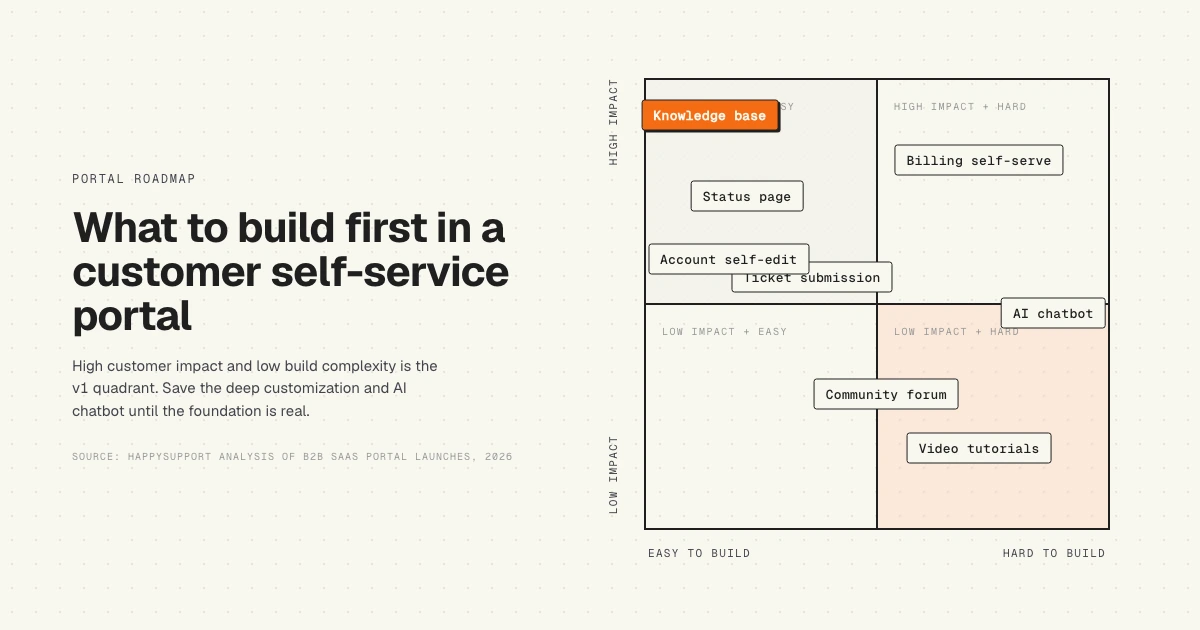
Cut the portal scope to seven things in version one. Anything else is version-two work. The seven cover 95% of self-service intent across B2B SaaS support based on our audit of 30 SaaS help centers (see we audited 30 SaaS help centers).
1. Searchable knowledge base
The knowledge base is the spine of the portal. Articles structured around how customers phrase the question, not how the team builds the product. Search bar on every page, not just the homepage. Three components per article: a clear title matching the customer's question, step-by-step instructions with screenshots, and links to related articles to prevent dead ends.
Coverage target for version one: the top 50 questions that drive 80% of ticket volume. Pull these from the ticketing system's macro library or from a quick scan of the last 90 days of support tickets. Skip the long tail.
2. Status page
One URL where customers see whether the product is up. Updated automatically by uptime monitoring (Pingdom, Better Uptime, Statuspage). Manual updates from the on-call engineer during incidents. The status page is the highest-leverage single page in the portal: during an outage, traffic spikes 50x, and the status page absorbs the wave that would otherwise hit support.
Include: current uptime, last 30 days of incidents, scheduled maintenance, and a subscribe-to-updates box (email or RSS).
3. Billing and account management
Customers need to update their card, change their plan, download invoices, and cancel without talking to anyone. Hide any of those and you guarantee tickets. The cancel flow in particular: customers who cannot self-cancel will chargeback or post on Twitter. Self-cancel is a deflection feature, not a churn risk.
Minimum surface: invoices list with PDF download, payment method update, plan change form, seat add and remove, and a self-cancel button. If the billing system is Stripe, Chargebee, or Recurly, the customer portal links from those vendors are usually enough for v1.
4. Ticket submission and history
The portal must be the place a customer submits a ticket when self-service fails. Two things matter: the submission form should default to context the customer already gave (their identity, their plan, the article they were reading before clicking "still need help"), and the ticket history should be visible so the customer can check status without emailing back to ask.
This is where the portal connects to the help desk (Intercom, Zendesk, Help Scout, HubSpot, Freshdesk, Front). The portal is the customer-facing layer; the help desk is the agent-facing inbox underneath.
5. Account self-edit
Profile updates, password resets, two-factor enrollment, team member invites, notification preferences. None of this should require a support ticket. Most help desks track "password reset" as their single highest-volume ticket category. Surfacing self-edit in the portal kills that volume.
6. Community or forum (conditional)
Add a community only if the product has a passionate user base that already discusses workarounds in Slack groups, Discord servers, or subreddits. Otherwise it sits empty and signals neglect. Most B2B SaaS companies under 500 customers should skip this in v1.
When it works: a community surfaces use cases the team would never document, peer support cuts ticket volume, and power users become advocates. When it fails: the moderator burns out, threads stay unanswered for weeks, and the empty forum erodes credibility.
7. System health and changelog
The changelog is the most under-built page in B2B SaaS portals. Customers ask "did something change?" every time the product surprises them. A simple weekly entry listing what shipped (feature, fix, breaking change) deflects the question before it becomes a ticket. Tie the changelog to the GitHub repo or release notes pipeline so it updates without a writer in the loop.
For the architecture of keeping documentation current with code changes, see how a self-updating help center works. The same mechanism applies to changelog freshness.
What to skip until later
Three things tempt every portal project. Three things should wait.
AI chatbot. The temptation is to slap a chatbot on the homepage before the knowledge base is accurate. The result: a bot that answers from stale docs, customers get wrong answers fast, and trust collapses. Build the knowledge base first. Make it current. Then add the chatbot. The chatbot inherits the accuracy (or the rot) of the content underneath. See how to connect your knowledge base to an AI chatbot without killing accuracy for the right order.
"AI should absorb complexity for the customer, not create new complexity around the customer."
Annette's point lands directly on the chatbot question. A chatbot pointed at unreliable content adds complexity. Annette's frame is the right test: if the AI layer is not absorbing complexity, it is creating it.
Multilingual portal. Translation is a v2 problem unless the customer base is already 30%+ non-English. Premature localization doubles content maintenance cost and slows article shipping. Stay in one language until the data forces a second.
Personalization engine. Showing different articles to different cohorts (admins vs end users, free vs paid) sounds smart and is hard to ship well. A search bar that works covers 90% of what personalization promises. Defer until search is solved and the content library has the depth to justify segmentation.
Portal vs help center vs knowledge base vs help desk
The four terms get used interchangeably in vendor marketing and they should not be. Each layer does a different job.
Stacked from the bottom up: the knowledge base feeds the help center, the help center sits inside the portal, and the portal hands off to the help desk when the customer needs a human. Each layer has a different vendor market and different success metrics.
A common failure mode: the team buys a help desk (Intercom, Zendesk) and assumes it includes a portal. It does not. Help desks ship with a knowledge base feature and call that the portal. The status page, billing surface, and account self-edit live elsewhere and the customer has to log into three tools to do what one portal should do.
Building a portal from scratch: a stage-by-stage plan
Four stages. Each stage takes 2 to 6 weeks. Do not parallelize. Stage three depends on stage two being done; stage four depends on stage three. Most failed portal projects skip a stage and pay for it in version two.
Stage 1: Foundation (weeks 1 to 4)
Pick the help center vendor. Connect domain (yourcompany.com/help). Migrate or write the top 50 articles. Set up search. Ship the knowledge base as a public site before adding any other portal surface.
Acceptance criteria: a customer can type a question and find the right article in under 30 seconds. Internal team reviewed every article in the top 50 for accuracy against the current product. The articles are not last year's docs in a new wrapper.
Stage 2: Self-service depth (weeks 5 to 8)
Add the status page (Statuspage, Better Uptime, or a simple page wired to uptime monitoring). Add the changelog (manual weekly entries or auto-generated from release notes). Surface billing self-serve via Stripe's customer portal or equivalent. Open ticket submission with context capture.
Acceptance criteria: a customer can update their card, see whether the product is up, read the last 30 days of releases, and submit a ticket without logging into anything other than the portal.
Stage 3: Integration (weeks 9 to 12)
Connect the portal to the help desk so ticket submission and history sync. Wire single sign-on so customers do not log in twice. Connect account self-edit to the product's auth and identity system. Add deflection capture (when the customer clicks "still need help" from an article, the ticket form pre-fills with the article context).
Acceptance criteria: the portal feels like one product to the customer, not three glued together. The agent in the help desk sees which articles the customer read before submitting the ticket.
Stage 4: Optimization (weeks 13+)
Wire analytics. Track the five metrics in the next section. Watch what searches return zero results, then write the missing articles. Watch which articles get the most "still need help" clicks, then rewrite them. Add the AI chatbot once the content is current and the agent inbox is integrated.
Acceptance criteria: month-over-month, the deflection rate moves up and ticket volume per customer moves down. If neither curve moves, the portal is decoration. Find which content is failing and fix it.
How to measure portal success
Five metrics. Track all five, not just one. Each catches a different failure mode.
Deflection rate
The percentage of customer issues resolved without an agent. Formula: deflected sessions divided by total help-seeking sessions. SuperOffice's Customer Service Benchmark Report and Salesforce State of Service benchmarks put the achievable range at 20 to 40% for SaaS portals.
The catch: deflection is hard to measure honestly. A customer who reads an article and closes the tab is counted as "deflected" but may have given up. Validate with engagement signals (time on page, scroll depth, helpful-vote feedback) and a "did this answer your question?" prompt before the customer leaves.
Self-service rate
The share of customer interactions that start and end in the portal versus those that escalate to a human. Higher than deflection because it counts every session, not just sessions where the customer was actively trying to file a ticket. For the full breakdown of what this rate actually measures, see what your self-service rate is actually telling you.
Time to find
From the moment the customer lands on the portal to the moment they find the answer. Measured via search-to-click time plus reading time, or via session recordings on Hotjar or FullStory. The benchmark: under 60 seconds for a successful self-service session. Anything over 90 seconds and the customer escalates.
Search exit rate
The percentage of searches where the customer leaves the portal without clicking a result. Two causes: the search engine is bad, or the content does not exist. Both are fixable, but the diagnosis matters. If exits are concentrated on a small set of queries with zero results, the content is missing. If exits are spread across queries with returned results, the search ranking is bad.
Ticket reduction
Month-over-month change in ticket volume per active customer (not absolute tickets, since the customer count grows). The honest portal metric: divide monthly tickets by monthly active customers, watch the curve trend down over 90 days. Anything else is vanity. For the deeper breakdown of how a help center drives this curve, see how to reduce support tickets by 40% with a better help center.
"The most successful customer-facing AI focuses on automating CRaP: Confident, Routine, Predictable."
Jeff's CRaP framing is the right filter for what the portal should be deflecting. The portal wins on Confident, Routine, and Predictable questions: password resets, billing changes, "how do I configure X". The portal does not win on novel, ambiguous, or emotional issues; those route to humans by design. Measuring deflection against the wrong question type produces the wrong target.
Common portal mistakes
Eight recurring failure modes from auditing portals across 30+ SaaS companies.
- Search hidden in a sub-page. Search must be on every page including the homepage and every article. Customers do not navigate categories; they search.
- Stale articles. The single biggest reason portals stop deflecting. Articles last edited 18 months ago describe a product that no longer exists. See the hidden cost of documentation decay.
- No "still need help" path. When self-service fails, the customer needs an obvious way to submit a ticket from inside the portal. Without it, they leave and email support instead, breaking context capture.
- Chatbot on top of bad content. A confident-sounding bot answering from wrong docs is worse than no bot. Order: content accuracy, then chatbot.
- Status page hidden. During an outage, the status page should be one click from anywhere. Most portals bury it three pages deep.
- Billing inside a separate tool. Forcing customers to log into Stripe to update their card breaks the "one portal" promise. Embed Stripe's customer portal or build a wrapper.
- Account self-edit gated behind support. Password resets, two-factor enrollment, and seat changes should never require a ticket.
- No measurement. Portals shipped without analytics rot in silence. Wire the five metrics from day one or the portal becomes a vanity project.
Portal software options
Six tools that ship a portal layer for B2B SaaS. Comparison is on the portal-suitability dimensions: knowledge base, status page native, billing integration, ticket submission, account self-edit, and how the article layer is kept current.
No single tool ships the whole portal end to end. The realistic stack is two or three tools: a help center vendor (HappySupport, Document360, Help Scout Docs, Intercom, Zendesk Guide, HubSpot KB), a status page tool (Statuspage, Better Uptime), and a billing portal (Stripe customer portal, Chargebee). The portal is the wrapper that ties them.
HappySupport sits beside the help desk, not in place of it. Keep Intercom, Zendesk, Help Scout, HubSpot, Front, Freshdesk, or Jira Service Management for the inbox and SLA layer. Swap in HappySupport for the article surface that stops drifting between releases. The portal stitches them together; one tool will not replace the other.
How HappySupport fits the portal question
The article layer is the single most fragile part of any portal. Customers find an outdated guide, follow it, hit a screen that no longer exists, and escalate to support more frustrated than if no article existed at all. The portal's deflection curve is gated on whether the content underneath stays current.
HappySupport is the help center built for that constraint. HappyAgent watches the GitHub repo for product changes that affect existing articles and flags affected articles before customers find the gap. HappyRecorder captures UI walkthroughs as DOM and CSS metadata so screenshots stay accurate through redesigns instead of breaking the moment the team renames a button. The portal inherits the freshness instead of fighting for it.
The rest of the portal stack stays as is. Keep the help desk for tickets, the status page tool for uptime, the billing portal for invoices. HappySupport is the article surface that sits inside the portal and stops needing weekly babysitting. For the architecture, see how a self-updating help center works and the hidden cost of documentation decay.










