Open-source knowledge base software is appealing for the line item that does not appear on the price page: the license fee. BookStack, Wiki.js, Outline, DokuWiki, MkDocs, and Docusaurus all cost zero to download. The catch is that the price you save on the license, you pay back in labor. You become the support team for the knowledge base software itself.
This article compares six open-source options that are still actively maintained in 2026, ranks them on self-hosting complexity and customer-facing polish, and runs the honest math on what self-hosting actually costs over a year. Open-source is the right answer for some teams. For most, it is more expensive than paid SaaS once you count the hours.
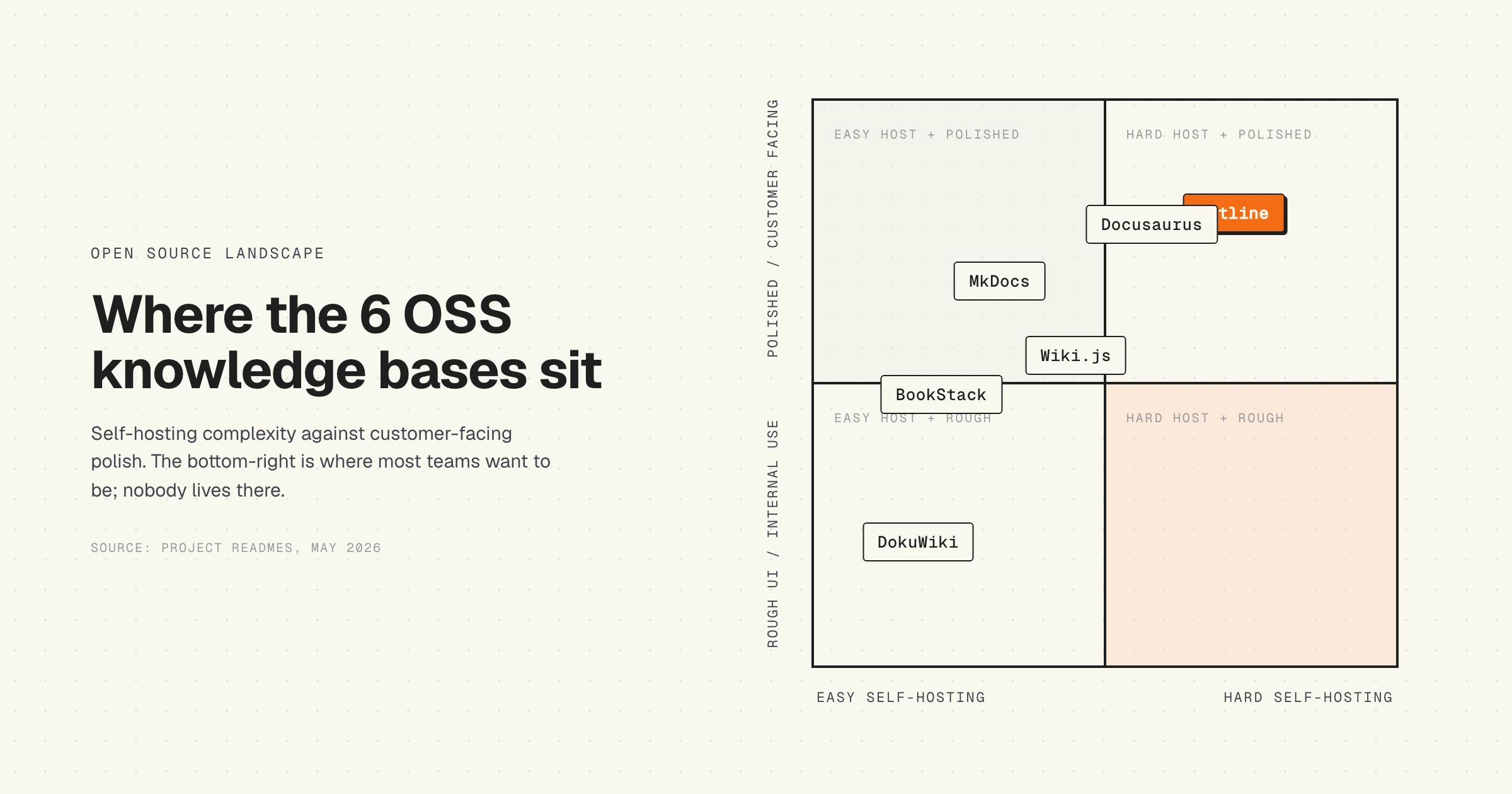
Self-hosting complexity (x) vs customer-facing polish (y). Outline scores highest on polish but heaviest on setup.
Quick verdict
The six options below all serve the same job: store articles in a searchable place that customers or employees can read. They differ on how much engineering time they demand to keep running.
| Tool | License | Hosting cost | Best fit |
|---|---|---|---|
| BookStack | MIT | $10 to $20/mo VPS | Small team, simple internal wiki |
| Wiki.js | AGPL-3.0 | $20 to $40/mo VPS | Dev-heavy team that wants Git-backed docs |
| Outline | BSL 1.1 | $30 to $60/mo VPS | Team that wants Notion-style polish, has an identity provider |
| DokuWiki | GPL-2.0 | $5 to $15/mo shared | No-database, file-based wiki |
| MkDocs | BSD-2-Clause | $0 to $10/mo static | Product docs for devs, static site |
| Docusaurus | MIT | $0 to $10/mo static | React-savvy team, polished docs site |
The hosting cost column is the small one. The labor cost is several times larger, and we get to it below.
BookStack: the easy on-ramp
BookStack is the most common starting point for teams that want a real self-hosted wiki without a long setup. It is written in PHP, runs on MySQL or MariaDB, and ships an official Docker image with two containers (app + database) that boots with default credentials and works immediately. The MIT license is permissive, which makes it safe for commercial use without lawyer review.
Where BookStack works well
The content model is intuitive: pages live in Books, Books live in Shelves. A non-technical writer can grasp it in under five minutes. The editor supports both WYSIWYG and Markdown. Permissions are role-based with sensible defaults. The latest release (v26.03.5, May 2026) is part of a steady cadence the solo maintainer has shipped for years. For an internal wiki of 50 to 500 pages, BookStack is the path of least resistance.
Where BookStack hits the wall
There are no built-in AI features: no semantic search, no generative answers, no automatic stale-article detection. The customer-facing themes look dated next to modern SaaS help centers. The project recently moved primary hosting to Codeberg, with GitHub kept as a mirror, which is fine but worth knowing if your CI pulls from GitHub. Solo-maintainer projects also carry bus-factor risk: the cadence is consistent today, but there is no team behind it.
Best for: small teams that want a working internal wiki this afternoon.
Wiki.js: the developer favorite
Wiki.js is a modern Node.js wiki built for teams that already think in Git and Markdown. The v2 line (v2.5.314, May 2026) is stable and widely deployed. Wiki.js supports multiple databases (PostgreSQL, MySQL, SQLite), modular authentication (LDAP, OAuth, SAML), and Git-backed content sync that lets writers edit articles in their normal editor and push to the repo.
Where Wiki.js works well
The integration story is the strongest in this group for engineering teams. Markdown-first editing, Git sync, modular auth, and a clean admin interface. The AGPL-3.0 license is permissive for internal use, with the well-known network copyleft clause that matters only if you are forking and offering Wiki.js as a public SaaS.
Where Wiki.js hits the wall
The biggest concern is v3. The next major version has been in alpha for years with slow release cadence. Teams that want to plan a multi-year deployment have to decide whether they trust v2 to keep getting patches or whether v3 will land in time to matter. Customer-facing presentation is functional but not striking. No native AI search or generative answers.
Best for: engineering-led teams that want a Git-backed wiki and run their own auth.
Outline: the polished one
Outline is what you point to when someone says "I want Notion, but self-hosted." Written in TypeScript with a React front end, real-time collaboration, a Slack-style command bar, and a UI that holds up against any commercial knowledge base. v1.7.1 shipped in May 2026.
Where Outline works well
The editing experience is the best in this category. Real-time collaborative cursors, slash commands, embeds, and a search that actually finds things. Markdown-compatible. For a team that has already standardized on an identity provider (Google Workspace, Okta, Azure AD, Slack OAuth), Outline is the closest you get to a paid SaaS feel without paying for SaaS.
Where Outline hits the wall
The setup is the heaviest of the six. You need three containers (app + PostgreSQL + Redis) and an external authentication provider. There is no fallback to email/password as a quick start, which is intentional but raises the floor. The license is BSL 1.1 (Business Source License), which is source-available rather than strictly OSI-approved open source. For internal use this almost never matters, but procurement and legal teams sometimes flag it.
Best for: teams that want a Notion-class self-hosted wiki and already run an identity provider.
DokuWiki: the elder statesman
DokuWiki has been shipping releases since 2004. It is GPL-2.0, written in PHP, and stores everything in flat files: no database needed. Latest release "Librarian" (v2025-05-14b, September 2025) continues a 20-year cadence.
Where DokuWiki works well
The file-based storage is genuinely useful. Backups are a tarball of the data directory. Version history is grep-able. No database to upgrade, no schema migrations, no ORM quirks. The plugin ecosystem is the deepest in the open-source wiki world, with hundreds of community plugins for everything from access control to PDF export.
Where DokuWiki hits the wall
The default theme looks like it shipped in 2010 because it largely did. Modern themes exist but require evaluation. The editor is functional but does not feel like 2026. No AI features, no semantic search. For an internal wiki where the team values stability and longevity over polish, DokuWiki is hard to beat. For a customer-facing help center, the visual gap is too wide.
Best for: teams that prize stability, file-based storage, and a long plugin tail.
MkDocs: documentation as code
MkDocs is a different category from the four above. It is a static site generator written in Python (BSD-2-Clause) that takes Markdown files plus a YAML config and outputs a static documentation site. No server-side application, no database, no admin panel. You write Markdown, run a build command, deploy HTML.
Where MkDocs works well
The deployment model is the cheapest possible: static hosting on Netlify, Vercel, GitHub Pages, or any S3 bucket runs $0 to $10 per month including a CDN. The Material for MkDocs theme is the gold standard for developer-facing documentation sites and ships features (search, dark mode, code highlighting) that match anything from a paid SaaS. Version-controlled content lives in Git, which means the same review process you use for code.
Where MkDocs hits the wall
The release cadence has slowed. v1.6.1 from August 2024 is the latest release as of this writing, which is longer between releases than the other tools here. The core project moves slowly while the Material for MkDocs theme moves fast. Static-only means no in-browser editing for non-technical writers and no commenting. Customer-facing use cases that need user accounts, content gating, or in-app surveys do not fit this model.
Best for: developer-facing product docs maintained by an engineering team in Git.
Docusaurus: React-native documentation
Docusaurus is the static site generator Meta uses for its own developer docs and open-sourced under MIT. v3.10.1 (April 2026) is the current line. Like MkDocs, it builds Markdown into a static site; unlike MkDocs, the generator is React and the output is heavier (React-hydrated) than MkDocs's plain HTML.
Where Docusaurus works well
If your team already runs React, the customization story is unbeatable. MDX support lets writers embed React components inside Markdown. Versioned docs and i18n are first-class. The output site looks modern out of the box, and the Meta-backing means the release cadence is faster than MkDocs and unlikely to stall.
Where Docusaurus hits the wall
The framework footprint is larger. Build times on a 500-page site can hit minutes, not seconds. The customization power assumes a React-comfortable maintainer; teams without one struggle with the configuration surface. Static-only means the same limits as MkDocs: no in-browser editing, no user accounts, no per-customer content.
Best for: React teams that want polished, versioned product docs with embedded interactive components.
Head to head: the three matchups people actually compare
Almost nobody evaluates all six. The shortlist collapses to two tools, and it is nearly always two of BookStack, Wiki.js and Outline, because those are the three that are self-hosted applications rather than static site generators. Here is each pair on the axes that decide it.
Wiki.js vs Outline
The real question is whether you want your content in Git or in a database.
| Wiki.js | Outline | |
|---|---|---|
| Stack | Node.js | TypeScript, React front end |
| Containers to run | 2 (app + database) | 3 (app + PostgreSQL + Redis) |
| Content home | Markdown, with optional two-way Git sync | PostgreSQL, Markdown-compatible import and export |
| Editing | Markdown-first, or your own editor via Git | Real-time collaborative, slash commands, embeds |
| Authentication | Modular: local, LDAP, OAuth, SAML | External identity provider required, no local password option |
| License | AGPL-3.0 (OSI-approved) | BSL 1.1 (source-available, not OSI-approved) |
| Main risk | v3 has been in alpha for years | Heaviest setup of the six, and the license can stall procurement |
Pick Wiki.js if engineers write the docs, you want articles reviewable as pull requests, and you need auth flexibility, including a local login. Git sync is the feature Outline has no answer to, and for a team whose docs belong next to the code it decides the question on its own.
Pick Outline if the writers are not all engineers. The editing experience is a category apart: a support lead or product manager will draft in Outline and will resist Wiki.js. The price is a mandatory identity provider and a third container.
The tiebreaker is usually neither feature. Wiki.js's stalled v3 and Outline's Business Source License are both open questions you inherit, and which one your legal or platform team objects to tends to settle it.
Outline vs BookStack
This pair is a straight polish-against-simplicity trade, and it is the sharpest contrast in the group.
| Outline | BookStack | |
|---|---|---|
| Time to a working instance | Hours: three containers plus IdP setup | Minutes: official two-container Docker image, default credentials |
| Structure | Collections and nested documents | Shelves, Books, Chapters, Pages |
| Editing | Real-time collaborative | WYSIWYG or Markdown, single-author |
| Login | External IdP only | Local accounts out of the box, LDAP and SAML available |
| Hosting cost | $30 to $60/mo VPS | $10 to $20/mo VPS |
| License | BSL 1.1 | MIT |
| Maintainer | Company-backed | Single maintainer, steady multi-year cadence |
Pick Outline if the wiki is somewhere people write together all day and the interface has to earn that. It is the only tool in this list that a team migrating off Notion will not experience as a downgrade.
Pick BookStack if you want it running this afternoon and the shape of the content matters more than the feel of the editor. The Shelves and Books hierarchy is the most legible model here for a non-technical writer, MIT is the least contentious license in the group, and local accounts mean you do not need to have solved identity first. The trade is real: no real-time collaboration, and themes that look their age on a customer-facing site.
The asymmetry worth naming is the failure mode. BookStack's risk is bus factor, one maintainer. Outline's risk is operational, three services and an IdP dependency, which is more moving parts to break at 2 AM.
BookStack vs Wiki.js
Both are approachable self-hosted wikis at similar cost, so this comes down to who writes.
BookStack organises content for you: the Shelf, Book, Chapter, Page hierarchy is fixed, and that rigidity is the point, because it is why a wiki with 300 pages in BookStack is still navigable. Wiki.js gives you a free-form page tree, which is more flexible and degrades faster without a librarian.
Wiki.js wins on integration: Git-backed content, modular auth, and multiple database backends. BookStack wins on getting a non-technical team productive without training. If the answer to "who maintains this" is an engineer, Wiki.js. If it is a support or ops lead, BookStack.
What none of the three do
Worth stating before you pick, because it applies equally to all of them: none of BookStack, Wiki.js or Outline detects that an article has stopped being true. There is no stale-content flag, no semantic search, no generative answers, and no link between a product release and the pages it just invalidated. That is not a gap in any one of these tools; it is a gap in the category, and it is the one that grows with your release cadence rather than your page count.
The real cost of self-hosting: the labor math
Here is where the open-source story gets honest. The hosting fee is the smallest line item. The labor cost is multiples larger, and it shows up whether you count it or not.
Take BookStack on a $15 a month VPS. Annual server cost: $180. Now add the work nobody puts in the spreadsheet:
| Maintenance task | Hours per month | Annual cost at $80/hour |
|---|---|---|
| OS and app security patching | 2 to 4 | $1,920 to $3,840 |
| Backups and tested restores | 1 to 2 | $960 to $1,920 |
| TLS, DDoS, login security | 1 to 2 | $960 to $1,920 |
| Annual major-version upgrade | 8 to 16 (one-time) | $640 to $1,280 |
| Total annual labor | 56 to 116 hours | $4,480 to $8,960 |
Total annual cost for a $15 VPS deployment: roughly $4,660 to $9,140. Outline, with three containers and an identity provider integration, runs higher: 80 to 160 hours per year is realistic, putting total cost in the $6,500 to $13,000 range.
Compare against the paid alternatives. Document360 starts around $199 per month, which is $2,388 a year with vendor-managed updates, backups, and security. Help Scout sits around $25 per seat per month, which is $1,500 a year for a 5-person team. HappySupport starts at 129 EUR per month flat, around 1,548 EUR a year, with built-in product change detection, AI answers and a ticket inbox included.
The math flips for two scenarios. First, when the team genuinely already runs the infrastructure (a DevOps team that hosts twenty other apps and amortizes the labor across all of them). Second, when team time is free in the eyes of finance (the founder hosts it on a Sunday because their hourly rate does not get counted). Outside these two cases, OSS is rarely cheaper than paid SaaS for a small team.
Security and update responsibility
When you self-host, the security surface becomes yours. The vendor is no longer responsible. Specifically, you take ownership of:
- CVE patching. When a CVE is disclosed against PHP, Node, PostgreSQL, your OS, or the app itself, you have a clock running. Median time-to-exploit for newly disclosed CVEs has dropped to under 5 days for some categories. Patch cadence is no longer a quarterly task.
- Backups. Nightly snapshots are the bare minimum. Tested restores (does the backup actually restore on a fresh server?) are what protects you. Untested backups are folk-tale backups.
- TLS renewal. Let's Encrypt makes this nearly automatic, but the moment your renewal cron silently fails, your site goes down.
- Login security. Brute-force protection, rate limiting, IP allowlists for admin paths, and a WAF if you face the public internet.
- GDPR controls. If you serve EU users, you handle data subject access requests, retention policies, and processor agreements directly. The vendor cannot do this for you.
- Incident response. When something breaks at 2 AM, the on-call is you.
None of this is unreasonable for a team with DevOps capacity. All of it is unreasonable for a 4-person SaaS startup whose CTO is shipping product. The honest question is: which one are you?
When open-source makes sense
Three scenarios where the math works for OSS:
Infrastructure exists. If your team operates twenty other self-hosted services, adding a wiki marginal-costs almost nothing. The patching, backup, and monitoring tooling is already in place. BookStack, Wiki.js, or DokuWiki slot in.
Docs as product. Developer-tool companies where the docs are the product (Stripe, Vercel, Cloudflare, every API company) almost always own their docs site. MkDocs or Docusaurus give you the control to build the experience your readers expect. Paid SaaS would be a step backward.
Data residency. Public-sector, defense, healthcare, or finance environments sometimes have data-residency rules that paid SaaS cannot satisfy. Self-hosted is the only option, and the labor cost is already budgeted as a compliance line item.
When paid SaaS is the better answer
Most teams fit one of these:
Small team. Under 10 engineers, every hour spent patching a wiki is an hour not shipping product. At early stages, this trade-off is brutal.
Customer-facing. The polish gap between OSS themes and modern SaaS help centers is wide. Customers judge the help center as part of the product. A help center that looks like 2010 makes your product look like 2010.
Weekly releases. Documentation decay is the unsolved problem in open-source knowledge bases. None of the OSS tools above flag stale articles when the product changes. We dug into this in the hidden cost of documentation decay: weekly-shipping teams accumulate stale articles fastest, and OSS gives you zero help there.
No DevOps team. Honest filter. If "DevOps" means "the founder on weekends," paid SaaS is cheaper for the company even before you count opportunity cost.
Where HappySupport sits in this picture
HappySupport is not open-source. It is a hosted help center built around the maintenance problem that none of the OSS tools solve. The HappyRecorder Chrome extension captures workflows as DOM and CSS selectors, so the system can detect when an underlying element changes after a product release. The HappyAgent Git handoff reads the product repository and flags articles whose source code shifted. We wrote up the architecture in how self-updating help centers work.
HappySupport also covers AI answers, the ticket inbox and in-app help in the same product at one flat price, so a small team does not need a separate ticketing system next to it. If you already run Intercom, Zendesk, Help Scout, HubSpot, Front, or Freshdesk and want to keep it, import the articles, redirect every old URL, and link articles from replies. The trade-off compared to self-hosting BookStack or Outline: you give up the lowest-license-cost path, and you get back the time your team would have spent on patching, backups, and chasing stale articles. Honest framing for the OSS-curious reader: if you already love operating servers, BookStack is fine. If you would rather not, this is the alternative.
If the reason you are looking at self-hosting is data residency rather than license cost, an EU-hosted help center with GDPR-compliant documentation gets you there without the patching and backup duty. For a side-by-side on the paid side, the best knowledge base software comparison covers ten tools. For SaaS-specific picks, the best knowledge base for SaaS teams piece narrows to the same shortlist. For the freshness scoring math behind why decay matters more than search quality, see LLM knowledge base freshness scoring and the help center content audit checklist.

 Book a demo