.png)

Most knowledge base platforms ship with SEO defaults that ignore what Google actually needs. No schema markup on article pages. No control over canonicals. An XML sitemap that drops half the articles or includes none of the metadata that matters. A robots.txt the team cannot edit. A hosting choice (subdomain on the vendor's domain) made by procurement, not by anyone who cares about ranking. The KB ships, traffic stays flat, and the team blames "content quality" when the problem is plumbing.
This guide on knowledge base SEO is the technical baseline most KB tools get wrong. It covers schema markup, canonicals, sitemap, robots, hreflang, page speed, and the subdomain vs subfolder question. It also calls out, by vendor, where the major KB platforms default to behavior that loses search traffic, and what to fix without touching engineering.
What makes KB SEO different from website SEO
Knowledge base SEO is not the same as marketing site SEO. The intent is different, the signals search engines weight are different, and the conversion model is different. A marketing page wants to capture commercial intent. A KB article wants to be the answer Google surfaces to a user already in the product, looking for a specific fix.
Three things shift when you optimize a help center instead of a marketing site. First, intent is transactional in a support sense: the searcher wants resolution, not consideration. Second, the SERP features that matter are different. People-also-ask, How-To rich results, AI Overviews, and AI search engine citations all draw from KB-shaped content (clear steps, structured answers, schema-tagged Q&A). Third, the success metric is not "traffic to a landing page" but "deflected ticket plus retained customer." Articles that rank but answer poorly hurt your support metrics even when your SEO dashboard looks healthy.
The technical baseline is the floor under all of that. If Google cannot crawl your articles, parse their structure, or understand the relationships between them, you do not get a chance to compete on content quality.
The technical SEO baseline for a knowledge base
Six technical foundations sit under every KB that ranks. Each one is a binary: shipped correctly or shipped broken. The article-by-article content layer (titles, descriptions, internal linking) only starts paying off once these six are right.
XML sitemap with article-level metadata
The XML sitemap is how a search engine discovers what exists in your help center and prioritizes recrawl. Three things matter: it has to include every public article, it has to update <lastmod> when an article changes, and it has to live at a URL Google can find (usually /sitemap.xml at the root of whatever domain or subdomain hosts the KB).
The most common failure is the sitemap that exists but does not refresh <lastmod> on edit. Search engines weight last-modified as a recrawl signal. A sitemap that hard-codes today's date on every entry teaches Google to ignore the signal. A sitemap that never updates <lastmod> teaches Google the corpus is dead.
Submit the sitemap manually to Google Search Console at the moment you publish the first article, and again whenever you restructure the URL hierarchy. Do not assume the platform's auto-submit works.
Canonical URL handling
Canonical tags tell search engines which URL is the master version of a piece of content. KB platforms generate duplicate URL paths by accident more often than you would expect: category-prefixed paths and direct paths to the same article, multi-locale variants pointing at the same underlying article, query-parameter versions from internal search, archived versions of edited articles.
The baseline is one canonical per article, pointing to itself, using an absolute URL. The platform either ships this correctly by default or it does not. Verify in browser DevTools on a published article: <link rel="canonical" href="..."> should be present in the <head>, point to the exact URL of the page you are viewing, and use the full https:// form.
Schema markup (Article, HowTo, BreadcrumbList)
Schema markup is structured data that tells search engines (and AI search systems) what kind of content the page is and how its parts relate. For KB articles, three schema types do real work: Article (or TechArticle) marks the page as authored content with a publish date and author; HowTo marks step-by-step instructions and is still eligible for rich results; BreadcrumbList communicates the page's place in the IA and earns the breadcrumb display in SERPs.
A note on FAQPage: Google deprecated the FAQ rich result for all but well-known government and health sites starting in 2023, and as of May 2026 announced full sunsetting of FAQPage rich result reporting in Search Console (Rich result report ends June 2026, API support ends August 2026). FAQPage schema is still worth shipping for AI search citation signal and for non-Google search engines, but do not promise FAQ rich results in the SERP. Use HowTo for step content, where rich results are still live.
Almost no major KB platform ships any of these by default. Most expose a "custom code" or "header injection" field where a developer can paste a template script. The fix without engineering work is the platform's metadata fields plus a snippet pasted once into the template head, with placeholders for article title, author, and date.
robots.txt and crawl control
robots.txt manages crawl budget, not indexing. Two rules: do not block search engines from your published articles, and do not use robots.txt to keep things out of search results. To keep an article out of search, use a noindex meta tag on that page. To prevent crawl waste, allow everything public and disallow internal search-result pages and edit URLs.
The KB-specific failure mode: hosted help centers running on a vendor's subdomain often inherit a vendor robots.txt the customer cannot edit. Verify your articles appear in site: searches within two weeks of publish. If they do not, check the vendor robots.txt before assuming a content problem.
hreflang for multi-locale help centers
hreflang annotations tell search engines which language and region a given article targets, and how it maps to its translated counterparts. Without hreflang, multi-locale KBs end up with the English version outranking the German version in German SERPs, or worse, with duplicate-content suppression hitting both.
The baseline implementation: every article in every locale carries <link rel="alternate" hreflang="..."> tags pointing to all translated versions, including a self-reference and an x-default fallback. Most KB platforms support locale switching but do not auto-emit hreflang correctly. The most common bug is the German article pointing to an English alternate that no longer exists at the listed URL.
Page speed at scale
Page speed matters more for KBs than for most marketing sites for one reason: a single help center hosts hundreds or thousands of articles, and crawl budget is finite. If average article load time is three seconds, Google crawls a smaller fraction of the corpus per cycle, and new articles take longer to surface.
The biggest culprits in hosted KBs are vendor-bundled JavaScript (analytics, in-page search widgets, chat overlays) and uncompressed embedded images. Audit a published article with Lighthouse. Anything below 70 in performance is leaking traffic. Tooling-level fixes (lazy-load images, defer non-essential scripts) usually live in the platform's theme settings, not in the article editor.
Subdomain vs subfolder for a knowledge base
The perennial question. Hosting your KB at help.yoursite.com (subdomain) or at yoursite.com/help/ (subfolder). Google's official position, repeatedly stated by John Mueller, is that either works fine and the ranking system does not prefer one. The official position is not the practical answer.
In practice, subfolder usually wins for one reason: link equity and topical authority consolidate on the main domain. The marketing site's backlinks, the brand's authority, and the topical signal from existing content all flow into KB articles when the KB lives at /help/. On a subdomain, Google often treats the help center as a separate property, which means each article starts from a lower baseline and has to earn authority on its own.
Three cases still justify a subdomain. First, when the KB platform forces it. Hosted Zendesk, Help Scout, Document360 default to a subdomain on the vendor's domain (e.g. support.yourcompany.zendesk.com), and only paid tiers allow you to map a custom domain. The vendor subdomain is the worst of both worlds. If you must use the vendor's hosting, at minimum map a custom subdomain on your own root domain. Second, when the help center is genuinely separate from the main brand: a developer docs site for an API, a partner-only resource center, a regulated-product manual that needs technical isolation. Third, when the engineering team needs to manage the KB stack independently from the marketing site (different CDN, different deploy pipeline).
If you have a choice, default to subfolder. If your platform forces a subdomain, map it to a subdomain on your own root domain (help.yoursite.com, not company.zendesk.com). Never accept the vendor-branded URL for any KB that needs to rank.
Schema markup for KB articles, with examples
Three schema types do almost all the work for a typical KB article. Here are the JSON-LD payloads you can drop into the page <head> (or have your platform inject via its custom-code field).
Article schema (or TechArticle for technical KBs)
<script type="application/ld+json">
{
  "@context": "https://schema.org",
  "@type": "TechArticle",
  "headline": "How to reset your account password",
  "description": "Step-by-step password reset for users who lost access to their email.",
  "author": {
    "@type": "Organization",
    "name": "Your Company"
  },
  "publisher": {
    "@type": "Organization",
    "name": "Your Company",
    "logo": {
      "@type": "ImageObject",
      "url": "https://yoursite.com/logo.png"
    }
  },
  "datePublished": "2026-01-15",
  "dateModified": "2026-05-20",
  "mainEntityOfPage": {
    "@type": "WebPage",
    "@id": "https://yoursite.com/help/reset-password"
  }
}
</script>
This earns nothing flashy in the SERP, but it is the foundation Google uses to understand the page as content (with an author and a publish history) rather than as a generic page. AI search engines weight this heavily for citation.
HowTo schema for step-by-step articles
<script type="application/ld+json">
{
  "@context": "https://schema.org",
  "@type": "HowTo",
  "name": "Reset your account password",
  "totalTime": "PT3M",
  "step": [
    {
      "@type": "HowToStep",
      "position": 1,
      "name": "Open the login page",
      "text": "Go to the sign-in URL and click 'Forgot password'."
    },
    {
      "@type": "HowToStep",
      "position": 2,
      "name": "Enter your account email",
      "text": "Type the email address you used to sign up and submit the form."
    },
    {
      "@type": "HowToStep",
      "position": 3,
      "name": "Check your inbox for the reset link",
      "text": "Click the reset link in the email and enter a new password."
    }
  ]
}
</script>
HowTo rich results are still active in Google Search as of May 2026. Articles with valid HowTo markup get the step-by-step display in the SERP, which dramatically increases click-through for resolution-intent queries.
BreadcrumbList for category hierarchy
<script type="application/ld+json">
{
  "@context": "https://schema.org",
  "@type": "BreadcrumbList",
  "itemListElement": [
    {
      "@type": "ListItem",
      "position": 1,
      "name": "Help Center",
      "item": "https://yoursite.com/help"
    },
    {
      "@type": "ListItem",
      "position": 2,
      "name": "Account",
      "item": "https://yoursite.com/help/account"
    },
    {
      "@type": "ListItem",
      "position": 3,
      "name": "Reset your password",
      "item": "https://yoursite.com/help/account/reset-password"
    }
  ]
}
</script>
BreadcrumbList earns the breadcrumb display in the SERP (the small hierarchical path shown under the title), which improves click-through and signals to Google that the page sits in a coherent IA.
For full schema reference, see schema.org/Article, schema.org/HowTo, and schema.org/BreadcrumbList. Validate the JSON-LD with Google's Rich Results Test before deploying.
What each major KB platform gets wrong by default
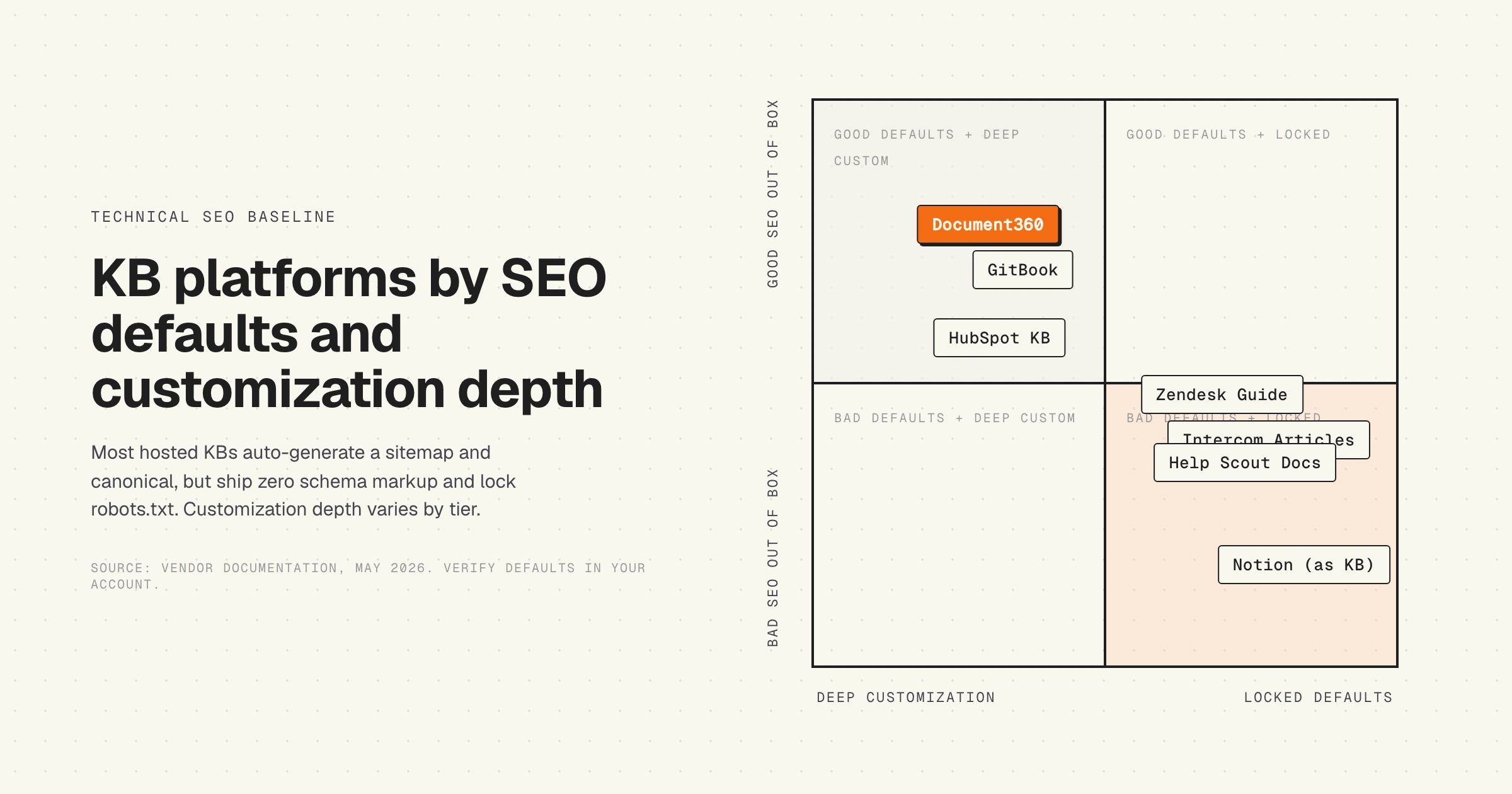
This is a snapshot of out-of-the-box behavior across the major KB platforms as of May 2026. Default behavior shifts as vendors update product, so verify directly in your account before treating any row as final. The pattern, not the cell, is the point.
The pattern is consistent across the category. Sitemap generation and canonical tags are usually handled by default. Schema markup is almost never shipped, and where it is shipped, it covers only the basics. robots.txt editing is locked on most hosted platforms. hreflang requires the multi-locale add-on. The further you move from "blog-style platform" to "true KB", the more SEO control you trade for product features.
For a deeper view of how broken defaults compound over time, the audit data in our review of 30 SaaS help centers shows the cumulative effect across real B2B help centers.
Fixes you can ship without engineering work
Most KB SEO failures are fixable inside the platform's settings, theme editor, or custom-code field. Engineering work is rarely required for the baseline.
Add schema markup via the platform's theme head
Every major hosted KB exposes a "custom code" or "code injection" field for the <head> of every page. Build one JSON-LD template per content type (Article, HowTo for step articles, BreadcrumbList for all articles), with platform-native template variables for title, date, author, and URL. Paste once. Verify with Google's Rich Results Test.
Fix the sitemap if it lies
If the sitemap exists but does not update <lastmod> when articles change, two options. First, the platform may have a setting toggle (Document360, GitBook). Check. Second, if not, generate the sitemap externally via a scheduled job that walks the article list and writes a fresh sitemap.xml to a CDN or to the platform's static-file slot. Submit the external sitemap to Google Search Console.
Map the KB to a subfolder, or at minimum a custom subdomain
If your KB lives at company.zendesk.com or yourname.helpscoutdocs.com, map it to a subdomain on your root domain immediately. Five minutes of DNS work. Vendor instructions are in their docs. Doing this preserves brand and gives the help center a chance to inherit at least the domain-level authority. Subfolder mapping (reverse proxy to yoursite.com/help/) is harder but worthwhile for any help center expected to drive material organic traffic.
Set up hreflang via head injection if the platform does not
If your KB ships in multiple languages and the platform does not emit hreflang correctly, inject the alternate-link tags via the same custom-code field used for schema. A small template per article generates the <link rel="alternate" hreflang="..."> tags for every locale variant plus an x-default. Audit quarterly. The fact that multilingual help center localization requires explicit SEO setup is itself an argument for staying single-language until you can resource it properly.
Audit robots and indexing weekly during launch
For the first month after launch, run site:yourkbdomain.com in Google weekly. If new articles are not appearing within 14 days, something is wrong with sitemap submission, robots.txt, or canonical handling. Diagnose before you publish more.
Internal linking strategy for a knowledge base
Internal linking is the most underused SEO lever in most help centers. Search engines use link structure to understand which articles are central to a topic and which are peripheral. KB platforms make this harder than it should be by hiding the internal-link insertion behind WYSIWYG editors and by burying category structure under their own UI.
Three patterns drive most of the gain. First, every article ends with three to five "related articles" links to other articles in the same topic cluster. Hand-curated, not "we generated these algorithmically". The link text should describe the related article in the searcher's words, not the article's title. Second, every category landing page links to every article in the category with descriptive anchor text. The category page becomes the topic pillar, the articles become the spokes. Third, articles in adjacent categories cross-link where the user journey crosses topics. A "billing" article that references an "account" feature should link to the account article in line.
The trap to avoid: linking back to the homepage or the marketing site from every article. That dilutes the help center's topical authority and signals that the KB is not a coherent property. Internal links should stay inside the KB unless there is a specific reason to leave.
Measuring KB SEO success
Standard SEO dashboards undercount help center performance because they measure traffic, not the thing the help center is for. A KB article ranking on a long-tail query and resolving a customer's issue in 90 seconds shows up in dashboards as low traffic and high bounce, and looks like a failure on every metric the marketing team tracks. It is not a failure.
The metrics that matter, in order. Search Console Performance, filtered by your help center subfolder or subdomain, segmented by query intent (resolution queries, exploration queries, brand queries). Average position on resolution-intent queries (e.g. "how to reset password in X"). Click-through rate on those queries (proxy for whether your title and meta description match intent). Article-level deflection rate, measured by tracking which articles a user reads before opening a support ticket. The last one requires KB instrumentation, but it is the only metric that closes the loop between SEO performance and the help center's actual job.
The companion piece is content freshness. Search engines weight content recency for support queries, and AI search engines especially penalize stale answers. A KB SEO program that only measures rank without also tracking when each article was last updated against the underlying product reality is measuring a snapshot of decay. For more on the freshness signal and how to instrument it, see documentation decay's hidden cost and LLM knowledge base freshness scoring.
The HappySupport approach to KB SEO defaults
HappySupport ships the technical SEO baseline by default because the team building the help center should not have to relearn what the team building the marketing site already learned. Article and HowTo schema render on every published article. Canonical URLs resolve correctly per article and per locale. The XML sitemap updates <lastmod> on every content change. hreflang emits automatically for multi-locale articles. robots.txt is editable from settings, not vendor-managed.
The deeper bet is on freshness. SEO baseline is necessary but insufficient if the underlying corpus decays faster than search engines recrawl. HappySupport's GitHub Sync keeps article content aligned with the product as it ships, so the <lastmod> signal Google sees reflects actual content correctness, not editor activity. The combination, technical defaults shipped right plus content kept current with the product, is what a help center has to be in 2026 to compete in search. For a full audit framework for your existing KB, see our knowledge base AI readiness audit.