.png)

A HIPAA compliant knowledge base is one where the vendor will execute a Business Associate Agreement, the platform encrypts protected health information at rest and in transit, every read and write is captured in an audit log, access is gated by role, and breach notification is contractually defined. That is the floor. Almost every healthcare SaaS team reads the floor as the ceiling. It is not.
HIPAA covers the wire and the storage. It does not cover whether the article is correct. An outdated clinical SOP, a stale data-handling guide, an integration article that still references a deprecated endpoint, all of these are patient safety risks and clinical risks even when the underlying platform is encrypted, audited, and BAA-backed. The compliance certification is necessary. It is not sufficient.
This guide covers two questions in order. First, the practical one: which knowledge base vendors actually sign a BAA, at what tier, and what HIPAA-relevant controls do they offer? Second, the harder one: what does HIPAA explicitly not cover, and what does a healthcare SaaS team need to do about it?
What HIPAA actually requires of a knowledge base
HIPAA does not have a clause that says "your knowledge base must do X." The regulation predates SaaS by nearly two decades. What HIPAA does have is the Security Rule, which lays out administrative, physical, and technical safeguards for any system that creates, receives, maintains, or transmits electronic protected health information. If your knowledge base ever holds PHI, the safeguards apply.
The honest framing is that most help center articles never contain PHI. A how-to about resetting a password, a guide for billing administrators, a release note about a new dashboard, none of these reference a specific patient. So in theory a company could argue the knowledge base sits outside the HIPAA boundary entirely. In practice, the moment a single article includes a screenshot with patient initials, a sample test result, a redacted-but-not-quite case study, or any agent-only article that explains how to handle a specific PHI scenario with an example, the boundary collapses and the platform is in scope.
The HHS Security Rule technical safeguards that map to knowledge base systems are:
- Access controls. Unique user IDs, automatic logoff, role-based permissions, and the ability to gate articles or sections to specific groups. A flat "everyone with the company SSO sees everything" model fails this.
- Audit controls. Hardware, software, and procedural mechanisms that record and examine activity in systems containing PHI. For a KB, that means logged reads on agent-only articles, logged article edits, and logged permission changes. Logs must be tamper-resistant and retained.
- Integrity controls. Mechanisms to authenticate that PHI has not been improperly altered or destroyed. Article version history with rollback is the practical implementation.
- Transmission security. Encryption of PHI in motion. TLS 1.2 or higher across every API and every browser connection.
- Encryption at rest. AES-256 is the de facto standard. Knowledge bases that store database backups, search indexes, or content caches must encrypt them.
On top of the technical safeguards sit the administrative and physical ones, breach notification timelines from the HITECH Act, and the six-year documentation retention requirement that applies to every policy, risk assessment, and audit log review. The Office for Civil Rights at HHS enforces all of it.
None of this is legal advice. The specifics of how your organization satisfies the Security Rule depend on your risk analysis, your business associate relationships, and the scope of PHI in your systems. Always consult your privacy, security, and legal advisors before treating a vendor's "HIPAA compliant" claim as the answer to a procurement question.
The BAA: what it is, what it covers, what it does not
A Business Associate Agreement is a contract between a HIPAA-covered entity (a healthcare provider, a health plan, a clearinghouse) and any vendor that creates, receives, maintains, or transmits PHI on the covered entity's behalf. The BAA does three things. It names the vendor as a Business Associate under HIPAA. It specifies what the vendor is allowed to do with PHI and what they are not. And it sets out breach notification obligations, subcontractor restrictions, and termination conditions.
Without a signed BAA, a covered entity cannot legally share PHI with a vendor. The covered entity remains liable, and the vendor is exposed under HIPAA's direct liability for business associates introduced under the 2013 Omnibus Rule. So the BAA is not optional. If a healthcare SaaS team is shopping a knowledge base that may ever hold PHI, the BAA is a hard gate. No BAA, no purchase.
What the BAA does not do is make the underlying platform secure. The BAA is a contract. The platform's audit logs, encryption, access controls, and breach response still need to exist in practice. A vendor can sign a BAA and have a security posture that fails a real audit. The BAA shifts legal liability. It does not substitute for technical controls.
The other gap is that the BAA covers PHI handling. It does not cover whether the documentation in the knowledge base is accurate. There is no clause in any standard BAA template that says "the Business Associate warrants that all articles describing clinical workflows are current and correct." That problem sits outside HIPAA entirely. We come back to it.
Knowledge base vendors that sign a BAA in 2026
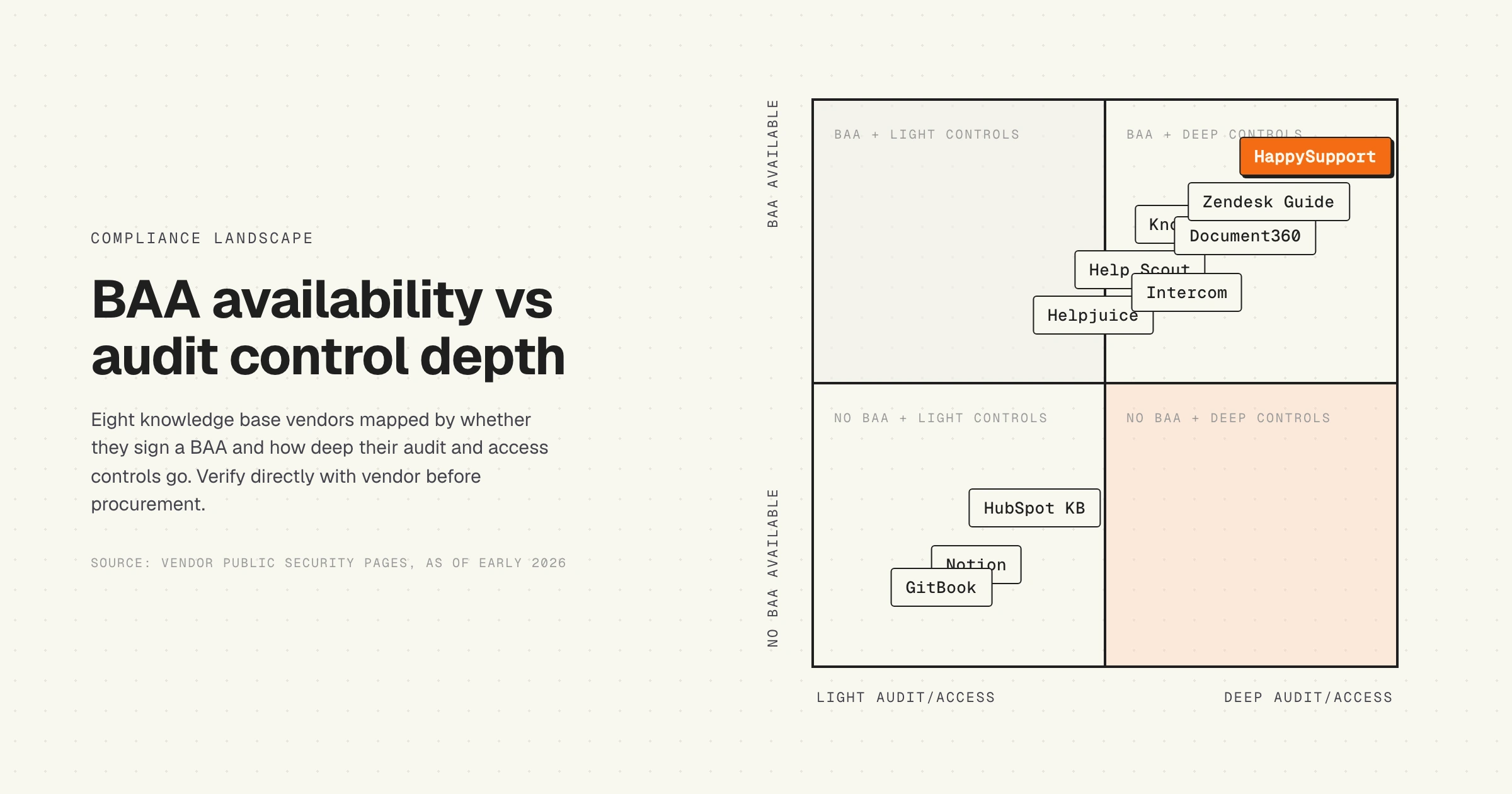
The BAA landscape across knowledge base vendors splits cleanly into three groups. Vendors that sign at Enterprise tier only, vendors that sign at lower tiers with conditions, and vendors that do not sign at all. The table below covers eight vendors commonly evaluated by healthcare SaaS teams. Every row reflects what the vendor publishes on their public security or compliance pages or has confirmed through sales channels as of early 2026. Verify directly with the vendor before procurement, because tier requirements and conditions change.
Two patterns are worth flagging from this table. First, the gating by tier is the rule, not the exception. Free, Starter, and basic Professional plans almost never include a BAA, even when the vendor markets itself as HIPAA-aware. The line in procurement budgets between "the plan we wanted" and "the plan that will sign a BAA" is sometimes a 3x to 5x price jump. Second, BAA scope varies by product layer. A vendor may sign for the knowledge base but not for the AI search layer, or sign for tickets but not for chat. Read the BAA itself, not the marketing page.
Knowledge base vendors that do not sign a BAA
The short list of common documentation tools that publicly state they do not sign BAAs covers most general-purpose collaboration and wiki tools. Notion, on the lower paid plans, does not. Confluence on Cloud requires the Atlassian Cloud for Healthcare plan, which is itself a separate procurement. GitBook does not advertise a BAA. Standard Google Workspace tiers do not include a BAA for Docs and Drive unless you are on Workspace for Enterprise with the BAA explicitly executed. Slack does not include the Slack knowledge base inside the standard BAA, which is signed at the Enterprise Grid plan with conditions.
The rationale these vendors give is consistent. The product was built for general-purpose work, the architecture has not gone through a HIPAA-aligned threat model end-to-end, the audit log retention does not satisfy the six-year requirement out of the box, or the BAA cost would change the unit economics of the lower tiers. None of that is a critique. It is a market-segmentation decision. The vendor has chosen not to serve healthcare-regulated workloads on the plans most teams are evaluating.
If a tool is not listed as BAA-available and the sales contact cannot produce a signed BAA in writing, treat the tool as out of scope for any workload that may touch PHI. Workarounds like "we will just not put PHI in the wiki" are unreliable in practice and do not protect the covered entity if an article leaks PHI through a screenshot, a case study, or an integration log.
What HIPAA does NOT cover: the accuracy gap
This is the section nobody else in the SERP writes, because it does not sell BAAs.
HIPAA's Security Rule covers confidentiality, integrity, and availability of PHI. Integrity, in the regulation's language, means that PHI has not been improperly altered or destroyed. It does not mean the article content is correct. The Security Rule is not concerned with whether a clinical SOP article describes the current workflow, whether an integration article references the current API endpoint, or whether a billing guide reflects the current insurance code. Those are clinical and operational risks, not HIPAA risks.
And yet they kill people. Or at minimum, they hurt people. A support agent following an outdated SOP article tells a patient the wrong thing about a medication interaction. A clinical staff member uses a knowledge base article that still references a pre-update intake form. A developer at a healthcare SaaS shop integrates against a deprecated endpoint that the documentation forgot was deprecated. None of this triggers a HIPAA breach notification. All of it is a real cost.
The gap is structural. Knowledge base platforms have spent fifteen years optimizing for write velocity, search, formatting, and permissions. They have not optimized for keeping the article accurate when the underlying product or workflow changes. The default failure mode of every knowledge base on the market is decay, and the larger the corpus the harder the decay is to see. We have written about this in the hidden cost of documentation decay and the freshness scoring problem for LLM-fronted knowledge bases. The healthcare context just makes the failure mode more expensive.
A complete HIPAA posture for a knowledge base needs three layers, not two. The BAA covers legal liability. The technical controls cover the wire and the storage. Accuracy controls cover whether the article is actually right. The first two are mature markets. The third is still mostly absent from the procurement checklist.
Accuracy controls in practice look like this. The article carries metadata that ties it to the product surface it documents, so when the underlying surface changes the article gets flagged for review. A clinical SOP carries an explicit review cadence and an owner, with automated escalation when the review date lapses. Internal-only articles that describe handling of PHI scenarios are version-tracked and require sign-off on every meaningful edit. The AI search layer, if there is one, returns a confidence score and refuses to answer when the source article is older than a threshold the team sets. None of this is required by HIPAA. All of it is required by the actual risk model of a healthcare SaaS team.
Implementation checklist for healthcare SaaS teams
If a healthcare SaaS team is shopping a knowledge base, here is the procurement order of operations. Ten items, none of them optional, and the order matters because the early ones disqualify vendors before you bother with the later ones.
- Confirm BAA. Get the vendor's BAA in writing, not a marketing page. Read it. Confirm which product surfaces are in scope.
- Verify tier. Confirm the BAA is available on the plan you are budgeting for, not three tiers up.
- Run a risk analysis. Document where PHI may appear in your knowledge base, including agent-only articles, screenshots, integration logs, and case studies. The Security Rule requires it and the OCR will ask for it.
- Specify access controls. Map article and section permissions to your existing role model. Confirm the platform supports group-level permissions inherited from your identity provider.
- Confirm audit log scope and retention. Reads on PHI-containing articles must be logged, not just writes. Logs must be retained six years.
- Verify encryption. AES-256 at rest and TLS 1.2 or higher in transit, including search indexes and any AI embeddings or caches.
- Pin the breach notification language. The BAA should specify the timeline for vendor notification to the covered entity, ideally well inside the 60-day HITECH window.
- Limit subcontractor exposure. The vendor's BAA should require flow-down BAAs to any subcontractor that may touch PHI. Verify what subcontractors are in play, including any LLM providers behind an AI search layer.
- Build the accuracy layer. Define review cadences, named owners, automated escalation for stale articles, and gating on AI responses sourced from old content. HIPAA does not require this. Patient safety does.
- Document everything. Every decision, every policy, every audit log review, every risk analysis update. Six-year retention is not negotiable.
The first eight items are familiar HIPAA hygiene. The ninth is the differentiator. Most healthcare SaaS teams have a story for items one through eight and no story for item nine, which is why a perfectly compliant knowledge base full of outdated articles is one of the most common patterns in the category.
Common HIPAA compliance mistakes with knowledge bases
Six failure patterns show up repeatedly when healthcare SaaS teams audit their own knowledge base posture. None are exotic. All are avoidable.
The first is treating the marketing page as the BAA. A vendor's "HIPAA compliant" badge on a product page is not a contract. The BAA is the contract. If the sales team will not produce a signed BAA in writing, the badge does not exist.
The second is buying the wrong tier. Procurement signs for the plan, the BAA is on a different plan, and the rollout discovers it during implementation. Months of replanning follow. Always confirm the BAA is included at the tier in the contract before signing, not after.
The third is assuming PHI never enters the knowledge base. It does. A support agent pastes a partial ticket into an internal article as an example. A product manager writes a release note with a screenshot that has patient initials in the corner. A developer documents an integration test against a non-production environment that holds real-looking PHI. Always run the risk analysis against the actual content, not the policy that says PHI never enters the wiki.
The fourth is treating the public help center and the internal knowledge base as one system. They have different PHI risk profiles. The public help center may genuinely never contain PHI, in which case the BAA scope can be narrower. The internal agent-facing knowledge base is more likely to contain PHI and needs the full safeguards. Architect the two so the boundary is enforceable.
The fifth is forgetting the AI layer. If the knowledge base has an AI search or AI answer feature, the AI vendor is a subcontractor in the BAA chain. Confirm the AI provider also signs a BAA, that no training happens on your data, and that the inference pipeline does not log PHI in third-party observability tools. This is the failure mode behind a lot of the accuracy and trust issues with AI chatbots in customer support.
The sixth is the one nobody catches in procurement. The knowledge base is compliant, the BAA is signed, the controls are in place, and the articles are wrong. This is not a HIPAA failure. It is a clinical and operational failure. It is also the most common failure in the category. We covered the structural pattern in our audit of 30 SaaS help centers for AI readiness, and the pattern repeats hardest in regulated verticals.
The HappySupport approach
HappySupport signs a BAA at the Enterprise tier. AES-256 at rest, TLS 1.3 in transit, end-to-end audit logs, role-based access controls down to the section level, six-year retention as default. The standard HIPAA hygiene is in place.
What is different is the accuracy layer. HappySupport records help center steps as DOM and CSS metadata, not as pixel screenshots. When the underlying product surface changes, the recorder knows. The article gets flagged for review, the screenshot gets re-captured automatically, and the editor sees the diff. We call the underlying pattern a self-updating help center, and the same pipeline powers the connection between a knowledge base and an AI chatbot so the AI answer is gated on whether the source article is still current.
This does not replace HIPAA's technical safeguards. It sits on top of them. The BAA covers liability, the controls cover PHI in flight and at rest, and the accuracy layer covers the question HIPAA does not ask: is the article still correct?
For healthcare SaaS teams that have learned the hard way that a perfectly compliant knowledge base full of outdated articles is still a clinical risk, that gap matters more than another security audit.










