.png)

"Free" can mean three things in knowledge base software. Forever-free tier with limits. Trial that converts after 14 or 30 days. Open-source that you self-host. This article splits them apart honestly, lists what each free option actually includes (verified 2026-05-23 directly from the vendor pricing pages), and ends with the part most roundups skip: the maintenance labor that no free tier covers.
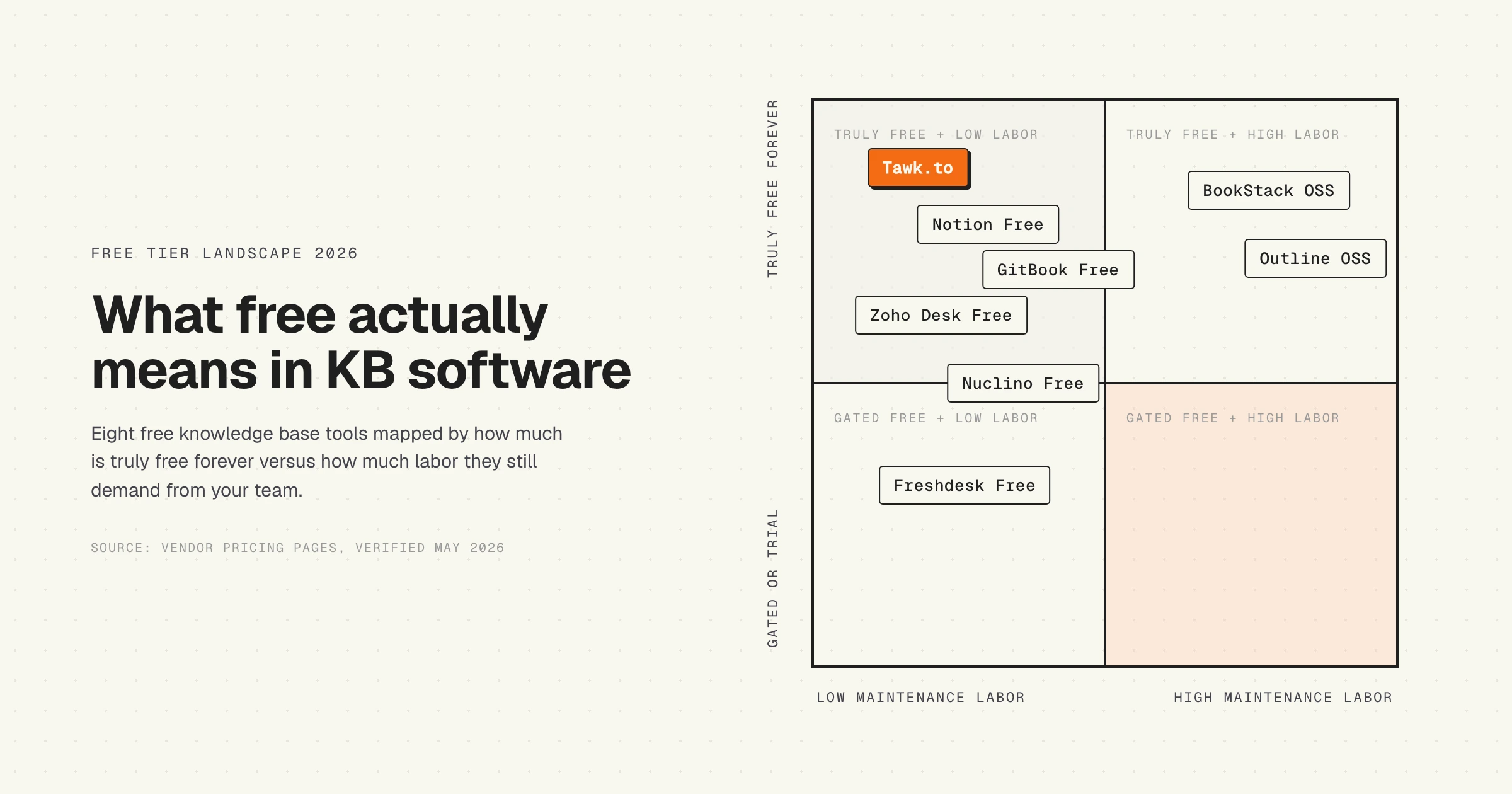
Eight tools qualify for "truly free in 2026": GitBook Free, Notion Free, Zoho Desk Free, Freshdesk Free, Tawk.to, BookStack, Outline, and Nuclino Free. A few names you might expect to see, including Document360, HelpCrunch, and Tettra, only offer trials. We list those briefly at the end so you do not waste a Friday afternoon discovering it yourself.
Quick verdict: which free KB tool fits which team
Before the per-tool detail, here is the short version. If you want a real product (not a trial) and you do not want to host anything yourself, Tawk.to is the answer almost no roundup mentions because it does not pay for ads. If you have engineers and want full control, BookStack or Outline. If your team already lives in Notion, the free tier is fine for a small internal wiki but not a customer help center. If you want a free help center attached to a real ticketing system, Freshdesk Free for 1 to 2 agents (capped at 6 months) or Zoho Desk Free for 3 agents.
Pricing and limits verified directly from each vendor's pricing page on 2026-05-23. Free tiers change. If you are reading this six months out, click through to confirm.
1. Tawk.to: the truly-free outlier
Tawk.to is the answer most "best free KB" articles avoid because the company does not run paid ads. It is genuinely free forever. No agent cap, no ticket cap, no article cap, no chat cap. The free product includes live chat, ticketing, a hosted knowledge base, and a CRM. The business model is hired chat agents (you can pay $1/hour for a human agent if you do not have one), plus optional add-ons. Removing the "powered by Tawk.to" line at the bottom of the chat widget is an optional paid add-on, around $19/month.
Where Tawk.to works free
You can ship a working customer help center with chat, tickets, and KB articles to a custom domain without ever giving Tawk.to a credit card. The product is mature: it has been free since 2008 and is used by more than 5 million businesses. The knowledge base supports 45+ languages, JavaScript API, and includes basic article analytics. For a small SaaS that just needs any functioning help center without budget approval, this is the path of least resistance.
Where the free tier breaks down
The product is dense. Onboarding takes a few hours to get right. The free knowledge base does not have the polish of Document360 or Help Scout, and the editor feels closer to a 2018 CMS than a modern doc tool. AI features are an optional paid add-on rather than baked in. If you want a brand-first help center that converts visitors, you will outgrow Tawk.to within a year.
Best for: bootstrapped SaaS or SMB teams that need a working free support stack today and can swap it out later.
2. GitBook Free: dev-friendly, capped at one user
GitBook started as a markdown-first doc tool for engineers and grew into a polished SaaS doc platform. The free plan exists, gives you the editor and GitHub or GitLab sync, but limits you to one user. Unlimited page views, version history, comments, API playgrounds, and ISO 27001 certification all come in the free plan.
Where GitBook works free
Solo founders, indie devs, and early-stage API products can publish a professional doc site to GitBook's subdomain at no cost. The block-based editor is one of the cleanest in the category, GitHub sync means your docs can live next to your code, and the search works out of the box.
Where the free tier breaks down
The moment a second person needs edit access, you are on the Premium plan: $65 per site per month plus $12 per user per month. No custom domain on free. No advanced branding. No analytics. No user feedback. No SAML SSO. No teams. The free tier is functional for one person and zero teams.
Best for: solo developers and indie founders publishing API or product docs in their first six months.
3. Notion Free: fine for personal wikis, gated for teams
Notion's free plan reads generous on the homepage. "Unlimited blocks for individuals," and unlimited workspace members. The catch is in the line that follows: "limited for 2+ members." The moment you add a second person, you hit the block cap, which in 2026 is around 1,000 blocks. A real internal wiki passes that in a quarter.
Where Notion works free
If one person owns the knowledge base, the free plan is excellent. You get unlimited blocks, 10 guest collaborators, 7-day page history, file uploads up to 5MB, and a trial of Notion AI. For a solo founder or a personal SOP library, that is enough. The editor is the gold standard for general-purpose docs and the templates ecosystem is unmatched.
Where the free tier breaks down
Notion is not built as a customer-facing help center. There is no native article analytics, no ticket integration, no AI search on stale content, and no custom domain on the free plan. The public publishing on Notion.so subdomains is slow to index in Google. And the block limit at 2+ members is the wall most teams hit within a quarter. Plus starts at €9.50 per member per month.
Best for: solo founders and one-person ops teams building internal wikis or personal knowledge stores.
4. Zoho Desk Free: a help center attached to a ticketing system
Zoho's free Desk plan covers 3 agents, email-based ticketing, and a basic knowledge base. If your team already pays for Zoho One (CRM, mail, projects), the Desk free tier slots in without extra cost or integration work.
Where Zoho Desk works free
Three agents is enough headcount for a small SaaS or services business. Email ticketing works out of the box. The knowledge base supports articles, categories, and a public help center on Zoho's subdomain. For a tiny team running its first support operation, this combination of free ticketing and free KB is hard to beat.
Where the free tier breaks down
The free plan strips the things that matter for a real customer help center: no multilingual KB, no custom domain, no workflows, no SLA management, no live chat, no analytics. The Express plan starts around ₹420 (approximately $5) per user per month annually. Even at that price, you lose the free tier the moment you cross 3 agents.
Best for: tiny SaaS or services teams already in the Zoho ecosystem, running 1 to 3 agents.
5. Freshdesk Free: $0 for 1 to 2 agents, capped at 6 months
Freshdesk's free tier reads stronger than it is. The page says "Free Forever" but the small print: free for 1 to 2 agents, included for 6 months. After 6 months you are on Growth at $19 per agent per month. The free 6 months bundles ticketing, a knowledge base, and pre-built reports.
Where Freshdesk works free
For a bootstrapped SaaS in its first 6 months, Freshdesk Free is a no-brainer. You get a mature help center, real ticketing, integrations, and a published KB on a Freshdesk subdomain (custom domain is paid). The product is polished, mobile apps work, and onboarding is fast.
Where the free tier breaks down
Two agents is the hard cap. The 6-month timer is the soft cap. Custom branding, custom domain, workflows, SLA management, and multilingual KB are all paid. The free tier is a runway, not a destination. If you grow, you will be on a paid plan inside a year.
Best for: bootstrapped startups in their first 6 months who want a real ticketing-plus-KB combo without budget approval.
6. BookStack: MIT-licensed, self-hosted, no paid tier ever
BookStack is the cleanest open-source KB option. MIT license, PHP and MySQL, runs on a $2.50 IONOS VPS. The product is genuinely simple: books, chapters, pages. No "team plans," no "enterprise tier," no upsell. The project sustains itself through donations and optional commercial support, not by limiting features.
Where BookStack works free
Engineering teams that want full data control, no per-seat fees, and no vendor lock-in. The editor is reasonable, search works, you can add users without a per-user invoice, and the entire codebase is yours to fork. For internal documentation in a developer-heavy team, this is one of the best free choices on the market.
Where the free tier breaks down
You host it. That means somebody on the team owns the VPS, the backups, the SSL certificate, the upgrades, and the moment something breaks at 2 AM. The polish is not at Document360 levels. AI search, generative answers, and the modern KB features your competitors ship by default are not in BookStack today (you can wire them in, but that is more labor on top of the maintenance you already signed up for).
Best for: engineering teams with on-call capacity who want a free, MIT-licensed internal wiki and accept the hosting cost.
7. Outline: open-source self-host or paid cloud
Outline is a modern team knowledge base, source-available under BSL (Business Source License), with a polished editor that competes with Notion on look-and-feel. You can self-host the source for free, or pay for the cloud version starting at $10/month for 1 to 10 team members.
Where Outline works free
If you self-host. The Outline codebase is on GitHub and the project ships a Docker setup that makes deployment closer to "an afternoon" than "a sprint." The editor and the API are first-class. For internal team wikis that need a Notion-quality experience without the per-member subscription, Outline self-hosted is excellent.
Where the free tier breaks down
BSL is not OSI-approved open source. You can use the self-hosted version free for almost any team but the license restricts hosting Outline as a service to compete with the official cloud. The cloud plan starts at $10/month for up to 10 users, not free. Maintenance burden is real, like BookStack: you own the upgrades and the backups.
Best for: internal team wikis with engineering capacity for self-hosting, where Notion-quality editing matters.
8. Nuclino Free: 50 items and 3 canvases, unlimited users
Nuclino is a lightweight team wiki with an unusually clean editor and a real-time collaboration model closer to Figma than Notion. The free plan supports unlimited users (rare in this category) but caps items at 50, canvases at 3, storage at 2GB, and version history at 30 days.
Where Nuclino works free
The unlimited-users free plan is unusual: most competitors gate users hard. For a 5- to 10-person team that wants a clean internal wiki and only needs 30 to 50 articles, the free plan is enough to get started. The editor is fast, the linking model encourages graph-style internal references, and the UI is opinionated in a good way.
Where the free tier breaks down
50 items is the ceiling. A real internal wiki passes 50 items in the first month. The Standard plan removes the cap but pricing is per user per month, which compounds quickly past 10 people. Public publishing (a customer-facing help center) is not a Nuclino strength even on paid plans.
Best for: small internal teams (5 to 10 people) testing the wiki habit before committing to a paid tool.
What every free tier strips (and why)
Compare the eight free plans side by side and the same six features disappear every time. Custom domain. Branding removal. Article limits raised. SSO and SAML. Analytics on which articles convert. Priority support. The free tier is engineered to be useful enough for personal use and frustrating enough for a real business.
Article count. Notion's block cap, Nuclino's 50-item ceiling, GitBook's single-user limit all act as soft article caps. Tawk.to and BookStack do not cap. Most teams cross 100 articles in the first year if they take documentation seriously.
Custom domain. GitBook Free, Zoho Desk Free, Freshdesk Free, and Nuclino Free all publish to a vendor subdomain. Tawk.to lets you embed on your own domain. BookStack and Outline are yours to point at any DNS record. For Google indexing, custom domain matters: subdomain pages from gitbook.io or freshdesk.com inherit none of your site's authority.
"Powered by" branding. Tawk.to and Freshdesk free both watermark the help center. Removing it costs $19 to $39/month depending on the vendor. If you sell to enterprise customers and they see "powered by tawk.to" at the bottom of your help center, expect a procurement review.
SSO and SAML. None of the free plans include SAML. GitBook's free plan does not include "authenticated access" at all. If your help center needs to gate any article behind a customer login, free tiers are off the table.
Article analytics. GitBook Free explicitly excludes analytics. Notion Free does not ship article-level analytics at all. Zoho Desk and Freshdesk show ticket-level analytics but not "which article saved a ticket." Without analytics you cannot tell which articles are working, which means you cannot prioritize what to maintain.
Support. Free tier support is community-only or email-with-no-SLA. The moment something breaks, you are reading forum posts.
The hidden cost of free: maintenance labor
Here is the part that most "best free KB" lists miss. Free knowledge base tools have the same maintenance burden as paid ones. You save the license fee, not the labor.
A knowledge base is a living asset. Every product release, every UI change, every renamed setting, every new pricing tier, every deprecated feature requires someone to walk through the help center and update articles. Internal research at HappySupport across 30 audited SaaS help centers shows the same pattern: articles drift out of date within two to three product releases. The screenshots stop matching the UI within 60 to 90 days for teams that ship weekly.
The labor cost is real. A 200-article help center with weekly product releases takes 8 to 12 hours a week of writer time to maintain at a basic level. At a fully loaded rate of $60 per hour, that is $25,000 to $37,000 per year of staff time. The free KB tool saves you the $2,000 to $5,000 annual license fee. It does not save you the $25,000 to $37,000 of labor.
The free tools that minimize labor are the ones tied to a source-of-truth that already changes (BookStack with markdown synced from a docs repo, Outline with API-driven content). The free tools that maximize labor are the ones with manual editors and no version control (Tawk.to, Zoho Desk Free, Freshdesk Free), because every product release requires a human to remember to update the article.
This is the part of the free-vs-paid decision that the pricing page does not show. The license fee is a fraction of the total cost. The article currency is the rest. See why documentation decay is the hidden cost no one budgets for.
Free KB tools sit beside your ticketing system, not in place of it
One thing to clear up. Free knowledge base tools do not replace your ticketing or live-chat system, they sit beside it. Tawk.to is an exception (bundles chat, tickets, and KB), but for the other seven you still need Intercom, Zendesk, Help Scout, HubSpot, Front, or Freshdesk to actually handle support conversations. The KB is the article layer that deflects tickets and the ticketing system handles the ones that still come through.
HappySupport works the same way: the help center is the article layer that sits beside whichever ticketing tool you already use. Keep your ticketing system, swap in HappySupport for the help center that updates itself when the product ships. We will return to this at the end.
When free is the right answer
Free is the right call in four situations. First, you are a solo founder testing whether documentation moves your conversion or retention numbers at all. You do not need polish, you need to ship 10 articles and watch the data. Notion Free or GitBook Free are enough. Second, you are a bootstrapped startup in your first 6 to 12 months and any extra software subscription delays runway. Freshdesk Free buys you 6 months and Tawk.to buys you forever. Third, you have engineering capacity and a strong "build it yourself" preference: BookStack or Outline self-hosted gives you control and removes the per-user invoice. Fourth, the knowledge base is genuinely internal-only, small (under 50 articles), and only a few people will edit it: Nuclino Free or Notion Free is fine.
When paid is worth it (even though "free works")
Paid becomes worth it the moment any of these are true. You sell to enterprise customers and they will see the "powered by" branding. You ship product changes weekly and you cannot afford 8 to 12 hours a week of writer time to chase stale articles. Your help center is the first thing a buyer sees before signing up and a vendor subdomain hurts conversion. You need SSO or SAML for gated articles. You need real article-level analytics to know which articles deflect tickets. You need multilingual support. You need a custom domain for SEO.
The threshold is simple: when the time cost of keeping articles current exceeds 10 hours a week, the labor savings from a maintenance-native paid tool outweigh the license fee.
Tools that are NOT actually free (despite the marketing)
Three tools that show up in "free knowledge base" lists do not have a permanent free tier as of 2026-05-23. Document360 offers a 14-day trial, no permanent free plan. HelpCrunch offers a trial but no free tier. Tettra offers a 30-day trial with no permanent free plan. Mention this only because we tried to fit them into this list and verified each pricing page directly. If you are reading this six months out, click through to confirm none of them added a free tier.
Where HappySupport fits (honest positioning)
HappySupport is not free. The product starts at €299 per month with a 14-day trial. If your budget is zero, one of the eight tools above is the right answer for now.
HappySupport is the answer when free stops working. When the maintenance labor (8 to 12 hours a week) outweighs the license fee you would save. When customers find stale articles and you have lost ticket-deflection trust. When your product ships weekly and the screenshots in your free KB stopped matching the UI three releases ago.
The HappyRecorder Chrome extension records UI flows so the article stays connected to the product. When the product ships, the article updates itself. The HappyAgent layer connects the help center to the product repository, flagging articles whose source code has shifted. Customers find the right answer the first time. The team writes the article once. See how a self-updating help center works, why help centers are always wrong, and the full comparison of knowledge base software if you outgrow free. For teams running everything solo, how to manage a help center as one person covers the operational side.
Free KB tools save the license. They do not save the labor. HappySupport is the trade: pay for the tool, save the labor.










