The knowledge base your 80-person startup picked four years ago does not pass the security review at a 4,000-person enterprise. The product is fine. The procurement gate is the problem. Enterprise buyers want SSO behind SAML or OIDC, SCIM provisioning wired to the IDP, regional data residency in writing, custom RBAC roles, audit logs that survive an external auditor, a dedicated CSM with an actual phone number, contract terms negotiated by legal, and a security questionnaire answered without "please contact sales".
This article maps the enterprise knowledge base buyer journey honestly. We cover what "enterprise" actually means at a procurement level (it is not a feature checklist, it is a contract structure), the 10 procurement requirements that show up in every RFP, the five vendors that genuinely meet them (Document360, Zendesk Guide, Helpjuice, KnowledgeOwl, Notion), where each one wins and where it hits the wall, and a section we owe you: where HappySupport does not fit. Skip to the procurement checklist at the bottom if you are already shortlisted.
Source: vendor security pages, pricing pages, and trust portals pulled 2026-05-23. We re-checked every claim against the vendor's own documentation rather than reseller listings.
What enterprise actually means for a knowledge base
"Enterprise" gets used three different ways in the knowledge base market, and conflating them costs you six weeks of procurement pain.
Definition one is feature-tier marketing. Many vendors call their highest plan "Enterprise" because the word raises the price ceiling. That tier may or may not include SSO, may or may not include SCIM, may or may not have data residency. Treat the word "Enterprise" on a pricing page as a label, not a guarantee. Read the security page next.
Definition two is org-size positioning. Some platforms target the 1000-plus employee segment by default, building procurement-grade features into the product from the start. Bloomfire, eGain, and ServiceNow Knowledge sit here. Pricing is custom because the customer is custom.
Definition three is procurement reality. This is the only definition that matters at signing time. Can your security team finish the review in the quarter? Will Legal sign the contract without 15 redlines? Does the vendor have a Trust Portal with current SOC 2 Type II, ISO 27001, and a populated CAIQ? Will the vendor name a CSM in the order form? Are there liability caps that match your spend? Most "enterprise" knowledge base vendors check definition one. A smaller list checks definition two. A much smaller list checks definition three.
The article focuses on definition three. If your knowledge base purchase needs Legal, Procurement, and Security signoff before it ships, the rest of this guide is for you.
The 10 enterprise KB requirements
Every enterprise RFP we have seen since 2023 has converged on roughly this list. Order varies by industry (healthcare front-loads HIPAA, EU shops front-load GDPR and residency, defense shops front-load FedRAMP), but the items are the same.
1. SSO and SAML
Mandatory. Your IDP is Okta, Entra ID (formerly Azure AD), Ping, OneLogin, or Google Workspace. The KB must support SAML 2.0 SP-initiated and IDP-initiated flows, plus OIDC if your stack runs on it. "We support Google login" is not SSO. JIT user creation on first sign-in saves you a separate provisioning project.
2. SCIM provisioning
SCIM 2.0 lifecycle (create, update, deprovision, group sync) from your IDP into the KB. Without SCIM, your IT team manually deletes departed employees from a third tool, which means departed employees keep access for weeks. Auditors will find this. Vendors who claim "SSO" but not "SCIM" are missing half the identity story.
3. Regional data residency
Where the data is stored matters for GDPR, Schrems II considerations, Australian Privacy Principles, and an increasing number of national data localization rules. EU customers want EU-only storage. US federal-adjacent customers may want US-only. Some industries require in-country (e.g. Germany). Ask the vendor for an explicit residency statement, not "we use AWS". AWS has regions in 30 places.
4. Audit logs
Every authentication event, every permission change, every content edit, every export. Logs must be retained per your compliance window (typically 12 to 24 months) and must be exportable to your SIEM via syslog, webhook, or S3 drop. The auditor will ask. If the KB cannot produce a CSV of "who edited which article when", you are running an unauditable system of record.
5. RBAC with custom roles
Out-of-the-box roles (Admin, Editor, Reader) do not match real enterprise org structures. You need custom roles ("can edit Security category but not delete", "can view internal-only space but not external") and group-based assignment that maps to your IDP groups. Without group sync, you are managing permissions in two places, which means you are managing them poorly in both.
6. Contract length and procurement terms
Annual or multi-year contracts standard, with negotiated MSA and DPA. Legal will want a vendor BAA if you are in healthcare, a US-EU DPA with Standard Contractual Clauses if EU data crosses the Atlantic, indemnification for IP claims, liability caps proportional to the contract value, and termination-for-convenience clauses. "Click-through TOS" is not a procurement-grade contract. Vendors who only sell self-serve fall out here.
7. Dedicated CSM and SLA
A named person at the vendor whose job it is to make your renewal happen. Quarterly business reviews. Escalation path that bypasses the support queue. A written SLA on uptime (99.9% minimum, 99.95% common at this tier) with service credits that mean something. Without a CSM, you are a ticket number when something breaks.
8. Custom integrations and API access
Read and write API with rate limits high enough to back a real integration. Webhooks for content events. Native connectors for the systems you actually use: Slack, Microsoft Teams, the ticketing system (Zendesk, Intercom, Help Scout, HubSpot, Freshdesk, Front, Jira Service Management), the CRM, the LMS. Custom integrations need an OpenAPI spec and a sandbox tenant.
9. White-label and brand control
Custom domain (help.yourcompany.com via CNAME), full CSS customization, no vendor branding in the rendered page, ability to inject analytics tags and consent banners. White-label matters more for customer-facing knowledge bases than for internal ones, but enterprise-grade vendors deliver it on both.
10. Content accuracy and freshness controls
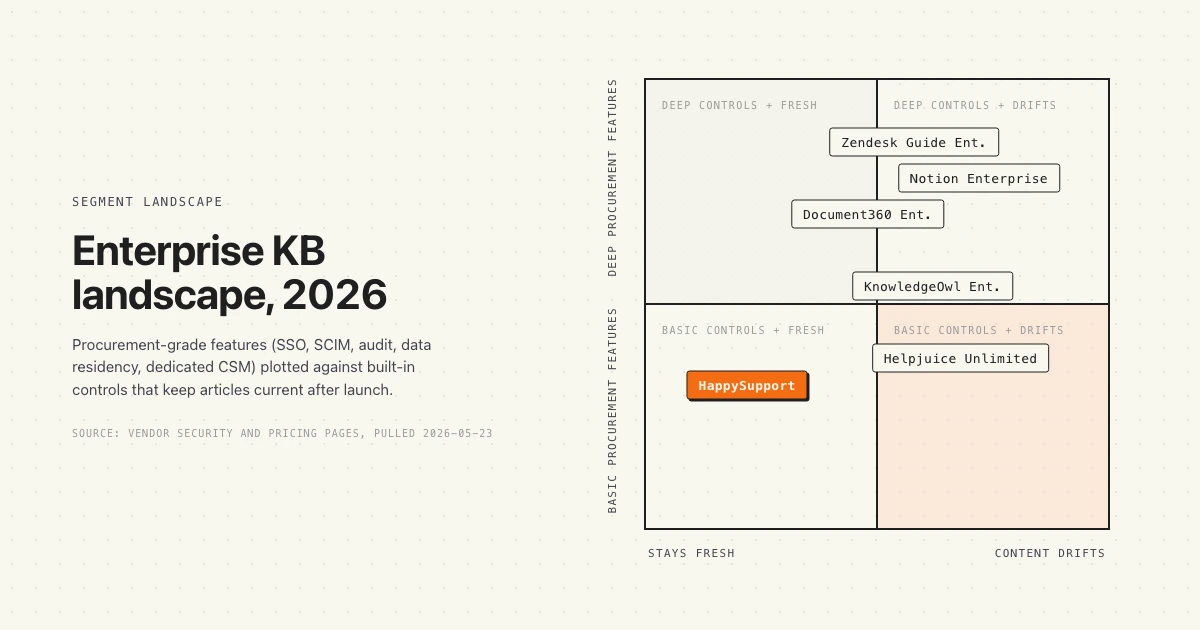
The forgotten requirement. Enterprise procurement focuses heavily on security and identity, and almost nothing on whether the content stays accurate after launch. Articles drift the moment the product ships. The decay curve runs at roughly 30% stale within 90 days of any major release. Look for built-in flags for stale content, last-reviewed timestamps, expiration workflows, and any vendor signal that they treat freshness as a feature rather than the customer's problem. We covered this in detail in the hidden cost of documentation decay.
Vendors that meet enterprise procurement
Five vendors clear the procurement bar consistently. We exclude vendors who require "contact sales" for every fact and refuse to publish a Trust Portal, and vendors who position as enterprise but have no published SCIM support.
| Vendor | SSO/SCIM | Data residency | Dedicated CSM | Contract | Starting price |
|---|---|---|---|---|---|
| Document360 Enterprise | SSO yes (Okta, Entra ID, Google, ADFS, OneLogin, Auth0, AWS SSO, custom). SCIM via Okta, Entra ID, OneLogin. | Not publicly disclosed. | 24/5 priority support, dedicated design expert. | Quote-based, annual. | Quote only. |
| Zendesk Guide Enterprise | SAML SSO and SCIM included on Suite Enterprise. | EU and US regions available on Enterprise. | Named CSM at Enterprise. | Annual, MSA available. | From around $169 per agent per month at Suite Enterprise tier. |
| Helpjuice (Unlimited tier) | SSO included. SCIM not publicly listed. | Not publicly disclosed. | Account team on top tier. | Monthly or annual. | $799 per month, unlimited users. |
| KnowledgeOwl Enterprise | SSO/SAML across tiers (including Salesforce SSO). SCIM not publicly listed. | Not publicly disclosed. | Dedicated account management, custom SSL. | Custom terms. | Quote only. |
| Notion Enterprise | SAML SSO and SCIM included. | Not on pricing page (US/EU historically available on enterprise contract). | Named CSM. | Annual, MSA available. | Quote only. |
Verified against each vendor's own pricing and security documentation, pulled 2026-05-23. Where a vendor does not publicly disclose a fact (data residency, contract length, exact pricing), we say so rather than guess.
Document360 Enterprise: where it fits
Where Document360 wins
The most enterprise-ready of the dedicated knowledge-base-first vendors. Document360 publishes a full identity story (Okta, Entra ID, Google, ADFS, OneLogin, Auth0, AWS SSO, plus custom SAML) and confirms SCIM for the three big IDPs. The product was built for the help-center use case from day one, so the authoring experience, version control, and workflow controls feel native rather than retrofitted. Multi-language support, branded portals, and an MCP server integration round out the AI story. Good fit when knowledge base is the primary use case and procurement needs SSO/SCIM checked off. We covered Document360 pricing structure in a separate breakdown.
Where Document360 hits the wall
Public pricing is opaque. Every tier is quote-based, which slows down internal budget approvals. Data residency is not stated explicitly on the security page, which becomes an issue for EU buyers who need it in writing before signing. The AI features ship but lean toward authoring helpers (auto-generate glossary, duplicate detection) rather than content-freshness automation. Best for: companies where the knowledge base is the standalone product (developer portals, customer-facing help centers, complex internal docs) and SSO/SCIM are the gating procurement requirement.
Zendesk Guide Enterprise: where it fits
Where Zendesk wins
If your support team already runs Zendesk Suite, Guide Enterprise is the path of least resistance. Help-center publishing is bundled into the ticketing system, agents see knowledge base suggestions inside the ticketing UI, and the AI Copilot can draft replies from articles. SSO, SCIM, audit logs, custom roles, and EU/US data residency are all available at the Enterprise tier. Zendesk's Trust Center publishes current SOC 2, ISO 27001, HIPAA, FedRAMP Moderate (for the GovCloud product), and PCI compliance, so the security review usually clears quickly. Named CSM at this tier. We covered Zendesk Guide pricing in detail.
Where Zendesk hits the wall
Suite Enterprise is priced per agent, not per knowledge base reader, so the cost scales with your support headcount whether or not they author articles. A 200-agent team on Suite Enterprise pays roughly $33,800 per month before any AI add-ons, and the AI Copilot moves you to Suite Enterprise Plus which is quote-only. Guide is also bundled inside Suite, so you cannot buy Guide standalone at Enterprise tier. If you want knowledge base without the rest of the Zendesk stack, this is the wrong tool. Best for: enterprise support orgs already on Zendesk who need the help center bundled into the ticketing flow.
Helpjuice (Unlimited tier): where it fits
Where Helpjuice wins
Flat monthly price ($799 for the Unlimited tier) is unusual at the enterprise end of the market. Unlimited users means you pay the same whether you have 50 authors or 500. SSO is included. The customization story is one of the better ones (Helpjuice positions their "$1 million worth" of customization as a moat, which translates to a lot of CSS control in practice). Multilingual AI translation covers 40-plus languages. Good fit for global customer-facing knowledge bases where unit economics need to be predictable.
Where Helpjuice hits the wall
SCIM is not publicly listed on the pricing page, which becomes an immediate "no" in a procurement review where SCIM is mandatory. Audit logs, data residency, and contract terms are not disclosed publicly either. The Trust Portal is thinner than the dedicated enterprise vendors. AI features are bundled, but content-freshness controls and stale-content automation are limited. Best for: mid-market companies who need flat-rate predictability and can live with a thinner identity story, not deep enterprise procurement.
KnowledgeOwl Enterprise: where it fits
Where KnowledgeOwl wins
The customer-success motion is the differentiator. KnowledgeOwl assigns dedicated account management at Enterprise, completes vendor security questionnaires (the actual ones, not a Trust Portal redirect), signs GDPR and HIPAA agreements directly, and provides custom SSL certificates. 99.9% uptime SLA written into the contract. Custom roles and granular RBAC are confirmed across all tiers. Salesforce SSO is supported alongside the standard IDPs. The vendor behavior is more "white-glove agency" than "self-serve SaaS", which suits regulated industries.
Where KnowledgeOwl hits the wall
SCIM is not publicly documented, which forces a sales conversation to confirm. Pricing is quote-only with no public anchor, so internal budgeting is harder. AI credits cap at 10,000 on Enterprise, which is fine for moderate use but constrains heavy automation. Data residency is not stated publicly. Best for: regulated mid-to-large enterprises (healthcare, finance, government-adjacent) who need a vendor that actually fills out the security questionnaire and signs a BAA.
Notion Enterprise: where it fits
Where Notion wins
If your company already runs on Notion for internal docs, the Enterprise tier extends it into a knowledge base without a separate procurement cycle. SAML SSO and SCIM are confirmed at Enterprise. The audit log is detailed (security and safety activity tracked). DLP and SIEM connections are available. Dedicated CSM. Granular admin roles and domain management. Notion AI ships with zero data retention on LLM providers, which clears the AI risk review at most enterprises. The same product covers internal wiki, project docs, and customer-facing knowledge base, which reduces tool sprawl. We covered the workspace comparison in Confluence vs Notion for knowledge base.
Where Notion hits the wall
Notion is a workspace platform first, knowledge base second. The published help-center experience is less polished than a dedicated KB vendor. Customer-facing site customization is more limited than Document360 or Helpjuice (no full custom domain CSS at the same depth, fewer help-center-native features like article version diffing). Data residency is not explicitly named on the pricing page. Pricing is quote-only. Best for: companies who already use Notion internally and want to extend it rather than introduce a separate knowledge base tool.
Where HappySupport does not fit
This is the section we owe you. HappySupport is built for mid-market SaaS companies between Seed and Series C, typically 20 to 150 employees, who ship product weekly and whose documentation cannot keep up. The product fits that ICP well. It does not yet fit Fortune 500 procurement cycles. Specifically:
- We are not on the standard procurement-platform vendor lists (Coupa, Ariba, ServiceNow Procurement). If your purchase has to flow through one of those, we are not in the catalog yet.
- Our public Trust Portal is in development. We have SOC 2 Type II underway, but we will not pretend it is complete. Healthcare buyers who need a current BAA should evaluate Document360 or KnowledgeOwl first.
- We do not yet offer a regional data residency commitment beyond our default EU hosting. If your contract requires US-only or APAC-only storage in writing, that is a 2026 roadmap item, not a current capability.
- SCIM is on the roadmap, not shipped. SSO via SAML works. SCIM lifecycle automation is the next major identity milestone.
- Contract terms are standard SaaS click-through plus a short DPA. We will not negotiate a 40-redline MSA in two days. That is an honest constraint of being a young company.
Where HappySupport does fit, and what we think we are best in market at, is the freshness problem. We built the platform around the assumption that your product will ship faster than your documentation team. Articles update from DOM and CSS metadata as the product changes, GitHub Sync watches the deploy pipeline and flags articles that need a review when the underlying UI moves, and the help center renders fresh by default. We covered that approach in detail here. If you are a 4,000-person enterprise that needs procurement-grade vendor stability and you have a content ops team to run a static knowledge base, the five vendors above are the right shortlist. If you are a 60-person SaaS shipping weekly and your three-year-old knowledge base is 47% stale, talk to us.
How to run an enterprise KB procurement
A repeatable procurement playbook compresses the cycle from 14 weeks to 6. The structure below is what we have seen work at 1000-plus employee buyers.
Stage one is requirements (week 1 to 2). Write the requirements document with the people who will use the system, not the people who will sign the contract. Tag each requirement Must-Have, Should-Have, or Nice-to-Have. The 10 requirements above are a good starting frame. Be ruthless about Must-Have. A list of 47 mandatory features is not a procurement document, it is a wishlist.
Stage two is longlist (week 2). Ten to fifteen vendors. Pull from G2, from analyst coverage, from peer recommendations, from the four to five vendors who already sell to your industry. Do not filter on "enterprise" branding. Filter on whether the security page is current.
Stage three is shortlist (week 3 to 4). Three to five vendors who meet every Must-Have on paper. Send a short security questionnaire (50 questions, not 500). Reject any vendor whose answers are "contact sales" for security-baseline items.
Stage four is demos and reference calls (week 5 to 7). Each shortlisted vendor gets a 90-minute scripted demo against your real use case. Ask for two reference customers at your size and in your industry. If the vendor cannot produce two, that is signal.
Stage five is proof of concept (week 7 to 11). Two finalists. Each runs a 4-week pilot with real content and real users. Measure search hit rate, average time-to-answer, deflection delta, and authoring throughput. Do not skip the pilot. Vendor demos look identical. Pilots do not.
Stage six is contract and signing (week 11 to 14). Legal review on the MSA, DPA, and any sub-processor list. Security signoff on Trust Portal artifacts (SOC 2 Type II, ISO 27001, penetration test summary). Finance signoff on the order form. Then sign.
Industries with heavy regulation (healthcare, finance, public sector) add two to four weeks for BAA, FedRAMP audit review, or jurisdiction-specific data handling. Plan accordingly.
Common enterprise KB mistakes
Five recurring mistakes show up in the procurement post-mortems we have read.
Mistake one. Confusing "Enterprise" the tier with "Enterprise" the procurement bar. A vendor labels their top plan "Enterprise" and includes SSO. That is a feature checkbox. It does not mean the vendor has a Trust Portal, a DPA, or a signed SOC 2 Type II. Read the security page first, not the pricing page.
Mistake two. Buying for headcount instead of usage. Per-agent pricing models punish you as you grow. Per-author pricing models reward you for not adding contributors, which is the opposite of what you want. Negotiate to user-based or unlimited-author pricing if you can. Helpjuice's flat-rate model is the cleanest example, though it comes with trade-offs on the identity story.
Mistake three. Skipping the content audit. The team buying the new knowledge base usually has not audited the old one. They are about to migrate a body of content that is 30 to 60% stale into a more expensive system, then complain that the new system is not better. Do the audit first. We audited 30 SaaS help centers and the decay rate was consistent.
Mistake four. Overweighting AI features in the demo, underweighting them in production. Vendor AI demos show curated examples on clean content. Production AI quality is downstream of content quality. The AI is only as accurate as the underlying articles. If the articles are stale, the AI confidently gives wrong answers. Procurement should ask about content freshness mechanisms before AI accuracy claims.
Mistake five. Not negotiating the renewal. The discount you get at year one disappears at renewal unless you negotiated the rate. Lock the renewal rate at signing, or build in a cap (CPI plus 3%, for example). Vendors will agree to this in writing if you ask. Most buyers do not ask.
The biggest meta-mistake is treating an enterprise knowledge base purchase as a software decision when it is actually a content-operations decision. The vendor is the platform. Your content team and your update process are the product. Pick the vendor that fits your content motion, not the one with the most features in the demo.
 Book a demo