Scribe and Tango are the two tools most teams compare when they need to document processes from a screen capture without writing instructions manually. Both auto-generate step-by-step guides from a browser session, both ship a one-click Chrome extension, both export to PDF, and both have a free plan that gets a small team started in the same afternoon. The tools also overlap on the things that matter for enterprise teams: SOC 2 Type II, GDPR, role-based access control, and SAML SSO on the higher pricing tier.
The honest answer to "Scribe or Tango" is that they win in different places. Scribe is built for documenting processes into a centralized location your team searches later. Tango is built for in app guided walkthroughs that run inside the software while the user works. This article runs through the comparison on every dimension that matters, capture mechanism, editing tools, pricing tier structure, sensitive information handling, version control, integrations, then ends with the thing both pricing pages quietly leave out, which is what happens to your library of multiple guides the moment your product ships a new process or new software release.
Quick comparison: which tool to pick
What is Scribe?
Scribe is a process documentation tool that automatically generates step-by-step guides as you work. Install the Chrome extension or desktop app, start a capture, then perform any workflow normally. Scribe records each action in the background, clicks, navigation, form entries, and builds an annotated guide with screenshots and instructions automatically. There is no manual effort required to produce a working, shareable guide. Teams document processes inside Scribe at roughly 15x the throughput of writing them by hand, which is the core promise both tools share.
The output is a static illustrated document: an HTML guide with annotated screenshots, shareable via link, embeddable in any knowledge base, web page, or wiki, and exportable as PDF, HTML, or Markdown. Scribe Pages extends this further: users can create more complex guides by adding multiple SOPs to a dedicated page, which makes it practical to assemble detailed training manuals, full onboarding docs, or structured SOPs that chain together multiple related processes into a single comprehensive document.
Scribe is built for teams that need to document processes into a searchable library their team members and new hires reference later. The approval workflow system lets managers review documentation before it is published, which matters in regulated industries and large enterprises where documentation accuracy has compliance implications. According to G2 reviews of Scribe and Tango as of May 2026, Scribe holds a 4.8 out of 5 rating across thousands of reviews and is positioned as a leader in the screen capture category.
External review by Patrick Walsh: "Make Step-by-Step Guides in Minutes: Scribe How Tutorial and Review."
What is Tango?
Tango is a guide creation tool focused on interactive, in-product guidance. Like Scribe, it uses a one click Chrome extension to capture workflows automatically and generate step-by-step guides from your actions. Unlike Scribe, Tango's primary output is interactive: guides that walk users through processes in real time, inside the software application itself. This is the structural difference between the two tools.
Tango's core differentiators are its in-app features. Pins and Nuggets are contextual callouts pinned directly within software interfaces, so critical information appears at the exact moment users need it as they work, not in a separate document they need to switch to. The Guide Me feature overlays interactive guidance directly on the target application, walking users step-by-step through a process without leaving it. Tango pros also extend to AI agents, available on the Enterprise plan, that can automate repetitive tasks like filling out forms or executing CRM updates inside the live application.
This is the fundamental design difference: Tango is built to help people during their work, not just before or after it. The Knowledge Pinning model, embedding guidance inside the application rather than in an external Help Center or wiki, is Tango's clearest competitive advantage over Scribe. For product management teams, sales teams, and enablement leads whose goal is software adoption, this in app guided walkthrough model changes how users experience the documentation entirely. Tango works particularly well in high-paced tech and agency environments where rapid onboarding and frequent software updates are the norm.
External review by Enrico Zamparo: "TANGO Chrome extension BLEW MY MIND (Best tool to create how to guides)."
What real reviewers say on G2
Aggregated reviewer feedback as of May 2026. We aimed for one "pro" theme, one "in practice" observation, and one honest gripe per tool.
Scribe
4.8 of 5, 781 reviews
“Scribe is unbelievably easy to use to create useful documentation. Once it is up and running, any employee, not just an IT person or administrator, can fire up a Scribe and use it.”
“Scribe Pages let me chain multiple SOPs into one document. The searchable library and approval workflow on Enterprise is what made it the standard tool for our compliance-sensitive process documentation.”
“The pricing jump from Pro Team to Enterprise feels steep when you only need SSO. Tango offers SSO on Business at a lower price point, which we noticed during procurement.”
Tango
4.8 of 5, 484 reviews
“Tango cuts time creating SOPs and training materials because it auto-generates step-by-step guides instead of forcing us to take screenshots manually. New users get clear visual instructions instantly.”
“Guide Me runs the walkthrough inside the live product. Our newer reps complete the onboarding flow without ever opening the help center. Adoption metrics jumped within two weeks of rollout.”
“The lack of a hub for chaining multiple guides on one URL is real. We end up sharing scattered links instead of one onboarding kit. Scribe Pages would solve this on Tango.”
Scribe vs Tango: which tool wins, dimension by dimension
Scribe is the better alternative if your team needs a searchable library of process documentation, SOPs, training manuals, onboarding docs, that team members reference and that requires governance before publishing. Tango is the better choice if you need in app guided walkthroughs that walk users through workflows directly inside the application in real time. Neither is the best alternative if your team ships UI updates frequently and needs documentation that stays current without a manual re-recording process. That is the failure mode we cover later in the article.
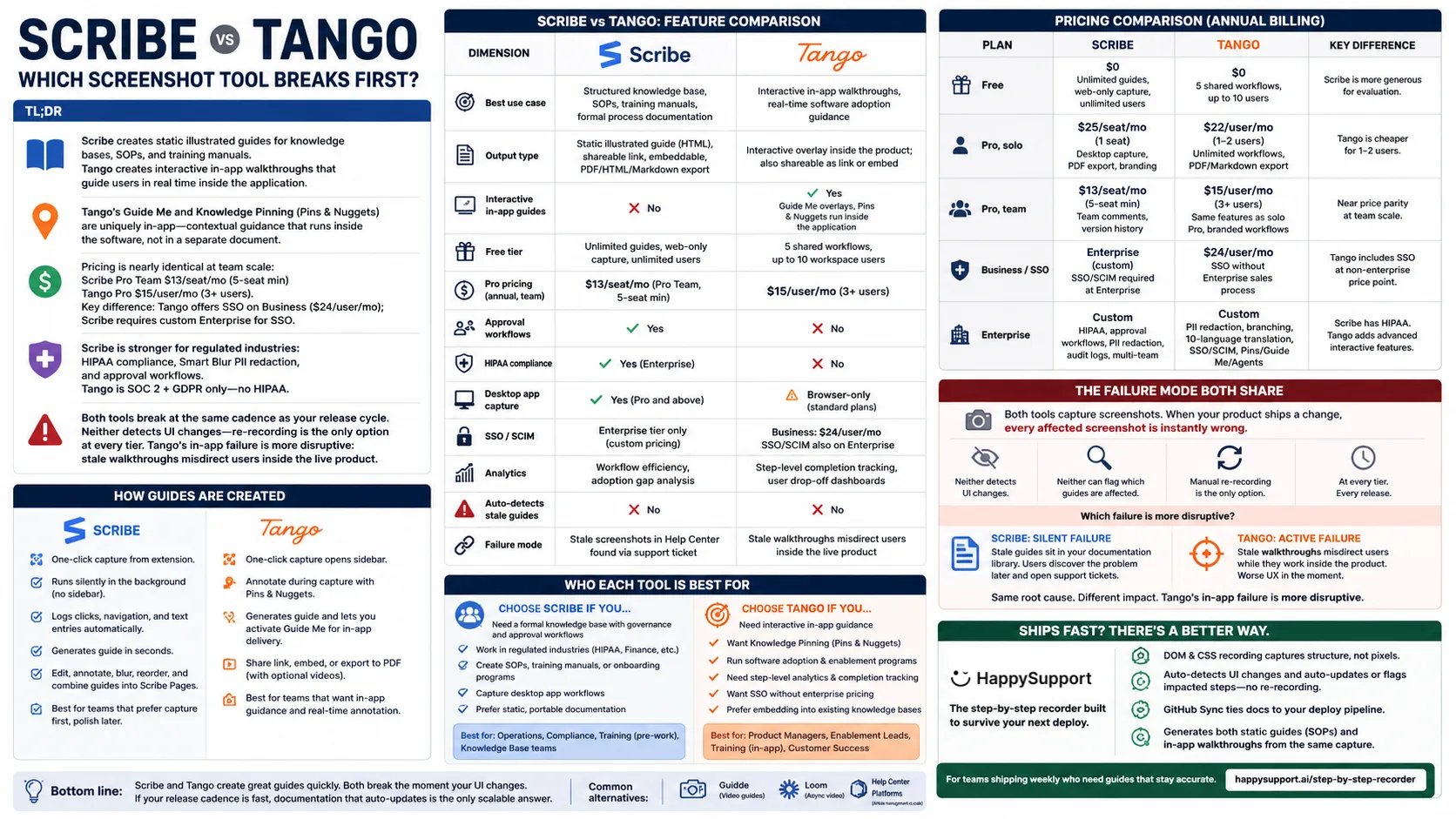
Scribe vs. Tango Infographic (created by HappySupport)
| Dimension | Scribe | Tango |
|---|---|---|
| Best use case | Searchable library, SOPs, onboarding docs, formal process documentation | In app guided walkthroughs, real-time software adoption guidance |
| Output type | Static illustrated guide, shareable link, embeddable, PDF/HTML/Markdown export | Interactive overlay inside the product; also shareable as link or embed |
| Interactive in-app guides | No, guides are external documents | Yes, Guide Me overlays, Pins, and Nuggets run inside the application |
| AI agents (automate tasks) | No | Yes, Enterprise plan only, fill forms, execute CRM updates |
| Free plan | Unlimited guides, web-only capture, link and embed sharing | Up to 10 users but capped at 5 shared workflows |
| Pro pricing (annual, team) | $13/seat/mo (Pro Team, 5-seat min), $17 monthly | $15/user/mo (from 3 users), $20 monthly |
| Approval workflows | Yes, formal documentation governance | No native approval queue (Enterprise content governance via admin controls) |
| Multiple guides on one page | Scribe Pages, chain multiple SOPs into one document | One workflow per link, no native bundling |
| Compliance | SOC 2 Type II, GDPR, HIPAA (Enterprise) | SOC 2 Type II, GDPR (HIPAA not certified) |
| Secure blur, sensitive information | Smart Blur, auto-redacts PII/PHI from Pro tier upward | Manual blur on all paid plans; auto PII redaction reserved for Enterprise |
| Desktop app capture | Yes (Pro and above), Windows and Mac | Yes on paid plans (Windows and Mac), browser-only on free |
| SSO/SAML, role-based access | Enterprise tier only | Enterprise tier only, no mid-tier Business plan |
| Version control on published guides | 1 week of history on every self-serve tier, unlimited on Enterprise | 14 days on Pro, 365 days plus audit logs on Enterprise |
| Custom branding | Paid plans only, logos and color schemes | Paid plans only, branded workflows |
| Step cap per recording | 200 steps | 100 steps |
| Step-level analytics | Workflow efficiency, adoption gap analysis at org level | Per-guide completion tracking, individual user drop-off |
| Auto-detects stale guides | No | No |
| Failure mode | Stale screenshots in Help Center, found via support ticket | Stale walkthroughs misdirect users inside the live product |
How the capture mechanism actually works in each tool
The Chrome extension behavior diverges in ways that affect SOP creation speed at volume, not just the marketing pages. Both tools generate the first draft in under a minute after a three to five minute capture, so for a single guide the two tools are functionally identical. The difference shows up when a team is documenting processes across dozens of workflows in a week.
Scribe's one click Chrome extension capture starts from the extension icon. The extension runs silently in the background, no visible sidebar, no overlay, no on-screen elements during recording. The workflow gets performed as the team member would normally do it. Every click, navigation step, and text entry is logged automatically, including text entries, which matters for guides that need to document form inputs and keyboard actions precisely. There is no annotation step during capture. Both tools generate step by step instructions from the screen recordings without manual edits to start, which is the time consuming part teams remove from process documentation workflows. The post-edit suite is where users adjust language, blur sensitive information, reorder steps, or merge separate captures into a single Scribe Page. This makes Scribe useful for teams that prefer one-pass capture and clean up afterwards, which saves time over the course of a day spent documenting processes.
Tango's one click Chrome extension opens a capture sidebar alongside the recording. The sidebar stays visible during recording so the team member can drop in Pins and Nuggets, contextual callouts, while they work. The same click and navigation logging happens in the background, but annotation happens during capture rather than only after. When the capture stops, Tango produces the guide and lets the user activate Guide Me for in-app delivery, share as a static link, or export to PDF. Tango offers a side panel during capture so teams can add annotations, contextual notes, and Pins to specific steps without leaving the recording flow.
Tango's AI-generated guide descriptions and Scribe's auto-generated step text both compete on documentation accuracy. Both use AI to draft the textual instructions that accompany each captured screenshot. Both still require a human pass for guides destined for production use, particularly when domain language or product-specific terminology has to appear correctly. The mistake teams make on either tool is treating the first auto-generated pass as final.
Editing tools, sensitive information, and the secure blur
Both Scribe and Tango ship key features in their editing tools that let users adjust the auto-generated guide after capture for complex workflows that span multiple screens: edit step text, replace individual screenshots, add callout annotations, blur sensitive regions, reorder or delete steps, and combine guides. This is where Scribe pulls ahead for teams handling sensitive information at scale.
Scribe's Smart Blur scans captured screenshots automatically and obscures patterns that look like personally identifiable information, names, email addresses, payment numbers, and similar fields, without a frame-by-frame edit step. Smart Blur is available from Pro tier upward, which puts auto-detection inside the price range mid-market teams pay. Scribe is also GDPR compliant and SOC 2 Type II compliant, with HIPAA certification at the Enterprise tier for healthcare and regulated workflows.
Scribe is preferred in the Finance, Healthcare, and Legal sectors for the same compliance reasons: HIPAA certification at the Enterprise tier, Smart Blur PII auto-redaction from the Pro tier, approval workflows that lock business processes behind formal review, and SOC 2 Type II plus GDPR coverage on every paid tier. Tango covers SOC 2 Type II and GDPR but does not certify HIPAA, which removes it from shortlists in regulated healthcare workflows.
Tango is also SOC 2 Type II compliant and GDPR compliant, but its sensitive information handling is positioned differently. Manual blur is available on all paid plans, the user selects the regions to mask after capture. Automatic PII detection and redaction is reserved for the Enterprise plan. For non-Enterprise Tango customers, sensitive information masking is a per-screenshot edit step, not a guide-wide pass, which adds up across a documentation library of multiple guides. Tango does not offer HIPAA compliance at any tier, which rules out HIPAA-compliant guide hosting for healthcare teams documenting workflows that involve protected health information.
Tango is particularly effective for organizations that prioritize in-app interactive walkthroughs, making it ideal for teams that need real-time guidance during software use. The Enterprise plan adds AI agents that automate repetitive tasks like filling out forms or executing CRM updates, taking the load off team members who would otherwise document and execute the same business processes by hand. For internal documentation that needs to stay live inside the product, this is meaningfully different from any other tool in the category.
SSO is an Enterprise conversation on both sides, and this is worth stating plainly because older comparisons (including an earlier version of this one) claimed otherwise. Tango's published lineup is Free, Pro and Enterprise, with no mid-tier Business plan, and SSO with SCIM sits in Enterprise. Scribe reserves SSO and SCIM for Enterprise too. If single sign-on is a hard requirement, neither tool lets you buy it with a credit card, and both route you through a sales process where the seat price stops being published.
Pricing tier comparison: free plan, paid version, enterprise readiness
Pricing parity at the team level is close enough that pricing alone should not drive the decision between the two tools. The free plans differ significantly in what they restrict, which matters for evaluation.
| Plan | Scribe | Tango |
|---|---|---|
| Free plan | $0, unlimited guides, web-only capture, link and embed sharing, no export or branding | $0, up to 10 users, capped at 5 shared workflows, link and embed sharing |
| Pro, solo (annual) | $25/seat/mo (Pro Personal, 1 seat), $35 monthly. Desktop and mobile capture, PDF/HTML/Markdown export, branding | $22/user/mo (1 to 2 users), $26 monthly. Unlimited workflows, branded exports, PDF/Markdown/HTML |
| Pro, team (annual) | $13/seat/mo (Pro Team, 5-seat minimum), $17 monthly. Adds comments | $15/user/mo (from 3 users), $20 monthly. Same Pro feature set |
| Real entry price for a team | $780/year, because of the 5-seat floor | $540/year at 3 users, no 5-seat floor |
| Version history | 1 week on every self-serve tier | none on Free, 14 days on Pro |
| Enterprise | Custom. HIPAA, approval workflows, enforced PII/PHI redaction, SSO/SCIM, roles, translations, unlimited version history | Custom. Automatic PII detection, workflow branching, translation, SSO/SCIM, 365-day history and audit logs, Pins/Guide Me/AI Agents |
Scribe's free tier is far more generous for evaluation: unlimited guide creation against Tango's cap of 5 shared workflows. Tango's free plan is a trial rather than a working library, though its 10-user allowance lets a whole team look at those five workflows. At the team Pro level on annual billing, Scribe is $13 per seat per month with a five-seat minimum and Tango is $15 per user per month from three users, which means the cheaper per-seat price and the cheaper total belong to different tools: Scribe wins per seat, Tango wins for any team under five people.
The structural pricing difference shows up at the bottom and at the top. At the bottom it is Scribe's five-seat floor: a three-person team pays Scribe's $25 Pro Personal rate three times over, $900 a year, where Tango's team rate starts at three users for $540. At the top, both tools put SSO, PII redaction and audit logging behind a custom Enterprise contract, which makes direct cost comparison impossible above the published tiers. The enterprise-grade content governance and approval workflows on Scribe's Enterprise plan are where Scribe earns the higher contract value.
Version history is the line most buyers miss. Scribe retains one week of history on every self-serve tier, including Pro Team, and only Enterprise gets unlimited. Tango's Pro plan keeps 14 days and Enterprise keeps 365 with audit logs. Neither is version control in the sense an engineer means it, but at the tier most teams actually buy, Tango retains twice as long.
Knowledge base integration: where the guides actually live
The two tools take opposite approaches to knowledge base integration. Scribe is library-first: Scribe hosts the guides in a centralized location with multi-nested folders, search, and a structured page hierarchy. Scribe Pages combines multiple individual guides into a single comprehensive document, so a team documenting a full onboarding program can build a single Scribe Page that chains together every related workflow guide with context, images, and additional instructions. The result is a training manual or SOP that lives in a Scribe-hosted knowledge base, is searchable and linkable, and updates consistently when any component guide changes.
Tango is integration-first: rather than maintaining a separate Tango-hosted library, teams embed Tango workflows into Notion, Confluence, SharePoint, or whatever knowledge base they are already using. Tango integrates with 100+ tools including Slack, Jira, Confluence, and Notion without API setup. Scribe also integrates with Confluence and Notion for embedding guides directly in pages, and ships portable PDF, HTML, and Markdown exports that paste into any knowledge base.
Salesforce embedding sits in an awkward middle ground. Neither tool ships a native Salesforce app that embeds the interactive guide overlay inside a record page. Both ship Chrome-extension capture that works on top of Salesforce, and both let teams paste a shareable link or iframe embed inside a Salesforce knowledge article. For teams whose actual ask is "I want a guide that appears inside the Salesforce record while the rep is working," Tango's Guide Me overlay running through the Chrome extension is the closest match. Confluence embedding is cleaner on both sides: both tools render the embedded guide inline inside a Confluence page without iframe quirks.
Team collaboration, version control, and approval workflows
Both tools support team collaboration with shared libraries: multiple team members can create, edit, manage, and share guides within a workspace. The collaboration models diverge at governance.
Scribe offers formal approval workflows on the Enterprise plan, a review process where managers must approve documentation before publication. This matters in regulated environments where accuracy is a compliance requirement and informal guide creation carries risk. Scribe's admin controls cover the full documentation lifecycle: creation, review, publication, and update. Role-based access (Creator, Viewer, Admin) lets enterprises control exactly what each team member can see, edit, or publish. Pro Team includes team comments and version history on published guides, useful for catching errors before they propagate, though it does not include the structured approval queue Enterprise customers get.
Tango does not ship a native approval queue. Workspace admin controls let an admin restrict who can publish to shared spaces, and edit history on individual guides lets the team see what changed and when. For most teams the lack of a formal approval workflow is fine. For sales teams that need enterprise content governance over what reps see in production, Scribe's structured approval flow is the cleaner fit. Tango's team permissions model relies on workspace roles plus space-level publish restrictions rather than a queue-driven sign-off.
Tango's collaboration is simpler and faster: shared libraries with step-level analytics showing who viewed each guide, who completed it, and where they dropped off. This completion tracking model is useful for teams whose primary question is not "is this guide compliant?" but "are team members actually using the guides we created, and where are they getting stuck?" For software adoption programs where engagement data drives iteration, Tango's dashboards are more actionable than Scribe's organization-level usage analytics.
What practitioners actually say
The marketing pages on both sides oversell, so the real signal comes from technical writers and operations teams running the tools in production. A technical writer on r/technicalwriting summed up the Scribe camp as: "Scribe is nice. It's elegant, simple, and quick. The best part is you can embed your scribes in other knowledge platforms and they update automatically when you edit the source." Another commenter, planning a Tango rollout, said: "We plan to implement Tango for video creation process steps, new feature overviews, and quick-step guides for customer care." Different jobs, different tool.
The recurring frustration on the Tango side, surfaced in G2 reviews, is the lack of a bundled hub for multiple guides on one URL. Tango forces users to manage scattered individual workflow links rather than chaining them into a centralized location, which becomes painful at scale when an onboarding kit needs to live behind one link. The recurring frustration on the Scribe side is the static output, the guide is useful in a Help Center, but it does not walk the user through the live product the way Tango's Guide Me does.
A YouTube reviewer comparing the two and a third tool, dubble, summarized the category bluntly: "These AI tools are like having your own personal scribe." Comparing three tools in the same category, the consistent message is the same one we end this article with: capture is the easy part, freshness is the unsolved one. The framing fits both tools fairly. They are personal scribes for the team member doing the documenting. Neither is a permanent scribe for the product, which is the part the comparison usually skips.
Tango vs Scribe for operations and training teams
Operations and training teams have a documentation pattern most other functions do not: they generate automatic step-by-step process documentation from screen capture in volume, then route it into a knowledge base where the rest of the company finds it. The choice between Tango and Scribe for these teams comes down to where the documentation gets consumed and how it integrates with the existing knowledge base.
For operations teams running standard operating procedures across multiple software tools, Scribe is the stronger default. Scribe Pages combines multiple captured workflows into a single document, the format SOPs actually take in practice. The PDF, HTML, and Markdown exports plug into whatever knowledge base the operations team already runs, Confluence, Notion, SharePoint, or a custom Help Center, without API setup. Approval workflows mean compliance-sensitive procedures get reviewed before they go live. Smart Blur automatically obscures customer data in screenshots, so SOPs that touch CRM or billing screens do not require frame-by-frame editing.
For training teams running onboarding programs and continuous enablement, the choice depends on whether training happens before the user is in the product or during the user's actual work. Scribe fits pre-work training, structured course manuals, ramp programs, certification material, because the static format chains together into a complete document team members can read end-to-end. Tango fits in-application training, where Guide Me overlays interactive walkthroughs directly on the software the user is learning. Pins and Nuggets attach permanent contextual tips inside the application interface, useful when the training problem is not "did the user learn this once" but "does the user remember this every time they hit the relevant screen."
The failure mode both share, even on Enterprise
Here is the honest answer to "which screenshot tool breaks first," both tools break at exactly the same time, for exactly the same structural reason. Even on the Enterprise plan of either tool.
Scribe and Tango both capture documentation as screenshots. Every guide, regardless of how well it is made or what pricing tier you are on, is a visual snapshot of your UI at the moment the capture happened. When your product ships a new process, a button renamed, a navigation item moved, a form field added or removed, every affected screenshot in every affected guide is immediately wrong. Neither tool detects this. Neither can flag which of your multiple guides reference a UI state that no longer exists. The only option is manual re-recording, at every tier, every time.
According to the GitLab DevSecOps Survey, 65% of software teams ship at least weekly. At that release cadence, documentation decay in step-by-step guides is not an occasional maintenance task, it is a permanent operating condition that starts the moment your team publishes the first guide. Jeff Toister of Toister Performance Solutions put it directly: "AI is making service worse when it's implemented in a closed loop with no escalation path." Stale documentation is the same closed loop, the user gets bad instructions, the agent gets bad instructions, no system catches it.
The failure is architectural, not a missing feature. Screenshots capture pixels, not structure. Neither Scribe nor Tango has access to your product's DOM or source code, so they cannot compare what was recorded against what the application currently looks like. The more team members creating guides, and the faster your release cadence, the faster your guide library accumulates inaccuracies your team has to find and fix manually.
Which failure mode is more disruptive?
Both tools break at the same cadence as your release cycle. The character of the disruption is different.
With Scribe, stale guides sit in your documentation library silently wrong. A user reads the old instructions, cannot find the button where it used to be, and opens a support ticket. The failure is invisible until it surfaces, often days or weeks after the release that caused it. The cost lands on the support team.
With Tango's in-app walkthroughs, stale guides misdirect users actively. Guide Me directs users to click elements that may have moved, been renamed, or no longer exist, while the user is working inside the product trying to complete a task. The in-product failure creates a worse user experience in the moment than a broken external help article. The root cause is identical; the consequence is more visible and more immediately frustrating. According to the Salesforce State of Service Report, 88% of customers say their experience with a company is as important as its product. A Guide Me overlay pointing to the wrong button is a product experience failure, not just a documentation maintenance gap.
Questions you may ask
Does Scribe offer a free tier with feature parity to Tango's free plan?
No, and the two free plans are limited along opposite axes, which makes the comparison more useful than a parity check.
Scribe's Basic plan is unlimited in volume: create as many guides as you like, capture any web app in the browser, share by link or embed. What it withholds is capability, specifically desktop and mobile capture, PDF, HTML and Markdown export, and custom branding. You can build a real library on it and never export a file.
Tango's free plan is the reverse: it allows up to 10 users in the workspace but caps you at 5 shared workflows. It is sized as an evaluation, not as a working library, but everyone on the team can look at the same five workflows.
So: Scribe free if you want to document a lot and only share by link. Tango free if you want a few workflows in front of a whole team before you decide. The first limit you hit on Scribe is export, the first limit on Tango is the sixth workflow. Neither free tier gives you branding, and neither detects when a guide has gone stale, which is the limit that outlasts both.
What are the best Tango alternatives for SaaS documentation?
Sorted by what you would be switching for, since "alternative" usually means one specific unmet need:
- You want the library, not the overlay. Scribe is the direct swap: same capture model, stronger multi-guide assembly through Pages, cheaper per seat from five people up.
- Your audience prefers video. Guidde and Loom produce narrated walkthroughs. Guidde keeps the step structure, Loom drops it entirely.
- You are documenting a product for customers, not a process for staff. A capture tool is the wrong shape here: you need search, navigation, article structure and analytics, which is help center software. Compare the field in best help center software.
- You want interactive demos for sales and marketing. Supademo and Floik are built for the demo use case rather than the training one.
- The problem is maintenance rather than capture. If your team is re-recording guides after every release, no capture tool solves that, because they all store pixels. Tools built on DOM and CSS recording store the structural identity of each element instead and can tell you which guides a release broke.
For SaaS documentation specifically, the split that matters is internal versus customer-facing. Tango and Scribe are both strong for internal enablement and both weak as a public documentation surface, because a scattered set of guide links is not a help center.
Does Scribe auto-detect sensitive data in screenshots, and how does that compare to Tango's privacy masking?
Yes. Scribe's Smart Blur scans captured screenshots and automatically obscures patterns that look like PII or PHI, names, email addresses, payment numbers, similar fields, without manual editing of each frame. Smart Blur is available from the Pro tier upward, which puts auto-detection inside the price range mid-market teams pay. Tango supports manual blur on all paid plans, you select the regions to mask after capture, but automatic PII detection and redaction is reserved for the Enterprise plan. Scribe also has HIPAA certification at the Enterprise tier; Tango does not. For teams documenting workflows that touch customer data at volume, Scribe's auto-detection at lower price points is the more practical option for sensitive information.
Does Scribe support version control on published guides, and how does that compare to Tango's guide versioning?
Neither ships version control in the engineering sense, and the retention windows are shorter than most buyers assume. Scribe keeps one week of version history on every self-serve tier, including Pro Team, with unlimited history reserved for Enterprise. Tango keeps none on Free, 14 days on Pro, and 365 days with audit logs on Enterprise. So at the tier most teams buy, Tango retains longer; at the Enterprise tier Scribe removes the limit entirely and adds an approval queue in front of publication. If an auditor will ever ask what a procedure said last quarter, both answers are Enterprise.
How does Scribe's AI-powered step detection compare to Tango's automatic screenshot capture during workflow recording?
The two tools converge on the underlying capture mechanism: both detect clicks and navigation events in the browser, both grab a screenshot at each interaction, both auto-generate step text. Scribe's edge is silent background capture, no on-screen sidebar, which keeps the workflow uninterrupted. Tango's edge is in-capture annotation through the sidebar, which lets the team member drop Pins and Nuggets as they work rather than only in post-edit. Documentation accuracy depends more on the human pass after capture than on the auto-detection itself, both tools require editing for production guides.
How does Tango's team permissions model compare to Scribe's workspace admin controls for enterprise content governance?
Scribe's permissions are queue-driven on Enterprise: an approval workflow gates publication, admins assign roles (Creator, Viewer, Admin), and a structured review process sits between draft and published. Tango uses space-level permissions plus workspace roles, an admin restricts who can publish to which spaces, but there is no formal approval queue. For large enterprises with strict enterprise content governance, Scribe's model is more rigid in the way auditors expect. For sales teams or operations groups that want lighter-weight controls without a sign-off process, Tango's workspace admin controls are sufficient.
How does Tango's one-click Chrome extension compare to Scribe's capture mechanism for SOP creation speed?
At the level of a single guide, the two tools are functionally identical, both produce a first draft in under a minute after a three to five minute capture. The difference shows up at volume. Tango's during-capture annotation reduces post-edit work for team members who already know what to highlight. Scribe's silent capture and stronger post-edit suite suits teams that prefer one-pass capture and clean up later. For high-throughput SOP creation across operations teams documenting dozens of workflows, Scribe Pages removes the assembly step that would otherwise sit with the knowledge base team.
How does Scribe's pricing for API access compare to Tango's developer plan for building documentation automation?
Neither tool ships a dedicated developer plan with documented public API pricing at standard tiers. Both expose limited automation via webhooks and integration partners on the Enterprise plan, and both treat full API access as an Enterprise-grade contract negotiation. For teams whose ask is "we want to programmatically generate guides from a CI pipeline," neither tool is positioned for that use case at a standard pricing tier.
Does Tango support enterprise-grade content governance with approval workflows?
Tango supports workspace-level permissions and edit history on its Enterprise plan but does not ship a native approval queue equivalent to Scribe's structured sign-off workflow. For teams whose definition of enterprise content governance includes a queue-driven publication process with formal sign-off, Scribe is the closer match. For teams whose definition is "control who can publish where, with an audit trail of changes," Tango's model is sufficient.
Does Scribe include unlimited team members on enterprise plans?
Scribe's Enterprise plan supports unlimited seats under a custom contract negotiated per team size and needs. The pricing pages do not publish a seat-count ceiling; the actual seat count is part of the Enterprise quote. Tango's Enterprise plan is structured the same way, with custom pricing based on team size and needs.
How does Tango's AI-generated guide descriptions compare to Scribe's auto-generated step text for documentation accuracy?
Both tools auto-generate the descriptive text that accompanies each captured screenshot, and both use AI to do it. Documentation accuracy on the first auto-generated pass is comparable, neither tool consistently produces text that is publication-ready without a human edit. Where the team is operating in a domain with specific terminology (medical, financial, technical), the editing pass remains necessary on both tools. The mistake is treating either tool's first-pass output as final.
Does Scribe integrate with Confluence to embed guides directly in pages?
Yes. Both Scribe and Tango ship Confluence integrations that embed the guide inline inside a Confluence page. Scribe's embed renders the static illustrated guide alongside the existing page content. Tango's embed renders the same interactive workflow that is available via direct link. For teams whose knowledge base already lives in Confluence, both tools work cleanly without forcing a migration.
Does Tango support HIPAA-compliant guide hosting?
No. Tango is SOC 2 Type II and GDPR compliant, but does not offer HIPAA compliance at any tier. Scribe offers HIPAA at the Enterprise tier. For teams documenting workflows that touch protected health information, Scribe is the only option in this comparison that ships HIPAA-compliant guide hosting.
Does Tango support embedding guides directly inside Salesforce?
Neither tool ships a native Salesforce app that embeds the interactive guide overlay inside a record page. Both let teams paste a shareable link or iframe embed inside a Salesforce knowledge article. The closest fit to "interactive guide inside a Salesforce record" is Tango's Guide Me running through the Chrome extension on top of the live Salesforce UI.
Does Scribe support video embeds inside step-by-step guides?
Scribe guides are illustrated documents built from annotated screenshots. Scribe Pages lets teams combine multiple guides plus video and images into a single comprehensive document, so videos can sit alongside guide content on the page. Inline video inside a step is not Scribe's primary output, neither tool ships native video recording inside a step.
How does Scribe's annual team plan compare to Tango's annual Pro plan in seats and storage?
Scribe Pro Team is $13 per seat per month on annual billing ($17 monthly) with a five-seat minimum and unlimited guide storage, so $780 a year at the floor. Tango Pro is $15 per user per month on annual billing ($20 monthly) from three users, with unlimited workflows, so $540 a year for a three-person team. Scribe is cheaper per seat, Tango is cheaper for any team below five people, and storage is unlimited on both. The retention difference is in version history, not storage: one week on Scribe Pro Team against 14 days on Tango Pro.
What does Tango charge for workspace collaboration features compared to Scribe's team workspace pricing?
Tango charges $15 per user per month on annual billing from three users for shared libraries, branded workflows and viewership analytics. Scribe Pro Team is $13 per seat per month annually from five seats and adds comments to the Pro feature set. Neither includes SSO: that is Enterprise on both, so if SSO is part of your definition of workspace collaboration, both answers are a sales call. Below five people Tango is cheaper in total; at five or more, Scribe is cheaper per seat.
Is there a Scribe alternative or Tango alternative that supports enterprise security, SSO, and admin controls without enterprise pricing?
Not from these two. Scribe and Tango both reserve SSO and SCIM for a custom Enterprise contract, so neither offers a self-serve tier with single sign-on. Among the wider set of alternatives, Guidde, Supademo, Floik and iorad price SSO inconsistently: some include it on a mid tier, others reserve it for Enterprise, and it is worth checking the current pricing page rather than a comparison article, this one included. If SSO plus admin controls at a published price is the requirement, help center platforms tend to include it further down the tier list than capture tools do.
Does any software export step-by-step guides to PDF and also embed on a Help Center?
Both Scribe and Tango do. Scribe exports to PDF, HTML, and Markdown, and embeds into any Help Center via iframe or link. Tango exports to PDF and embeds via iframe or link. Both are GDPR compliant, both ship SAML SSO on the appropriate pricing tier, both produce guides that look better than a 90s PowerPoint slide deck.
What other tools should I look at as a Scribe or Tango alternative?
If you need Scribe or Tango functionality but with specific capabilities they lack: Guidde produces video-based how-to guides rather than screenshot walkthroughs, useful when video narration communicates a process better than annotated stills. Supademo focuses on interactive product demos with bundled multi-demo hubs. Loom handles async video documentation without step-by-step annotation. For teams building customer-facing Help Centers with search, navigation, and article organization at scale, purpose-built Help Center platforms handle the documentation infrastructure that screenshot tools are not designed to manage. If guide maintenance overhead is the core problem, your team is spending significant time re-recording guides after releases, the self-updating documentation model addresses this structurally rather than operationally. Tools built on DOM/CSS recording capture code selectors and structural metadata instead of pixels.
HappySupport: the step-by-step recorder built to survive the next deploy
The cleanest fix for the failure mode both Scribe and Tango share is to stop capturing pixels and start capturing structure. HappySupport's step-by-step recorder uses DOM and CSS metadata to record each step in your workflow, which means the recorded guide carries the structural identity of every element it touched. When your product ships a new process or UI change, the recorder detects which steps reference UI states that no longer exist and either auto-updates those steps or flags them for review. No re-recording. No manual audit. The GitHub Sync layer ties this to the deploy pipeline so documentation gets reviewed at the same time as the code that broke it.
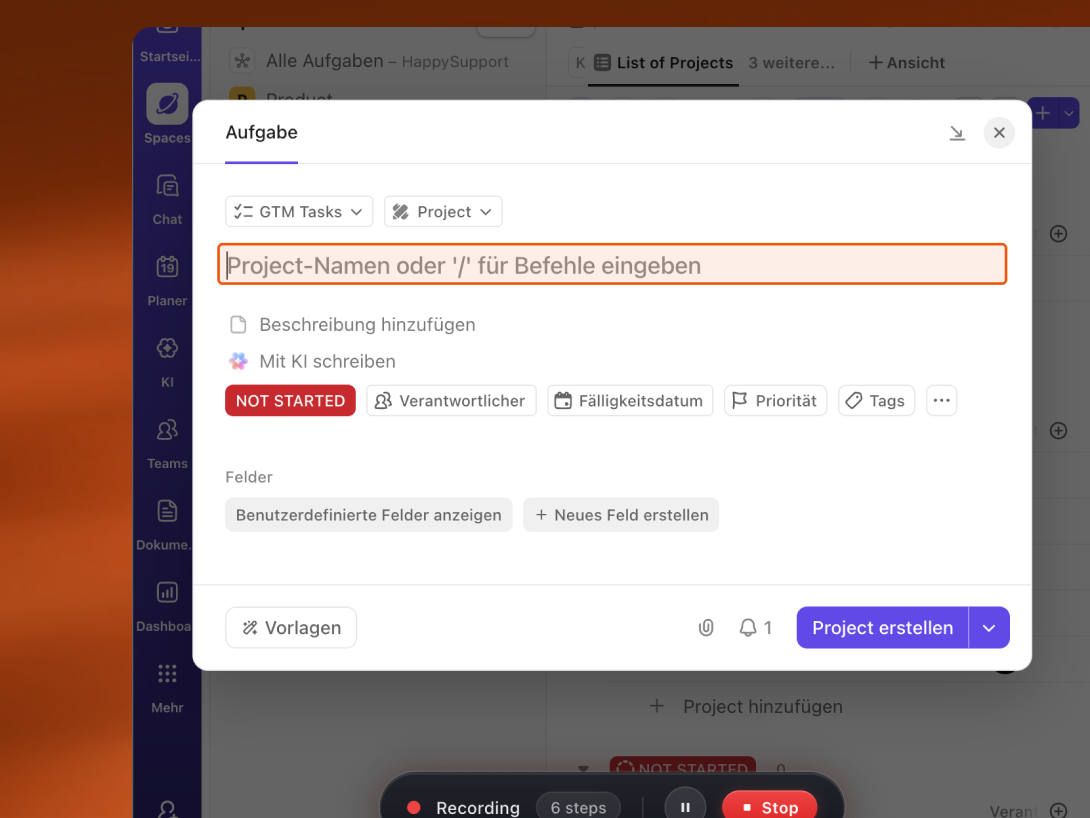
Try the HappySupport step-by-step recorder for free.
For operations teams and training leads creating SOPs and onboarding docs that have to stay accurate across weekly product releases, this is the architecture that closes the maintenance gap Scribe and Tango both leave open. The recorder generates both static guides (the Scribe shape: portable, embeddable, ready for a Confluence or Notion knowledge base) and in-app guided walkthroughs (the Tango shape: contextual guidance that runs inside the live product). The output format is a choice, not a tool migration, the same DOM-based capture feeds both.
Scribe is still the better choice today if your team needs static SOPs with formal governance and your product is stable enough that re-recording is rare. Tango is still the better choice if your team needs in app guided walkthroughs and your product release cadence is slow enough that manual maintenance fits inside one person's role. HappySupport is the option built for teams that need either output and ship fast enough that the re-record-every-release loop is not realistic at the headcount the company has today.
See how DOM and CSS recording survives a UI change, and what the GitHub Sync workflow looks like in practice, at the HappySupport step-by-step recorder page.
See how HappySupport's Recorder work for SaaS products
Each card below opens a live HappyRecorder walkthrough recorded on a real SaaS product page. Use the filter chips to scope to the category that matches your product. Click any card to open the demo.